Shared Equipment Booking: How IT Teams Stop Double Bookings and Missing Assets
Prevent double bookings, missed returns, and unclear asset ownership with a structured shared equipment booking workflow built for IT teams.
A projector is needed for an important presentation, but no one knows who has it. A laptop is supposed to be available, but it is still with the previous user who forgot to return it. An employee asks to reserve equipment, but finds out that someone else already booked it.
As more employees rely on shared IT equipment, managing these assets becomes more than a scheduling task. In this article, we will explore how shared equipment booking works in ITAM and how teams can prevent common issues.
1. What Is Shared Equipment Booking in ITAM?
Shared equipment booking in IT asset management is the process of allowing employees to request and temporarily use company-owned equipment. These assets usually do not need a permanent owner since they are only required for specific situations. A projector may be shared for events, while a loaner laptop may be issued when a main device is repaired.
Instead of assigning these items to one person, organizations keep them available for employees to book whenever a short-term need arises. Under this process, the operations team still keeps control of their availability, custody, and return status.
Read more: Do You Know Booking Assets Makes ITAM More Efficient?
Because these assets are used by people at different times, a simple calendar entry is often not enough for management. Without a structured booking workflow, shared equipment can quickly become difficult to locate, double-booked, or left overdue.
2. Shared Equipment Is Easy to Book, but Hard to Control
Booking shared equipment may seem simple. An employee sends a Slack message, adds an event to a shared calendar, or asks the operations team directly. However, these methods often record only the request, not what happens to the asset afterward.
Scheduling Conflicts
Two employees may request the same item for overlapping periods because availability is not updated consistently across different channels. One request may be recorded in a calendar, while another is still waiting in a Slack thread or email.
Without clear visibility into asset availability, multiple employees may book the same equipment for the same period. The operations team may also approve overlapping requests without realizing the asset has already been reserved.
Missed Returns
A booking may include an expected return date, but that does not guarantee the asset is returned on time. Without a formal check-out and check-in process, overdue equipment may remain with an employee unnoticed.
As a result, the asset may appear available for the next booking though it is still with the previous employee. The team then has to track down the asset, update the booking, and find alternative equipment for the next user.
Scattered Communication
Requests, approvals, collection details, and return updates may be spread across Slack messages, emails, calendars, and verbal conversations.
When information is scattered, it becomes difficult to track the answers to these questions:
- Has the request been approved?
- Was the equipment collected?
- Who currently has it?
- When is it expected to return?
- Is it ready for the next employee?
As the number of booking requests grows, these gaps create more manual work for IT and operations teams. What begins as a simple scheduling task can become a problem of unclear custody, inaccurate availability, and missing asset history.
3. What a Shared Equipment Booking Workflow Should Include
A reliable booking workflow should connect each request to the actual asset and track what happens from reservation to return. This gives employees a clearer booking experience while helping IT and operations teams maintain accurate asset records.
Real-time Asset Availability
Before submitting a request, employees should be able to see whether an asset is available. They should also know when it can be booked and how long it will remain available.
This visibility helps prevent overlapping requests and ensures employees only book equipment that will be ready when they need it. It also reduces the time operations teams spend checking availability across calendars, messages, and spreadsheets.
A Clear Request and Approval Process
Each request should include the specific asset or equipment type, booking period, requester, purpose, and approval status.
A consistent booking request process gives the operations team the information needed to decide which requests should be prioritized. It also helps requesters follow the progress of their booking and see whether it is pending, approved, rejected, or cancelled.
Asset Activity Log
Every booking, approval, check-out, handover, return, and status change should be recorded in the asset’s activity log.
Instead of searching through Slack messages or calendar events, the operations team can review the asset record directly. They can see what happened, when it happened, and who was involved throughout the asset’s activity history.
4. How AssetLoom Helps Manage Shared Equipment
AssetLoom connects asset records, booking requests, custody tracking, and check-in processes in one place. Let’s explore how AssetLoom helps IT teams manage shared equipment from booking to return.
Step 1: Prepare Your Asset List For Booking
Before setting up shared equipment bookings, you need to make sure all available equipment is recorded in AssetLoom.
Instead of adding each asset manually, AssetLoom allows your teams to import asset data from a CSV file. This helps you quickly upload large numbers of assets and prepare your shared equipment inventory for booking.
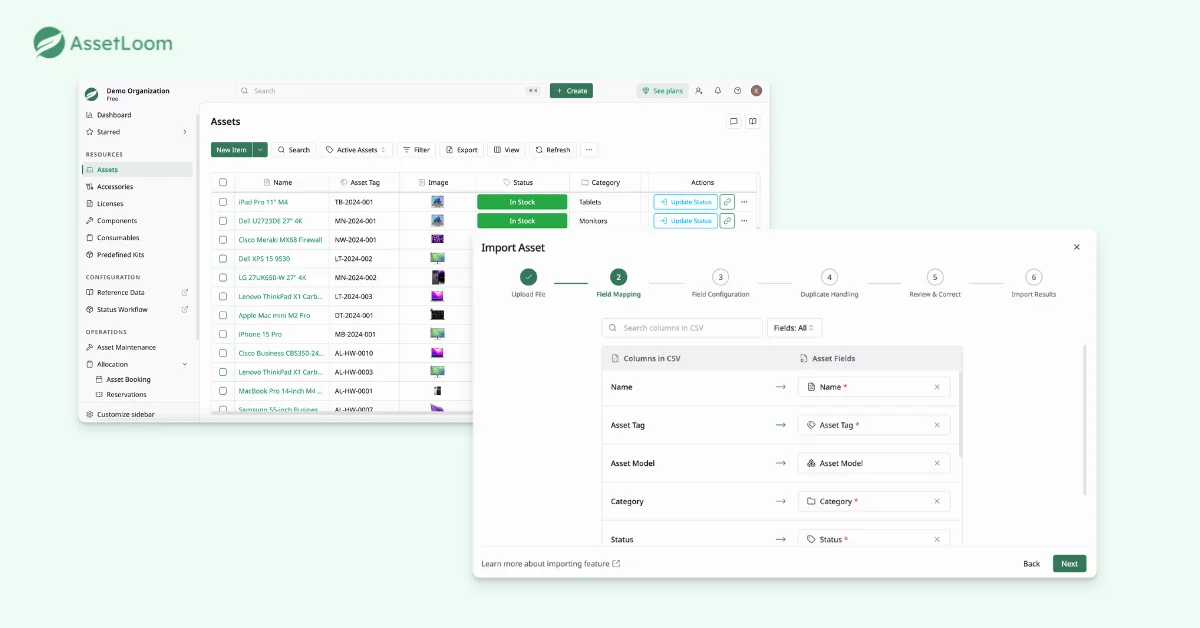
After importing, you have a centralized asset list where you can identify which equipment can be shared, track its current status, and prepare it for future booking requests.
Step 2: Schedule Asset Booking With Form
Now, employees can submit booking requests directly through the asset booking form.
When selecting an asset, users only see equipment that is available for booking. Assets that are already assigned, checked out, or under maintenance will not appear as available options. This prevents employees from accidentally requesting equipment that cannot be used at that time.
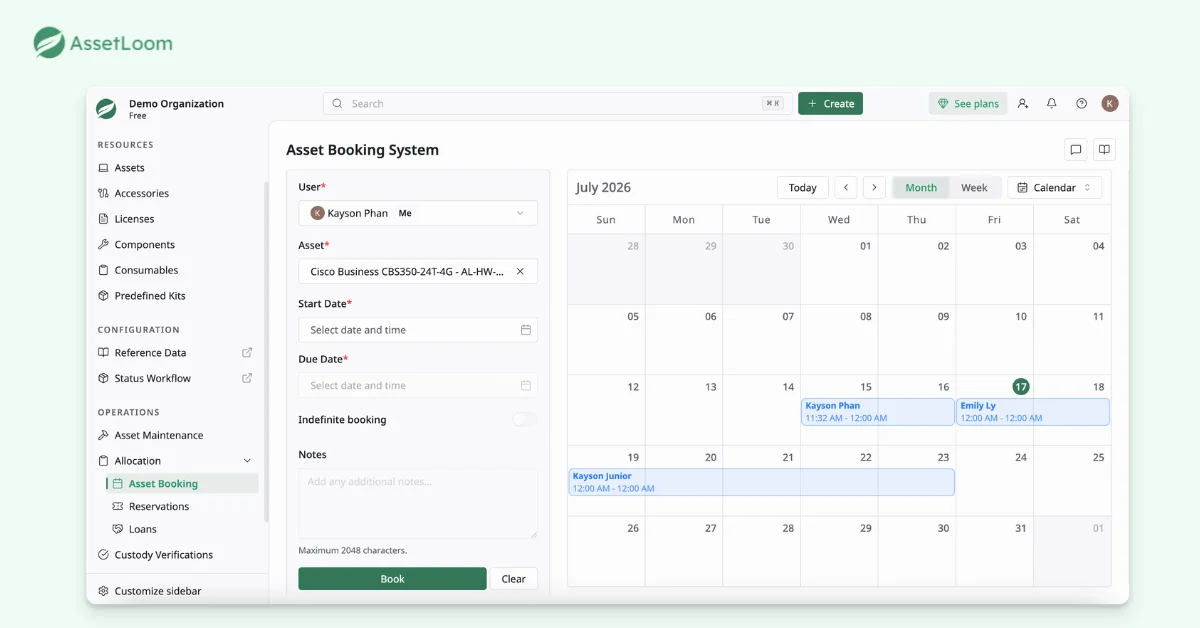
Before creating a booking, users can check the asset’s existing schedule and availability. This helps prevent multiple employees from requesting the same equipment at the same periods.
Instead of managing requests through separate calendars, emails, or chats, AssetLoom keeps all booking information connected to the asset record. This gives both requesters and IT teams a clear view of upcoming bookings, current usage, and expected return dates.
Step 3: Review Booking Requests
After employees submit booking requests, your team can review all requests from a centralized reservation in AssetLoom.
You have a complete view of all upcoming and pending bookings in one place. Here, you can review requests, approve valid bookings, or reject requests when the equipment is unavailable.
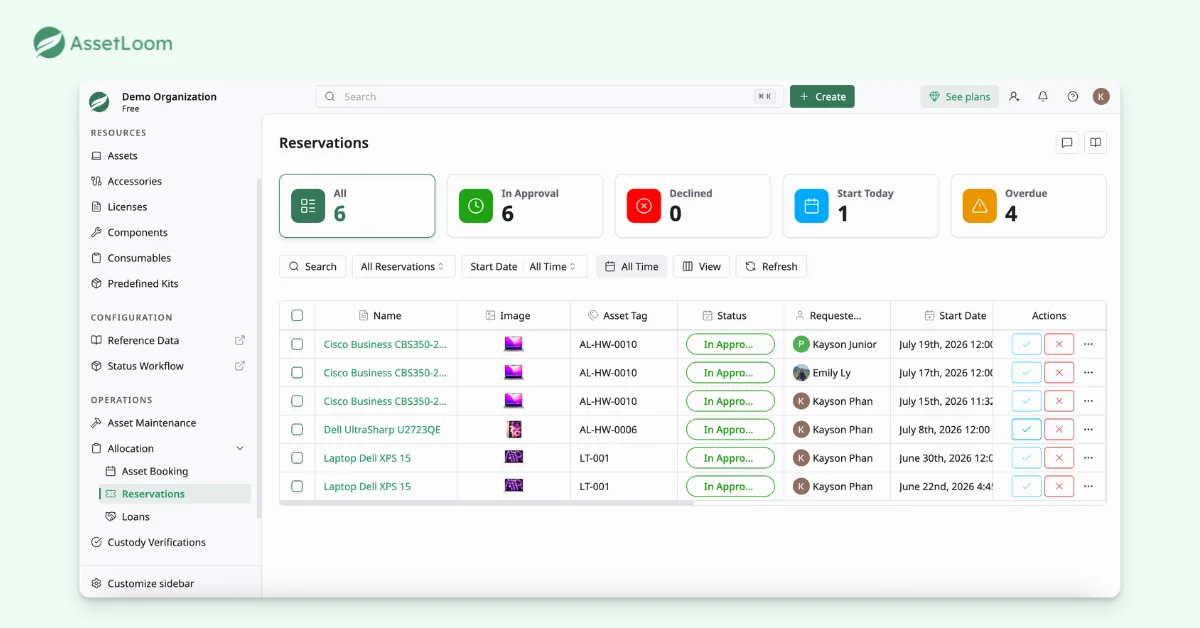
Once a decision is made, AssetLoom automatically updates the booking status and notifies the requester of the result. Employees can know whether their request has been approved or declined without needing to follow up with the operations team.
Step 4: Remind Asset Check-in
Keeping track of its return date is essential to ensure shared equipment remains available for other employees. You can configure automated reminders before the expected check-in date.
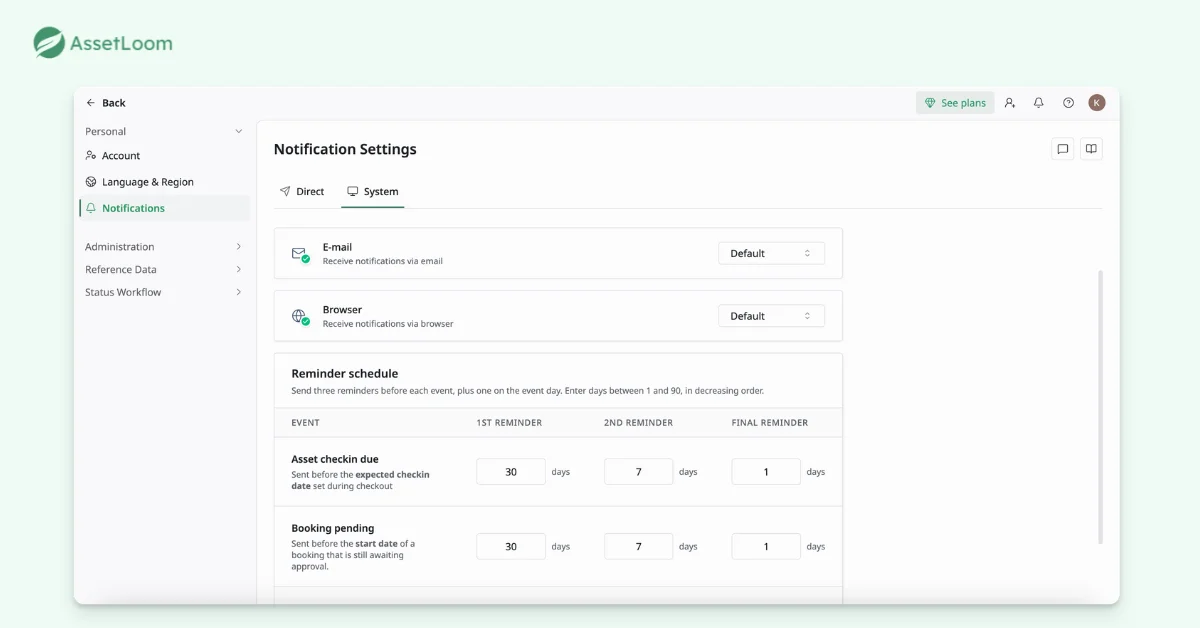
These reminders help employees return equipment on time without requiring the operations team to manually follow up through emails or chat messages. They also reduce the risk of assets being unavailable for upcoming bookings because they are still held by previous users.
Step 5: Confirm Asset Status And Ownership
Shared equipment is often moved between employees, departments, or locations. Without regular custody verification, asset records can become outdated even if booking records are accurate.
AssetLoom helps teams verify asset custody by keeping track of the current user, verification status, condition, and verification due date. This allows teams to confirm whether the equipment is still with the assigned user or not.
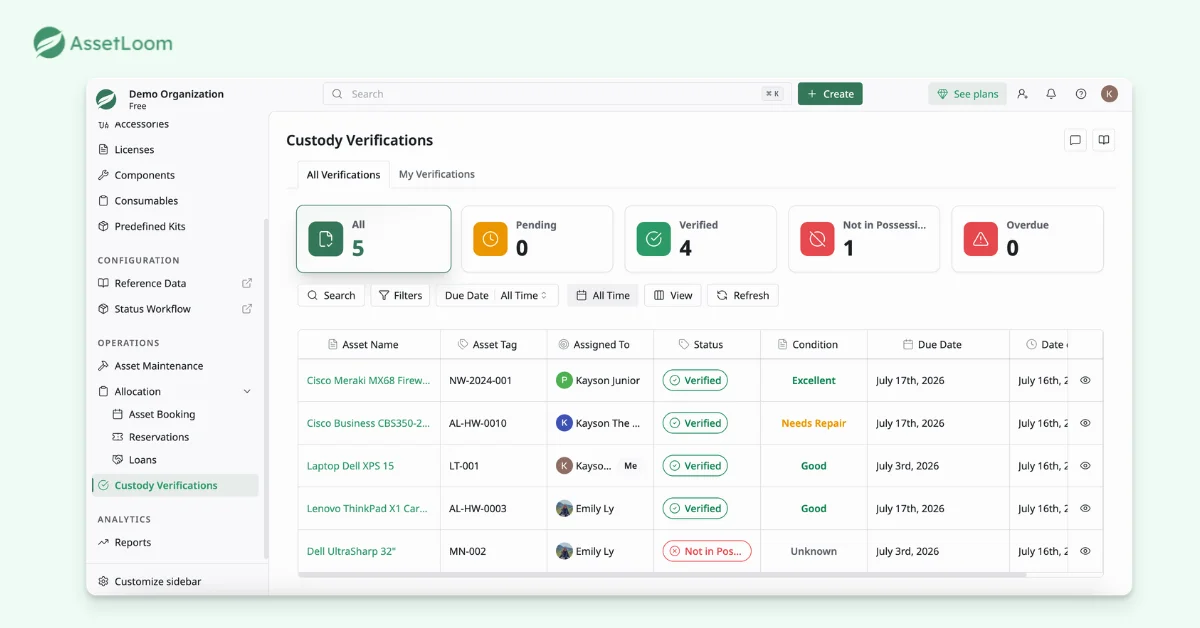
During custody verification, teams can review important details such as:
- Who currently has the asset?
- Whether the asset is verified or not in possession?
- The current condition of the equipment?
- When the verification was completed?
Instead of relying on manual follow-ups or communication history, your teams have a clear view of custody records.
Read more: What is Custody Verification? Verify IT Asset Custody in 3 Simple Steps
Step 6: Check In Asset To Inventory
When equipment is returned, the final step is to check the asset back into inventory and update its current status.
AssetLoom allows IT teams to confirm that the asset has been returned. They can update its availability and record relevant details, such as condition changes or issues found during the check-in process.
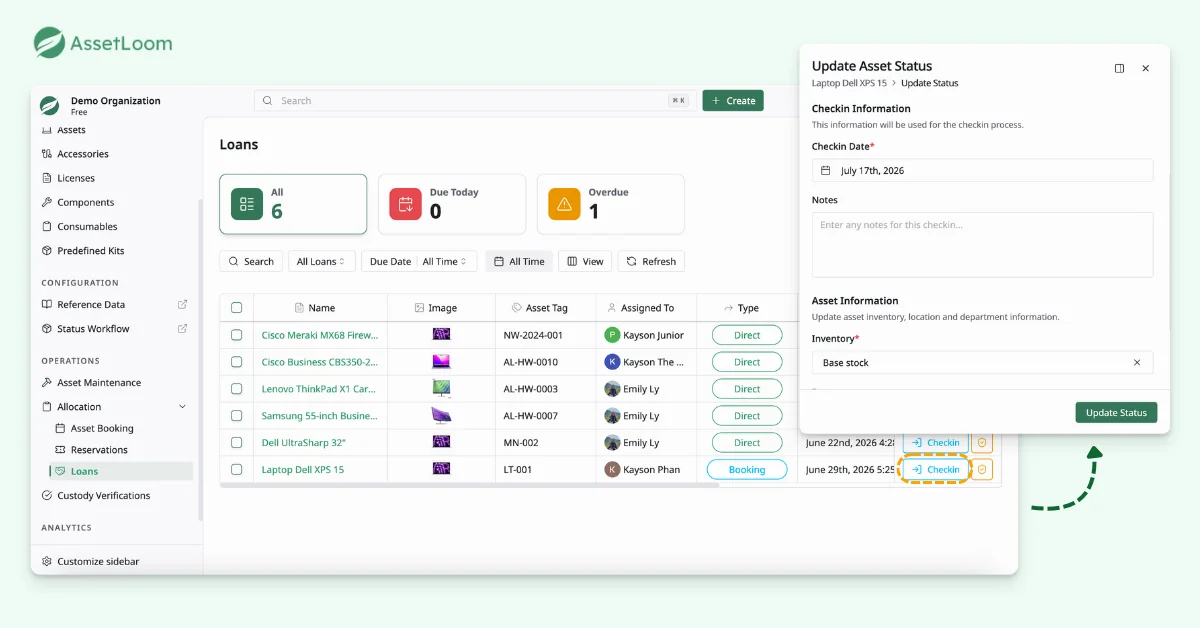
After checking in, the asset is returned to inventory and becomes available for other employees to book for future needs. This keeps shared equipment ready for reuse while ensuring the asset status always reflects its actual availability.
FAQs
1. What types of IT equipment should be managed through shared equipment booking?
Shared equipment booking is useful for assets that are needed temporarily by multiple employees rather than assigned permanently to one person. Common examples include loaner laptops, projectors, tablets, mobile hotspots, testing devices, conference equipment, and other portable accessories.
2. How is shared equipment booking different from asset assignment?
Asset assignment is used when an employee is responsible for an asset for an extended period, such as a company laptop assigned to a specific user. Shared equipment booking is designed for temporary usage, where multiple employees can request the same asset based on their needs while IT maintains visibility into availability and custody.
3. Can shared equipment booking help reduce unnecessary IT purchases?
Yes. Booking history provides visibility into how frequently equipment is used and whether existing assets are being fully utilized. IT teams can review demand patterns before purchasing additional equipment and make decisions based on actual usage data.
4. How should IT teams manage shared equipment across multiple locations?
For organizations with multiple offices, shared equipment should be tracked by both asset status and location. This helps employees identify where equipment is available and allows IT teams to manage transfers, availability, and ownership across different sites.
5. What information should IT teams track for shared equipment?
Beyond basic asset details, IT teams should track information such as booking history, current custodian, check-out and return dates, asset condition, maintenance records, and usage activity. This creates a complete view of how each shared asset is being used throughout its lifecycle.
Final Thoughts
Shared equipment management is more than reserving an asset. Without a connected workflow, shared equipment can lead to double bookings, overdue returns, and inaccurate asset records.
Start managing your shared IT equipment with AssetLoom today for better visibility and control.
Starting from July 2026, AssetLoom is open for early access. Try it for free and manage unlimited assets until the end of 2026.