Request an Asset
Learn how to request an asset
If you need an asset (like a laptop, monitor, or accessory), you can request it directly through the booking form.
How to Request an Asset:
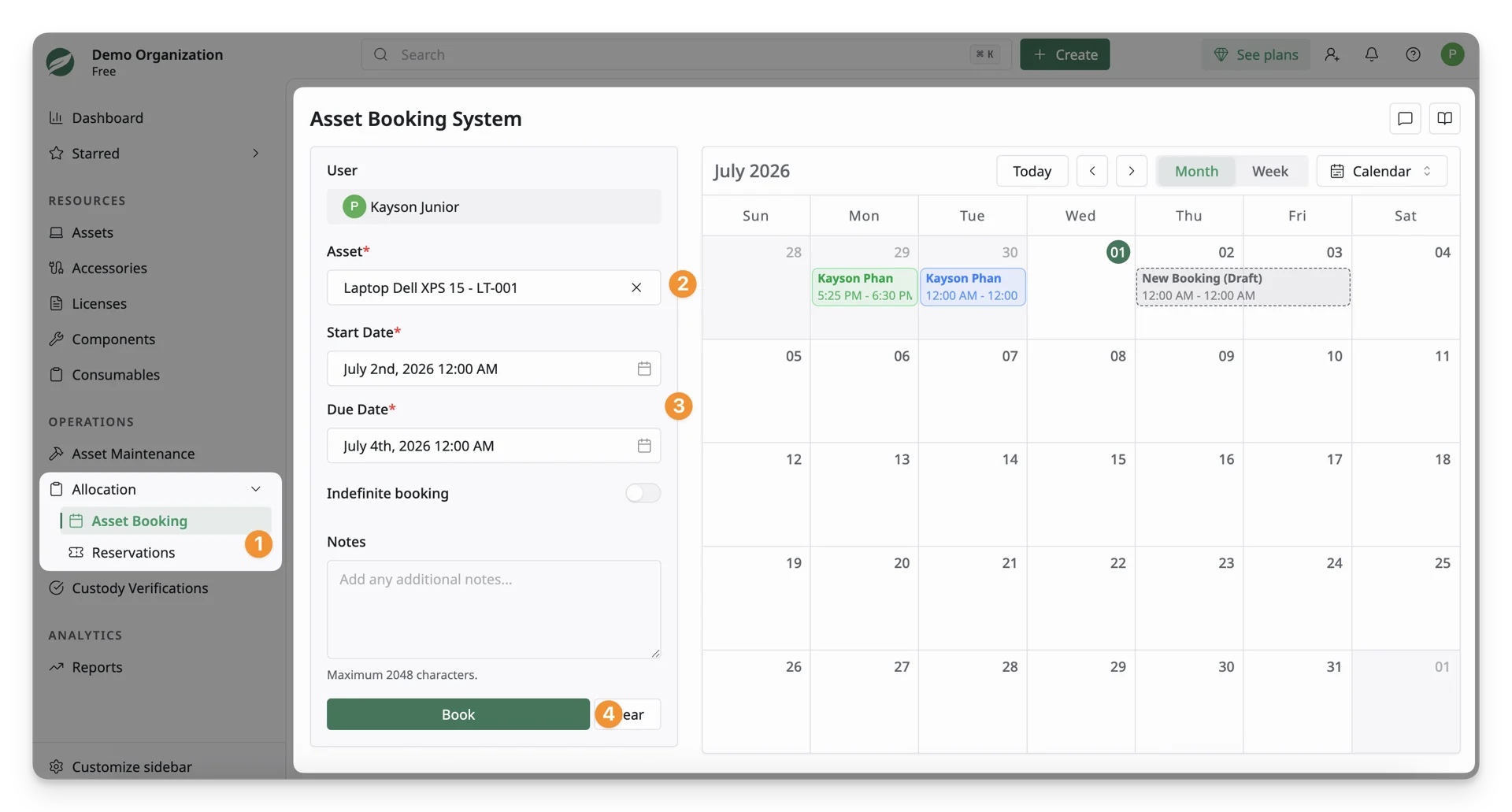
- Locate the Allocation dropdown on the main menu and click Asset Booking.
- Select the Asset
- Search and choose the asset you need (e.g., Dell 15, MacBook Pro 2022 14” 64GB, etc.). The asset can be searched by its asset tag or its exact name.
- After selecting the asset, the Booking Calendar may also display the time ranges during which the chosen asset is already booked (if any).
- Provide Request Details
- Time and Date: Select the desired time range for booking the asset on the Start Date and Due Date. Alternatively, on the Booking Calendar, click and drag to choose the time range as per your reference.
- Add Notes: Enter any relevant information related to this asset request.
- Submit the Request: Click Submit Request. Your request will be sent to the site admin for approval.
What’s Next?
- Check asset information: Review warranty details and assignment records for transparency.