Understanding Account Types
Understand about AssetLoom account types
An Account Type defines a user’s level of authority across the entire AssetLoom site. It determines what a user can manage at the site level, including access to: User Management and Invitations, Billing and Subscription, General Site Management.
Account types are assigned based on a user’s role within the organization. When a user is invited to a site, they are given an account type that defines how much control they have over the system.
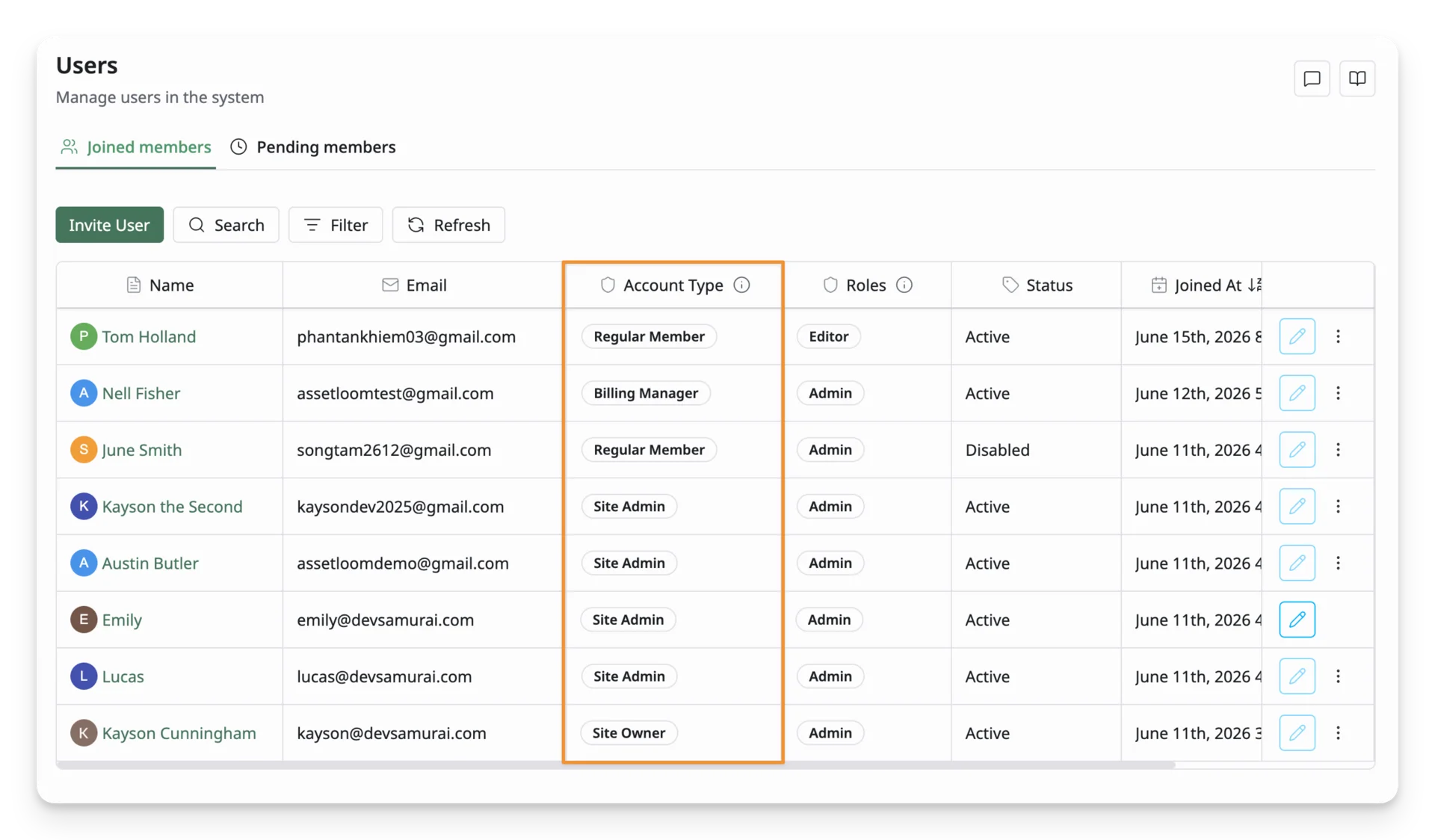
There are 4 account types:
| Hierarchy | Account Type | Key Access Levels |
|---|---|---|
| 1 | Site Owner | Full control: manage users and account types, configure site settings, access billing, transfer ownership, and delete the site. |
| 2 | Site Admin | All Regular Member access levels, plus the ability to manage users, assign account types, and configure site settings. Cannot delete the site. |
| 3 | Billing Manager | All Regular Member access levels, plus the ability to manage billing, view invoices, manage payment methods, and update subscription plans. |
| 4 | Regular Member | Uses assigned features based on assigned roles, such as Admin, Editor, or Viewer. Cannot manage users or site settings. |
Site Owner
The Site Owner has the highest level of authority in AssetLoom. The user who creates the site is automatically assigned this account type.
They can:
- Manage all users and account types
- Configure site settings
- Access billing and subscription management
- Transfer site ownership to another user
- Delete the site
Site Owners are responsible for the overall management and security of the AssetLoom workspace.
Site Admin
A Site Admin is a member with additional administrative access to manage the site’s general settings. They can also access User Management.
They can:
- Manage access levels granted to the site members
- Configure site-level settings
Site Admins cannot delete the site, but they can manage most operational aspects of the site.
Billing Manager
A Billing Manager is a Regular Member with additional access to billing features.
They can:
- View billing history and invoices
- Manage payment methods
- Manage subscription plans
Billing Managers do not have administrative access to users or system settings.
Regular Member
Regular Members are standard users in your organization. They can access and use features based on the roles assigned to them, such as Admin, Editor, or Viewer.
Regular Members cannot manage other users or site-wide settings.
Account Type Access Levels
Account Type Hierarchy
Site management levels follow this order (highest → lowest):
- Site Owner (highest authority)
- Site Admin
- Billing Manager
- Regular Member (lowest level)
Users can only manage accounts at the same level or lower in the hierarchy.
Account Type Matrix
The Account Type Matrix provides a detailed breakdown of what each account type (Owner, Admin, Billing Manager, and Member) can access and manage in AssetLoom. It helps you understand the access levels across different account types, including page access, member management, subscriptions, billing, and system settings.
Overall Access
| Access Levels | Site Owner | Site Admin | Billing Manager | Regular Member |
|---|---|---|---|---|
| Access User Management / Site Members (+ required View all people permission) | ✓ | ✓ | ✓ | ✓ |
| Access User Management / Pending Members (+ required View all people permission) | ✓ | ✓ | ✓ | ✓ |
| Access Plans | ✓ | ✓ | ✓ | ✕ |
| Access Subscriptions | ✓ | ✓ | ✓ | ✕ |
| Access Payment Methods | ✓ | ✕ | ✓ | ✕ |
| Access Invoices | ✓ | ✕ | ✓ | ✕ |
| Access General Settings | ✓ | ✓ | ✕ | ✕ |
User Management
Account types must be granted the View All People permission to access User Management
| Access Levels | Site Owner | Site Admin | Billing Manager | Member |
|---|---|---|---|---|
| View profiles | All members | All members | All members | All members |
| Update members | All members | Limited to Site Admin, Billing Manager, Regular Member | ✕ | ✕ |
| Suspend members | All members | Limited to Site Admin, Billing Manager, Regular Member | ✕ | ✕ |
| Delete members | All members | Limited to Site Admin, Billing Manager, Regular Member | ✕ | ✕ |
Invitations
Account types must be granted the View All People permission to manage Invitations
| Access Levels | Site Owner | Site Admin | Billing Manager | Regular Member |
|---|---|---|---|---|
| View invitations | All members | ✓ | ✓ | ✓ |
| Update invitations | All members | Limited to Site Admin, Billing Manager, Regular Member | Limited to Regular Member | Limited to Regular Member |
| Delete invitation | All members | Limited to Site Admin, Billing Manager, Regular Member | Limited to Regular Member | Limited to Regular Member |
Plans & Subscription
| Access Levels | Site Owner | Site Admin | Billing Manager | Regular Member |
|---|---|---|---|---|
| View plans | ✓ | ✓ | ✓ | ✕ |
| View subscriptions | ✓ | ✓ | ✓ | ✕ |
| Create subscription | ✓ | ✕ | ✕ | ✕ |
| Update subscription | ✓ | ✕ | ✕ | ✕ |
| Delete subscription | ✓ | ✕ | ✕ | ✕ |
Payment & Invoices
| Access Levels | Site Owner | Site Admin | Billing Manager | Regular Member |
|---|---|---|---|---|
| View payment methods | ✓ | ✕ | ✓ | ✕ |
| Create payment methods | ✓ | ✕ | ✓ | ✕ |
| Update payment methods | ✓ | ✕ | ✓ | ✕ |
| Delete payment methods | ✓ | ✕ | ✓ | ✕ |
| View invoices | ✓ | ✕ | ✓ | ✕ |
Site Management
| Access Levels | Site Owner | Site Admin | Billing Manager | Regular Member |
|---|---|---|---|---|
| View site | ✓ | ✓ | ✕ | ✕ |
| Update site | ✓ | ✓ | ✕ | ✕ |
| Delete site | ✓ | ✕ | ✕ | ✕ |