The Real Reason You Can't Trust Your IT Asset Inventory
Your IT asset inventory falls behind every time an asset changes and nobody updates it. Learn why drift happens and how to close the gap.
If you can’t trust your IT asset inventory, the problem usually isn’t laziness or a broken spreadsheet formula. It’s timing. Most inventories get updated after assets change, sometimes days later, sometimes never. A laptop goes to a new hire on Monday, a license renews on Wednesday, and a broken monitor leaves for repair on Friday. The record catches up whenever someone remembers.
Every unrecorded change is a small crack. One crack is harmless. A few hundred of them, and your inventory becomes a rough draft nobody wants to sign off on before an audit. In this guide, we’ll show you where those cracks come from, why traditional methods keep creating them, and how to close the gap between what happens to an asset and what your records say.
Why Your IT Asset Inventory Isn’t Trustworthy
Your IT asset inventory is supposed to be the definitive guide to everything your organization owns or uses in its tech ecosystem. It’s essential for budgeting, compliance, and security; with it, your business might run smoothly. But too often, it’s more like a rough draft than a reliable record. Here are some common reasons your inventory might not be as accurate as you need:
Human Error
You may have seen this as a reason in many other articles, but this has to be mentioned once again, for the fact that it is one of the biggest concerns in the IT asset management process (ITAM).
Humans are great at many things, but flawless data entry isn’t one of them. Most IT inventories rely on manual input at some point: logging a new laptop’s serial number, updating a software license, or recording a server’s location, to name a few. Every keystroke is an opportunity for error. A typo in a model number might mean a device is misidentified, leading to incorrect maintenance schedules. Forgetting to remove a retired asset can inflate your inventory, skewing budgets or audits. In one case, a Fortune 500 company discovered it was paying for hundreds of unused software licenses because an employee failed to update the inventory after a department downsized.
These errors aren’t just clerical; they have real consequences. Inaccurate data can lead to wasted budgets, missed upgrades, or security breaches. In 2025, with organizations managing thousands of assets, relying on manual updates is like playing a high-stakes game of telephone: one mistake, and the whole chain breaks.
Shadow IT
Shadow IT: unapproved devices, apps, or services used without IT’s oversight is a silent killer of inventory accuracy. Employees might use personal laptops to access company systems, sign up for cloud tools like Asana without approval, or connect smart devices to the network. A 2023 Gartner report estimated shadow IT accounts for 30–40% of enterprise tech spending, and with remote work, that figure is likely higher. For example, a marketing team at a tech startup adopted a cloud-based video editing tool to meet a tight deadline, but IT never knew. When the tool’s free trial expired, sensitive project files were locked in an untracked account, causing a week-long delay. In another case, a financial services firm suffered a data breach when an employee’s personal tablet, used for work but absent from the inventory, was compromised due to missing security updates.
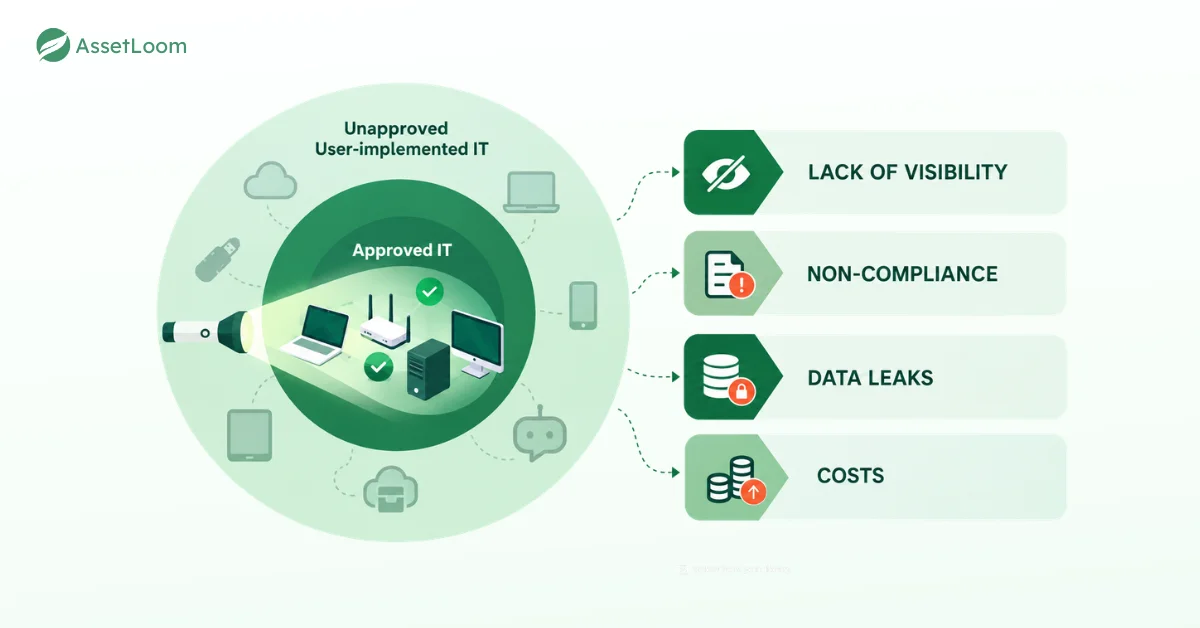
Shadow IT creates blind spots that undermine your inventory. Untracked assets bypass security protocols, increasing the risk of breaches or malware. They also jeopardize compliance with regulations like GDPR or HIPAA, which demand full visibility into your IT environment. Without a handle on shadow IT, your inventory is incomplete and your organization is exposed.
Distributed Workforces
The rise of remote and hybrid work has scattered IT assets across the globe, especially after the COVID-19 pandemic. Employees are logging in from home offices in Chicago, co-working spaces in Berlin, or coffee shops in Tokyo. Tracking laptops, monitors, and IoT devices in this environment is a logistical quagmire. Consider a logistics company that lost track of 50 laptops in 2024 after a wave of remote hires; some were never returned during employee offboarding, costing $75,000 in replacements. Or take a healthcare provider whose remote nurses used untracked tablets to access patient records, violating HIPAA because IT couldn’t enforce security policies on devices it didn’t know existed.
Distributed workforces lead to inventory gaps. Devices get lost, stolen, or forgotten, especially during turnover. Without centralized visibility, IT teams are left guessing, resulting in inaccurate asset counts, delayed upgrades, and compliance risks if devices fall into the wrong hands.
These issues aren’t just frustrating. They can lead to security risks, compliance headaches, and wasted budgets. To understand why these problems keep cropping up, let’s look at the traditional methods organizations have used to manage IT assets and why they’re struggling.
Traditional IT Asset Management
For decades, companies have relied on a few standard approaches to track their IT assets. These methods might have worked when IT environments were simpler, but they’re buckling under the weight of today’s complex, cloud-driven world. Here’s a breakdown of the most common traditional IT asset inventory, and why they’re no longer up to the task.
Spreadsheets
Spreadsheets are the default for many small and medium-sized organizations. They’re cheap, familiar, and seem like an easy fix. But managing an IT inventory in Excel is like building a house on quicksand. Spreadsheets depend on manual updates, which invite errors, such as mistyped asset IDs or forgotten entries. They don’t scale well, either; as your organization grows, that tidy file turns into an unwieldy beast. Version control is a nightmare (how many “final_v3” files are floating around?). And security? Spreadsheets rarely have robust access controls, leaving sensitive data exposed.
Periodic Audits
Many organizations conduct periodic physical audits to verify their IT assets. Picture an IT team roaming the office, clipboard in hand, checking serial numbers and updating records. Audits can catch discrepancies, but they’re labor-intensive and only capture a moment in time. By the time you’ve finished, new devices might be online, old ones retired, or software licenses renewed. When tech evolves daily, which is obvious, an audit from last quarter is practically irrelevant.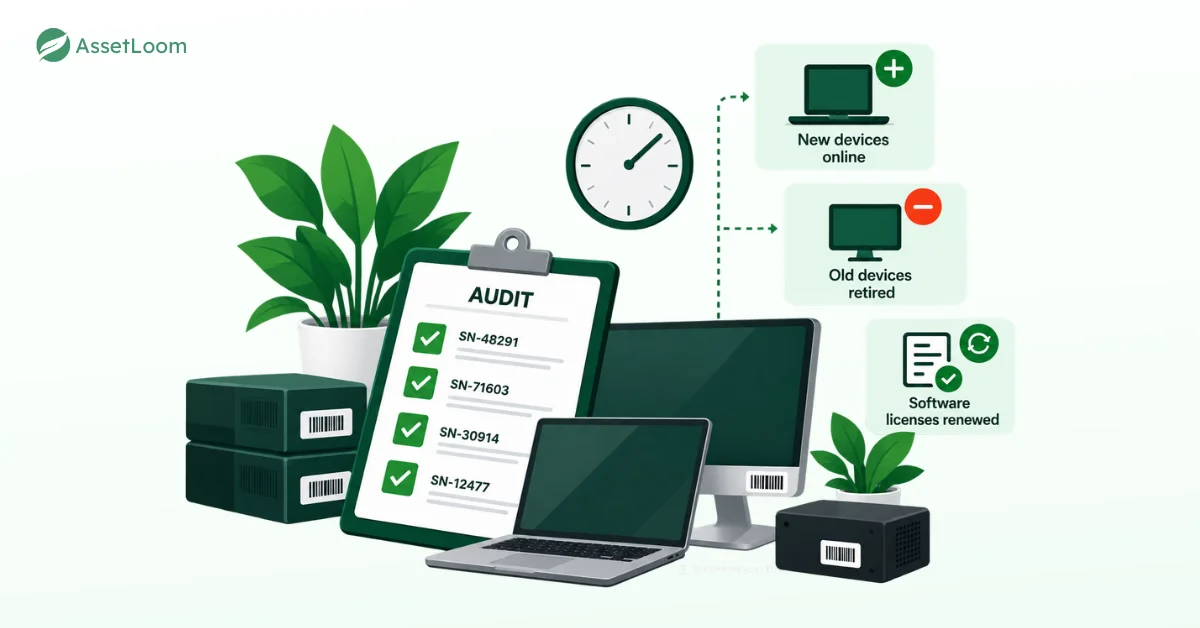
Legacy Asset Management Software
In the 2000s, dedicated IT asset management (ITAM) software promised to replace spreadsheets. These tools offered centralized databases and basic tracking. But many legacy systems were designed for on-premises environments and struggle with today’s cloud-heavy, distributed setups. They often require manual configuration and can’t easily track modern assets like IoT devices or serverless cloud resources. If your team isn’t diligent about updates, these systems become just as unreliable as spreadsheets.
Siloed Systems: When Data Doesn’t Connect
In larger organizations, IT asset data is often spread across disconnected systems. Finance might track hardware costs in one tool, IT manages software licenses in another, and HR handles employee devices in a third. These siloed systems rarely talk to each other, leading to incomplete or conflicting data. For instance, finance might list a laptop as “active,” while IT has no record of it because it was never properly onboarded. Without a unified view, your inventory is a patchwork at best.
These traditional methods rely too heavily on manual effort and lack the flexibility to handle modern IT complexity. Fortunately, 2025’s technology is stepping up with solutions that address these shortcomings head-on.
The Trust Problem Makes Itself Worse
Here’s the effect most articles skip. Once people stop trusting the IT asset inventory, they stop using it. A technician keeps a private list of loaner laptops. A manager tracks team devices in a personal sheet. Finance exports a copy “just to be safe.”
Each side list feels like a fix, but it pulls updates away from the main record. The inventory gets fewer updates, becomes less accurate, and loses even more trust. Breaking that loop matters more than any single feature, because an IT asset inventory only improves when people have a reason to keep using it.
What a Trustworthy IT Asset Inventory Looks Like
Modern IT asset management tools don’t make drift disappear. What the good ones do is shrink the gap between an asset event and its record.
- Updates happen at the moment of change. Scanning a QR code or barcode during a handover records the assignment right away, instead of relying on memory.
- Device data flows in automatically. Integrations with mobile device management (MDM) tools, which IT teams use to manage and secure laptops and phones, bring in device details without retyping.
- Discovery finds what nobody reported. Network discovery tools scan for connected devices, which helps catch shadow IT and forgotten hardware.
- One record replaces many. When finance, IT, and HR check the same inventory, conflicting versions stop piling up.
- Audits become small and frequent. Instead of one painful annual count, you check one location or device group every few weeks.
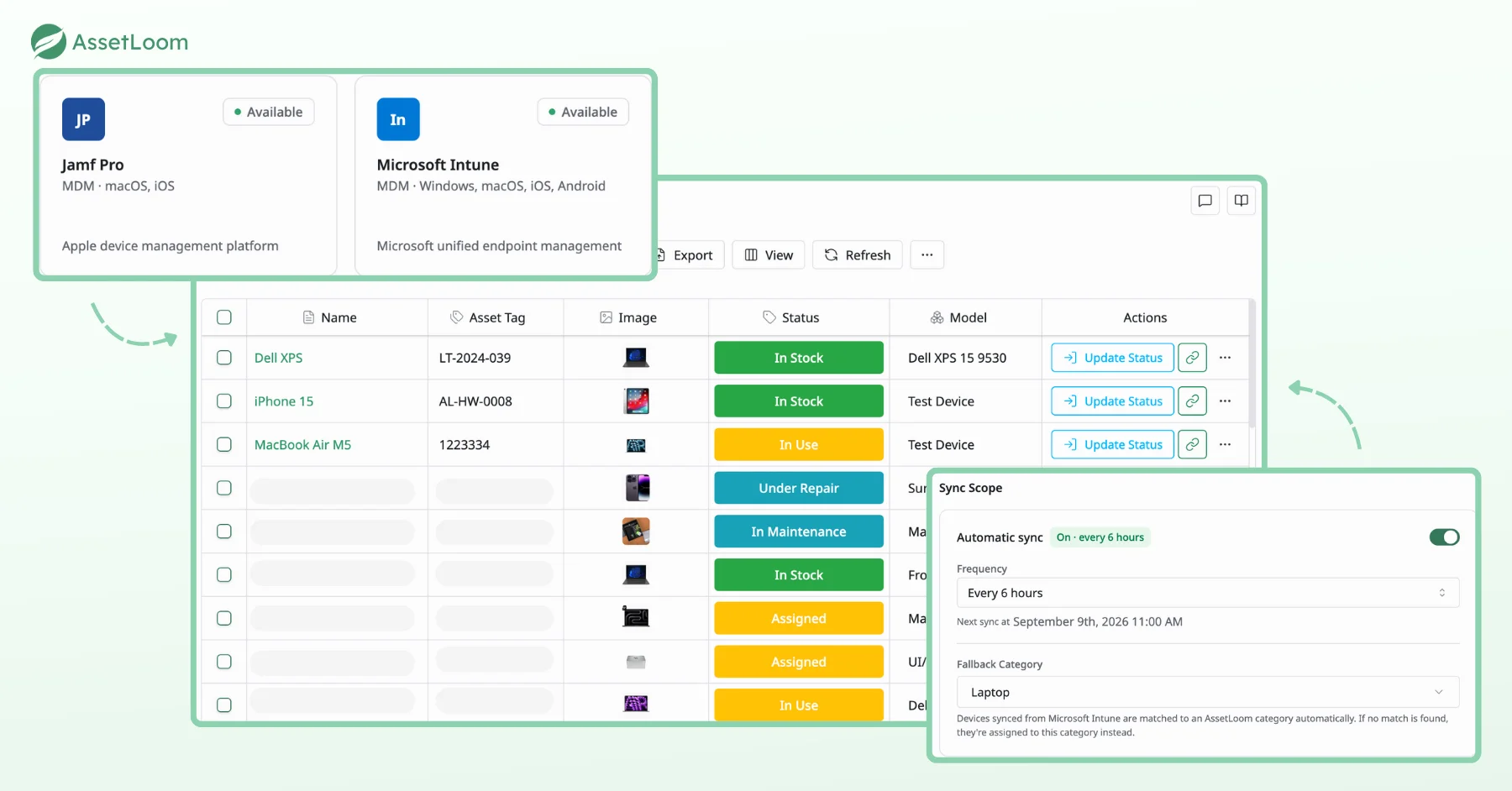
In AssetLoom, the Intune and Jamf Pro integrations follow this idea. Devices sync automatically on a schedule you choose, such as every six hours. Devices from Intune are matched to the right AssetLoom category, and anything without a match goes to a fallback category, so nothing gets lost between systems. Statuses like In Stock, In Use, and Under Repair then sit next to the synced data. That means a laptop at the repair shop finally looks like a laptop at the repair shop.
How to Build an IT Asset Inventory You Can Trust
You don’t need to rebuild everything at once. Start with the moments that cause the most drift.
- List the events that change assets. Onboarding, offboarding, reassignment, repair, purchase, and retirement are a good start.
- Attach an inventory update to each event. Add the update as a step in your onboarding and offboarding checklists, so it happens during the work instead of after it.
- Label every device. A durable QR code or barcode label turns updates into a quick scan.
- Connect the systems you already use. Pull device data from your MDM tools instead of typing it by hand.
- Replace the annual audit with small checks. Audit one office, one team, or one device type at a time.
- Give the inventory an owner. Someone should be responsible for data quality, even when many people make updates.
How AssetLoom Helps You Trust Your IT Asset Inventory
We built AssetLoom to make updates part of everyday work, not a separate admin job.
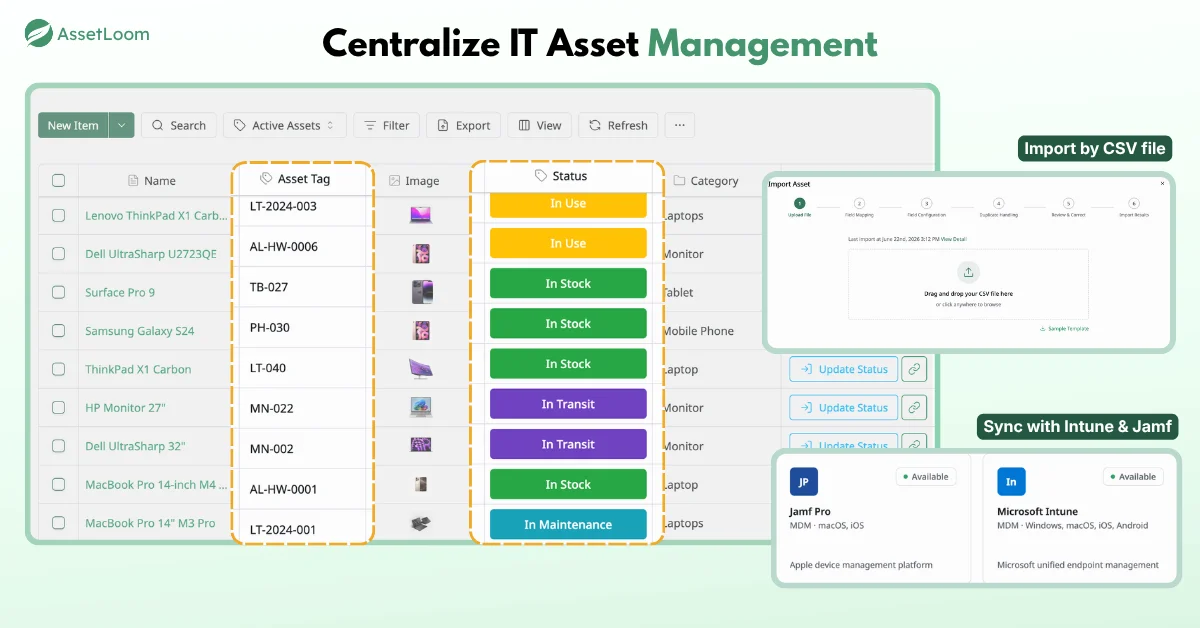
- One place for everything you track. Manage IT assets, accessories, licenses, components, and consumables in a single system, so finance and IT stop working from different lists.
- Device information from Intune and Jamf Pro. AssetLoom integrates with Microsoft Intune and Jamf Pro, so you can work with device information from the tools that already manage your fleet. [VERIFY sync scope and fields]
- QR code and barcode labels. Generate QR codes and barcodes in CODE128, CODE39, or EAN13 formats, customize the embedded fields, and export label sheets as PNG, SVG, or PDF.
- Scan-based check-in and check-out. Use mobile scanning to record handovers the moment they happen, which closes the gap between event and record.
- A free tier to start small. Try AssetLoom with one team or device group before rolling it out across the company.
Frequently Asked Questions
1. Why can’t I trust my IT asset inventory?
Most inventories are updated after assets change, not when they change. Handovers, returns, repairs, and renewals happen during daily work, while records get updated later or not at all. Over time, those missed updates add up until the data no longer matches reality.
2. How often should I audit my IT asset inventory?
Instead of one big annual audit, run small checks every few weeks by location, team, or device type. Smaller audits catch drift early and take far less time. Keep a full audit for compliance deadlines or big changes like office moves.
3. Can a spreadsheet work as an IT asset inventory?
For a small team with a few dozen devices, a well-kept spreadsheet can work. Once you have hundreds of assets, remote staff, or several people making updates, spreadsheets struggle with version control, access control, and missed changes. That’s usually the point to move to a dedicated tool.
4. How does shadow IT affect inventory accuracy?
Shadow IT adds devices and apps that never reach your records. That creates security blind spots, since untracked assets often miss updates, and compliance gaps, since you can’t prove control over data you don’t know about. Network discovery and clear purchase rules help reduce it.
5. What’s the fastest way to improve inventory accuracy?
Start with onboarding and offboarding. Add an inventory update step to both checklists, and scan device labels during every handover. In our experience, these two events cause more drift than anything else, so fixing them improves accuracy quickly.
Conclusion
An unreliable IT asset inventory is rarely about one bad tool or one careless person. It’s about the gap between when assets change and when records change. Spreadsheets, annual audits, and disconnected systems all let that gap grow. Closing it means tying updates to real events, labeling and scanning devices, and keeping one shared record that people actually use.
If you want to start small, the AssetLoom free plan lets you track assets, print QR code labels, and record check-ins and check-outs from your phone. Close the gap, and you’ll stop wondering why you can’t trust your IT asset inventory.