7 Methods to Track IT Assets Across Departments
Track IT assets across departments using 7 methods: barcodes, RFID, GPS, and more. Discover how these methods improve asset management, efficiency, and security.
If you need to track IT assets across departments, the hard part isn’t the technology. It’s the handoffs. IT buys the laptop, HR onboards the new hire, finance records the cost, and nobody holds the whole story.
For most companies, QR code or barcode labels plus one shared asset management system cover almost everything. RFID, BLE, and GPS only pay off in specific cases like warehouses or equipment in transit. Below, we compare all seven methods and show where each one fits.
First, Decide Whether You Need Location or Custody
Before comparing tags and readers, ask one question. Do you need to know where a device is, or who is responsible for it?
Location tracking answers “where,” like a pallet of laptops in a warehouse. Custody tracking answers “who, and in what state,” like a laptop assigned to a sales rep or a monitor out for repair.
In our experience, when teams try to track IT assets across departments, most problems are custody problems. Nobody needs a live map of the marketing team’s laptops. They need to know who has each one and whether it came back when someone left. Buy location tech for a custody problem, and you’ll pay for a very detailed map of the wrong thing.
7 Methods to Track IT Assets Across Departments
This table compares seven common ways to track IT assets, from the simplest and cheapest to the most automated.
| Method | What it tells you | Setup effort | Best fit | Main limit |
|---|---|---|---|---|
| Pen and paper | Who signed for what, on paper | Very low | A handful of assets in one room | No sharing, easy to lose |
| Spreadsheets | A shared list of assets and owners | Low | Small teams with one editor | Version chaos with many editors |
| Barcode or QR code | Asset identity and custody at each scan | Low to medium | Office and remote devices in most companies | Someone has to scan |
| RFID | Which tagged assets pass a reader | High | Warehouses and stockrooms | Cost and signal interference |
| NFC | Asset identity with a phone tap | Low to medium | Shared equipment checked in and out | Very short range |
| BLE | Approximate indoor location | Medium to high | Large offices, hospitals, campuses | Beacons must be installed |
| GPS | Outdoor location on a map | High | Vehicles and high-value gear in transit | Battery, cost, and privacy |
Notice that only the last three tell you where an asset is. The first four tell you who is responsible for it. For most departmental tracking, responsibility is the question that actually matters, which leads to the first decision you should make.
1. Pen and Paper
Pen and paper is the most basic way to track IT assets. Someone writes the serial number, the owner, and the date in a logbook or on a sign-out form.
Where it works. It costs nothing, needs no training, and still works during a power outage. For a tiny team with a few devices in one office, it’s honestly fine.
Where it breaks. Paper can’t be shared across departments. Finance can’t see it, HR can’t update it, and the logbook tends to live in one person’s drawer. Handwriting gets misread, pages get lost, and finding one serial number means flipping through months of entries.
Verdict. Use it as a temporary backup, not a system. Once a second department needs the information, paper stops working.
2. Spreadsheets
Spreadsheets in Microsoft Excel or Google Sheets are the next step up for teams that want to track IT assets digitally. Each row is an asset, and columns hold details like serial number, owner, department, and status. If you want a starting point, copy our free asset tracking Google Sheet template.
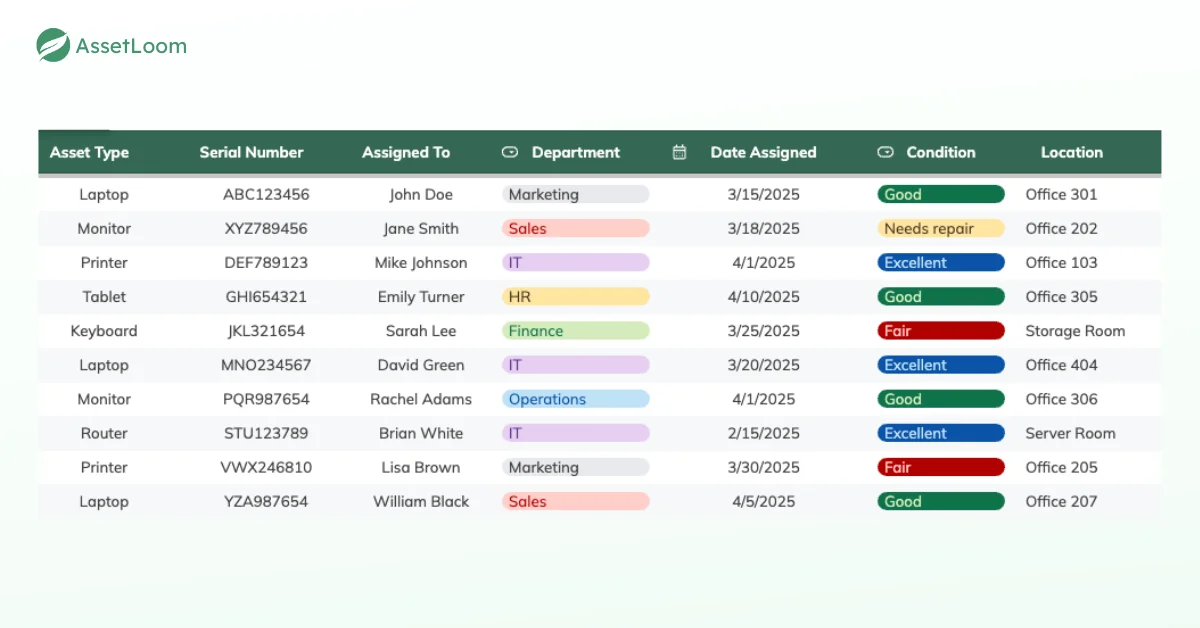
Where it works. Spreadsheets are cheap, flexible, and familiar. Cloud versions let several people view the same file, which is a real improvement over paper.
Where it breaks. Every change is manual, so the sheet is only as current as the last person who remembered to update it. When several departments edit the same file, you get overwritten cells, duplicate rows, and the classic “inventory_FINAL_v2_USE_THIS.xlsx.” Spreadsheets also struggle with anything that renews or expires, which is why software license management often gets forgotten in a sheet.
Verdict. Good for small teams with one clear owner of the file. It gets risky once several departments share editing rights.
3. Barcode and QR Code Tracking
With barcode or QR code tracking, each asset gets a label with a unique code. Scanning the label with a handheld scanner or a smartphone opens the asset’s record in your asset management system, where you can view or update its details.
Where it works. Scanning replaces typing, which cuts data entry mistakes. Labels are cheap, and most smartphones can scan QR codes, so you may not need new hardware. It also scales well, since adding a thousand assets means printing a thousand labels, not rebuilding a process.
Where it breaks. Someone still has to scan. If a device changes hands without a scan, the record falls behind. Labels can also peel or fade, so durable materials matter. Our guide to asset tag labels covers how to make them last.
Example. A new sales hire gets a laptop. IT scans the label during the handover, and the record now shows the owner, the department, and the date. Three months later, IT audits the sales floor by scanning each device. The whole check takes an hour instead of an afternoon of cross-checking a spreadsheet.
Verdict. This is the best default way to track IT assets for most companies. It fits office devices, remote laptops, and shared equipment, as long as scanning is built into handovers and audits.
4. RFID
RFID (radio frequency identification) uses tags with a small chip and antenna. Readers send out radio waves, and tags within range reply with their ID. Passive tags have no battery and can be read from a shorter distance. Active tags have a battery and can be read from much farther away.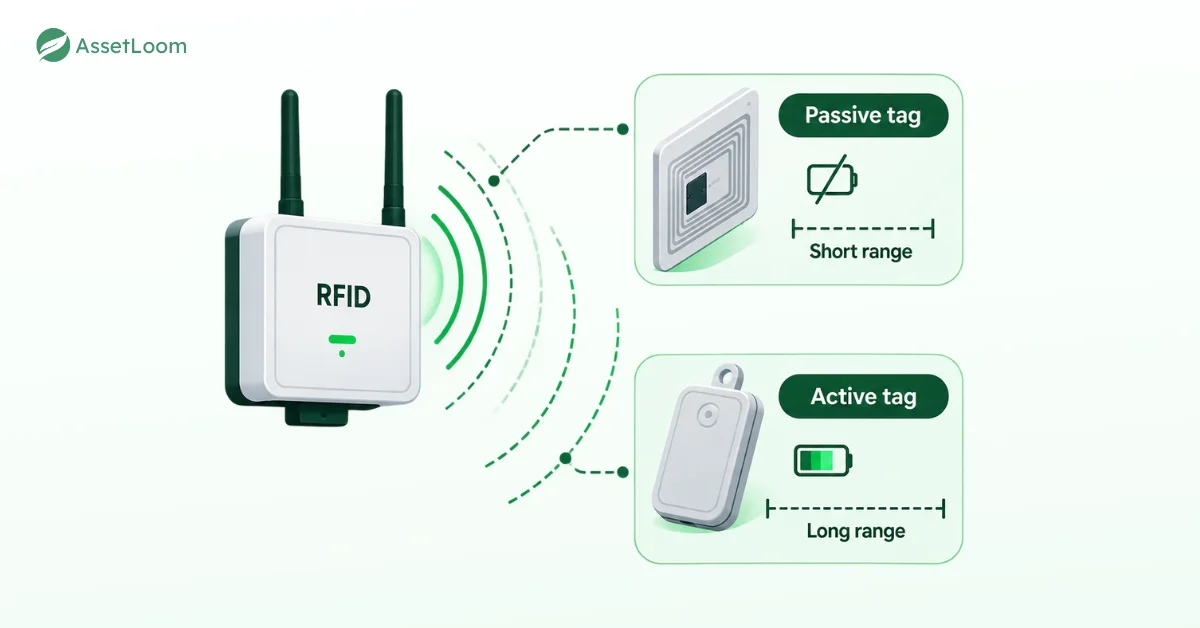
Where it works. RFID doesn’t need line of sight. A reader at a stockroom door can log every tagged device that passes through, and a handheld reader can count a full shelf in seconds. For warehouses and large stockrooms, that speed is hard to beat.
Where it breaks. Tags, readers, and setup cost much more than labels. Metal and liquids can interfere with signals, which is inconvenient when most IT hardware is made of metal. Active tags also need new batteries. And a reader only knows an asset passed by, not who has it now.
Verdict. Worth it for high-volume stockrooms and distribution centers. If you mainly track IT assets like laptops on desks or in home offices, it’s usually more than you need. For a deeper comparison, see QR, barcode vs RFID for inventory tracking.
5. NFC
NFC (near field communication) is a close cousin of RFID with a much shorter range, usually a few centimeters. To track IT assets with NFC, employees tap an NFC-enabled phone against a tag on the asset to open or update its record.
Where it works. Most modern smartphones read NFC, and the tags are passive, so they don’t need batteries. The tap is quick and intentional, which suits check-in and check-out of shared equipment like loaner laptops or conference room gear.
Where it breaks. You have to be right next to the tag, so assets on high shelves or inside racks are awkward to reach. Like barcodes, NFC only records what someone deliberately taps. Metal surfaces can also affect reads unless you use tags designed for metal.
Verdict. A nice option for shared equipment pools. In practice, it does a similar job to QR codes, so pick whichever one your team will use consistently.
6. Bluetooth Low Energy (BLE)
BLE tags send out small, low-power signals. Beacons or gateways installed around a building pick up those signals and estimate where each tagged asset is, often down to a room or zone.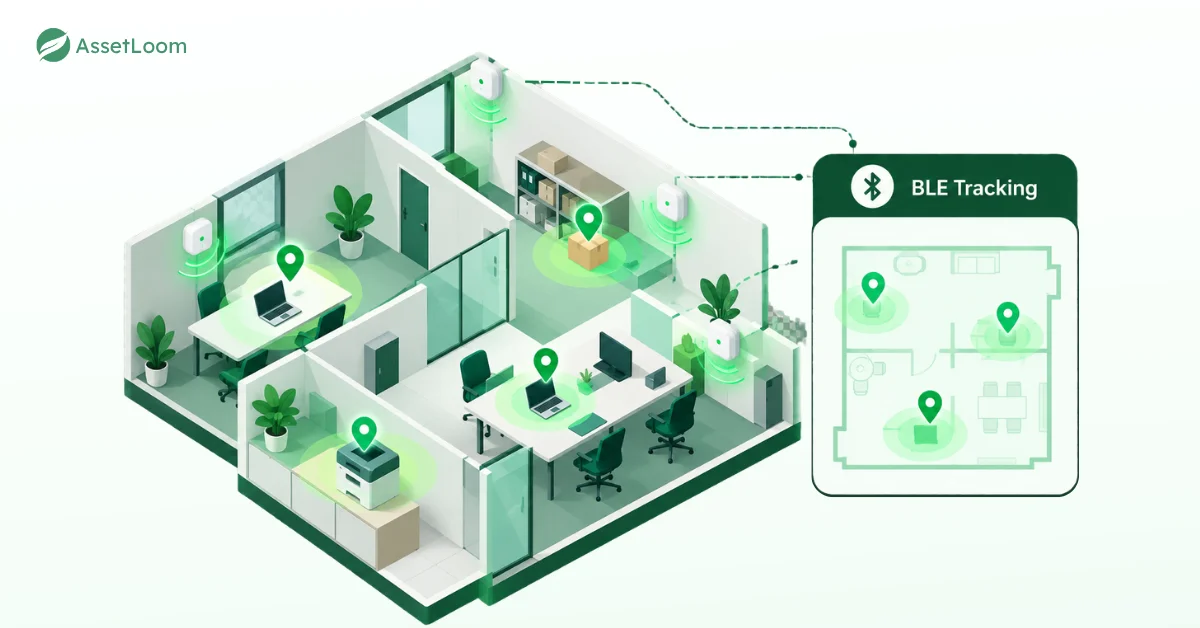
Where it works. BLE lets you track IT assets indoors without anyone scanning anything. That helps in large offices, campuses, and hospitals where shared equipment moves between floors and departments all day. Tags can run on small batteries for a long time.
Where it breaks. You need beacons across the building, which means planning, installation, and upkeep. Walls, metal shelving, and crowds can weaken signals, so accuracy varies. BLE can tell you a device is on the third floor, but not which employee is responsible for it.
Verdict. Worth considering when finding shared equipment fast is a daily need. For assigned laptops, custody usually matters more than indoor location.
7. GPS
GPS trackers use satellite signals to find an asset’s location outdoors, then send it to a central system, often through a cellular connection.
Where it works. GPS is the go-to option for vehicles, field equipment, and high-value hardware in transit. It can alert you when an asset leaves a set area and helps with recovery after theft.
Where it breaks. GPS needs a view of the sky, so it’s unreliable inside buildings. Trackers cost money, drain batteries, and often need a data plan. Tracking devices that employees carry also raise privacy questions, so check with HR and legal first. For company laptops and phones, many teams rely on the lost-device features in their mobile device management (MDM) tools instead.
Verdict. Use it for assets that travel outside your buildings and would really hurt to lose. For standard office and remote laptops, it’s usually the wrong way to track IT assets.
How AssetLoom Helps You Track IT Assets Across Departments
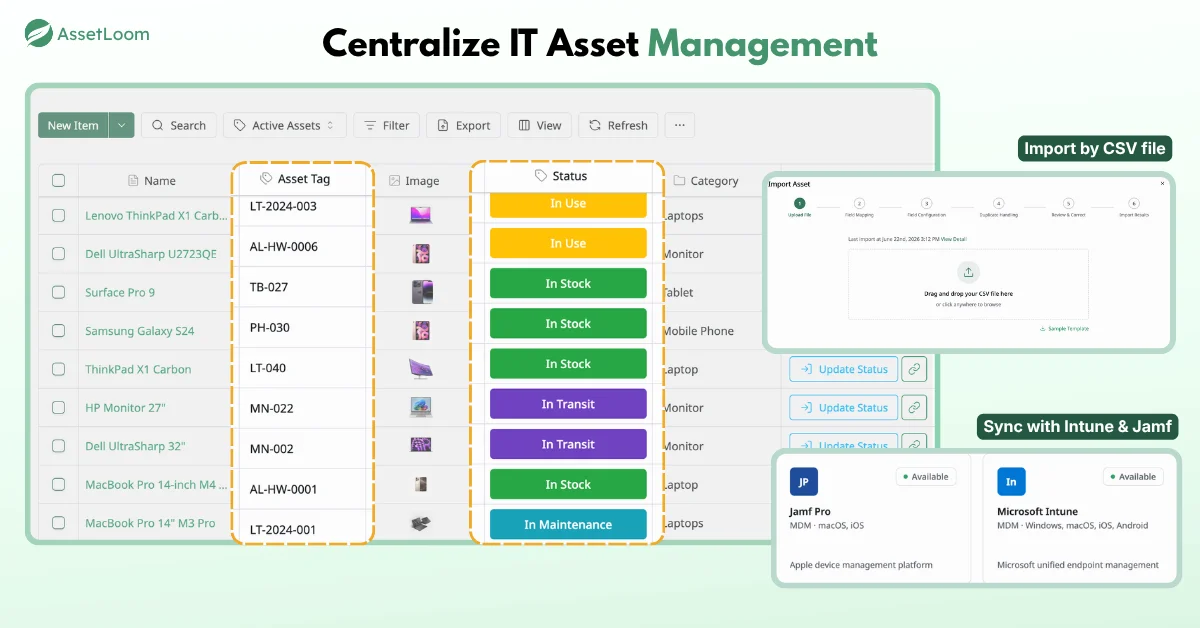
AssetLoom focuses on custody and lifecycle tracking, which covers the questions most departments ask every day. Who has this device, what state is it in, and where is it in its lifecycle?
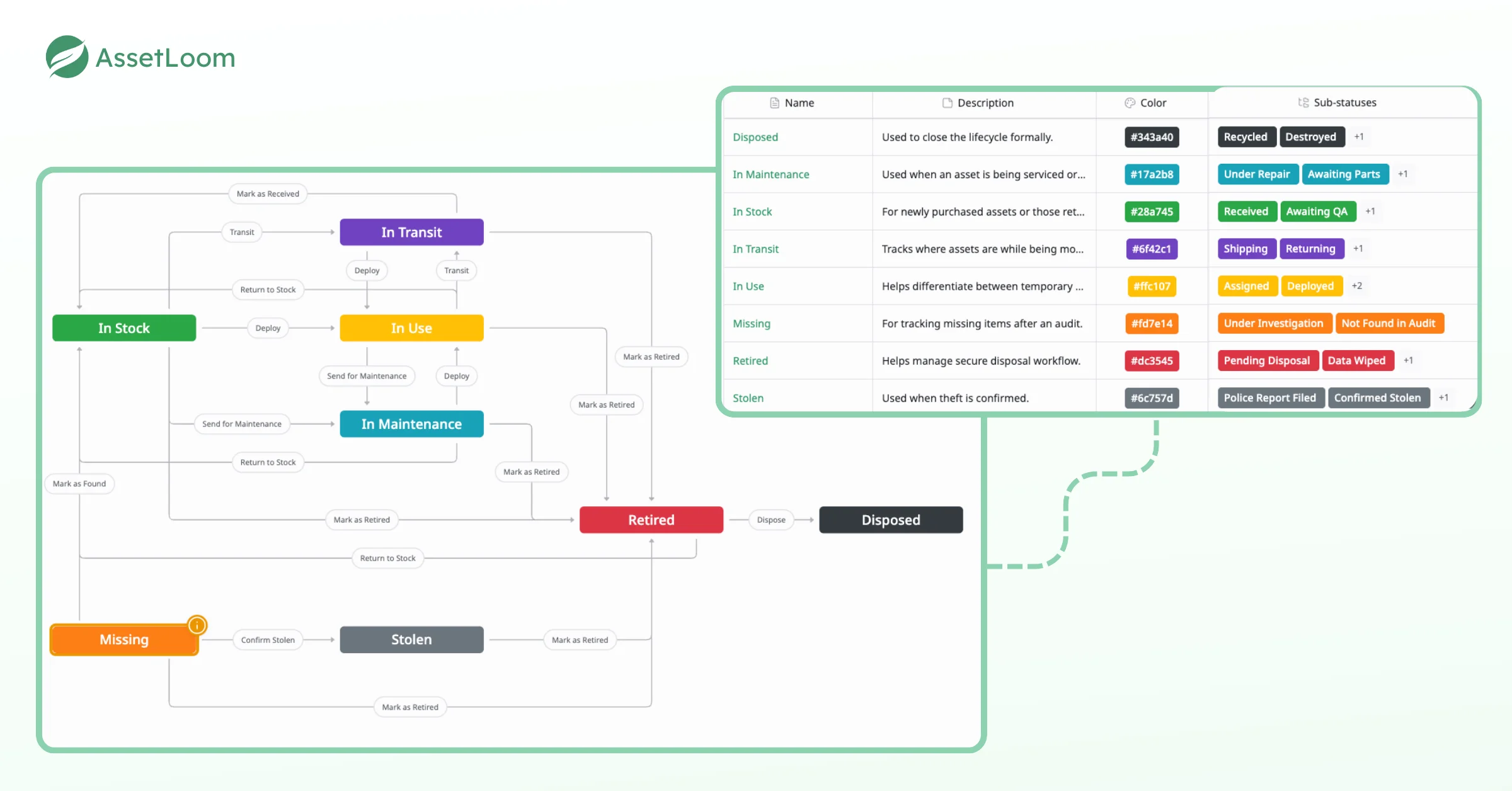
- One record for every department. Manage IT assets, accessories, licenses, components, and consumables in one place, so IT, finance, and HR check the same data.
- QR code and barcode labels. Generate QR codes and barcodes in CODE128, CODE39, or EAN13 formats, customize the embedded fields, and export label sheets as PNG, SVG, or PDF. [VERIFY bulk generation for multiple assets at once]
- Mobile scanning for handovers. Scan labels with your phone to check devices in and out, so assignments update the moment a device changes hands.
- Device data from Intune and Jamf Pro. AssetLoom syncs with Microsoft Intune and Jamf Pro on a schedule you choose, so device details arrive without retyping.
- A free tier to start small. Test the setup with one department before rolling it out company-wide.
To be clear, AssetLoom doesn’t offer GPS or real-time location tracking. If you need live location for vehicles or field equipment, use a dedicated location tool for those assets and keep AssetLoom as the record of who is responsible for them.
Frequently Asked Questions
1. What is the best way to track IT assets across departments?
For most companies, QR code or barcode labels combined with a shared asset management system work best. Add integrations with your MDM tools to bring in device details automatically. Keep RFID, BLE, or GPS for specific needs like warehouses, large buildings, or equipment in transit.
2. Is RFID better than barcodes for IT assets?
Not always. RFID reads many tags quickly without line of sight, which suits warehouses and stockrooms. Barcodes and QR codes are much cheaper and easier to roll out, and they fit office and remote devices well. Many companies use barcodes everywhere and add RFID only in high-volume areas.
3. Can I track IT assets with a spreadsheet?
Yes, for a small team with one person managing the file. Problems start when several departments edit the same spreadsheet, which leads to overwritten data, duplicate rows, and missed updates. At that point, a dedicated asset management tool with scanning is usually worth it.
4. Should I use GPS to track company laptops?
Usually not. GPS trackers work poorly indoors, need batteries and data plans, and raise employee privacy concerns. For laptops, custody tracking plus the lost-device features in your MDM tools usually cover what you need. Save GPS for vehicles and high-value equipment that travels.
5. How do I track IT assets for remote employees?
Label every device before you ship it, and record the assignment with a scan at handover. Connect your MDM tools so device details stay current even when laptops never visit the office. Build device returns into your offboarding checklist, since that’s where remote assets most often go missing.
Conclusion
The best way to track IT assets across departments isn’t the most advanced technology. It’s the method each team will actually use, feeding one record everyone trusts. For most companies, that means QR code or barcode labels, scans at every handover, and device data from MDM tools, with RFID, BLE, or GPS added only where they solve a real problem.
If you want to start small, the AssetLoom free plan lets you print QR code labels, scan check-ins and check-outs from your phone, and sync devices from Intune and Jamf Pro. Start with one department, and you’ll soon have a simple, shared way to track IT assets.