Top 5 Software License Management Software Solutions Compared
Top 5 Software License Management Software to optimize costs and ensure compliance. Compare the best solutions for your business.
Managing software licenses can be complex, especially for organizations that use multiple applications across different departments. Keeping track of software usage, renewals, and compliance requirements is essential to avoid unnecessary costs and audit risks.
To maintain control over licensing, many businesses implement software license management software. These solutions provide real-time visibility into software assets, help optimize license usage, and ensure compliance with vendor agreements.
With various options available, selecting the right solution requires a clear understanding of features, capabilities, and business needs. In this blog, we will compare five leading software license management solutions, highlighting their key benefits and functionalities.
Key Features to Look for in Software License Management Software
Not every feature matters equally. These are the ones that decide whether software license management software saves you time or creates new admin work.
1. License Inventory
A single record of every license, with type, seat count, cost, and expiry date. This is the foundation. If your inventory is wrong, every report built on top of it is wrong too.
2. Assignment and Usage Tracking
Knowing you bought 200 seats is useful. Knowing which 40 nobody has opened in 90 days is where the savings are. Look for tools that tie each seat to a person or device and keep a full history.
3. Compliance Monitoring
The tool should compare what you own with what is deployed and flag gaps before an auditor does. Audit-ready reports can save days of manual work when a vendor letter arrives.
4. Cost Optimization
Look for help finding unused, duplicate, or overlapping licenses. Real usage data is also your best leverage at renewal time. Vendors negotiate differently when you can show that half the seats sit idle.
5. Renewal Alerts
Automatic reminders before contracts renew or expire. This sounds basic. It also prevents some of the most expensive mistakes, because auto-renewals never wait for you to be ready.
6. Vendor and Contract Management
Contracts, terms, and renewal dates stored next to the licenses they govern. When a renewal comes up, you want the contract one click away, not buried in a shared drive.
7. Integrations With Your IT Stack
Connections to ITSM, MDM, identity, and procurement tools keep license data current without manual entry. Every manual update is a future discrepancy waiting to happen.
8. SaaS Discovery
Most software license management software can only manage licenses you already know about. Discovery finds apps connected to company accounts through SSO, OAuth, or sign-in activity. Without it, your inventory has a blind spot exactly where spend grows fastest.
Quick Overview of the Top 5 Software License Management Software Tools
Choosing the right Software License Management (SLM) software is essential for keeping track of software usage, ensuring compliance, and optimizing costs. Below is a quick summary of the five leading solutions.
| Feature | ManageEngine AssetExplorer | FlexNet Manager by Flexera | Software Asset Optimization by Altair | AssetSonar | AssetLoom |
|---|---|---|---|---|---|
| Best For | Small to mid-sized businesses | Large enterprises with compliance needs | Companies optimizing software spend | Small to mid-sized businesses | Small to mid-sized IT teams |
| Software Tracking | ✅ Yes | ✅ Yes | ✅ Yes | ✅ Yes | ✅ Yes |
| SaaS & Cloud License Mgmt | ❌ No | ✅ Yes | ✅ Yes | ✅ Yes | Manual records + free SaaS Scanner |
| Automated Compliance Reports | ✅ Yes | ✅ Yes | ✅ Yes | ✅ Yes | Custom dashboards |
| Audit Readiness | ✅ Yes | ✅ Yes | ✅ Yes | ✅ Yes | ✅ Yes |
| Cost Optimization | ❌ Limited | ✅ Advanced | ✅ Strong | ❌ Basic | ❌ Basic |
| License Key Management | ❌ No | ❌ No | ❌ No | ❌ No | ❌ No |
| Integration with ITSM | ✅ Yes | ✅ Yes | ❌ No | ✅ Yes | ❌ No |
| Deployment Type | Cloud & On-Premise | Cloud & On-Premise | Cloud & On-Premise | Cloud | Cloud |
| Pricing | Free trial, paid plans (quote-based) | Custom pricing (enterprise) | Custom pricing (enterprise) | Tiered pricing | Free plan available |
| Rating (out of 5) | ⭐ 4.3 | ⭐ 4.2 | ⭐ 4.1 | ⭐ 4.0 | ⭐ 4.5 |
The pattern is clear. Flexera and Altair lead on cost optimization and enterprise depth, but they cost more and take longer to set up. AssetExplorer and AssetSonar are easier starting points for smaller teams. Quick License Manager solves a different problem, since it helps vendors protect their own software.
Looking for a lighter option that ties licenses to the people and devices using them? We cover AssetLoom right after the five reviews.
Top 5 Software License Management Software Solutions Compared
Selecting the right software license management software requires evaluating features, scalability, and how well the tool fits an organization’s needs.
ManageEngine AssetExplorer
Overview
ManageEngine AssetExplorer is an IT asset management (ITAM) tool that doubles as software license management software. It discovers hardware and software across your network, tracks installed software against purchased licenses, and helps teams prepare for vendor audits.
Key features
- Software license tracking. Keeps records of installed software and license details.
- Automated asset discovery. Identifies hardware and software assets across the network.
- Expiry and renewal alerts. Sends reminders before licenses expire.
- Audit and compliance reports. Produces reports to support vendor audits.
- Flexible deployment. Available in the cloud or on-premises.
- ITSM integration. Works with ServiceDesk Plus and other ManageEngine tools.
Pros
- User-friendly interface with a clear dashboard.
- Affordable compared to enterprise-level solutions.
- Automated alerts help prevent missed renewals.
Cons
- Limited advanced analytics for large enterprises.
- Fewer integrations than premium ITAM platforms.
- No built-in SaaS license management.
Best for small to mid-sized businesses that want budget-friendly license tracking, especially teams already using ServiceDesk Plus.
Pricing. ManageEngine AssetExplorer offers a free trial, with paid plans based on the number of assets managed. Pricing is quote-based.
Our take. A solid, practical choice for on-premises software. The gap is SaaS, which is where many smaller teams now spend the most.
FlexNet Manager by Flexera
Overview
FlexNet Manager by Flexera is enterprise-grade software asset management (SAM) built for complex licensing environments. After Flexera acquired Snow Software in 2024, the platform expanded its analytics and automation for on-premise, cloud, and SaaS applications.
Key features
- Comprehensive license tracking. Monitors on-premise, cloud, and SaaS usage.
- Advanced cost optimization. Identifies unused licenses and suggests savings.
- Automated compliance audits. Generates reports to reduce audit penalties.
- Cloud and SaaS management. Tracks tools such as Microsoft 365, AWS, and Adobe Creative Cloud.
- Enterprise integrations. Works with ServiceNow, SCCM, and other enterprise systems.
- Contract and vendor management. Centralizes contracts and renewal tracking.
Pros
- Deep features for complex IT environments.
- Strong SaaS and cloud license tracking.
- Comprehensive compliance and audit reporting.
Cons
- Higher cost than SMB-focused software license management software.
- Setup often requires training or professional services.
- More than most small businesses need.
Best for large enterprises with heavy audit exposure and complex vendor contracts.
Pricing. Custom pricing based on company size and required modules. Contact Flexera for a quote.
Our take. If a single audit finding could cost more than the tool, Flexera earns its price. If not, you may be buying a jet to cross the street.
Software Asset Optimization by Altair
Overview
Software Asset Optimization (SAO) by Altair, now part of Siemens, focuses on reducing software spend. It gives real-time visibility into usage across on-premise and cloud environments, which is especially useful for expensive engineering and technical software.
Key features
- Real-time usage tracking. Monitors how software is used across the organization.
- License optimization. Identifies underused software to cut costs.
- Cloud and on-premise support. Covers traditional and SaaS applications.
- Audit and compliance reports. Supports vendor agreement compliance.
- Usage-based cost allocation. Distributes software costs by actual use.
- Data-driven insights. Analytics to guide procurement and renewals.
Pros
- Strong focus on software cost optimization.
- Real-time tracking reduces license waste.
- Detailed reporting for audits.
Cons
- Fewer ITSM integrations than competitors.
- Narrower than a full IT asset management platform.
- Likely too much for simple software environments.
Best for mid-sized and large companies where specialty licenses make up a big share of the budget.
Pricing. Custom pricing. Request a quote from Altair.
Our take. Think of it as a cost analyst rather than an inventory tool. Great at showing waste, less focused on day-to-day asset operations.
AssetSonar
Overview
AssetSonar is cloud-based ITAM and software license management software built for teams that want quick setup. It combines automated discovery, license monitoring, and reporting without on-premise infrastructure.
Key features
- Software license tracking. Monitors usage and helps prevent violations.
- Automated discovery. Scans IT environments for installed software.
- Expiry and renewal alerts. Reminds teams before renewals.
- Cloud-based deployment. Accessible anywhere with no local install.
- Audit and compliance reports. Keeps records ready for vendor audits.
- Integrations. Works with Jira, Zendesk, Microsoft Intune, and Microsoft Entra ID (formerly Azure AD).
Pros
- Cloud-based and easy to deploy.
- Good compliance tracking and alerts.
- Useful ITSM integrations.
Cons
- Lacks the advanced optimization found in enterprise tools.
- Less depth than Flexera or Altair for large organizations.
- Limited on-premises options.
Best for small to mid-sized teams that want cloud-based license tracking and already use Jira, Zendesk, or Intune.
Pricing. Tiered plans based on the number of assets. A free trial is available.
Our take. A sensible middle ground. Check how it handles your SaaS stack during the trial before committing.
AssetLoom
Overview
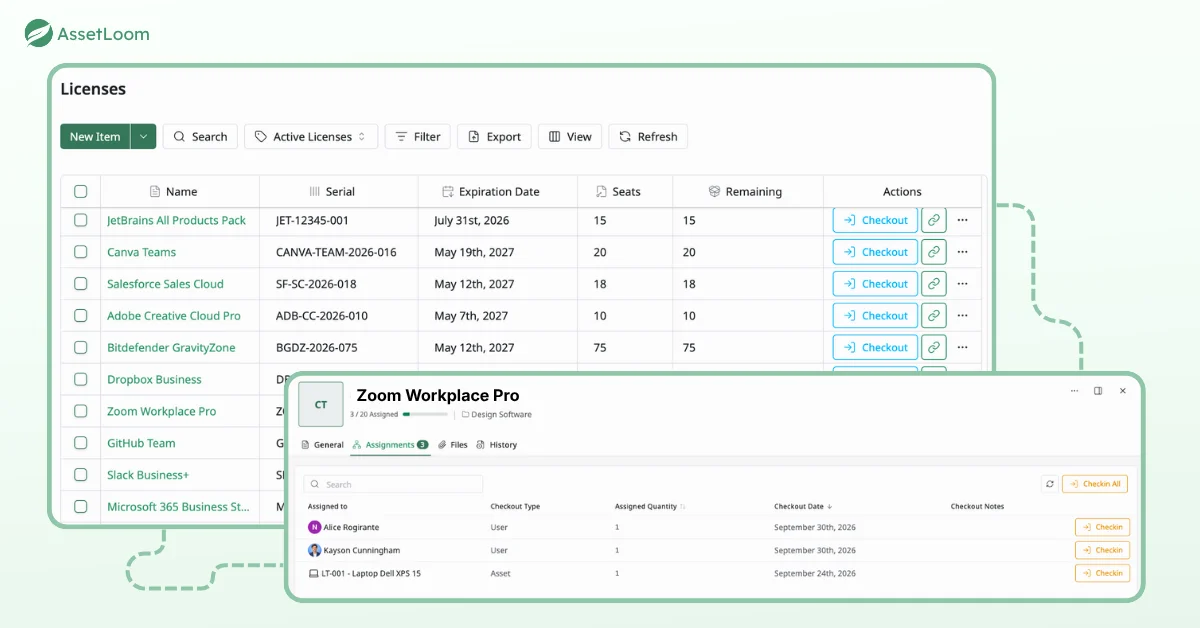
AssetLoom is an IT asset operations platform that include software license management for teams who want licenses tracked alongside hardware, accessories, components, and consumables. That matters because a license rarely lives alone. It is tied to a person, a laptop, and an onboarding or offboarding process.
Key features
- License records. Stores license keys, renewal dates, and vendor contracts in one place.
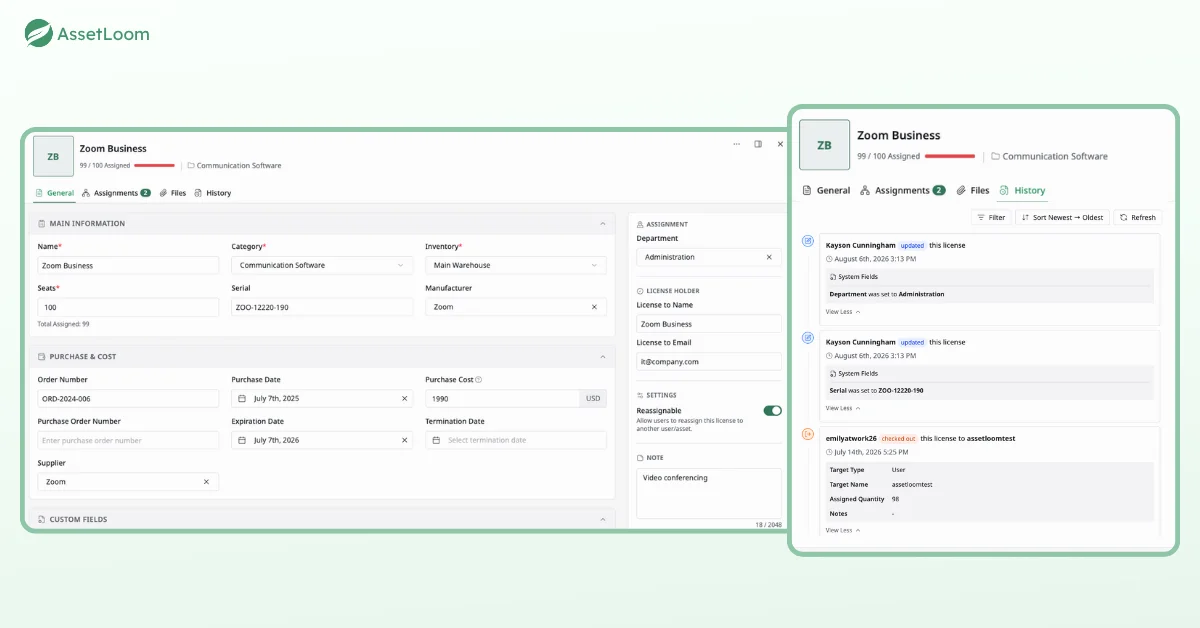
- License assignment. Checks licenses out to users and back in, with a full history of who had what and when.
- One view per person. Shows a user’s laptop, accessories, and license seats together, which makes offboarding recovery easier.
- No-code automation. Handles reminders, approvals, and status updates.
- Cost dashboards. Custom dashboards track spend and total cost of ownership.
- Device sync. Integrates with Microsoft Intune and Jamf Pro.
Pros
- Licenses and hardware managed in one workspace.
- Free plan with no credit card required.
- Spreadsheet import makes the first setup fast.
Cons
- No deep software metering or usage analytics like Flexera or Altair.
- Not built for complex Oracle or IBM licensing.
- SaaS discovery comes from a separate free scanner, not live usage tracking.
Best for small and mid-sized IT teams that want licenses, devices, and custody in one place, especially teams moving off spreadsheets.
Pricing. A free plan is available with no credit card required.
Our take. AssetLoom will not replace an enterprise SAM platform. It is built for teams whose real problem is knowing who has what, and getting it back when people leave.
Find Hidden SaaS First With the Free AssetLoom SaaS Scanner
Every software license management software tool above manages licenses you already know about. The expensive ones are usually the licenses you don’t.
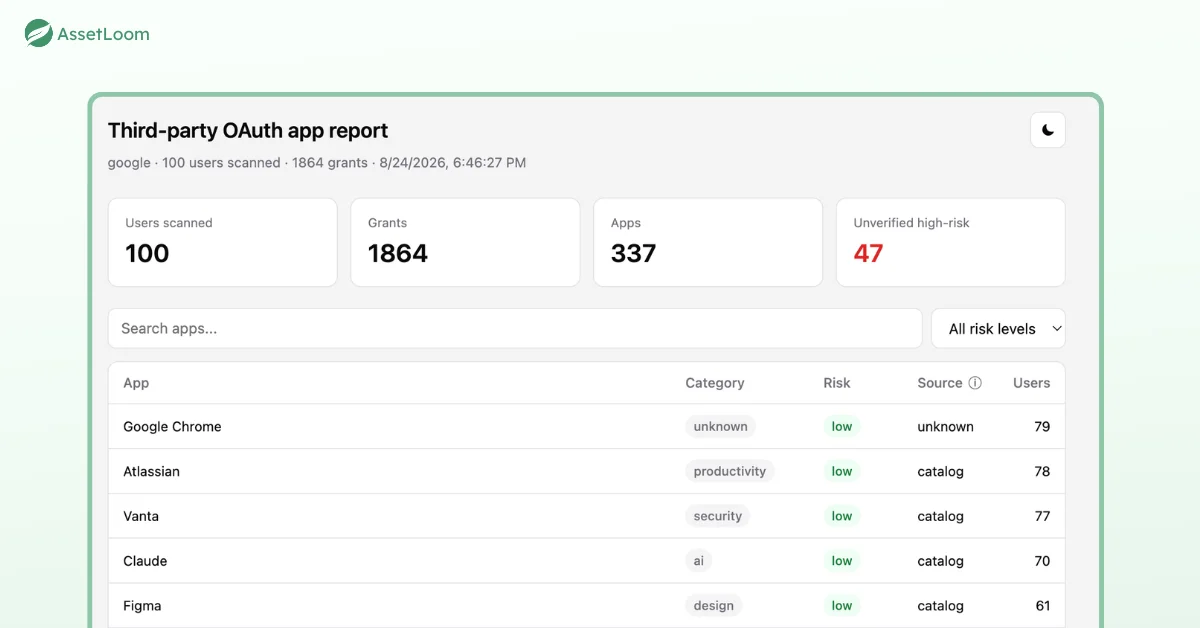
The AssetLoom SaaS Scanner (also called the Shadow IT Scanner) is a free, read-only command-line tool for Windows, macOS, and Linux. It connects to Microsoft Entra ID, Okta, or Google Workspace and analyzes sign-ins, OAuth connections, assigned apps, and supported access logs. The result is a list of SaaS apps that may be missing from your inventory.
What it gives you in practice.
- A named list of apps found across your identity sources, with user counts.
- Risk flags, plus filters such as
--aiand--riskyto narrow results. - Exports in CSV, JSON, or HTML for your team or your license tool.
- No subscription and no agents to install.
We suggest a simple three-step license review with it.
- Scan. Run the scanner against your main identity provider.
- Compare. Match the results against your license inventory. Anything unknown is either shadow IT or a license nobody is tracking.
- Decide. Bring the apps you keep into your software license management software. Cancel or consolidate the rest.
One note on scope. The scanner is a discovery tool, not a full SaaS management platform. Its job is to give you an honest starting list, which is exactly what most license inventories are missing.
Download the free SaaS Scanner. Find the apps hiding outside your inventory in one scan.
FAQs
1. What is software license management software?
Software license management software helps organizations track the licenses they own, who uses them, and when they renew. It centralizes license records, flags unused or overdeployed seats, and supports vendor audits. The goal is to avoid paying for software nobody uses while staying compliant with license agreements.
2. What is the difference between SAM and license management?
Software asset management (SAM) covers the full lifecycle of software, from purchase and deployment to retirement. License management is one part of SAM, focused on entitlements, compliance, and renewals. Many tools include both, but enterprise SAM platforms usually go deeper on usage metering and complex licensing rules.
3. How does software license management software help with vendor audits?
It keeps proof of purchase, contract terms, and deployment data in one place. When a vendor requests evidence, you can compare entitlements with actual installs and produce a report quickly. That turns audit prep from days of searching emails into a review of records you already maintain.
4. Can software license management software track SaaS subscriptions?
Some can, but coverage varies widely. Enterprise tools like Flexera track SaaS usage directly, while others focus on installed software. Either way, a tool can only track subscriptions it knows about. A discovery scan of your identity systems helps surface SaaS apps that never went through procurement.
5. How do I find unused software licenses?
Start by assigning every license to a named person or device. Then compare assignments with activity data from your identity provider, MDM, or the software vendor. Seats with no recent activity, or seats still assigned to former employees, are the first candidates to reclaim before your next renewal.
Conclusion
The best tool is the one your team will keep accurate. Flexera and Altair suit enterprises with complex licensing and large budgets. AssetExplorer and AssetSonar fit smaller teams that want simpler tracking. Quick License Manager belongs to software vendors, not IT buyers.
Whatever you pick, start with visibility. Run the free SaaS Scanner to find what you are missing, then try AssetLoom for free to tie licenses to the people and devices using them. Accurate data first, then the right software license management software.