Snipe IT Asset management vs. AssetLoom: Which Tool Is For You?
Snipe IT asset management is a widely-used open source ITAM system. Let’s see if SnipeIT is a best fit for your business.
Are you searching for an ITAM solution like Snipe IT asset management but feeling overwhelmed by the many software options flooding the market?
Snipe-IT and AssetLoom take different approaches to IT asset management. Snipe-IT provides an open-source solution focused on inventory tracking, while AssetLoom provides a modern IT asset operations platform designed for organizations that need lifecycle management, automation, and integrations.
This comparison breaks down their features, pricing, workflows, and use cases to help you find the right asset management tool for your organization.
TL;DR:
SnipeIT offers a cost-effective, open-source solution for small teams with basic IT asset management needs, while AssetLoom provides a feature-rich, scalable platform with automation and integrations, making it the go-to choice for growing organizations seeking to streamline complex ITAM workflows. Your decision depends on budget, scale, and the level of sophistication your business demands.
What is SnipeIT?
Snipe IT asset management is a widely recognized, free, open-source ITAM system built on the Laravel PHP framework. Designed to help organizations track and manage IT assets such as hardware, software licenses, accessories, and consumables, Snipe IT asset management is a web-based solution that can be self-hosted or accessed via paid cloud hosting. Since its inception, it has garnered a large community of users—over 8.1 million managed users and 15.9 million managed assets across 5,680 customers—thanks to its accessibility and robust feature set. It’s a go-to choice for those seeking a cost-effective, customizable tool like Snipe IT asset management.
Snipe IT Asset Management Features
SnipeIT offers a range of features that make it a solid contender in the ITAM space. Here’s a closer look at its most significant offerings:
- Asset Tracking and Management: SnipeIT allows users to monitor hardware assets, software licenses, and other IT resources. It provides visibility into asset assignments, locations, and statuses with one-click check-in/out functionality and full history tracking.
- User Management: Administrators can assign assets to users, manage permissions, and view detailed activity logs per user profile, enhancing accountability across teams.
- Customizable Fields and Status Labels: SnipeIT offers flexibility with custom fields and status labels, allowing organizations to tailor asset data to their specific workflows—whether marking an asset as “repair pending” or “ready for deployment.”
- REST API for Integrations: Its open JSON REST API enables developers to build custom integrations and automate processes, a boon for tech-savvy teams looking to extend functionality.
- Multilingual Support: With support for over 55 languages, SnipeIT caters to global teams, offering per-user language customization.
- Security Features: It includes SAML login, two-factor authentication (2FA), HTTPS-only cookies, and password security, ensuring data protection for web-facing applications.
While these features make SnipeIT versatile, it does have limitations, such as a time-intensive initial setup and a lack of advanced integrations (e.g., no native Intune or calendar booking system support), which may push some organizations to seek alternatives.
How Snipe-IT Handles Daily Asset Operations
Snipe-IT works well for organizations that mainly need asset records, assignments, and check-in/check-out tracking.
- A typical workflow looks like:
- Add assets manually or through import
- Assign assets to users
- Track check-in/check-out history
- Manage licenses and accessories
- Review asset reports
This approach works well for teams that already have IT processes in place and need a reliable inventory database.
However, organizations looking for more automation, integrations, and lifecycle workflows may need additional customization or supporting tools.
How is the Price of SnipeIT for Each Version?
SnipeIT’s pricing model is straightforward, offering a free tier alongside paid hosting options. Here’s the breakdown as of March 2025:
- Free Self-Hosted Version: No cost, but requires users to set up and maintain their own server (e.g., using a LAMP stack or Docker). It includes all core features but lacks official support beyond community resources like GitHub and Discord.
- Basic Hosting: $39.99/month – Cloud-hosted with no user or asset limits, ideal for small teams needing a managed solution without advanced API safeguards.
- Small Business Hosting: $99.99/month – Adds more robust hosting features for growing organizations, still with unlimited users and assets.
- Dedicated Hosting: $249.99/month – Offers VPN connectivity, private server support, and IP address control, catering to businesses with complex needs.
- Support Add-Ons: Optional annual support plans range from $449.99 (Standard) to $4,999.99 (Enterprise) for personalized assistance and priority bug fixes.
This pricing structure makes SnipeIT highly affordable, especially for budget-conscious organizations comfortable with self-hosting.
Where Does Snipe IT Asset Management Fit?
SnipeIT is best suited for:
- Small to Mid-Sized Businesses: Its free tier and unlimited asset/user capacity make it ideal for organizations with limited budgets and moderate ITAM needs.
- Tech-Savvy Teams: Companies with IT staff capable of self-hosting and leveraging the REST API for custom workflows.
- Cost-Conscious Nonprofits or Startups: Those needing a robust, no-cost solution without the overhead of commercial software.
- Single-Location Operations: It shines in simpler setups but may struggle with scalability for large, multi-site enterprises.
What is AssetLoom?
AssetLoom is an IT asset management app, designed to deliver a modern, comprehensive, and user-friendly solution for organizations seeking to streamline their ITAM processes. Unlike SnipeIT’s open-source roots, AssetLoom is a purpose-built platform that emphasizes full-cycle asset management, automation, and seamless integrations. It’s crafted to address the evolving demands of dynamic businesses, offering enhanced customization and workflow efficiency to manage IT assets from acquisition to disposal.
AssetLoom’s Key Features
AssetLoom is designed as a complete IT asset operations platform that combines inventory management, lifecycle tracking, asset verification, maintenance, and integrations in one place.
Unlike traditional inventory-focused ITAM tools, AssetLoom helps teams manage what happens before, during, and after an asset is assigned.
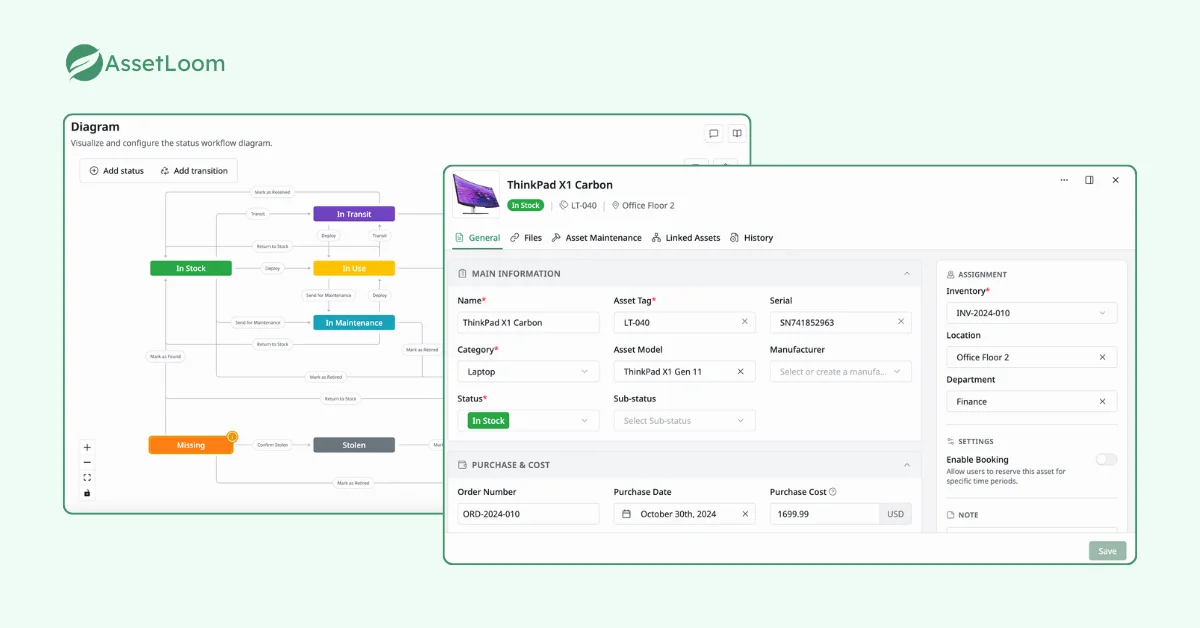
IT Asset Management (Full Lifecycle Tracking)
AssetLoom manages the entire lifecycle of IT assets, accessories, software licenses, components, and consumables.
From procurement to retirement, it tracks purchase dates, warranty periods, maintenance schedules, and disposal records. This holistic approach ensures no asset falls through the cracks, with detailed reporting on usage, depreciation, and lifecycle status.
Beyond basic inventory records, AssetLoom helps IT teams maintain visibility throughout every stage of an asset’s journey, including assignment, ownership changes, maintenance activities, and retirement decisions. Teams can track asset history, monitor depreciation values, and understand the condition and value of assets over time.
Inventory-Based Management
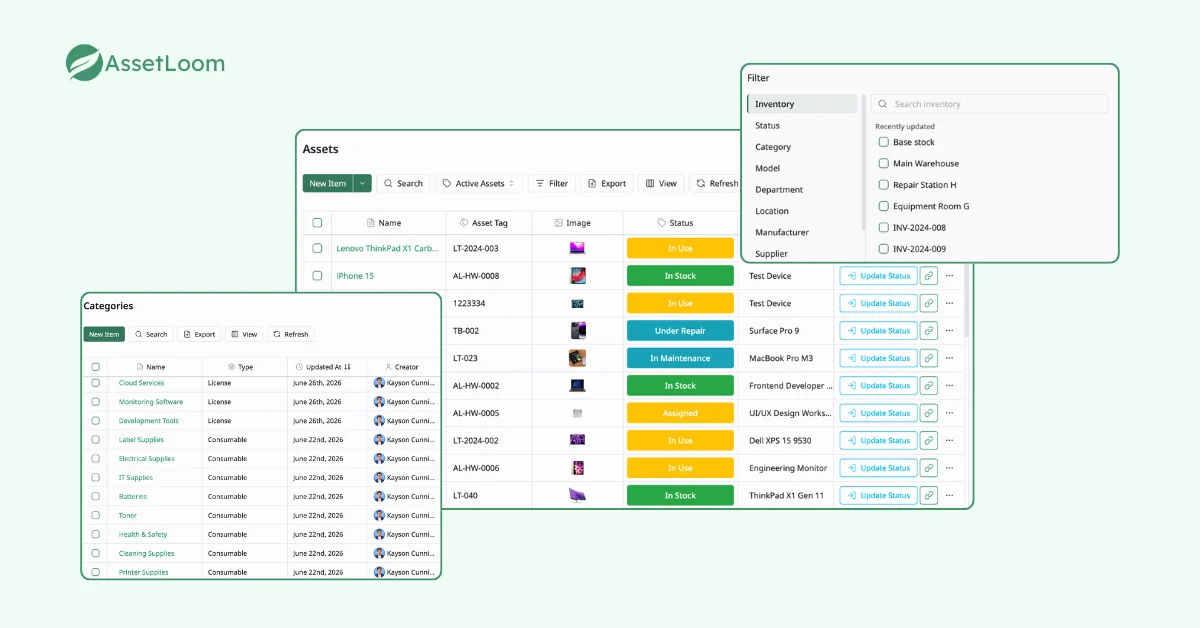
Beyond basic tracking, AssetLoom offers a robust inventory system that categorizes assets by type, location, and availability. It provides real-time stock visibility, helping IT teams manage spares, replacements, and consumables (e.g., cables, batteries) with precision.
AssetLoom offers a robust inventory system that categorizes assets by type, location, and availability. It provides real-time stock visibility, helping IT teams manage spares and replacements with precision.
AssetLoom supports different asset categories, including hardware, accessories, components, consumables, and software licenses. Teams can quickly identify available inventory, locate assets, and understand which items are assigned, in storage, under maintenance, or ready for reuse.
Asset Booking and Reservations
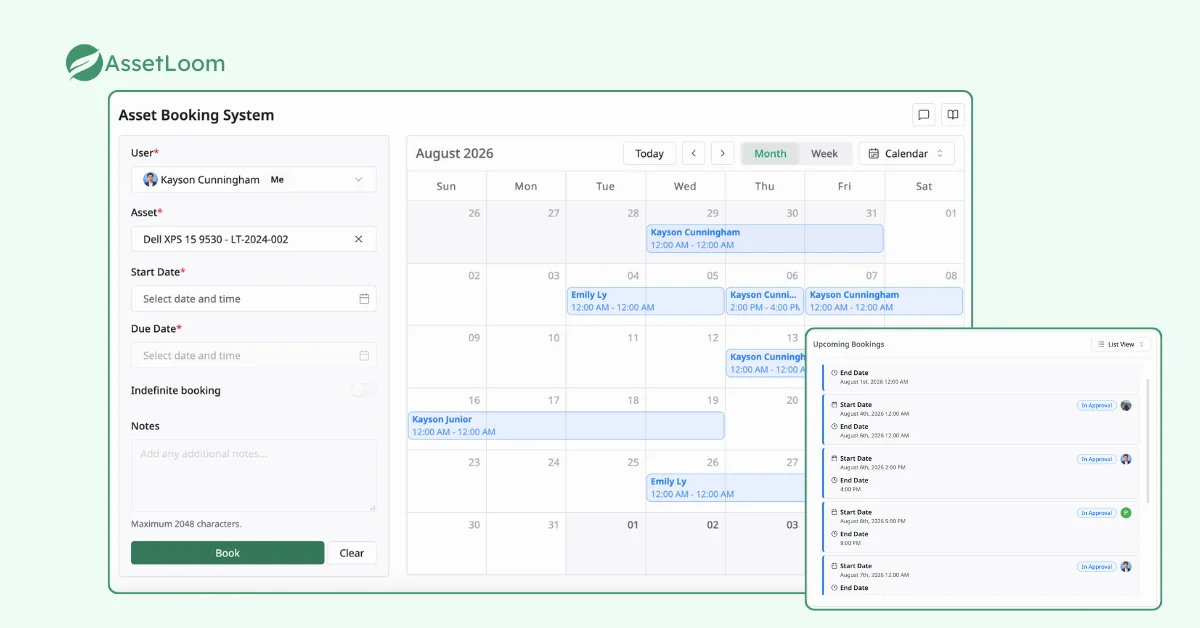
AssetLoom allows users to reserve assets for specific projects or timeframes via an integrated calendar system. This is perfect for teams needing temporary equipment allocations, ensuring availability without overbooking conflicts.
The booking workflow helps organizations manage shared equipment such as laptops, meeting devices, testing devices, or project-specific hardware. Teams can check asset availability before making requests and maintain a clear history of asset usage.
Check-In/Check-Out System
Similar to SnipeIT, AssetLoom simplifies asset assignment with a streamlined check-in/check-out process. It supports barcode scanning and mobile access, enabling quick handoffs and returns while maintaining an audit trail.
With custody verification capabilities, IT teams can confirm who currently has an asset, track ownership changes, and reduce gaps between inventory records and physical assets. This is especially useful during employee onboarding, offboarding, and regular inventory audits.
Enhanced Customization
AssetLoom goes beyond SnipeIT’s custom fields with a highly adaptable interface. Teams can customize asset information based on their internal requirements, add additional asset attributes, and organize reporting views around their operational needs. This allows organizations to maintain the data structure that matches their existing IT processes.
Automation (Onboarding/Offboarding Workflow)
AssetLoom automates repetitive ITAM tasks, especially in new hire onboarding workflow. These workflows help reduce manual updates, improve accuracy, and ensure asset records stay current.
By connecting asset information with employee and operational processes, IT teams can simplify common workflows such as preparing devices for new employees, recovering equipment from departing users, and updating asset ownership records.
Integration with JAMF & Intune
For organizations managing endpoint devices, AssetLoom integrates with Microsoft Intune and Jamf Pro to synchronize device information into its platform.
These integrations help teams maintain accurate inventory records by reducing manual updates and keeping important device details, such as device information, status, and ownership data, aligned with existing endpoint management systems.
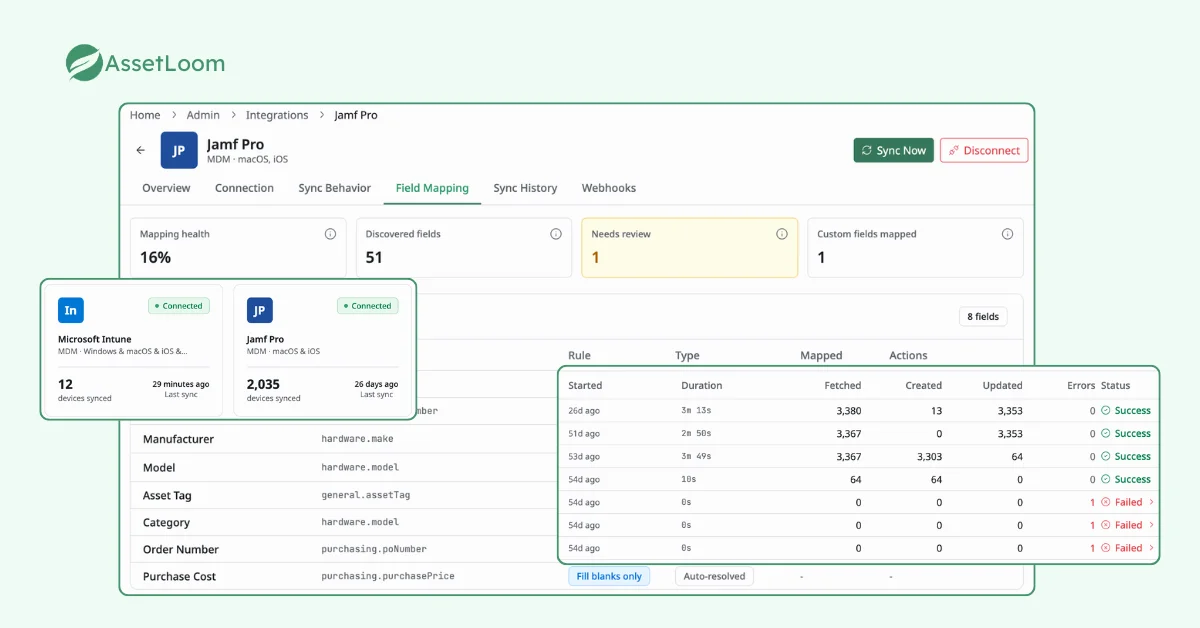
For Apple device environments, Jamf Pro integration provides centralized visibility of macOS and iOS assets alongside other IT resources. For Microsoft environments, Intune integration helps teams extend endpoint visibility into their broader IT asset management process.
These features make AssetLoom a modern IT asset management solution, combining traditional inventory tracking with lifecycle management, verification, automation, and integrations to support today’s evolving IT environments.
What Kinds of Organizations Does AssetLoom Fit For?
AssetLoom is designed for:
- Mid-Sized to Large Enterprises: Its scalability and advanced integrations (e.g., Jira, JAMF) make it ideal for organizations with complex IT ecosystems and multiple locations.
- Hybrid and Remote Workforces: Features like asset booking and onboarding/offboarding automation cater to distributed teams needing flexible resource management.
- IT-Driven Businesses: Companies relying heavily on IT infrastructure—such as tech firms, creative agencies, or healthcare providers—benefit from its full-cycle tracking and customization.
- Organizations Seeking Efficiency: Those prioritizing automation and streamlined workflows over manual processes will find AssetLoom’s capabilities transformative.
SnipeIT vs. AssetLoom: Which One is for You?
The choice between SnipeIT and AssetLoom depends on your organization’s size, budget, and ITAM priorities:
| Capability | Snipe-IT | AssetLoom |
|---|---|---|
| Asset inventory | Hardware, licenses, accessories tracking | Hardware, software, accessories, components, consumables |
| Asset lifecycle | Basic asset history tracking | Lifecycle management with maintenance, depreciation, and retirement |
| Check-in/check-out | Yes | Yes, with custody verification |
| QR codes | Yes | Yes, with mobile scanning |
| Asset booking | Limited | Built-in booking workflows |
| Maintenance tracking | Basic tracking | Maintenance records, costs, and history |
| Depreciation | Limited | Straight Line and Double Declining Balance |
| Integrations | REST API | Microsoft Intune and Jamf Pro integrations |
| Mobile access | Web-based | Dedicated mobile app |
| Best fit | Teams needing open-source inventory tracking | Organizations needing complete IT asset operations |
- Budget and Setup: SnipeIT wins for cost-conscious teams with its free self-hosted option, though it requires technical know-how to deploy and maintain. AssetLoom, while pricing is TBD, promises a managed solution with less setup overhead, appealing to those willing to invest in a polished experience.
- Features and Flexibility: AssetLoom shines with full lifecycle management, booking, automation, and ties to Jira and JAMF, making it more robust for dynamic needs. While SnipeIT offers solid basics—asset tracking, QR codes, and an API—but lacks advanced automation and integrations.
- Scale and Complexity: AssetLoom scales effortlessly for larger, multi-faceted operations. Meanwhile, SnipeIT suits smaller, simpler setups.
- Support and Ease: SnipeIT leans on community support (unless you pay extra), whereas AssetLoom aims to deliver dedicated free assistance and a user-friendly interface out of the box.
Choose Snipe-IT if
- You need a free or open-source ITAM solution
- Your main requirement is asset inventory tracking
- Your team has technical resources for hosting and customization
Choose AssetLoom if
- You need more than basic inventory tracking
- You want lifecycle management, maintenance, and depreciation tracking
- You need integrations with device management platforms
- You prefer a managed platform without self-hosting requirements
- Your team wants mobile access for asset operations
FAQs
1. What should businesses consider before replacing their IT asset management software?
Before switching ITAM tools, businesses should evaluate their current inventory process, data quality, migration requirements, integrations, and future growth needs. Important factors include whether the new platform supports existing asset data, improves daily workflows, and reduces manual maintenance.
2. How difficult is it to migrate asset data from Snipe-IT to another ITAM platform?
The migration effort depends on the amount and quality of existing asset data. A smooth migration usually involves exporting current asset records, mapping fields between systems, importing data into the new platform, and verifying important information such as ownership, locations, and asset history.
3. Can IT asset management software replace spreadsheets?
Yes. IT asset management software helps organizations move beyond spreadsheets by centralizing asset records, automating updates, improving tracking accuracy, and providing better visibility into ownership, status, and lifecycle information.
4. What features should companies look for in an IT asset management tool?
Companies should look beyond basic inventory tracking and consider features such as lifecycle management, asset verification, maintenance tracking, reporting, integrations with endpoint management tools, and mobile access for physical inventory operations.
5. How can IT teams improve asset tracking accuracy?
IT teams can improve accuracy by creating standardized asset records, regularly verifying physical assets, tracking ownership changes, using QR or barcode scanning, and connecting asset management tools with existing systems such as device management platforms.
Final Thoughts
Snipe-IT and AssetLoom serve different needs. Snipe-IT is a strong choice for organizations looking for an open-source IT asset tracking solution with flexibility and low software costs.
AssetLoom is designed for teams that need a more complete IT asset management platform with lifecycle tracking, automation, integrations, and operational workflows. The right choice depends on whether your organization needs a simple inventory system or a broader platform to manage assets throughout their entire lifecycle.
See how AssetLoom can help you build a more organized IT asset management process.