Free Personal Asset Inventory Template (Excel Format) for Easy Tracking
Download a free personal asset inventory template Excel to track employee-assigned items with organized owner, insurance, and asset details.
A personal asset inventory helps companies track items assigned to employees, such as laptops, phones, monitors, ID cards, or other work-related equipment. When assets are issued across different departments or locations, it can be hard to keep everything organized. Over time, this can lead to confusion, missed returns, or extra costs.
Many teams manage assets through spreadsheets because it’s simple, flexible, and easy to share across teams like IT, HR, and administration. An Excel template is often enough to get started, especially when you’re tracking individual items linked to specific employees.
If your team also needs to track larger sets of equipment or shared resources, check out our asset management template in Excel for broader use.
What Is a Personal Asset Inventory?
A personal asset inventory is a list of items that a company assigns to individual employees. This might include laptops, mobile phones, access cards, uniforms, or any other equipment needed to perform their role. Each item is usually recorded with details like who it was assigned to, when it was issued, its value, and where it’s currently located.
For companies, keeping this type of inventory is more than just staying organized. It supports accountability, reduces losses, and makes it easier to handle returns when someone leaves the company or changes roles. It also helps during audits, insurance claims, and internal reviews.
When this information is missing or scattered across different systems, things slip through the cracks. Assets go unreturned, replacements are ordered unnecessarily, and budgets take a hit. A well-maintained personal asset inventory gives you a clear picture of what’s assigned, where it is, and what needs attention.
Using a shared and structured tool like an Excel template can help teams across departments stay aligned. It keeps everything in one place and is easy to update as things change.
Key Features of the Free Excel Template
1. Owner Information
This section captures details about the person the asset is assigned to. It helps track who is responsible for each item and makes it easier to follow up in case of updates, transfers, or returns.
Fields can include:
- Full Name
- Job Title
- Department
- Work Location
- Phone Number
- Email Address
- Employee ID
This section ensures that every item is clearly linked to an individual, making asset tracking more accountable and organized.
2. Insurance Information
Some assets may be insured, especially high-value items like laptops, mobile devices, or specialized equipment. This section keeps key insurance details in one place in case a claim needs to be filed.
Fields include:
- Insurance Provider
- Agent Name
- Contact Number
- Policy Number
- Coverage Type
- Policy Start and End Date
- Estimated Inventory Value
- Claim Instructions or Notes
Keeping this information alongside the asset list makes it easier to act quickly if an item is lost, stolen, or damaged.
3. Item Information
This is the core of the inventory, where you record specific details about each asset. It provides a full view of what the item is, where it came from, and what condition it’s in.
Fields include:
- Item Description
- Category (e.g. Laptop, Phone, Furniture)
- Cost or Purchase Price
- Date Acquired
- Manufacturer
- Model or Style
- Serial Number
- Current Value (Estimated)
- Condition (e.g. New, Good, Damaged)
- Warranty Expiration Date
- Assigned Location
- Remarks or Notes
- Image Link (for photos or receipts)
- Document/URL Link (e.g. manuals, invoices)
- Return Status or Date (if applicable)
This section can be filtered, sorted, or customized based on how your team wants to view or manage the data. You can also use Excel formulas to highlight missing warranties, track depreciation, or summarize total asset value by department.
Download the Free Template
To help you get started, we’ve created a ready-to-use personal asset inventory template in Excel format. It includes all the fields covered in this guide and is structured into three clear sections: owner information, insurance details, and item records.
You can use the template as-is or customize it to match your company’s needs better. It works well for tracking employee-assigned items across departments, and it’s easy to update as things change.
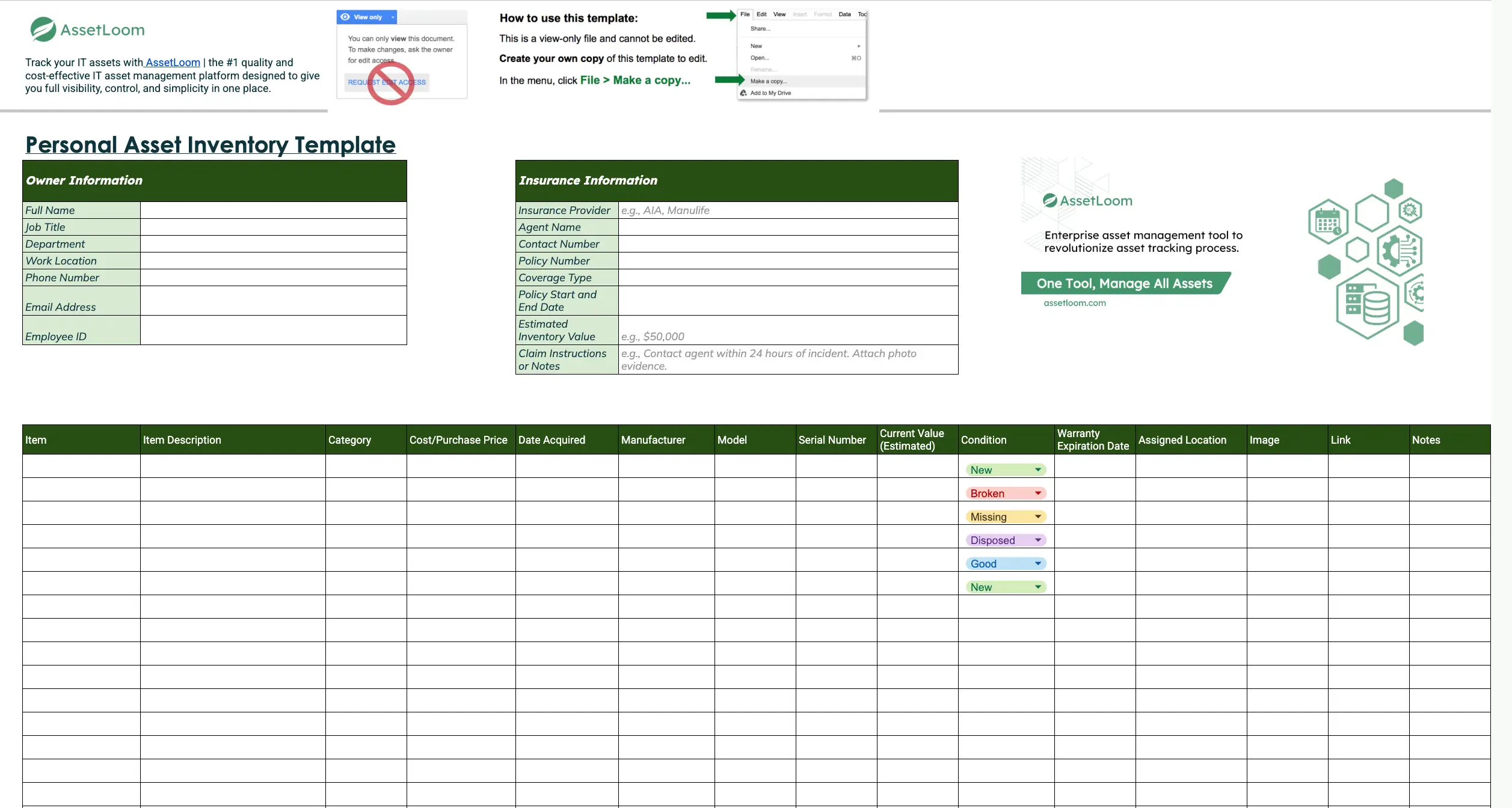
What’s included in the Excel file:
- Pre-filled column headers and example entries
- Drop-down options for common fields like condition or category
- Filters for sorting by name, department, or asset status
- Space for links and attachments (e.g. receipts or manuals)
- Simple formatting for easy printing or sharing
How to Use the Template Effectively
- Save a master copy: Download the template and save a clean version in a secure, shared location such as a cloud drive or company folder with limited access. Use consistent file naming to avoid confusion.
- Fill in owner information: For each employee receiving assigned assets, enter their name, department, contact info, and other relevant details. This keeps the responsibility clear and organized.
- Add insurance details (if needed): For high-value items, enter insurance provider, policy number, coverage dates, and estimated value. This helps during claims or audits and keeps important details in one place.
- Enter asset information: List each item with specific details like:
- Use filters and formatting: Apply Excel filters to sort by employee, asset type, or condition quickly. Use conditional formatting to highlight:
- Items in poor condition
- Expired or soon-to-expire warranties
- Overdue returns
- Update regularly: Schedule monthly or quarterly reviews to:
- Add new assignments
- Remove returned or replaced assets
- Check for missing or outdated information
- Create backups: Save periodic backups of the file in a secure location. Export to PDF or CSV when you need a shareable or archived version.
By following these steps, you can maintain a clear, accurate, and up-to-date view of all assets assigned to employees.
Read Also: 3 Key Challenges in IT Asset Inventory Management.
Track Your IT Assets with AssetLoom
A personal asset inventory template works well for getting started. But as more employees, devices, and locations are added, keeping every assignment updated manually becomes harder.
AssetLoom is an IT asset management platform that helps IT teams move beyond manual records by bringing asset discovery, ownership tracking, and lifecycle management into one platform.
Related Blog: Integrating IT Inventory Tracking Software with Other Enterprise Systems
Discover Devices with Less Manual Work
With AssetLoom Network Scanner, IT teams can scan their network and identify connected devices without installing agents on individual machines. The scanner collects device information such as IP address, MAC address, hostname, vendor, open ports, and device type.
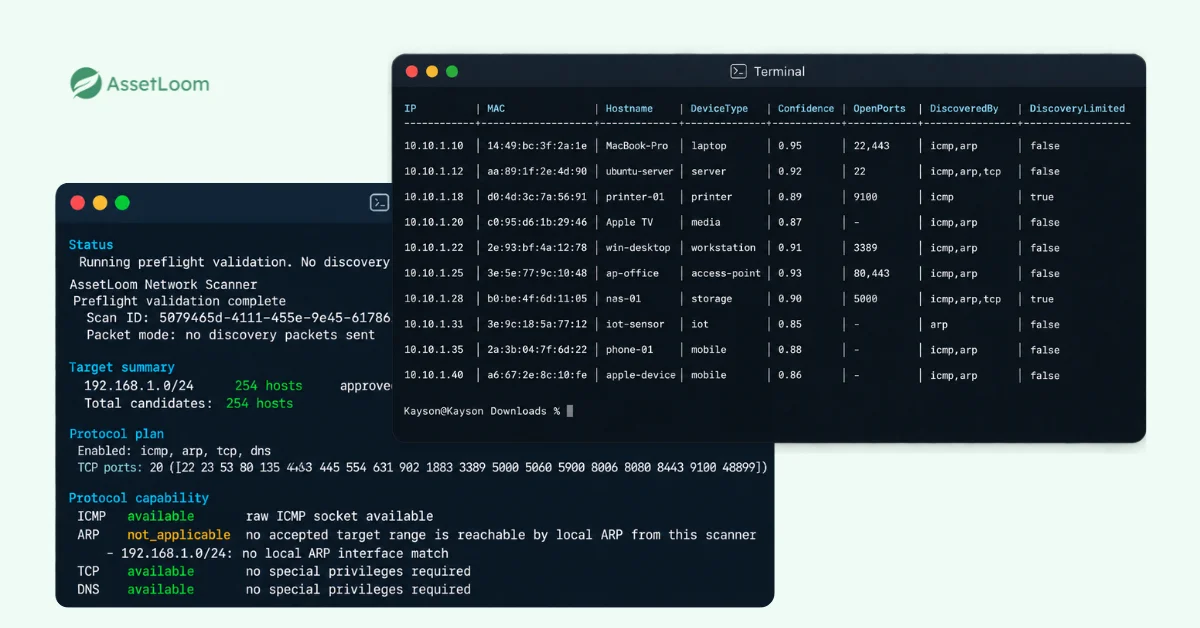
After a scan, teams can export the discovered devices as a CSV file and import them into AssetLoom, reducing the need to create asset records one by one.
Read more: How to Export Network Devices to CSV: A Practical Guide
Know Who Has What
Once assets are in AssetLoom, teams can connect them with employees, departments, and locations to maintain a clear record of ownership.
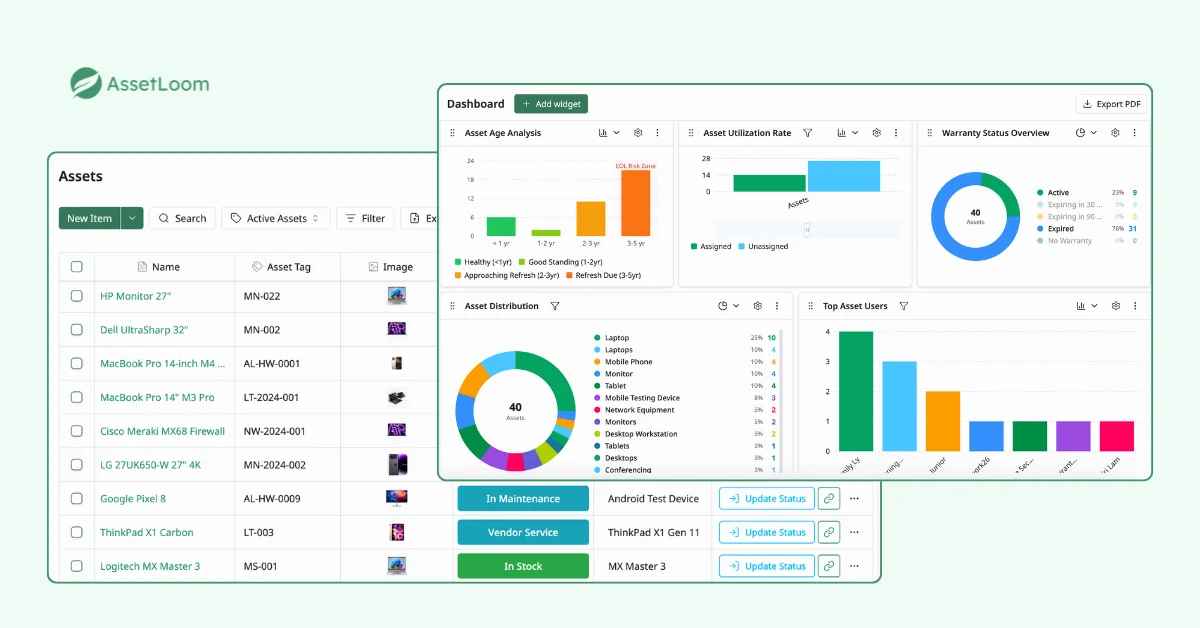
When equipment changes hands, IT teams can track assignments, check-ins and check-outs, custody history, and asset status. This makes common processes such as onboarding, offboarding, device returns, and equipment handovers easier to manage.
Manage More Than Employee Assignments
AssetLoom also helps teams manage assets beyond the initial assignment. IT teams can track warranties, maintenance, depreciation, booking, and lifecycle history from purchase through retirement.
QR and barcode scanning also make it easier to verify physical assets during audits and handovers, while Microsoft Intune and Jamf Pro integrations help keep device information aligned with existing endpoint management systems.
Instead of maintaining separate spreadsheets for devices, assignments, and lifecycle records, AssetLoom gives teams one place to see what they own, who has it, and what happens next.
FAQs
1. What assets should companies assign and track for employees?
Companies typically track any equipment provided for employees to perform their jobs, including laptops, monitors, mobile phones, tablets, access cards, peripherals, and specialized tools. The exact assets depend on the employee’s role and the organization’s policies.
Tracking these items helps companies maintain accountability and simplify equipment returns when employees change roles or leave the organization.
2. How do companies keep track of assets during employee onboarding and offboarding?
Companies can create a standard process for assigning assets when employees join and recovering them when they leave. This usually includes recording assigned equipment, confirming ownership, collecting returned assets, and updating asset status after each change.
A centralized asset management process helps prevent missing equipment and ensures records stay accurate throughout the employee lifecycle.
3. What is the difference between personal asset inventory and IT asset management?
A personal asset inventory focuses on items assigned to specific individuals, such as an employee’s laptop or phone. IT asset management covers a broader range of activities, including purchasing, inventory tracking, maintenance, depreciation, compliance, and retirement of assets.
Personal asset inventory is often one part of a larger IT asset management process.
4. How can companies audit employee-assigned assets?
Companies can audit employee assets by comparing inventory records with actual equipment, confirming assigned users, checking asset conditions, and updating outdated information.
For larger organizations, tools such as QR code scanning, automated discovery, and centralized asset records can make audits faster and more accurate.
5. How can companies track assets across multiple offices or remote employees?
Companies can manage distributed assets by maintaining centralized records that include employee assignments, locations, and asset status. This helps IT teams understand where equipment is located, who is responsible for it, and whether it is available or in use.
For remote teams, digital asset management tools can reduce reliance on manual spreadsheets and provide better visibility across different locations.
Final Thoughts
A personal asset inventory is a simple but effective way to keep track of employee-assigned equipment, improve accountability, and reduce the risk of lost or forgotten assets.
Download the free Personal Asset Inventory Template to get started, then move beyond manual tracking with the free AssetLoom Network Scanner and AssetLoom for complete IT asset lifecycle management.