Microsoft IT Asset Management Tool: Is It Enough for ITAM?
Microsoft IT Asset Management Tool explained: learn what Intune, Entra ID, and Microsoft 365 can manage, and why IT teams need dedicated ITAM for complete asset lifecycle visibility.
Microsoft IT Asset Management Tool is a common search term for IT teams looking to improve device visibility, prepare for audits, or regain control of their inventory. However, there is no single Microsoft product with this name. Instead, Microsoft relies on a combination of tools like Intune, Configuration Manager, Microsoft Entra ID, Defender for Endpoint, and Microsoft 365 to manage devices and identities.
These tools are powerful for managing endpoints, but they are not built as complete IT asset management solutions. They help IT teams track devices, users, and security status, while ITAM requires broader visibility across ownership, lifecycle, costs, maintenance, and asset value. Understanding this difference is essential before building an ITAM strategy around Microsoft tools.
What Is IT Asset Management (ITAM)?
IT Asset Management (ITAM) is the practice of tracking every piece of technology your organization owns, from purchase to retirement. That includes laptops, servers, software licenses, cloud subscriptions, and, increasingly, accessories and consumables that quietly drain budgets without anyone noticing.
Skip ITAM, and you’re guessing. You don’t know how many software seats you’re paying for versus actually using. You don’t know which laptops are still in circulation after three rounds of “who has this device” Slack messages. And when an auditor asks for proof of license compliance, “we think we’re fine” is not an answer anyone wants to give.
Done well, ITAM delivers four things:
- Cost savings: Eliminate redundant licenses and unused hardware.
- Compliance: Stay aligned with software licensing regulations.
- Security: Monitor devices to catch vulnerabilities early.
- Efficiency: Simplify onboarding and asset updates.
For a deeper look at what a full ITAM process actually involves, see our guide to IT asset inventory management.
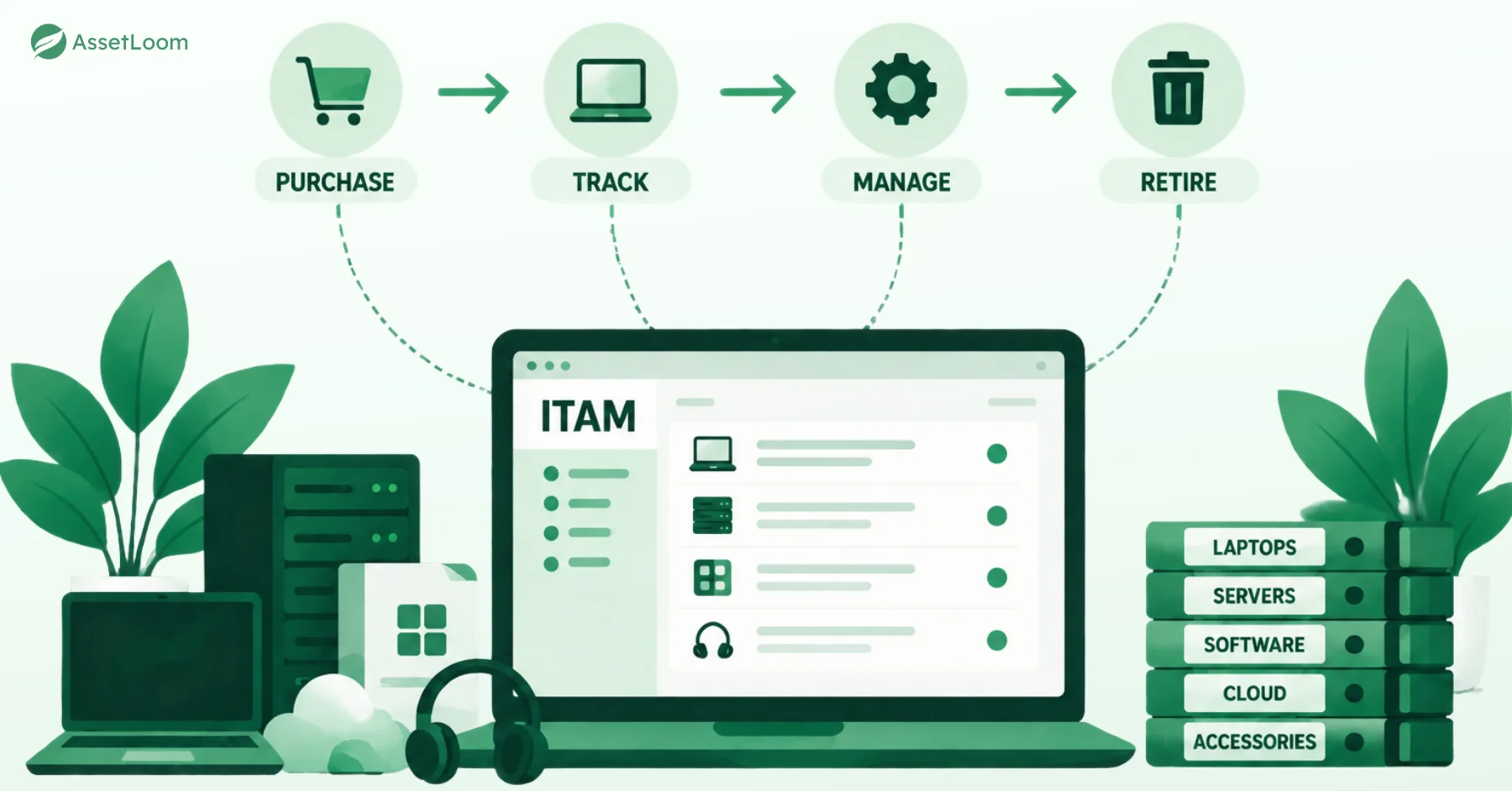
Microsoft’s Role in IT Asset Management
Microsoft doesn’t sell a product called “Microsoft ITAM.” Intune, Configuration Manager, Entra ID, Defender for Endpoint, and Microsoft 365 are Mobile Device Management (MDM) and Unified Endpoint Management (UEM) tools. That’s not a knock; MDM/UEM is a real discipline, and if your fleet is mostly Windows and Entra ID-joined, Microsoft handles it well.
But MDM and ITAM answer different questions. MDM asks: is this device configured, patched, and compliant right now? ITAM asks: what do we own, what did it cost, who’s using it, and what happens when it’s retired?
The gap shows up fast. Microsoft’s tools only see devices they manage. They miss the monitor on someone’s desk, a license for software not deployed via Intune, the printer toner you keep reordering, or a laptop a departing employee never returned. They also skip financial lifecycle data like cost, depreciation, and disposal records, exactly what finance and procurement ask for.
That’s the line between device management and complete asset management. Intune is a strong foundation, just not the whole building.
Microsoft’s Native Tools for IT Asset Management
Here’s what each tool in Microsoft’s stack actually does, in plain terms, along with where it stops being useful for ITAM specifically.
1. Microsoft Intune: The Device Tracking Pro
What it does: Intune is Microsoft’s cloud-based device management tool. It manages phones, tablets, and laptops, whether they’re company-owned or employee-owned (BYOD), and enforces the rules you set, like requiring a passcode or blocking jailbroken devices.
How it helps ITAM:
- Shows device details such as model, serial number, and OS version.
- Automates setup through Windows Autopilot, so a new laptop arrives ready to use.
- Links each device to a user through Microsoft Entra ID, so you know who has what.
Example: Fifty new laptops go out for a remote hiring push. Autopilot installs Teams and applies your password policy automatically. The Intune dashboard shows each device’s model, OS version, and assigned user, so if one goes missing, you can lock or wipe it remotely.
Where it stops: Intune is built for phones and laptops. It’s not the tool for servers, fixed desktops outside its scope, or anything that isn’t a managed endpoint, which is most of what a full asset inventory actually includes.
2. Endpoint Manager (SCCM): The Office Tech Boss
What it does: Microsoft Endpoint Manager combines Intune with System Center Configuration Manager (SCCM). SCCM is a powerful tool for managing devices in traditional office settings, like desktop PCs and servers, while Intune handles cloud and mobile devices. Together, they give you a complete view of all devices, whether in the office or remote.
How it helps ITAM:
- Collects detailed hardware and software data, like CPU, RAM, and installed apps, across your network.
- Pushes software updates and app deployments to many devices at once.
- Works alongside Intune so cloud and on-premises devices show up in one view.
Example: For 100 office PCs and 50 remote laptops, Configuration Manager scans the office PCs and lists their hardware (16GB RAM, for instance) and installed software (Adobe Acrobat, say). It pushes a Windows update to those PCs overnight, while Intune handles the laptops separately.
Where it stops: Configuration Manager is powerful, but it’s also genuinely complex to set up and maintain. It suits larger organizations with dedicated IT staff more than small teams.
3. Defender for Endpoint: The Watchful Protector
What it does: Defender for Endpoint is primarily a security tool that protects devices from threats like malware or hacking. For ITAM, it doubles as a monitoring tool by tracking device health and flagging issues that could affect your assets.
How it helps ITAM:
- Flags devices running outdated software or showing suspicious activity.
- Feeds device health data into your broader inventory picture.
- Works with Intune to block risky devices from accessing company apps until they’re fixed.
Example: Across 200 devices, Defender flags 10 laptops with outdated antivirus, marking them “at risk” in your inventory. It alerts you to a tablet’s suspicious activity and, with Intune, blocks risky devices from accessing email until updated.
Where it stops: Defender tracks security posture, not ownership, cost, or hardware specs. It’s a security layer, not an inventory tool.
4. Microsoft Entra ID: The People-to-Device Matchmaker
What it does: Microsoft Entra ID, the identity platform formerly known as Azure Active Directory (Azure AD), links employees to the devices and apps they use. For ITAM, it’s how you answer “who has this device” without digging through spreadsheets.
How it helps ITAM:
- Maintains a record of which devices are assigned to which users.
- Enforces access rules, so only approved devices reach certain apps.
- Strengthens tracking when paired with Intune or Configuration Manager.
Example: Across 300 employees, Entra ID links Jane Doe to her iPhone and her Surface Pro. Policy ensures only registered devices reach Microsoft 365. When Jane leaves the company, unlinking her account cuts off device access immediately.
Where it stops: Entra ID tracks the person-to-device relationship. It doesn’t track hardware specs, software licenses, or asset value.
5. Microsoft 365: The DIY ITAM Helper
What it does: Microsoft 365 tools like SharePoint, Power Apps, and Power Automate weren’t built for ITAM, but plenty of IT teams press them into service anyway. Microsoft AppSource also lists third-party asset management apps built on top of Microsoft 365, though depth and reliability vary a lot from app to app, so it’s worth trialing before committing to one.
How it helps ITAM:
- SharePoint: stores basic asset lists, like device names, serial numbers, and purchase dates.
- Power Apps: lets you build a custom tracking app, though it takes setup time.
- Power Automate: automates simple tasks, like alerting you before a warranty expires.
Example: For 20 laptops, a SharePoint list logs serial numbers, assigned users, and purchase dates. A Power App lets IT scan a barcode to update each device’s status. Power Automate sends an email when a warranty is about to lapse.
Where it stops: this is a DIY approach. It takes real setup effort, doesn’t scale well past a few dozen assets, and won’t match what a dedicated ITAM platform does out of the box.
Best Practices for IT Asset Management with Microsoft Tools
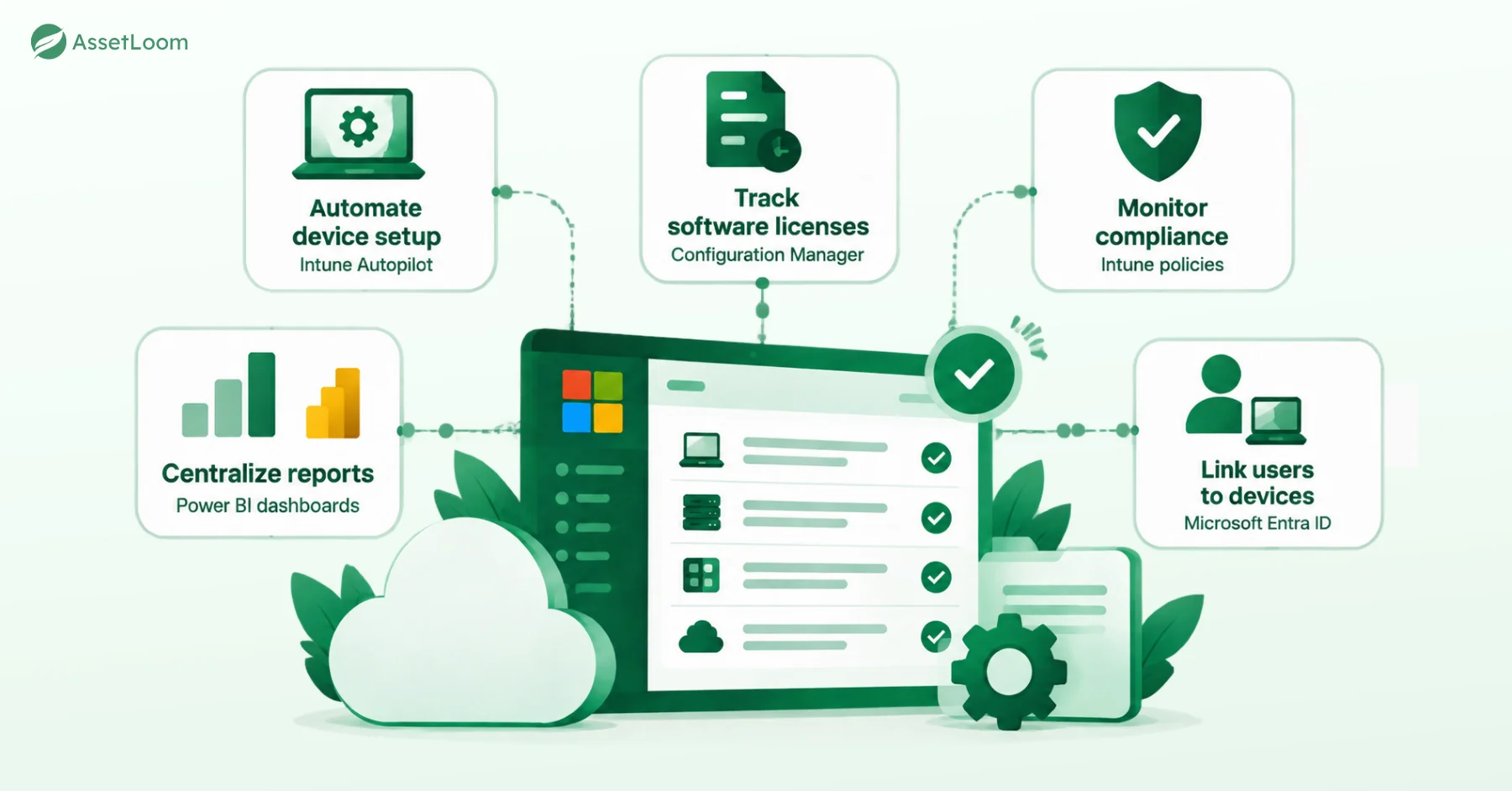
Microsoft’s tools work best when you treat them as a toolkit, not a finished ITAM strategy. Here’s what actually moves the needle:
- Automate device setup: use Intune’s Autopilot so new laptops arrive ready to go, not sitting in a box for two weeks.
- Track software licenses: check Configuration Manager’s inventory regularly to catch unused apps before renewal season.
- Monitor compliance: set Intune policies so devices meet your security and licensing rules automatically.
- Centralize reports: build Power BI dashboards so device and software data live in one place, not six spreadsheets.
- Link users to devices: use Entra ID so “who has this laptop” stops being a weekly mystery.
Do this consistently and audits stop being a fire drill. You’ll have accurate records instead of guesswork, catch unused licenses before you pay for another year of them, and free up IT time that used to go into manual tracking.
Limitations and Considerations
Microsoft’s tools are a solid starting point, not a finished ITAM system. Here’s where they fall short:
- No single ITAM tool: Microsoft does not have one dedicated app, so you must mix and match tools or add third-party help like AssetLoom.
- Mobile device focus: Intune shines for phones and laptops but struggles with servers, desktops, or non-IT stuff like buildings or vehicles.
- DIY takes effort: Building custom tracking with Microsoft 365’s SharePoint or Power Apps works but needs lots of setup and may not scale for big companies.
- Non-Microsoft hiccups: If your setup has lots of non-Microsoft gear, tying everything together can feel like juggling apples and oranges.
- Tricky for small crews: Managing multiple tools like Intune and SCCM can overwhelm smaller IT teams.
These quirks do not make the Microsoft IT Asset Management Tool suite a dud. Pair it with a platform like AssetLoom, and you will have a complete ITAM setup that runs like a well-oiled machine.
What AssetLoom Adds on Top of Intune
AssetLoom connects directly to your Microsoft Intune data (and to Jamf Pro, if you’re also managing Apple devices). Once connected, every device Intune already tracks syncs into AssetLoom on its own. No re-typing serial numbers, no separate spreadsheet to keep updated.
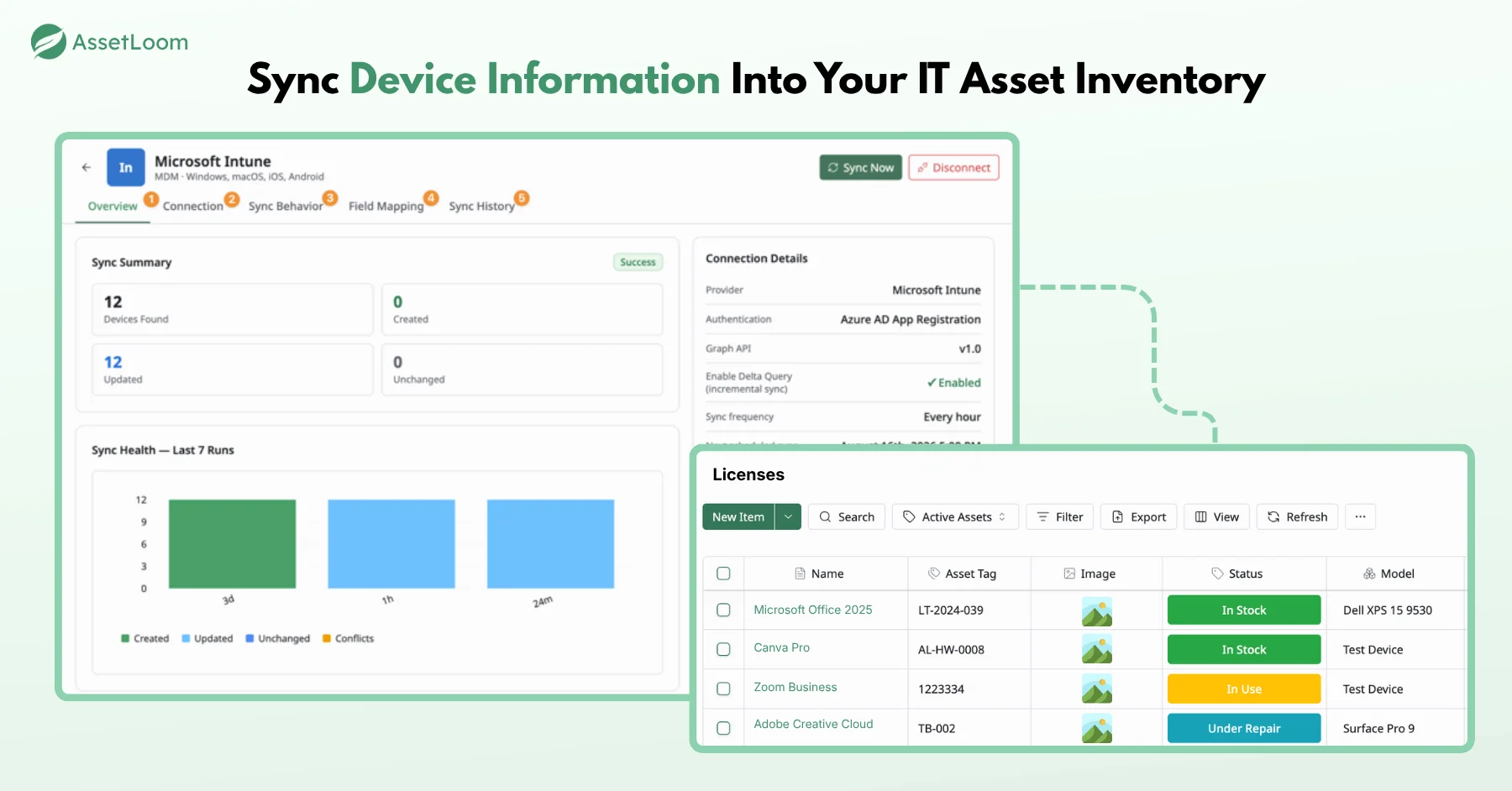
From there, AssetLoom picks up everything Intune was never built to track:
- Software licenses: cost, renewal dates, and seat usage, even for software Intune never deployed.
- Accessories and consumables: monitors, docking stations, toner, the stuff that quietly disappears from your budget.
- Non-Intune hardware: servers and other devices outside Intune’s reach.
Not ready to commit to a platform? AssetLoom has a free agentless network scanner that finds devices on your network without installing anything on them, a good first step if you just want an honest picture of what’s out there. There’s also a free tier if you want to try the full platform on a small scale before going further.
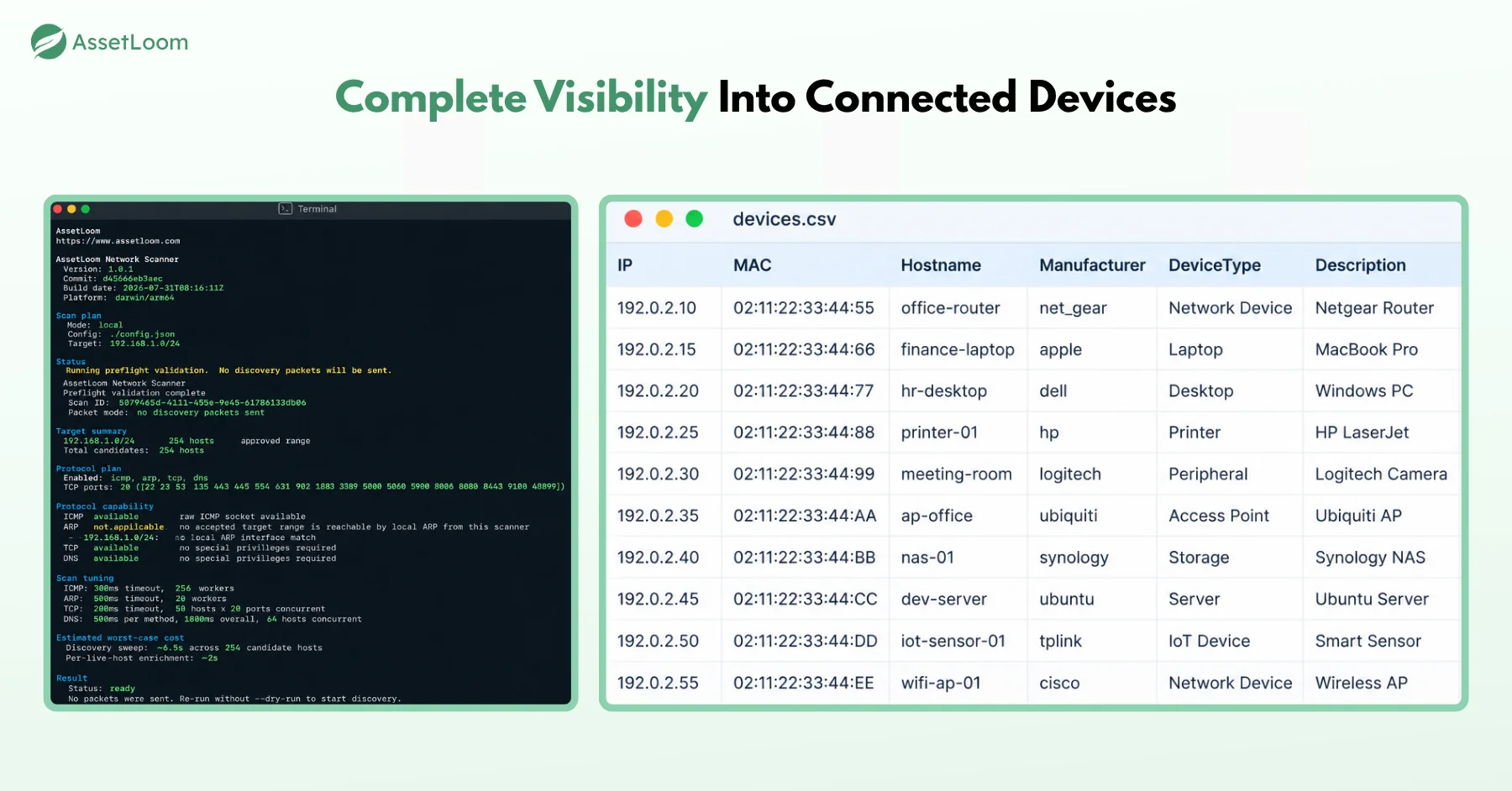
In short: let Intune handle what it’s good at, keeping your Microsoft-connected devices managed and secure. Let AssetLoom handle the rest: licenses, accessories, non-Microsoft assets, and the full lifecycle records an audit actually asks for.
FAQs About Microsoft IT Asset Management Tools
1. Does Microsoft have a dedicated IT asset management tool?
No. There is no single Microsoft IT Asset Management Tool. Microsoft covers parts of the job through Intune, Configuration Manager, Entra ID, Defender for Endpoint, and Microsoft 365. Together they handle devices, users, and security well, but they don’t track purchase cost, depreciation, accessories, or full lifecycle records. Most teams add a dedicated ITAM platform for that part.
2. Can Microsoft Intune track software licenses?
Only partly. Intune’s discovered apps report shows which apps are installed on the devices it manages. It doesn’t know how many seats you bought, what they cost, or when they renew.
3. Do I still need an ITAM tool if my Microsoft 365 plan already includes Intune?
Intune comes bundled with plans like Microsoft 365 Business Premium, E3, and E5, which is why many teams assume they’re covered. For a small, mostly Windows fleet, that can work for a while. Once finance, procurement, or an auditor starts asking about costs, contracts, and non-Microsoft assets, you’ll need records Intune simply doesn’t keep.
4. What happens to a device’s record in Intune after it’s retired or wiped?
It eventually disappears. Retiring or wiping a device removes it from Intune management, and cleanup rules can automatically delete devices that stop checking in. That’s good housekeeping for device management but bad news for audits. When someone asks who had that laptop two years ago and how it was disposed of, Intune often has nothing left to show.
5. How does AssetLoom work with Microsoft Intune?
AssetLoom connects to your Intune data and syncs the devices Intune already manages, so nobody re-types serial numbers or maintains a side spreadsheet. On top of that synced data, you track what Intune doesn’t, such as software licenses, accessories, consumables, non-Intune hardware, and lifecycle details like cost and depreciation.
Conclusion
Microsoft IT Asset Management Tool isn’t one product. Intune, Configuration Manager, Entra ID, Defender for Endpoint, and Microsoft 365 form a genuinely strong device management layer, especially if you’re already on Microsoft 365. They keep devices configured, secure, and linked to the right people.
They still miss the bigger picture, software licenses across every vendor, accessories and consumables, non-Microsoft hardware, and the financial lifecycle data an audit will eventually ask for. That’s not a flaw; it’s just outside what device management was built to do.
The practical move is using both. Microsoft’s tools for device management and a platform like AssetLoom, connected to Intune, for the complete Microsoft IT Asset Management Tool picture you actually need.