Microsoft IT Asset Management: What Intune Can and Can't Do
Microsoft IT Asset Management isn't a single Intune feature. See what Intune covers, where it stops, and how AssetLoom fills the gap.
Microsoft IT Asset Management searches usually lead to one question: can Intune handle it alone?
In our experience, only partly. Intune gives solid visibility into managed devices: hardware, OS, apps, primary users, compliance. That’s genuinely useful, but Intune is an endpoint management platform, not a full ITAM system, and that distinction trips up more teams than you’d expect.
A device can look fully compliant in Intune, and IT still can’t say when it was purchased, what it cost, whether the warranty is active, or who had it before. Microsoft’s tools each cover a piece of that puzzle, but none replace a purpose-built ITAM platform.
So the real question is what Intune should stay responsible for, and where Microsoft Lists, SharePoint, or dedicated ITAM software fill the rest.
What Is Microsoft IT Asset Management?
There’s no single Microsoft product called “IT asset management.” Instead, organizations usually piece it together from several Microsoft technologies, each covering a different slice of the problem:
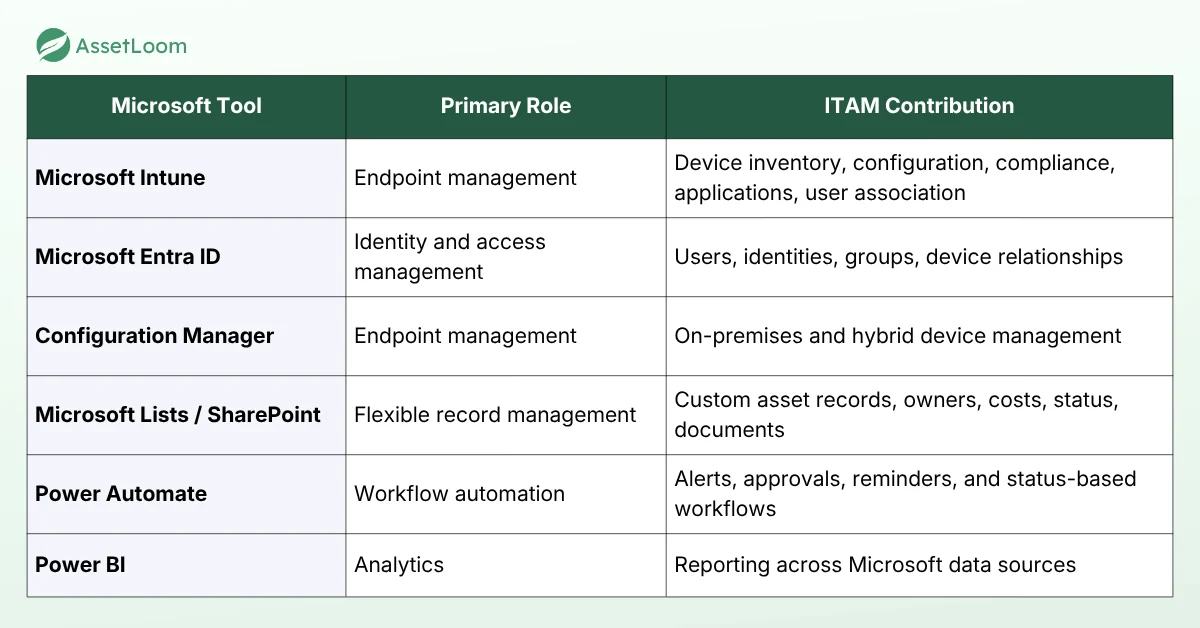
Together, these tools can support parts of an ITAM process, but none of them was built to own it end-to-end. IT asset management covers the full business and operational lifecycle of an asset: acquisition, assignment, maintenance, financial tracking, recovery, and retirement. That’s the gap organizations need to account for when building a Microsoft-based ITAM stack.
What Microsoft Intune Does Well
Intune is most useful when IT needs to answer three basic questions: What devices do we have? How are they set up? Are they secure and compliant?
Device inventory that stays up to date
Once a device is managed through Intune, IT can see key details such as its serial number, operating system, hardware information, primary user, and installed apps.
Because this data comes directly from the device, teams do not have to rely on someone manually updating a spreadsheet. This makes Intune a reliable source for current technical device information.
Compliance and security management
Intune also helps IT check whether devices meet the company’s security requirements. For example, teams can set rules for OS versions, encryption, security settings, and device risk. Devices that do not meet those requirements can be marked as non-compliant.
Intune can also work with Microsoft Entra Conditional Access to limit access from non-compliant devices. This is one of Intune’s biggest strengths. But it mainly helps with device security and compliance, not things like asset cost, maintenance, warranty, or lifecycle tracking.
Configuration and enrollment at scale
Intune makes it easier to set up and manage many devices at once. Instead of configuring each laptop manually, IT can centrally deploy apps, security settings, certificates, Wi-Fi profiles, and other configurations. For teams managing hundreds or thousands of devices, this can save a significant amount of repetitive work.
User-to-device association
Intune can show the primary user associated with a device, which helps IT understand who mainly uses it. However, this is not the same as a complete asset ownership or custody history.
For example, Intune may show that David is the current primary user, but ITAM teams may also need to know that the laptop was previously assigned to Anna, returned to IT, repaired, and then reassigned to David.
That full history of assignments, returns, and transfers usually needs to be tracked in an IT asset management system.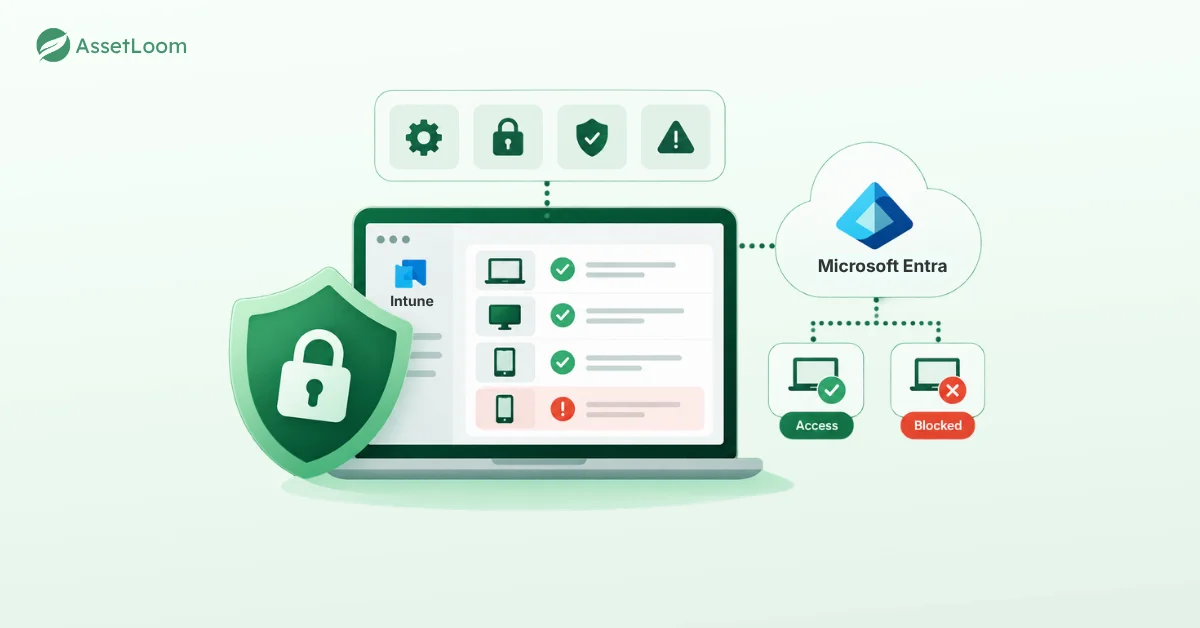
Where Intune Stops: The IT Asset Lifecycle Gap
Microsoft describes Intune’s own device lifecycle as enroll, configure, protect, and retire. That fits endpoint management. IT asset management looks at the same device from a wider angle:
Acquire → Receive → Store → Assign → Maintain → Transfer → Recover → Replace → Dispose
Each stage carries financial and operational data that Intune alone doesn’t track:
- Procurement and purchasing: purchase date, price, order, vendor, and delivery status, tracked before a device is even enrolled. A laptop still in storage is already an IT asset, even if Intune isn’t managing it yet.
- Custody and assignment history: the full chain, not just the current user, such as purchased, moved to IT storage, assigned to Anna, returned, repaired, then assigned to David. Matters most during offboarding and audits.
- Maintenance and repair history: repair dates, costs, service providers, and repeated failures, which answer a different question than compliance does. Is this asset still worth maintaining?
- Warranty and end-of-life tracking: warranty expiration, end-of-support dates, and remaining useful life, since a compliant device today can still be due for replacement.
- Financial information: purchase cost, book value, depreciation, and budget allocation, which sit outside endpoint management entirely.
- Assets that aren’t managed endpoints: monitors, keyboards, docking stations, chargers, and consumables can’t be enrolled in Intune at all, so a complete inventory has to extend beyond it.
Intune vs. IT Asset Management
The easiest way to understand the difference between Intune and ITAM is to look at the questions each system answers.
Intune focuses on device management: what devices are enrolled, how they are configured, who uses them, and whether they are compliant. An ITAM platform looks at the broader asset lifecycle, including purchase, ownership, maintenance, cost, warranty, and replacement.
| Question | Microsoft Intune | ITAM platform |
|---|---|---|
| What device is this? | Yes | Yes |
| What OS is installed? | Yes | Yes, synced |
| Is the device compliant? | Yes | Can reference MDM data |
| What apps are installed? | Yes | Can reference inventory data |
| Who is the primary user? | Yes | Yes |
| Who previously held the asset? | Limited | Yes |
| When was it purchased? | Not core | Yes |
| What did it cost? | Not core | Yes |
| Is it under warranty? | Not core | Yes |
| What repairs has it had? | Not core | Yes |
| What is its current lifecycle status? | Device-management lifecycle | IT asset lifecycle |
| What is its depreciation? | Not core | Yes |
| When should it be replaced? | Not core | Yes |
| Can we track accessories and consumables? | Limited, outside MDM scope | Yes |
The key difference is scope. Intune manages the device. ITAM manages the asset around it. In many cases, the two work best together rather than replacing each other.
Can You Use SharePoint or Microsoft Lists for IT Asset Management?
Yes, and for organizations already on Microsoft 365, it’s a flexible way to build an asset register without adopting another platform right away.
Microsoft’s Asset Manager list template already covers the basics:
- Asset tag, status, manufacturer, and model
- Asset type and serial number
- Purchase date, price, and order number
- Current and previous owner
- Due date, condition notes, and attachments
Default statuses even include available, reserved, in use, in repair, and retired, giving small IT teams a surprisingly capable starting point.
But storing asset data isn’t the hard part. The real cost shows up when you try to turn that flexible list into an operational system: lifecycle rules, assignment workflows, check-in and check-out, maintenance and warranty alerts, license tracking, depreciation, Intune syncing, all built and maintained by hand.
At that point, you’re effectively building your own ITAM application on top of Microsoft 365, and the price is engineering time, not licensing.
How Microsoft Intune and AssetLoom Work Together
This is where the difference between device management and asset management becomes useful rather than inconvenient. Intune can remain the source for managed-device information. AssetLoom can use that data as part of a broader IT asset record.
Through the Microsoft Intune integration, AssetLoom retrieves managed-device information from Intune and creates or updates corresponding asset records.
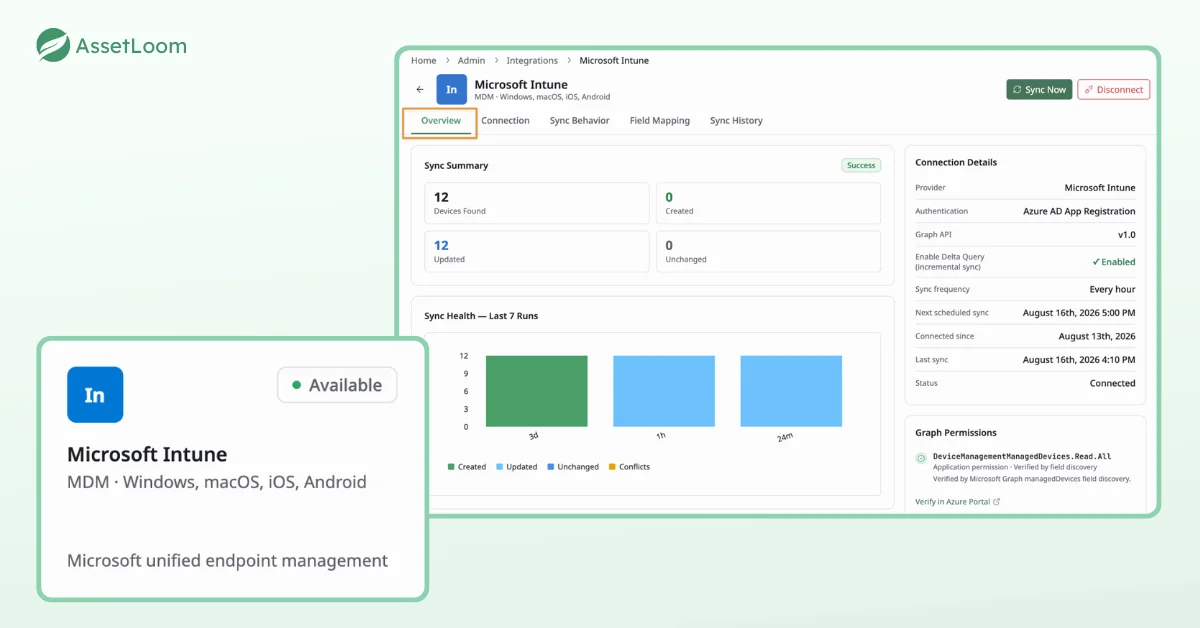
The integration can sync information such as device metadata, operating system details, ownership, assigned users, network information, and enrollment or management status. Syncs can run on a schedule or on demand. AssetLoom also lets administrators define how conflicts between existing AssetLoom data and Intune data should be handled.
The integration is designed to read managed-device information from Intune rather than write changes back into it, so IT teams keep Intune as the system of record for device management while AssetLoom builds the asset record around it.
The model looks like this:
- Microsoft Intune, device truth: device details, OS information, management status, primary user, network information, compliance context.
- AssetLoom, asset operations: asset lifecycle, assignment and custody, purchase information, warranty, maintenance, depreciation, end-of-life planning, accessories, licenses, components, consumables, and asset reporting.
Instead of asking IT to maintain the same device information twice, the Intune data can feed the ITAM record. The IT team can then add the business context that an endpoint-management system was never designed to own.
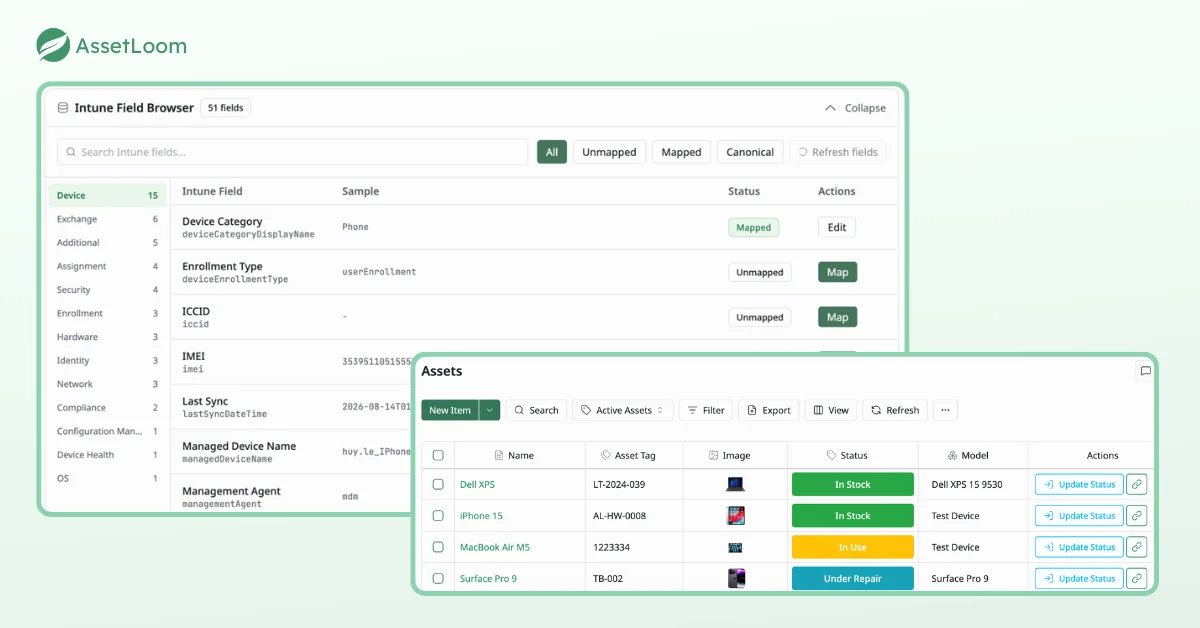
The result is a clearer division of responsibility: Intune manages the endpoint, and AssetLoom manages the asset around it. That is usually a more scalable architecture than trying to force one tool to solve both problems.
Do You Need AssetLoom If You Already Use Intune?
If your main need is enrolling, securing, and monitoring endpoints, Intune may already be enough. For a small asset inventory, Microsoft Lists can also handle basic ownership and status records.
A dedicated ITAM platform becomes useful when questions get harder to answer: who has each asset, what is in storage or under repair, which warranties are expiring, and what your asset estate is worth. Add offboarding returns, accessories, licenses, and physical inventory checks, and the gaps grow quickly.
At that point, it is no longer just device management. It is asset operations. That is when it is worth trying AssetLoom free to see how it works alongside the Intune data you already have.
FAQs
1. Can Microsoft Intune track hardware inventory?
Yes. Intune provides hardware and device properties for managed devices, including information such as device name, serial number, model, operating system, ownership, and primary user. The exact information available varies by platform and configuration.
2. What IT asset data does Intune not typically manage?
Intune is not designed to be the main system for purchase costs, warranty dates, repair history, depreciation, vendor contracts, disposal records, or detailed asset custody history. These are usually handled in an ITAM platform or another business system.
3. What is the difference between Intune and ITAM?
Intune manages endpoints; ITAM manages assets as business resources. Intune focuses on enrollment, configuration, security, compliance, applications, and device operations. ITAM adds procurement, ownership, custody, maintenance, warranty, costs, depreciation, recovery, and retirement processes.
4. Can Intune track devices that are not enrolled?
Intune has the best visibility into devices that are enrolled or managed through Microsoft’s endpoint management environment. Assets such as monitors, accessories, spare parts, consumables, and other unmanaged hardware usually need to be tracked elsewhere.
5. When should a company move from Microsoft Lists to an ITAM platform?
Microsoft Lists can work well for a small and simple inventory. A dedicated ITAM platform becomes more useful when teams need automated workflows, assignment history, maintenance tracking, warranties, depreciation, audit trails, integrations, and reporting across a growing number of assets.