Laptop Handover and Recovery Process: Building a Better IT Asset Lifecycle
Learn why laptop handover and recovery becomes harder at scale, the hidden gaps in traditional processes, and how IT teams can build a more reliable asset lifecycle.
Laptop handover and recovery process often looks simple on paper.
An employee receives a laptop, uses it during their time at the company, and returns it when they leave. But the reality is rarely that straightforward. The difficult part is not buying laptops or collecting them back. The difficult part is knowing what happened between those two moments.
In this article, we will share why traditional laptop handover and recovery processes struggle at scale, what mature IT teams do differently, and how organizations can create a more reliable asset lifecycle management process.
1. Why Laptop Handover Becomes Harder as Companies Grow
For a small company, managing laptops often feels simple. Someone buys a few devices, writes down the serial numbers in a spreadsheet, and remembers who has each one. When someone joins or leaves, IT can solve the problem with a quick message or a walk across the office.
But as companies grow, that approach starts breaking down. This challenge gets worse as IT environments become more distributed. Device data ends up split across spreadsheets, systems, threads, and MDM tools, with no single place that shows the full picture. According to Ivanti’s Democratizing IT Data 2024 Research report, 72% of respondents said security and IT data in their organizations are siloed.
We observed this problem clearly during employee offboarding. A laptop that was assigned months or years ago may still appear under the wrong employee in a spreadsheet. A device sitting in storage may still show as “In Use”. A returned laptop may have no record of whether it was repaired, wiped, or prepared for another employee.
Until then, we realized that the question changes from: “Where is our laptop?” to: “Can we confidently explain everything that happened to this laptop throughout its lifecycle?“
2. The Hidden Gaps in Traditional Laptop Recovery Processes
As we looked closer at the process, we found that the biggest challenges were not in collecting devices. They were in the gaps between each step, where information from IT asset tracking could become outdated, incomplete, or disconnected from reality.
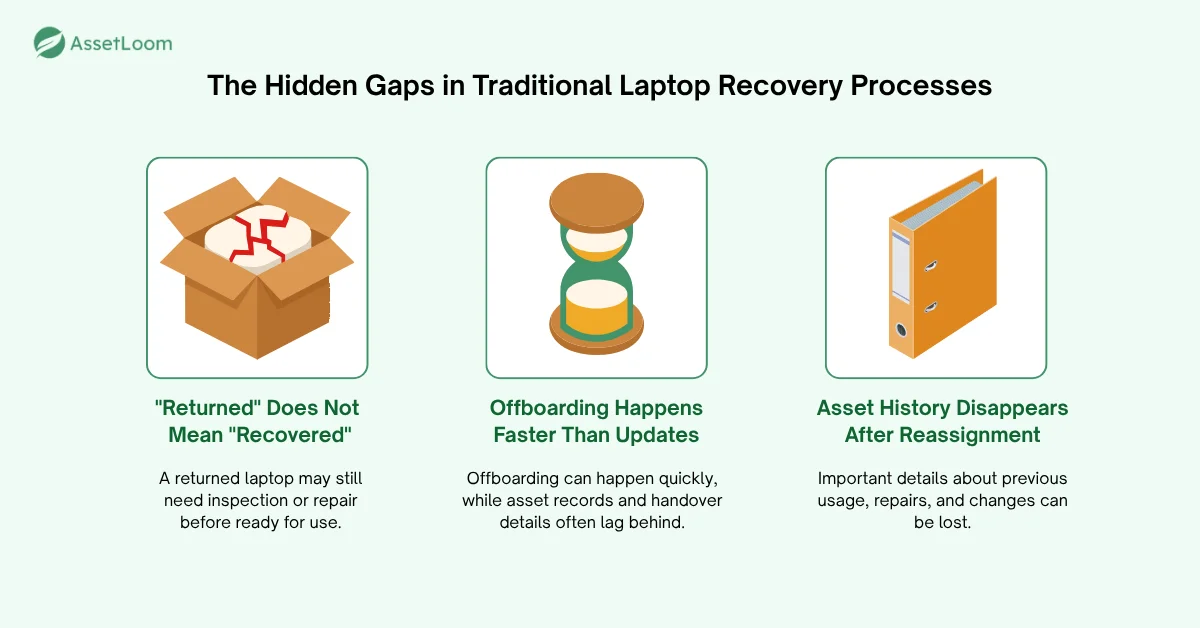
“Returned” Does Not Always Mean “Recovered”
Many ITAM teams assume that getting a laptop back is enough. We used to think so too.
However, receiving a device is only the beginning. A laptop sitting on an IT desk does not automatically mean it is ready for the next employee.
Many organizations record only a simple status: Returned. But that status hides important details. A returned laptop could mean:
- Returned and ready for a new employee
- Returned but missing accessories
- Returned and waiting for inspection
- Returned but requiring repair
- Returned but waiting for secure data wiping
Without capturing these details, IT knows the laptop came back, but not what should happen next. The recovery process is incomplete until the organization knows the device’s next destination.
Employee Offboarding Happens Faster Than Asset Updates
In a normal offboarding process, there is usually enough time to prepare. HR informs IT about an employee’s departure. IT checks the assigned assets, arranges the return, updates the records, and closes the loop.
But real situations do not always happen that way. We had an employee leave the company unexpectedly on a Monday morning. The physical recovery happened quickly. Within a short time, the laptop was shipped back, and the equipment was already on its way to IT.
But the process was not finished. The team was still working through the handover records, confirming asset details, updating ownership information, etc.
That was when we started questioning the process: Is our handover process helping us move faster, or is it creating additional work after the actual handover is already completed?
Asset History Disappears After Reassignment
Even when ownership is updated correctly, many organizations lose the previous lifecycle history.
A laptop is reassigned from Employee A to Employee B. On the system, it shows that Employee B is the current assignee. But you may not know:
- Who previously used the laptop
- Whether it had security incidents or required malware removal
- Which components were replaced or repaired
- What condition it was in before reaching the current user
Without historical records, every reassignment starts from zero. A laptop is not just an asset with a current owner. It is a timeline of ownership changes, repairs, and lifecycle decisions.
3. What a Mature Laptop Handover Process Looks Like
After identifying these gaps, we realized that improving laptop recovery is not about adding more steps to the process.
The goal is to create a system where every asset has a clear owner, every movement is recorded, and every decision has the information needed behind it.
One thing we changed our perspective on was this: laptop recovery does not start during offboarding. By that point, it is already too late to fix missing information. It starts when the device enters the organization and continues throughout its entire lifecycle.
Start With Complete Asset Ownership Records
After going through these situations, we learned that the first mistake is treating a laptop as just a device. A laptop is not only a piece of hardware; it is an asset with a history that starts before the first handover.
Before it reaches an employee, IT needs a complete picture of the device, including its identity, condition, purchase information, warranty details, and lifecycle status. This information becomes the foundation for every future assignment, transfer, and recovery decision.
In practice, we record the serial number, model, purchase date, etc before a laptop is ever assigned. If a field is missing, the device doesn’t leave IT.
Treat Assignment as a Transfer of Responsibility
A laptop handover is not just about giving someone a device. It is a transfer of responsibility.
We found that a mature process sets clear responsibility from the beginning by creating a complete record of the handover. It should clarify who received the device, when it was assigned, and what condition it was in.
This information prevents situations where everyone assumes someone else is responsible for an asset. The goal is not simply knowing who has the laptop. It is creating clear accountability throughout the entire period that the employee uses it.
For us, that means noting any existing scratches or damage, and having the employee confirm receipt. It takes minutes, and it saves long discussions when the laptop comes back.
Make Every Movement Traceable
A laptop rarely stays with one person forever. Throughout its lifecycle, it may move between employees, departments, or different stages of use.
A mature process does not simply replace old information when something changes. Instead, it records each movement as part of the asset’s lifecycle, creating a complete history of assignments, transfers, repairs, returns, and reassignments.
The difference is simple: An inventory list tells you where an asset is now. A lifecycle record tells you how it got there.
This history gives IT the context needed to make better decisions, whether they are preparing a device for a new employee, investigating an issue, or planning future replacements.
4. An Example of a Standardized Laptop Handover Process With AssetLoom
Every organization has its own way of managing laptop assignments and recoveries. Some may have additional approval steps, different security requirements, or specific compliance procedures.
The following is an example of how IT teams can structure a standardized laptop handover process with AssetLoom, from initial assignment to recovery.
Step 1: Assign the Laptop to an Employee
When a laptop is handed to an employee, the most important question should not be “who has this device?” Instead, we care more about “When did the responsibility begin, and what exactly was transferred?”
With AssetLoom, we can check out an asset and record its user, assignment date, location, and related equipment. This turns a simple handover into a documented transfer of responsibility.
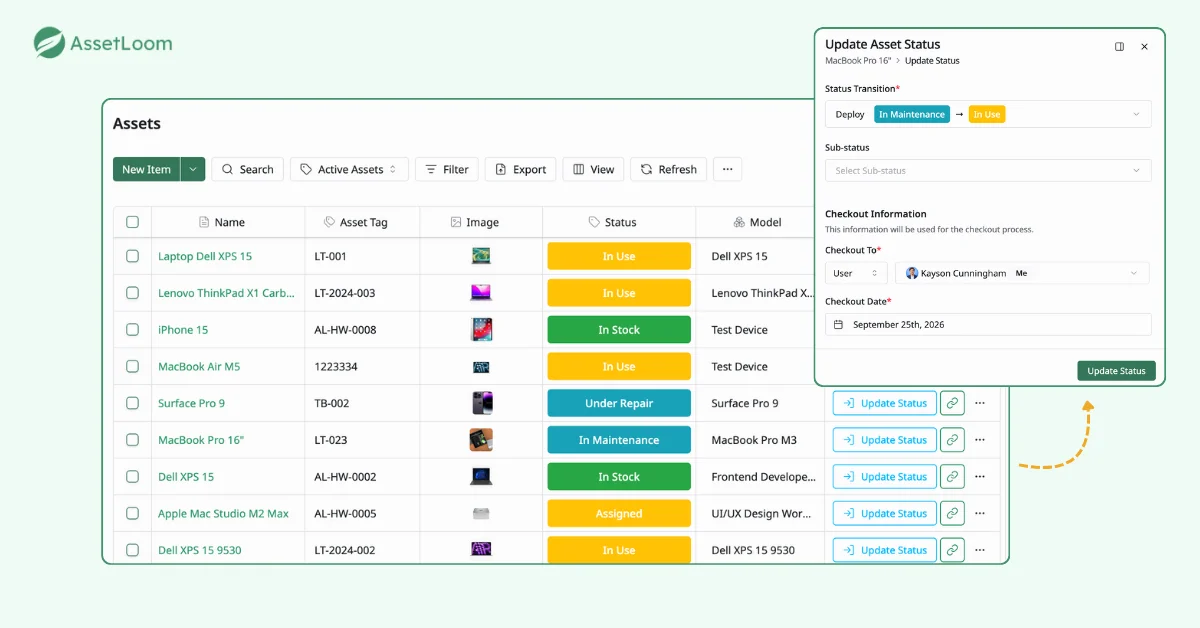
For organizations like ours that frequently prepare devices for new employees, preparing each handover package manually can become repetitive. With AssetLoom, we can create predefined kits that include commonly assigned items such as laptops, chargers, and accessories. These ready-to-handover packages help make device preparation faster and more consistent.
Learn more about New Hire Onboarding Workflow: A Better Process With AssetLoom
Step 2: Maintain Asset History During the Employee Lifecycle
Next, we want to keep a full history of an asset. With AssetLoom, every change can become part of the asset’s history. We can filter events to track assignments, transfers, maintenance activities, and status changes without losing previous records.
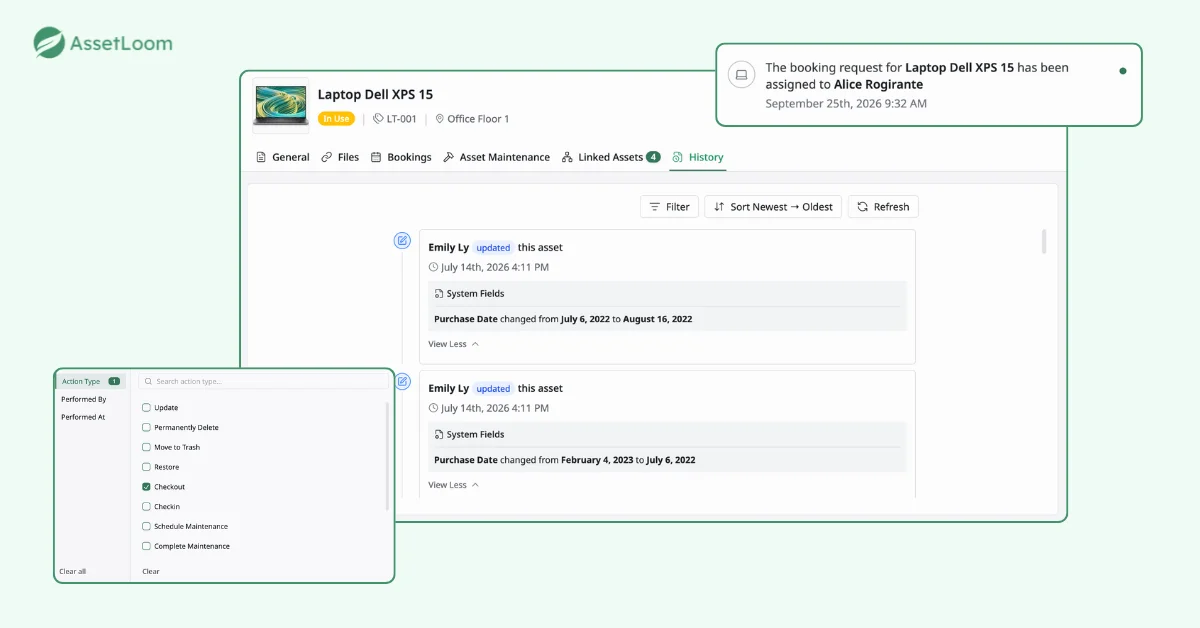
If questions arise months later, we do not need to search through emails or spreadsheets to confirm who received the device or what was included. We can review the asset’s event history to trace each change, from assignment and transfers to maintenance and recovery. This creates a reliable source of truth for every handover, transfer, and recovery decision.
This directly solves the problem of history disappearing after reassignment. When a laptop moves from one employee to another, its full past moves with it.
Step 3: Confirm Custody With Asset Verification Before Recovery
Over time, asset records can become outdated. Employees change roles, devices move between locations, and equipment may no longer be with the person listed in the system.
Before checking an asset back in, we can verify custody to confirm that the recorded information still matches the actual device status.
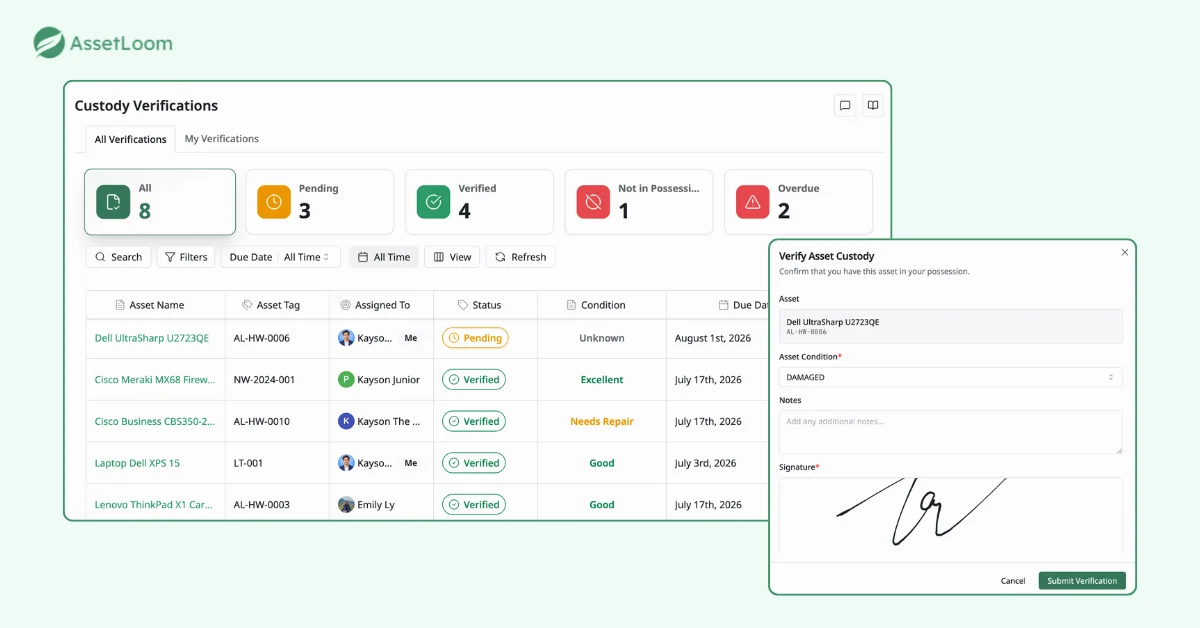
We often ask users to verify their assigned assets and confirm that they still have the expected equipment. The verification schedule can be adjusted based on each organization’s audit process, whether that means regular checks, periodic reviews, or verification before a specific lifecycle event.
This helps identify discrepancies before recovery, such as missing assets, incorrect assignments, or outdated records.
Step 4: Verify Returned Assets and Update Their Next Status
A laptop return does not mean the lifecycle is complete. Once a device comes back to IT, we still need to decide what happens next. We usually check in the returned asset, review its condition, and update the relevant status based on the next action required.
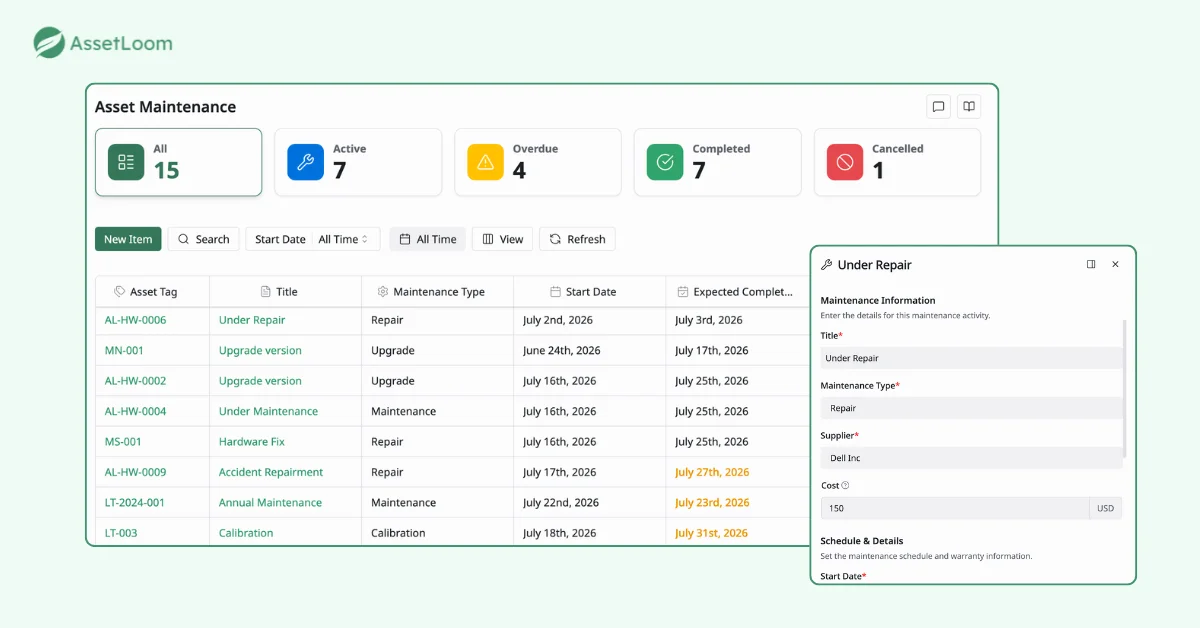
For example, a returned laptop may be marked as available for reassignment, sent for maintenance, kept in storage, or retired from use. By connecting the return process with the asset record, we aim to avoid assets with unclear status or outdated information.
Instead of treating recovery as the final step, AssetLoom can help us turn each return into the next stage of the asset lifecycle, with a clear history of what happened and what needs to happen next.
FAQs
1. What information should IT track during a laptop handover?
A laptop handover should capture more than just the device and assigned user. IT teams should maintain information about the asset identity, assigned employee, handover date, device condition, included accessories, and any changes throughout its lifecycle.
Having this information helps organizations maintain accountability and quickly answer questions during audits, employee transitions, or recovery processes.
2. How often should companies verify assigned laptops?
The right verification frequency depends on the organization’s size, risk level, and internal policies. Some companies perform regular custody checks, while others verify assets during specific events such as employee transfers, audits, or offboarding.
The goal is not to verify assets as often as possible, but to ensure asset records continue to match the real-world situation.
3. What happens to a laptop after an employee returns it?
A returned laptop should move into the next stage of its lifecycle instead of simply being marked as “returned.”
IT teams typically inspect the device condition, confirm accessories, complete required maintenance or data wiping, and decide whether the laptop should be reassigned, stored, or retired.
A clear post-return process prevents recovered assets from becoming unmanaged inventory.
4. Why is asset history important for IT teams?
Current ownership information only shows where an asset is today. Asset history provides the context behind that status.
By tracking previous assignments, maintenance activities, transfers, and lifecycle events, IT teams can make better decisions about reassignment, repairs, replacements, and audits.
5. How can companies reduce manual work in laptop handover processes?
Companies can reduce manual effort by standardizing asset workflows and keeping lifecycle information in one place.
Instead of relying on spreadsheets, emails, and separate records, IT teams can use an asset management platform to manage assignments, custody verification, status changes, and recovery activities through a consistent process.
Final Thoughts
The best laptop handover process is not the one that collects devices the fastest. It is the one that allows IT teams to answer every question about an asset without searching through scattered records.
Ready to build a more reliable laptop handover and recovery process? Explore AssetLoom and bring complete visibility to your IT assets from assignment to retirement.