Lansweeper Asset Management: Features and Alternatives
Explore Lansweeper IT asset management features, strengths, limitations, and alternatives. Learn how AssetLoom combines asset discovery with complete IT asset operations.
Lansweeper Asset Management scans devices, software, and other network-connected assets, then organizes that data into one place. It’s commonly used to replace manual tracking or fill gaps in visibility. The platform covers a wide range of discovery tasks and works across different environments, but it also has its limitations, especially when it comes to usability, customization, and service management features. This post covers the main features, where Lansweeper performs well, where it doesn’t, and whether it fits the needs of most IT teams.
What Is Lansweeper?
Lansweeper is a technology asset discovery and intelligence platform designed to help organizations understand what exists across their technology environment.
Its core strength is automated discovery. Instead of relying entirely on spreadsheets, manually maintained asset registers, or employees reporting what they use, Lansweeper collects information from the environment itself.
Depending on the infrastructure and scanning method, this can include:
- Computers, servers, and network devices
- Installed software
- Virtual machines
- Cloud infrastructure
- Users and device relationships
- IoT and operational technology
- Remote endpoints
- Hardware and software configuration information
Lansweeper can use different discovery methods, including active network scanning, passive discovery, agentless scanning, agents for remote or difficult-to-reach devices, and integrations with other IT systems.
Core Features of Lansweeper Asset Management
Discover Features
- Instant Asset Detection: Lansweeper spots devices as soon as they connect to the network, helping avoid missing any assets.
- No Credentials Needed: It can collect basic device details without requiring login credentials, making scans faster and easier.
- Network Scanning: The tool actively scans IP address ranges to find all devices within the IT environment.
- Agent Option for Hard-to-Reach Devices: Though it mostly works without agents, Lansweeper offers an agent for scanning devices that can’t be reached remotely.
- Data Import from Other Systems: It can bring in and sync data from tools like SCCM, Intune, and other device management systems.
- Automatic Warranty Tracking: Lansweeper checks warranty status on physical devices automatically, so warranty info is always up to date.
- Cloud Asset Discovery: The platform detects resources running across various cloud providers to include them in the overall inventory.
- Operational Technology (OT) Detection: It finds OT devices alongside IT assets, providing a single view of both technology environments.
Unify Features
- Cloud Access: Lansweeper’s cloud platform lets users access their asset inventory from anywhere, making it easier to check information remotely.
- Data Federation: The system combines data from multiple locations and sources into one unified view, helping avoid confusion from scattered information.
- Normalization: It cleans up and standardizes data like software names, versions, and device models to ensure consistency across the inventory.
- Risk Insights: By connecting to vulnerability databases like NIST, Lansweeper shows which assets might have security risks.
- Lifecycle Insights: The platform tracks when software or hardware will reach end of life, helping teams plan upgrades or replacements ahead of time.
Inventory Features
- Comprehensive Asset Inventory: Lansweeper lets you search and browse detailed information on physical devices, virtual machines, cloud resources, users, and software.
- Asset Grouping: To manage assets more easily, you can group them by location, owner, or other categories.
- Detailed Documentation: It’s possible to add comments, attachments, and custom fields to assets, so you can track extra details beyond the standard information.
- Switch Port Mapping: The tool automatically identifies which devices are connected to each network switch port, giving a clearer picture of the network layout.
- Asset Uptime Tracking: An uptime calendar shows the activity history of devices on the network, helping monitor their availability.
- Asset Location Tracking: Assets can be tracked across locations, with the option to view their positions on maps or office blueprints.
Analyze Features
- Dashboards: Users get an overview of their entire IT environment with dashboards that allow drilling down into specific details when needed.
- Report Builder: An easy-to-use tool lets users ask any question about their IT assets and get customized reports as answers.
- Report Library: Lansweeper includes many ready-made reports and dashboards to quickly find useful insights without building reports from scratch.
- Data Export: Reports and data can be exported in formats like Excel, CSV, and PDF for sharing or further analysis.
- Diagrams & Topology: Visual tools help map out networks, cloud setups, and directory structures to see how assets relate to each other.
- Performance Monitoring: Windows and Linux performance metrics can be tracked without needing to install agents, providing deeper insights into system health.
- Collective Intelligence: Insights are enhanced by data from thousands of other IT environments, offering benchmarking and tailored recommendations.
Learn more about Lansweeper Core Features
Pros of Using Lansweeper
- Automatically detects a wide range of devices, including physical, virtual, cloud, and operational technology assets
- Uses multiple scanning methods like passive detection, active IP scanning, and agent-based scanning to minimize missed devices
- Combines data from different sources into a single, unified inventory for easier management
- Flexible reporting tools with dashboards and customizable reports for both detailed and high-level views
- Integrates smoothly with other tools through APIs, connectors, and automation workflows
- Strong security with role-based access controls, multi-factor authentication, and single sign-on
- Features like asset location tracking, switch port mapping, and uptime monitoring provide valuable insights into asset status and location
Cons of Using Lansweeper
- Setup Complexity: Fine-tuning credential-free recognition and agent scans can take time.
- Data Normalization Limits: Inconsistencies in asset details like software versions and vendor names still happen.
- Limited Asset Booking: Lansweeper doesn’t offer built-in features to book or reserve assets for users.
- Basic Asset Allocation: Tracking who currently uses or is responsible for an asset is possible but not very detailed or automated.
- Asset Grouping Restrictions: Grouping by location or owner is available but lacks dynamic or custom tagging options.
- Switch Port Mapping Limits: May miss devices on complex or segmented networks.
- Warranty Tracking Gaps: Automated warranty checks don’t cover all types of devices, especially older or custom hardware.
- Cloud Discovery Limits: Covers major cloud providers but may miss some resources in multi-cloud environments.
- Uptime Tracking: Tracks overall activity but lacks detailed insights on downtime reasons or trends.
Where Lansweeper May Not Cover the Full IT Asset Operations Workflow
Lansweeper provides strong visibility into technology environments. However, organizations evaluating it as an IT asset management (ITAM) platform should also consider the operational workflows they need beyond discovery.
Asset Assignment and Ownership Management
Knowing that a device exists is different from managing responsibility for that device. IT teams often need structured processes for assigning equipment to employees, recording handover history, and maintaining accountability throughout the asset lifecycle. For example, during employee onboarding, IT may need to track:
- Which laptop was assigned
- Which accessories were included
- When the handover happened
- Who approved the assignment
- Whether the employee confirmed receipt
During offboarding, the same process works in reverse by helping IT recover equipment and update asset status accurately.
Asset Booking and Shared Equipment
Not every IT asset belongs permanently to one employee. Many organizations manage shared equipment such as:
- Testing laptops
- Meeting room devices
- Loaner equipment
- Temporary project hardware
- Mobile devices
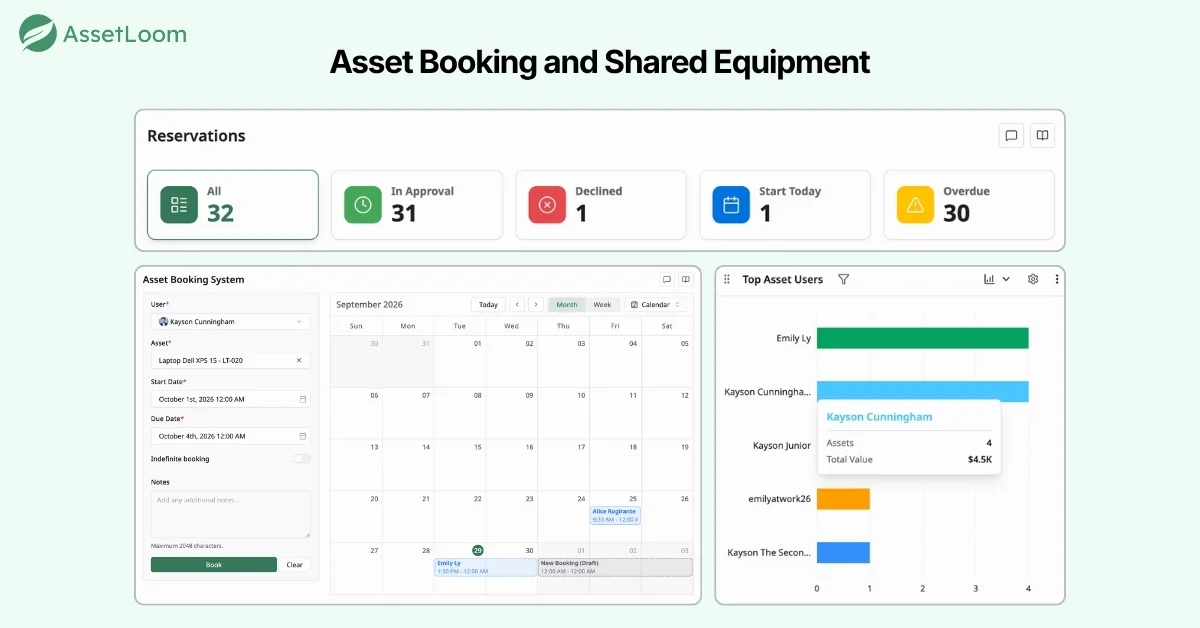
In these cases, IT needs more than inventory visibility. Teams need to know what is currently available, who has reserved an asset, and when it will become available again. Booking workflows help organizations manage shared resources without relying on manual communication or spreadsheets.
Maintenance and Lifecycle Tracking
Assets continue to change after they are deployed. A laptop may require repairs, upgrades, replacement parts, or eventually retirement. Without proper lifecycle tracking, organizations may lose important information about an asset’s history. Operational IT asset management helps teams record:
- Maintenance activities
- Repair history
- Associated costs
- Current status
- Downtime periods
- Replacement decisions
This information helps IT teams decide whether to repair or replace an asset, which results in further financial decisions, not just asset discovery.
AssetLoom: A Lansweeper Alternative for Complete IT Asset Operations
While Lansweeper is widely recognized for its IT asset discovery and technology intelligence capabilities, many IT teams need more than visibility into what exists in their environment. They also need a platform that helps them manage the complete lifecycle of those assets, from assignment and handover to maintenance, verification, booking, and retirement.
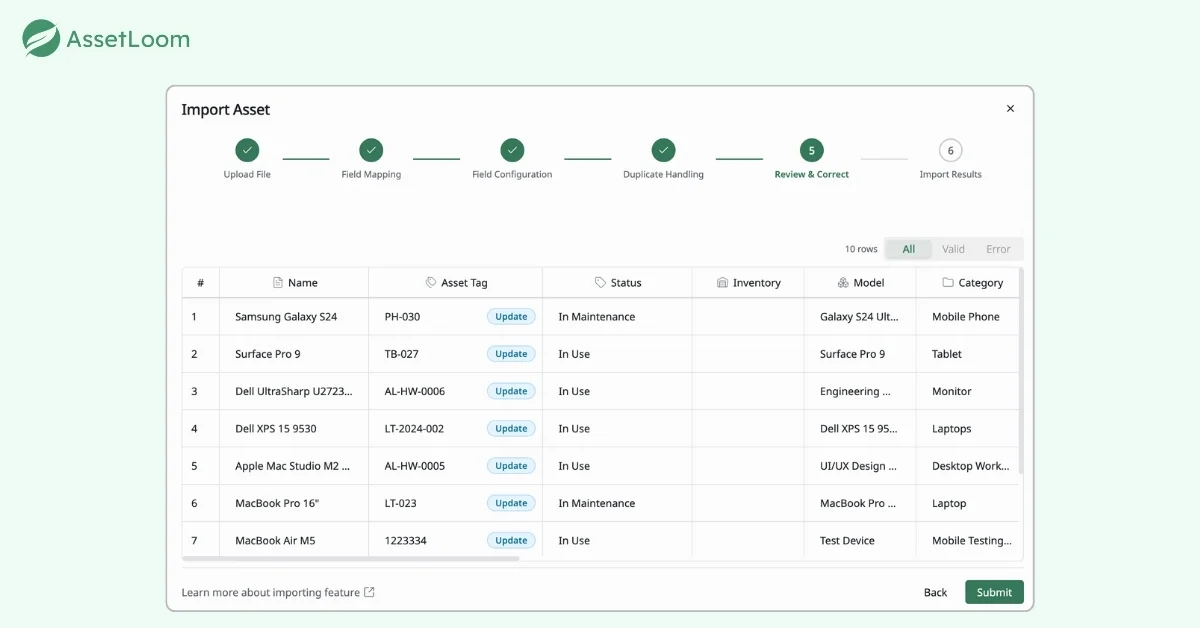
As a modern IT asset management tool, AssetLoom provides a complete IT asset management approach by combining agentless asset discovery with everyday IT asset operations. Teams can discover network-connected devices through network discovery, identify SaaS usage through the free SaaS scanner, and synchronize managed devices from platforms such as Microsoft Intune and Jamf. Beyond discovery, AssetLoom helps IT teams manage the complete asset lifecycle with assignment, check-in/check-out, QR code verification, maintenance tracking, booking, software license management, and more.
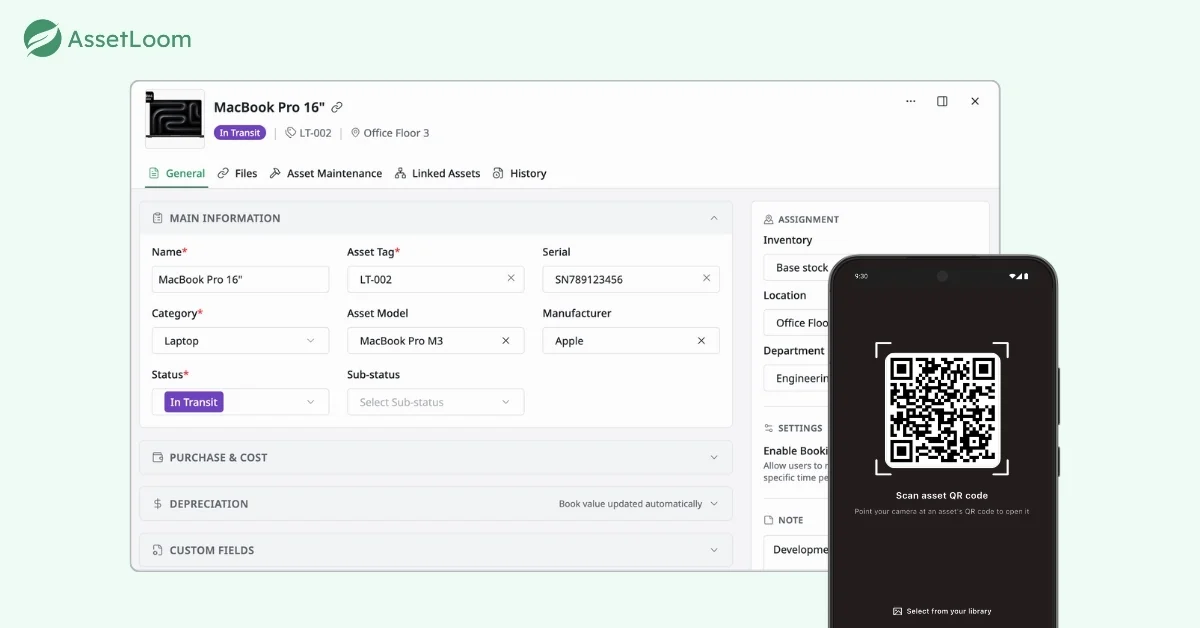
For organizations looking for a Lansweeper alternative that goes beyond asset visibility, AssetLoom provides a more operations-focused approach to IT asset management.
Try AssetLoom as your Lansweeper IT asset management alternative
Frequently Asked Questions
1. Is Lansweeper an IT asset management tool?
Lansweeper is primarily a technology asset discovery and intelligence platform that helps organizations identify, collect, and organize information about their IT environment. It provides detailed visibility into hardware, software, network devices, cloud resources, and other connected assets.
However, IT asset management involves more than discovering assets. It also includes managing ownership, assignment, maintenance, verification, booking, and lifecycle processes. Organizations evaluating Lansweeper should consider whether they need asset visibility or a broader platform for managing day-to-day IT asset operations.
2. What is Lansweeper used for?
Lansweeper is commonly used to discover and inventory IT assets across an organization. IT teams use it to identify devices, software, configurations, users, and technology relationships across networks and other environments.
Common use cases include asset discovery, inventory management, software visibility, technology audits, reporting, security assessments, and integrating asset information with other IT systems.
3. What is the difference between asset discovery and IT asset management?
Asset discovery focuses on finding and identifying technology resources within an environment, such as laptops, servers, network devices, software, or cloud resources.
IT asset management covers the complete lifecycle of those assets, including purchasing, assignment, ownership tracking, maintenance, audits, compliance, and retirement.
In simple terms, discovery helps answer “What assets do we have?” while IT asset management helps answer “What are we going to do with these assets throughout their useful life?”
4. What is the best Lansweeper alternative?
AssetLoom is a strong Lansweeper alternative for organizations looking for an IT asset management platform that combines asset discovery with complete asset lifecycle management.
While Lansweeper is well known for its powerful technology discovery and inventory capabilities, AssetLoom focuses on helping IT teams manage what happens after assets are discovered. It provides network discovery, SaaS discovery, and integrations with tools like Intune and Jamf, while also supporting daily IT asset operations such as asset assignment, check-in/check-out, booking, maintenance tracking, QR code verification, software license management, and lifecycle management.
For organizations that need more than asset visibility and want to manage, track, and optimize IT assets throughout their lifecycle, AssetLoom provides a practical alternative to Lansweeper.
5. Can AssetLoom replace Lansweeper?
AssetLoom can be an alternative to Lansweeper for organizations looking for a broader IT asset management platform that combines discovery with operational workflows.
AssetLoom provides network discovery, SaaS discovery, and integrations with endpoint management platforms such as Intune and Jamf, while also supporting asset assignment, maintenance, booking, custody verification, software license management, and lifecycle tracking.
The right choice depends on whether an organization’s primary challenge is discovering technology across complex environments or managing the complete lifecycle of IT assets after discovery.
6. Does AssetLoom support asset discovery?
Yes. Asset discovery is part of AssetLoom’s IT asset management capabilities. AssetLoom helps teams discover and maintain inventory through multiple sources, including network discovery, SaaS discovery, Intune and Jamf integrations, imports, and manual asset management workflows.
This allows organizations to build a more complete inventory while also connecting discovered assets with operational processes such as ownership tracking, maintenance, and lifecycle management.
7. Is there a free alternative to Lansweeper network discovery?
Yes. Organizations looking for a lightweight way to discover devices on a network can use the free AssetLoom Network Scanner.
It provides agentless network discovery to identify connected devices, collect basic asset information, and export discovery results. For teams that need full IT asset lifecycle management, these discovered assets can then be managed within the AssetLoom platform.