5 Reasons Why Every IT Department Needs IT Equipment Inventory Software
Discover 5 reasons every IT department needs IT equipment inventory software to save time, cut costs, and stay organized.
In the world of IT, the only thing that moves faster than technology is the rate at which your equipment and assets multiply. One minute you’re tracking laptops, and the next thing you know, you’ve got a sea of devices, software, and hardware to manage. It’s easy to feel like you’re drowning in data, constantly playing catch-up.
But what if you had a simple solution that turns this overwhelming task into something you could handle in your sleep?
IT equipment inventory software does exactly that. It gives you a clear, real-time picture of your assets, making sure you always know what you have, where it is, and when it needs attention. It’s like having a personal assistant for your IT department, one that’s efficient, precise, and always one step ahead.
Ready to discover why this tool is about to become your best friend? Let’s dive into the top reasons every IT department needs IT equipment inventory software.
5 Reasons Every IT Department Needs IT Equipment Inventory Software
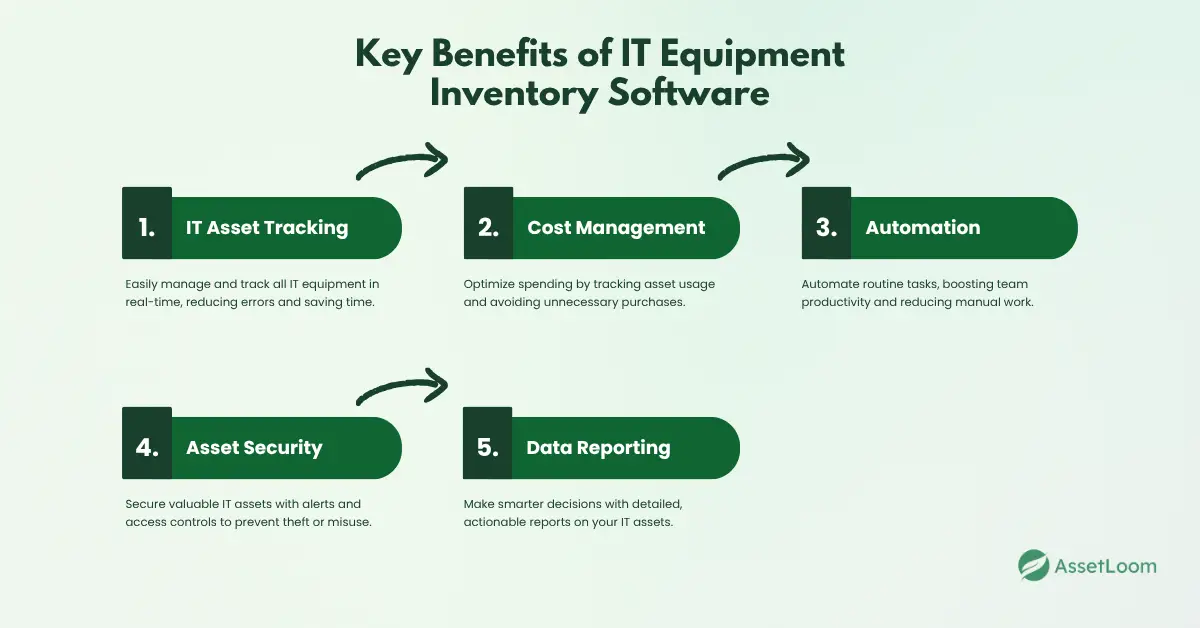
1. Track Your IT Equipment Effortlessly
How it works:
Imagine having a real-time, digital inventory assistant. IT equipment inventory software makes this a reality. By using tools like barcode scanning, RFID tags, or QR codes, it automatically updates and tracks the location, status, and condition of every piece of tech you manage. No more hunting through spreadsheets or manually updating lists. You’ve got it all in one place, up-to-date and easy to access.
Benefits to the Business:
This makes asset management a breeze. Instead of wasting time looking for lost devices or trying to remember when a laptop last got serviced, you get a precise overview of your entire inventory. Plus, everything’s tracked automatically, so the risk of misplacing valuable assets drops significantly.
Industry Example:
- Healthcare: Hospitals are dealing with expensive, often life-saving equipment. Imagine needing a particular device for an urgent procedure and not knowing where it is. With inventory software, hospitals can track and manage medical devices like ventilators or patient monitors in real time, ensuring they’re always where they need to be.
- Education: Whether it’s computers, projectors, or other tech equipment, schools and universities juggle a lot of assets across departments. IT equipment inventory software helps keep track of everything, ensuring teachers and students always have what they need.
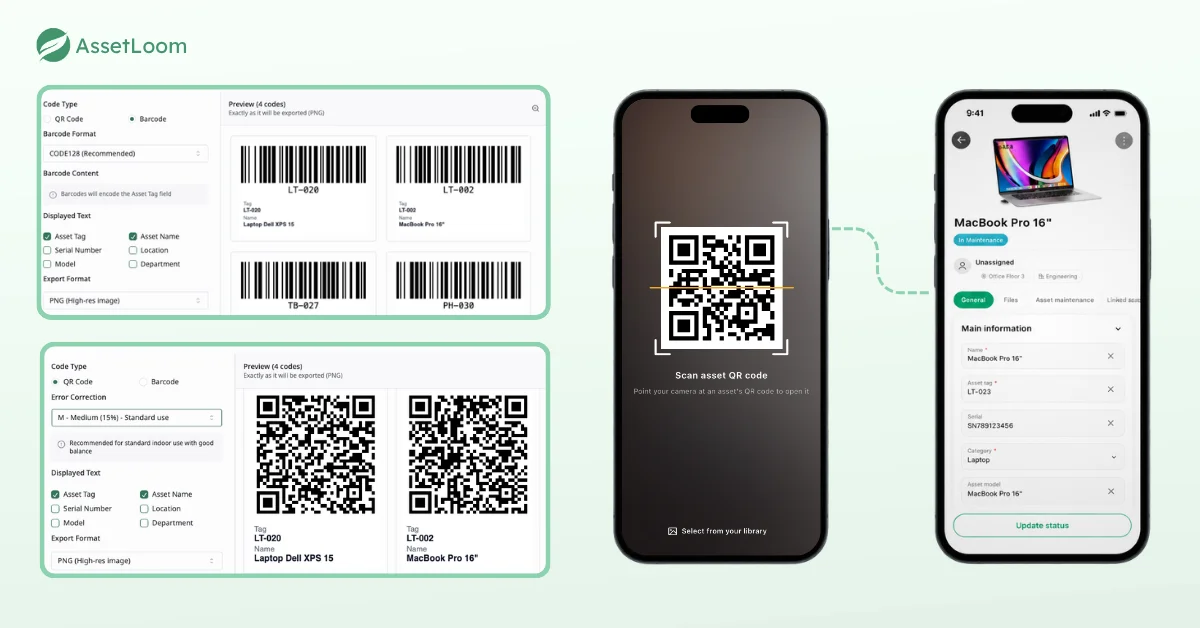
AssetLoom creates QR code and barcode labels for every device, and one scan opens the full asset record on your phone.
2. Unlock Big Savings with Smarter Management
How it works:
The software doesn’t just track your assets; it also lets you analyze them. It’ll tell you how often each piece of equipment is being used, when it’s nearing the end of its life, and if it’s time to replace or repurpose anything. This helps you avoid buying new gear you don’t really need and instead get the most out of what you already have.
Benefits to the Business:
By understanding your equipment’s lifecycle, you can avoid unnecessary spending and better plan for replacements. Instead of over-purchasing or having equipment sit idle, you’re managing your assets with real-time, data-driven insights. Smart choices = big savings.
Industry Example:
- Small Businesses: For small businesses, every penny counts. With IT equipment inventory software, they can track how often equipment like laptops or servers is used and redistribute underutilized assets rather than buying new ones. This helps stretch the IT budget further without sacrificing productivity.
- Large Enterprises: Think of big corporations with hundreds of workstations and complex tech setups. The software can help identify underused equipment that can be redeployed elsewhere, saving thousands in unnecessary purchases and optimizing the whole company’s tech setup.
3. Supercharge Your Team’s Productivity
How it works:
Manual processes can be draining, especially when it comes to keeping track of IT assets. IT equipment inventory software automates tasks like audits, maintenance scheduling, and updates. This means no more hours spent checking off equipment lists or scrambling to update inventory. It’s all done for you.
Benefits to the Business:
This not only saves time but lets your IT team focus on more important tasks, like improving infrastructure or implementing new technologies. By taking care of the repetitive stuff, the software lets your team be more strategic and productive.
Industry Example:
- Tech Startups: In fast-paced environments like startups, IT teams often have to wear many hats. Automating routine tasks with inventory software means they can focus on what really matters: scaling the business and supporting growth, rather than getting bogged down in tracking down equipment.
- Retail: For retail businesses that rely on POS systems, tracking tech performance is crucial. IT equipment inventory software automates maintenance schedules for things like cash registers and barcode scanners, ensuring everything runs smoothly without manual checks every day.
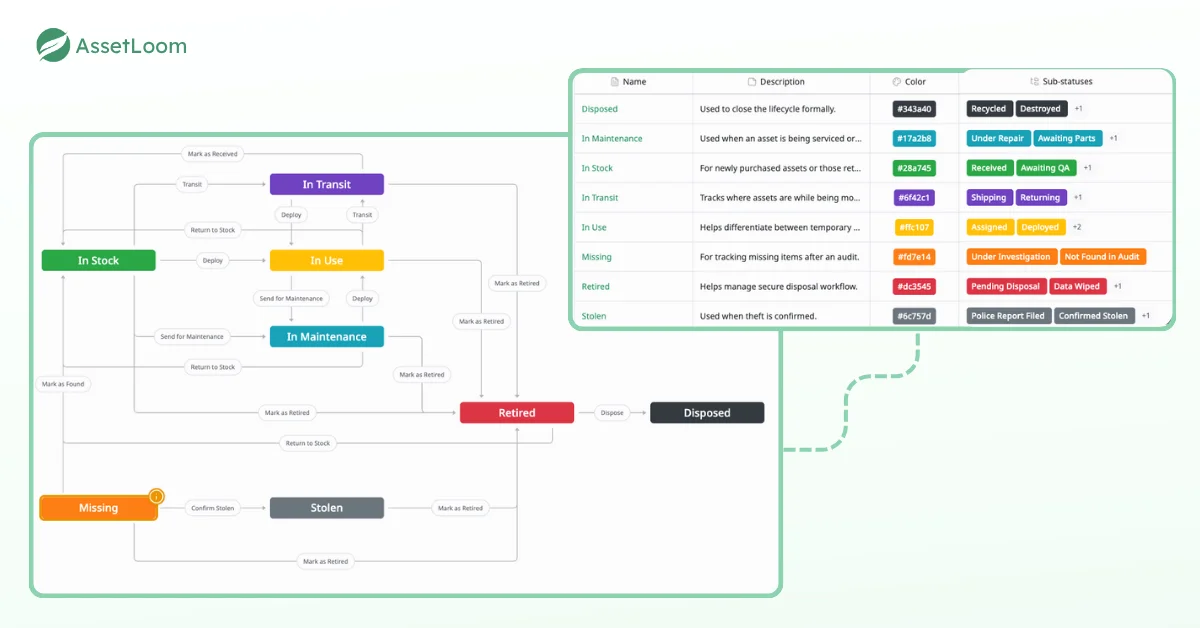
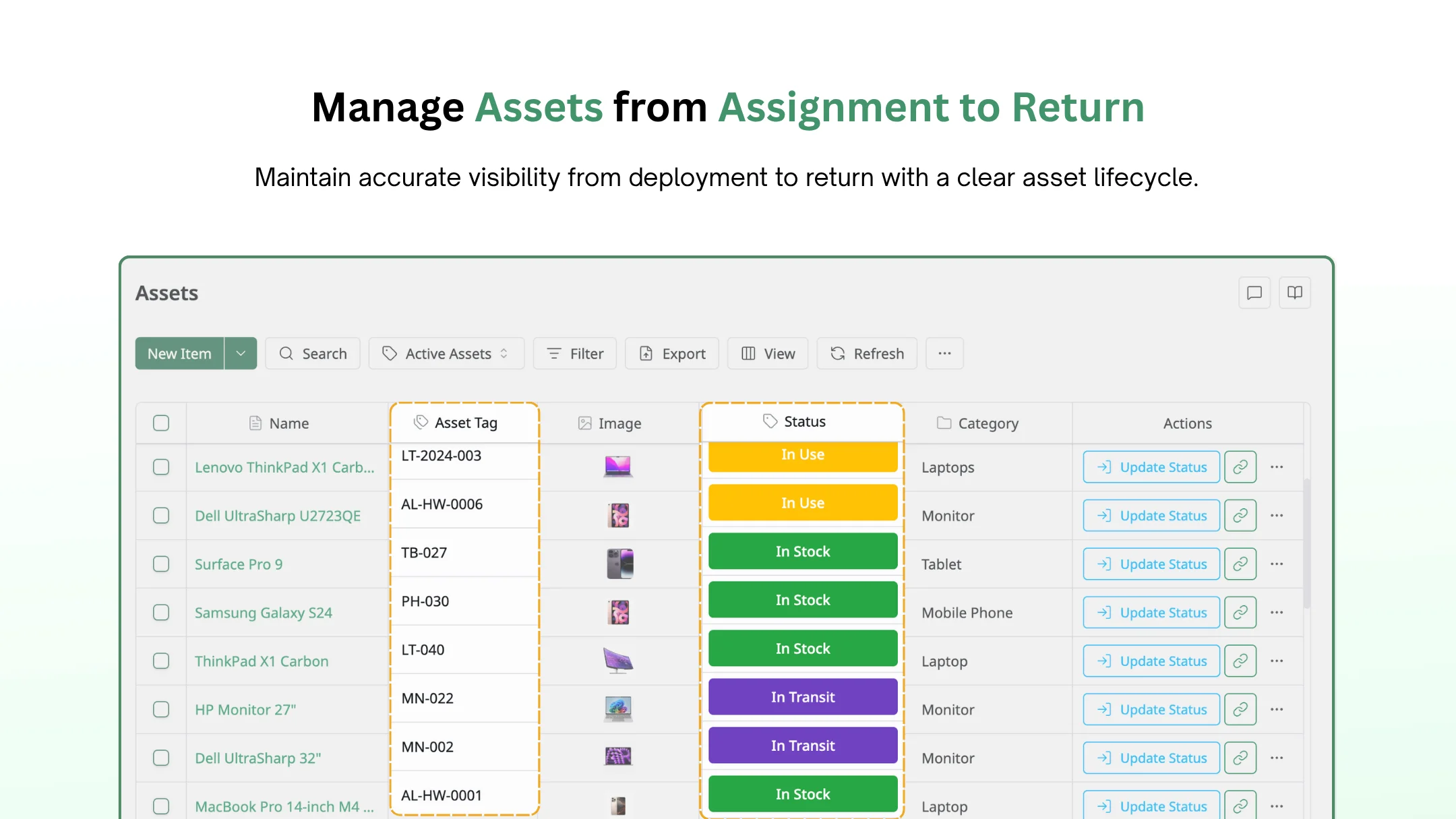
AssetLoom lets you define asset statuses and the exact steps between them, so every update follows the same path.
4. Keep Your Equipment Secure
How it works:
Inventory software doesn’t just track where your gear is, it also ensures that the right people have access to it. You can set permissions and track who’s using each device at any given time. Plus, real-time alerts notify you if anything goes missing or is being used outside authorized hours, helping you stay on top of security.
Benefits to the Business:
This keeps your assets safe and ensures compliance with industry regulations. It also reduces the risk of theft or loss, making sure that sensitive company data or expensive equipment doesn’t fall into the wrong hands.
Industry Example:
- Government Agencies: For government entities managing sensitive data, tracking devices are non-negotiable. IT equipment inventory software ensures that laptops or tablets carrying confidential information are secure, with access logs and tracking in place.
- Financial Institutions: Banks and insurance firms rely on secure systems. Inventory software lets them monitor who is using what, and when, ensuring that devices handling sensitive financial data are secure and compliant with regulations.
5. Make Smarter Decisions with Powerful Reports
How it works:
The software comes with built-in reporting tools that help you analyze your entire inventory, how much it costs, when things need maintenance, and where your equipment is most used. Customizable dashboards allow you to filter data and dig into the details that matter most to your business, whether you’re looking at long-term costs or short-term asset health.
Benefits to the Business:
These insights give you the upper hand in decision-making. You can plan for equipment replacements, optimize your IT budget, and allocate resources based on real-time data. No more guesswork, just actionable insights that lead to smarter decisions.
Industry Example:
- Manufacturing: In a factory setting, equipment downtime can cost a lot. Reports from the inventory software allow managers to spot issues before they become critical. For example, a machine that’s close to breaking down can be flagged for early maintenance or replacement.
- Healthcare: For hospitals, keeping track of expensive medical equipment is crucial. Detailed reports can show the frequency of use and help predict when a device needs servicing or replacement, minimizing unexpected failures that could affect patient care.
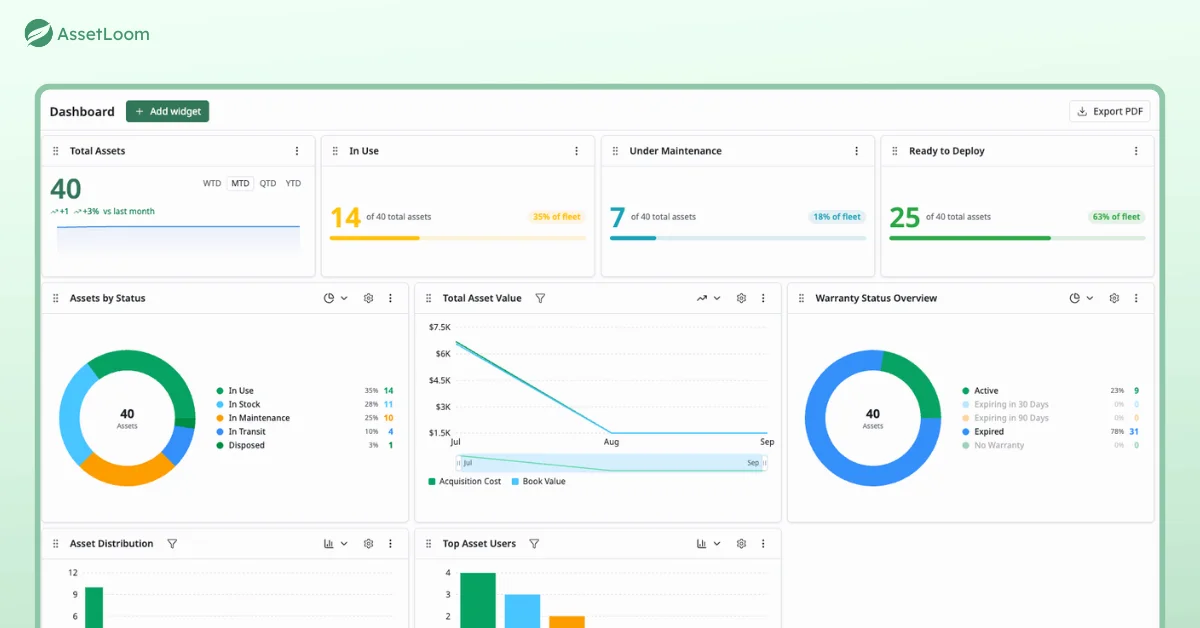
One AssetLoom dashboard answers the questions leadership asks most, including what you own, what it is worth, and what needs attention.
Comparing Popular IT Equipment Inventory Software
The right tool depends on your main problem. Here is how five common IT equipment inventory software options compare for small and mid-size IT teams.
| Tool | Best for | Main strength | Watch out for | Pricing model |
|---|---|---|---|---|
| AssetLoom | Lean IT teams moving off spreadsheets | Custody tracking, QR and barcode check-in and check-out, MDM sync, warranty data | Younger ecosystem than legacy suites | Free plan up to 250 assets, paid tiers by asset count |
| Snipe-IT | Teams with in-house technical staff | Open source, flexible, solid check-in and check-out | Self-hosting means you own updates, backups, and security | Free self-hosted, paid hosted plans |
| Lansweeper | Larger networks that need deep discovery | Automated network discovery and device detail | Discovery comes first, custody workflows less so | Paid, scaled by asset volume |
| Asset Panda | Organizations tracking mixed asset types beyond IT | Highly customizable fields and mobile app | Customization takes real setup time | Quote-based |
| Freshservice | Teams that want help desk and assets in one tool | ITSM with asset management built in | Priced per agent, asset features tied to plan tier | Per-agent subscription |
If custody and accountability are your biggest pain, start with a tool built around check-in and check-out. If finding unknown devices is the problem, a discovery-first tool fits better. Already paying for an ITSM platform? Check its asset module before you buy another tool.
How AssetLoom Supports IT Equipment Inventory
AssetLoom is built for the custody side of inventory. It answers who has what, what state it is in, and what happens to it next. Here is what that covers today.
- One workspace for five resource types. Track hardware, accessories, licenses, components, and consumables together instead of in separate lists.
- QR code and barcode labels. Generate labels in CODE128, CODE39, or EAN13 and export them as PNG, SVG, or PDF for printing.
- Mobile check-in and check-out. Scan a label with your phone to assign or return a device, and every move is saved to the asset’s history.
- MDM sync. Connect Microsoft Intune and Jamf Pro so device details flow into the inventory without manual entry.
- Warranty tracking. See live warranty status for Dell, HP, Apple, and Lenovo devices without checking vendor portals one by one.
- Lifecycle and stock control. Follow each asset from procurement to retirement, and set reorder thresholds with low-stock alerts for consumables.
- Dashboards and cost insight. Build custom dashboards and track total cost of ownership and depreciation for finance reviews.
FAQs
1. What is IT equipment inventory software?
IT equipment inventory software is a tool that keeps one record for each piece of IT hardware your company owns. Each record shows the device details, its status, its location, and the person responsible for it. Barcode or QR scans keep the record current as devices move between people.
2. How is it different from a spreadsheet?
A spreadsheet stores data, but nothing forces anyone to update it. IT equipment inventory software builds updates into daily work through scans, assignments, and integrations. It also keeps a history of every change, which a spreadsheet loses the moment someone overwrites a cell.
3. Is IT equipment inventory software the same as MDM?
No. Inventory software tracks ownership, custody, lifecycle, and cost. MDM manages device settings and can lock or wipe a device remotely. Most teams use both and sync them so the inventory includes every enrolled device.
4. Can it track the live location of a device?
Not in the GPS sense. IT equipment inventory software records the last known location and assigned user from check-outs, returns, and status changes. For live location, you need MDM or a dedicated tracking tool.
5. When does a company need IT equipment inventory software?
In my experience, the tipping point comes at around 50 devices or when more than one person updates the list. At that point, the spreadsheet starts drifting faster than anyone can fix it.
Conclusion
Managing IT equipment doesn’t have to be a constant headache. IT equipment inventory software turns scattered records into one accurate view. You save time, cut costs, and always know where your assets are.
Ready to move beyond guesswork? Import your spreadsheet, print QR labels, and start tracking with free IT equipment inventory software.