IT Asset Naming Conventions: Best Practices
Discover practical tips for IT asset naming conventions to help your team stay organized. Learn what naming conventions are & key components.
Managing IT assets becomes increasingly difficult as organizations grow. A few laptops can be tracked manually, but hundreds or thousands of devices across multiple locations require a more structured approach.
Without a clear system, asset names often become inconsistent. One device may be named after an employee, another after a location, while others use random identifiers. This makes it harder to search for assets, troubleshoot issues, prepare audits, and maintain accurate inventory records.
An IT asset naming convention provides a consistent way to identify and organize assets. When combined with structured asset data and an IT asset management system, it helps teams maintain better visibility throughout the asset lifecycle.
This article will help you explain what IT asset naming conventions are, why they’re essential, their key components, and how they are used in real-world scenarios.
What Are IT Asset Naming Conventions?
IT asset naming conventions refer to standardized rules and formats used to assign unique, meaningful names to IT assets within an organization. These assets include physical hardware (e.g., servers, laptops, network devices) and virtual resources (e.g., virtual machines, cloud instances, software licenses). The goal is to create names that are consistent, descriptive, and easy to understand, enabling IT teams to quickly identify an asset’s type, location, purpose, or other relevant attributes. Eventually, they can optimize the ITAM process.
For example, a naming convention might produce names like “NY-LAP-01” (New York, Laptop, #1) or “CHI-SRV-03” (Chicago, Server, #3). These names follow a specific format, use abbreviations for brevity, and include details to make identification effortless. The convention isn’t just the abbreviations (like “LAP” or “SRV”), it’s the whole structure, including the order, format, and rules that keep names uniform across your team.
A naming convention is more than a collection of abbreviations. It defines the complete naming structure, including:
- The order of information
- Allowed abbreviations
- Formatting rules
- Numbering patterns
- Naming standards across teams
Common resources that may use naming conventions include:
- Laptops and desktops
- Servers
- Network devices
- Virtual machines
- Cloud resources
- Other managed IT equipment
A well-designed naming convention makes assets easier to identify, search, and manage throughout their lifecycle.
Why IT Asset Naming Conventions Matter
Implementing IT asset naming conventions offers numerous benefits, especially for organizations managing large and complex IT environments. Here’s why it’s worth the effort:
Make Asset Identification Faster
A clear asset name provides useful information immediately. For example: SRV-NYC-FIN-001 helps an IT team understand that the asset is:
- A server
- Located in New York
- Used by the Finance department
- The first asset in that group
This reduces the time spent searching through inventory records or checking multiple systems.
Improve IT Inventory Management
Consistent naming makes it easier to organize and maintain asset records. Without a naming convention, you might end up with a mess, random names like “JohnsPC,” “OfficeLaptop2,” or “ServerXYZ” that waste time and cause confusion. A good system streamlines operations and sets your team up for success.
These names may make sense temporarily but become difficult to manage when employees change roles, assets move locations, or inventory grows. A standardized naming approach helps teams maintain cleaner inventory data and improves reporting accuracy. Consistent naming also simplifies tracking and reporting in the IT asset management system (e.g., ServiceNow, AssetLoom).
Reduce Errors and Confusion
Inconsistent naming becomes a bigger problem when IT inventory management involves multiple technicians, departments, or locations.
In a growing organization, asset records are rarely maintained by one person. Different IT technicians may add new devices, update asset information, perform inventory checks, or manage asset movements. Without clear naming rules, each person may follow their own approach.
For example, one technician may create:
- NYC-LAP-001
- NewYork-Laptop-002
- John-Laptop
Although these names may describe similar assets, the inconsistency makes searching, filtering, and reporting more difficult.
A standardized naming convention gives everyone a shared framework to follow. Whether a technician is adding a new laptop, recording a server, or updating an existing asset, the information remains consistent across the entire inventory.
This becomes especially important when teams manage:
- Multiple offices or locations
- Large numbers of devices
- Shared IT responsibilities
- Regular asset transfers between users or departments
By creating clear naming rules, organizations can reduce human errors and maintain more reliable asset data as their IT environment grows.
Support Growth
A good naming convention should work as the organization grows. It should support:
- Additional locations
- New departments
- More asset categories
- Different types of technology resources
Creating scalable naming rules early prevents teams from rebuilding their inventory structure later.
Related article: Custom Asset Tags: A Simple Solution to Prevent Asset Loss
Components of IT Asset Naming Conventions
A robust IT asset naming convention typically includes several components that describe an asset’s key attributes. These components are combined into a concise, structured format.
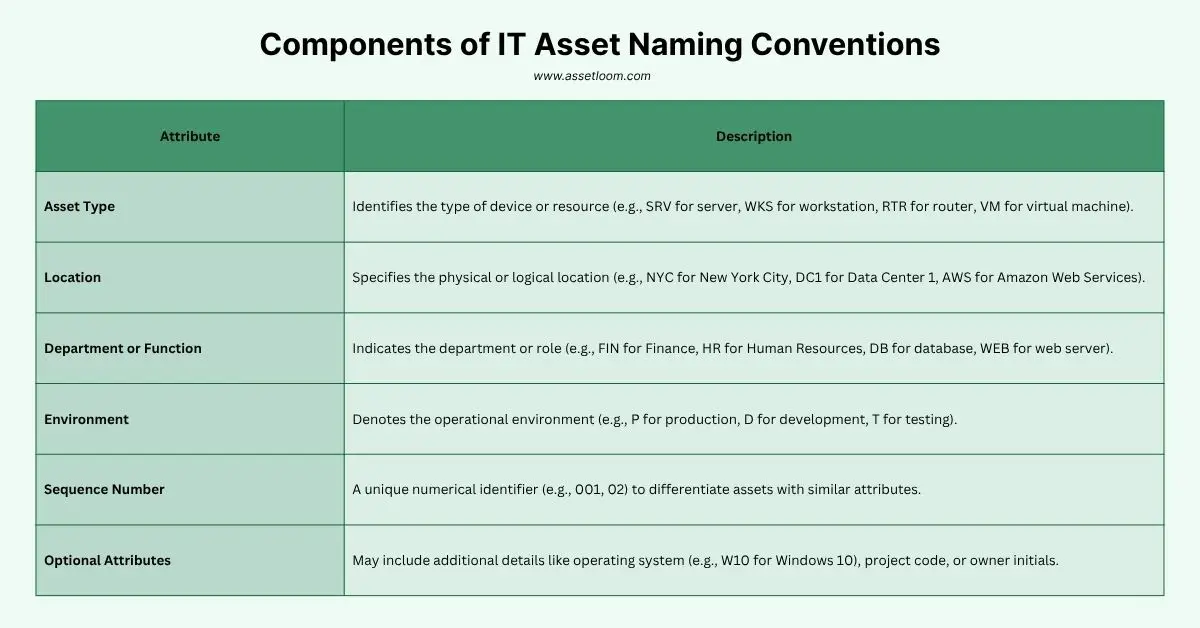
Common elements include:
- Asset Type: Identifies the type of device or resource (e.g., SRV for server, WKS for workstation, RTR for router, VM for virtual machine).
| Abbreviation | Full Form | Example IT Asset Name |
|---|---|---|
| SRV | Server | SRV-NYC-FIN-001 (Server in New York City, Finance Department) |
| WKS | Workstation | WKS-LON-HR-02 (Workstation in London, HR Department) |
| RTR | Router | RTR-DC1-DB-004 (Router in Data Center 1, Database Department) |
| VM | Virtual Machine | VM-SFO-IT-003 (Virtual Machine in San Francisco, IT Department) |
- Location: Specifies the physical or logical location (e.g., NYC for New York City, DC1 for Data Center 1, AWS for Amazon Web Services).
| Abbreviation | City | Example IT Asset Name |
|---|---|---|
| NYC | New York City | SRV-NYC-FIN-001 (Server in New York City, Finance Department) |
| LON | London | WKS-LON-HR-02 (Workstation in London, HR Department) |
| SFO | San Francisco | VM-SFO-IT-003 (Virtual Machine in San Francisco, IT Department) |
| DC1 | Data Center 1 | RTR-DC1-DB-004 (Router in Data Center 1, Database Department) |
| SYD | Sydney | WKS-SYD-MKT-005 (Workstation in Sydney, Marketing Department) |
- Department or Function: Indicates the department or role (e.g., FIN for Finance, HR for Human Resources, DB for database, WEB for web server).
| Abbreviation | Full Form | Example IT Asset Name |
|---|---|---|
| FIN | Finance | SRV-NYC-FIN-001 (Server in New York City, Finance Department) |
| HR | Human Resources | WKS-LON-HR-02 (Workstation in London, HR Department) |
| IT | Information Technology | VM-SFO-IT-003 (Virtual Machine in San Francisco, IT Department) |
| DB | Database | RTR-DC1-DB-004 (Router in Data Center 1, Database Department) |
| WEB | Web Development | SRV-AMS-WEB-007 (Server in Amsterdam, Web Development Department) |
- Environment: Denotes the operational environment (e.g., P for production, D for development, T for testing).
| Abbreviation | Full Form | Example IT Asset Name |
|---|---|---|
| P | Production | SRV-NYC-FIN-001-P (Server in New York City, Finance Department, Production) |
| D | Development | WKS-LON-HR-02-D (Workstation in London, HR Department, Development) |
| T | Testing | VM-SFO-IT-003-T (Virtual Machine in San Francisco, IT Department, Testing) |
- Sequence Number: A unique numerical identifier (e.g., 001, 02) to differentiate assets with similar attributes.
- Optional Attributes: May include additional details like operating system (e.g., W10 for Windows 10), project code, or owner initials.
| Abbreviation | Full Form/Description | Example IT Asset Name |
|---|---|---|
| W10 | Windows 10 | SRV-NYC-FIN-001-W10 (Server in New York City, Finance Department, Windows 10) |
| Linux | Linux Operating System | VM-SFO-IT-003-Linux (Virtual Machine in San Francisco, IT Department, Linux OS) |
| Project-X | Project Code | WKS-LON-HR-02-Project-X (Workstation in London, HR Department, Project-X) |
| Owner-AB | Owner Initials | RTR-SYD-MKT-005-Owner-AB (Router in Sydney, Marketing Department, Owner AB) |
For example: Consider the asset name WKS-LON-HR-D-W10-015:
- WKS: Workstation
- LON: Located in London
- HR: Used by the Human Resources department
- D: Development environment
- W10: Runs Windows 10
- 015: The 15th workstation in this category
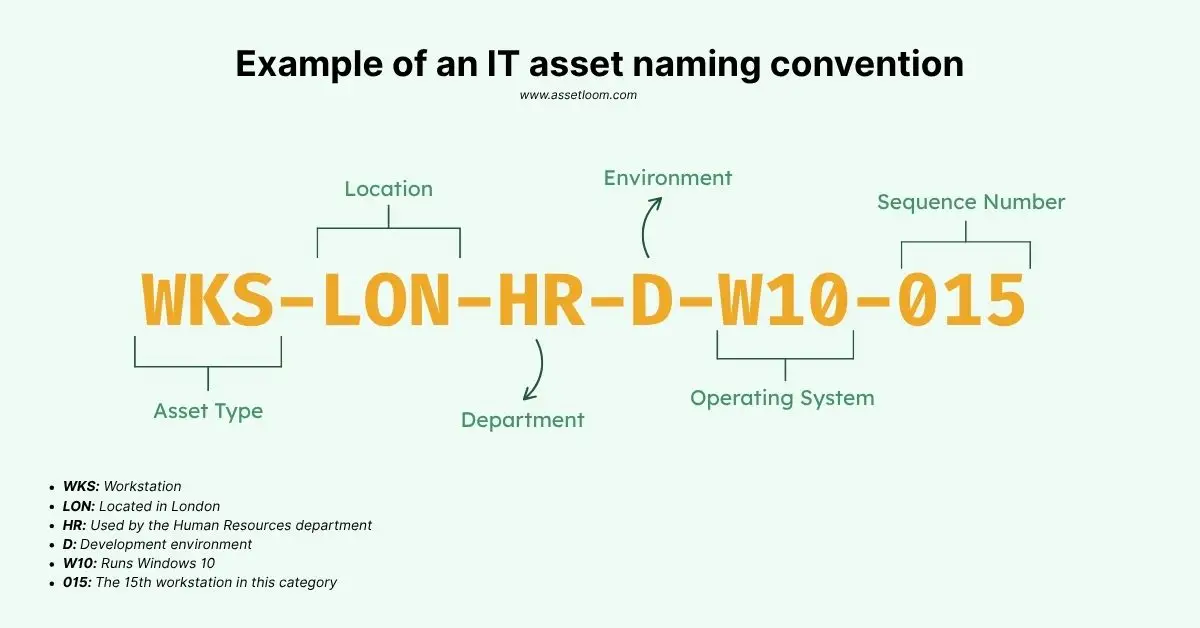
This format provides a clear, at-a-glance understanding of the asset’s identity and purpose.
Best Practices for Creating IT Asset Naming Conventions
To create an effective naming convention, you need a few core components that work together. Here’s what makes a naming system tick, along with practical examples to show how it comes to life.
1. Structured Format
A naming convention defines a consistent structure, like a template, for every asset name. This ensures all names follow the same pattern, making them predictable and easy to search.
Tip: Use a 2-3 part format like [Location]-[Asset Type]-[Number].
Example: “SF-LAP-01” (San Francisco, Laptop, #1) or “IT-SRV-02” (IT Department, Server, #2).
2. Abbreviations for Brevity
Abbreviations keep names short and manageable, packing key info into fewer characters. They’re not the whole convention but a critical tool to avoid long, clunky names.
Tip: Use intuitive abbreviations like “SRV” (Server), “LAP” (Laptop), “NY” (New York). Document them in a shared guide.
Example: “CHI-WS-03” (Chicago, Workstation, #3) is shorter than “ChicagoWorkstation3.”
3. Descriptive Elements
Names should include details like asset type (laptop, router), location (city, office), or function (accounting, marketing). This makes identification instant.
Tip: Pick 1-2 descriptors that matter most, like location or department.
Example: “NY-ACC-LAP-01” (New York, Accounting, Laptop, #1) tells you where and who uses it.
4. Scalability
Your convention should handle growth, like new offices or asset types, without breaking. Avoid names tied to specific people (e.g., “JanesPC”) or rigid formats.
Tip: Use two-digit numbers (01-99) to allow for many assets per category. Add prefixes like “CLD” for cloud assets later.
Example: “SF-SRV-01” can scale to “SF-SRV-99” or “CLD-SRV-01.”
5. Consistency Rules
Rules ensure uniformity, like always using hyphens (not underscores) or sticking to a set order. This prevents chaos like mixing “Server1” and “NY_server_2.”
Tip: Document rules in a one-page guide, e.g., “Always use [LOC]-[TYPE]-[NUM], hyphens, two-digit numbers.”
Example: “LA-RTR-01” follows the same rule as “NY-LAP-02.”
How AssetLoom Helps Maintain Organized IT Asset Data
Creating a naming convention is an important first step, but maintaining accurate inventory becomes more challenging as more people contribute data.
In a growing IT environment, technicians may add new devices, update assignments, perform inventory checks, and manage asset movements every day. Without standardized information, inventory records can quickly become inconsistent.
AssetLoom helps teams maintain organized IT asset information by combining asset tracking, structured reference data, and lifecycle management in one platform.
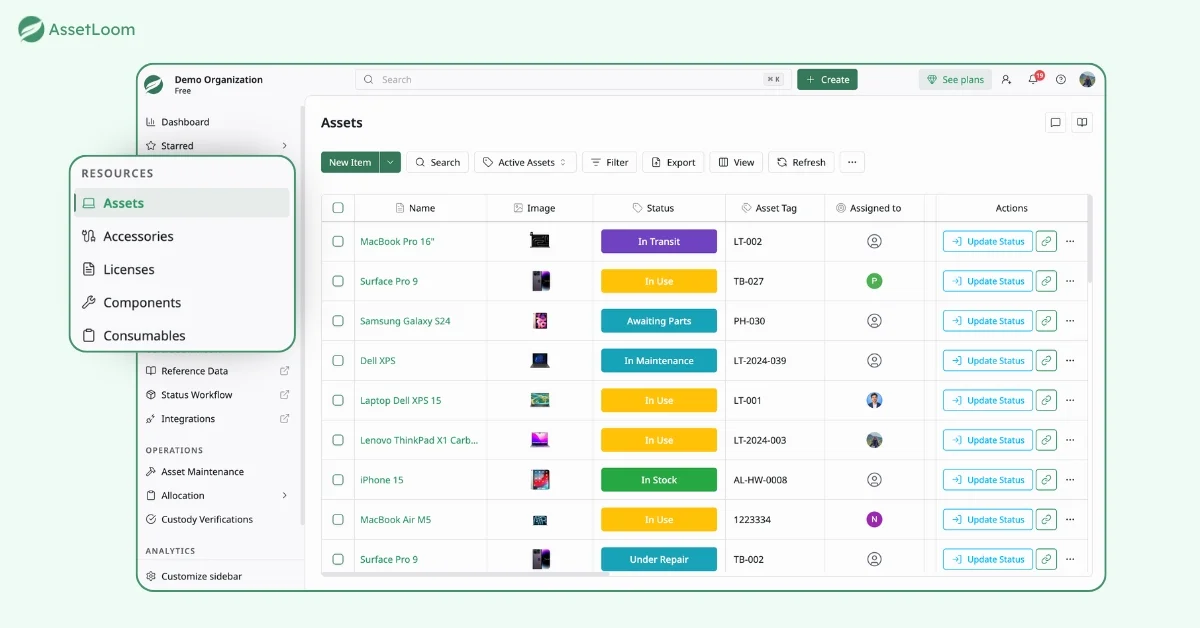
Manage Different Types of IT Resources
IT inventory is not limited to laptops and servers. Organizations also need to track supporting resources throughout their lifecycle.
AssetLoom helps teams manage:
- Assets: Devices such as laptops, desktops, servers, and network equipment
- IT Accessories: Supporting items such as keyboards, mice, and docking stations
- IT Components: Hardware parts such as RAM, storage drives, and processors
- IT Consumables: Items that are regularly used and replaced, such as printer supplies and batteries
- Licenses: Software licenses and allocation information
By keeping different resource types organized in one place, teams can maintain better visibility beyond basic device tracking.
Get started with AssetLoom for free →
Maintain Consistent Reference Data
AssetLoom uses structured reference data to help teams organize inventory information consistently.
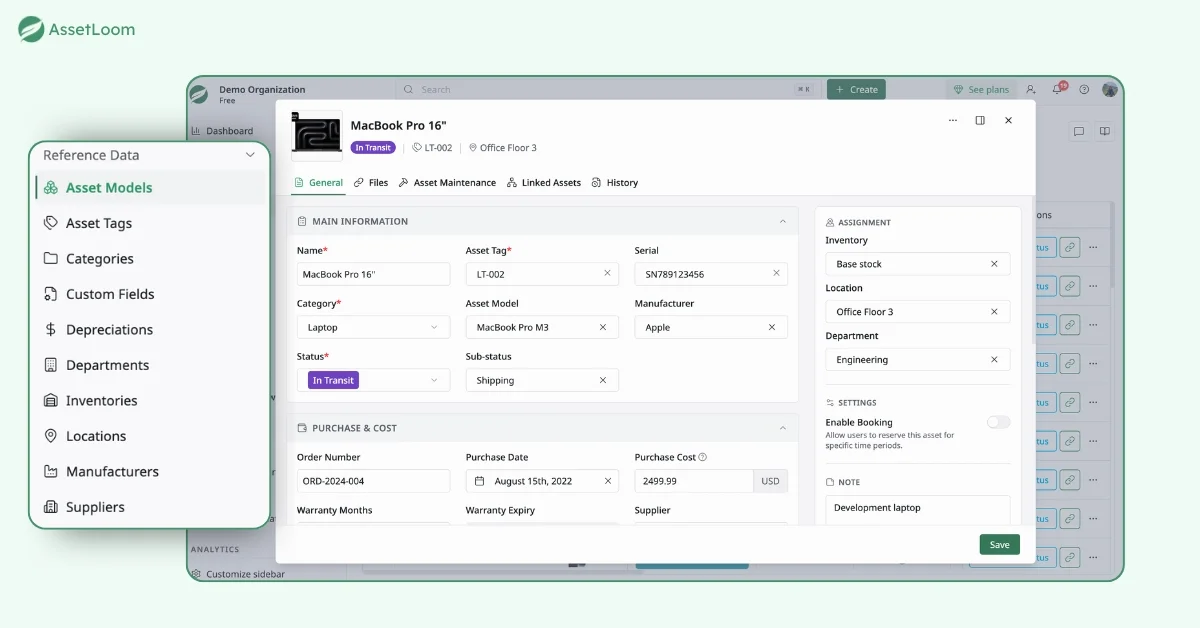
This includes:
- Asset tags
- Asset models
- Categories
- Locations
- Departments
- Manufacturers
- Suppliers
- Custom fields
- Status workflows
For example, instead of allowing technicians to manually type different versions of a manufacturer name, teams can maintain consistent manufacturer records across all assets.
Use Asset Tags and QR Codes and Barcodes for Faster Identification
While naming conventions help users understand assets, asset tags provide a unique identifier for tracking.
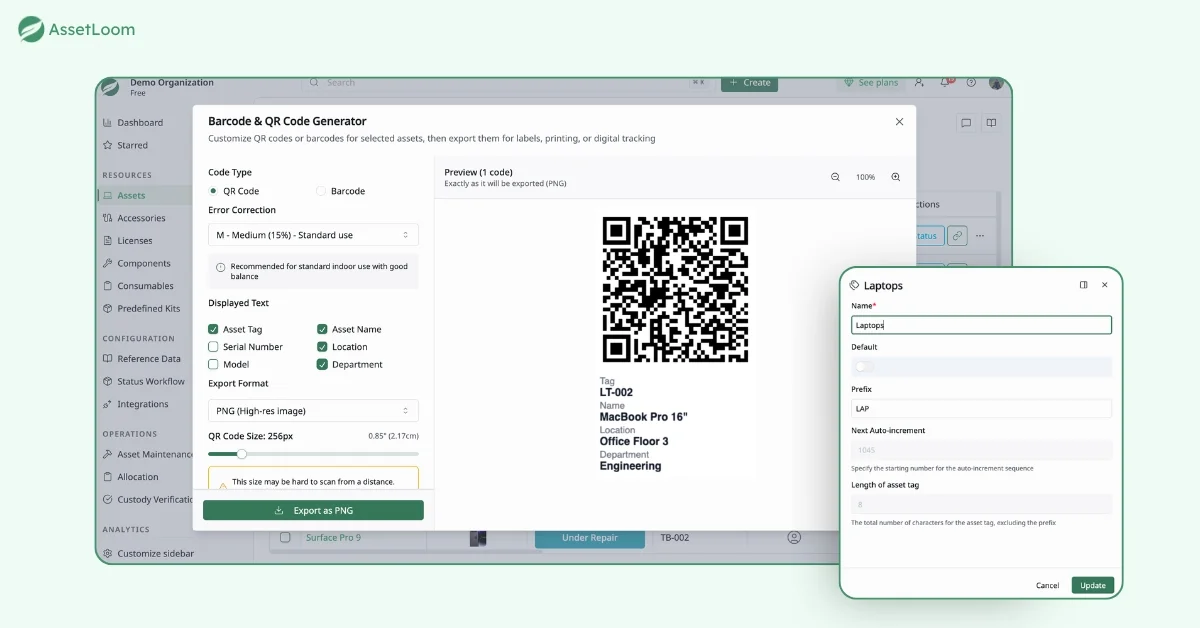
AssetLoom allows teams to create and manage asset tags that can be used with QR codes or barcodes for faster inventory checks. Technicians can quickly scan an asset, access its information, and verify details without manually searching through records.
Track Assets Throughout Their Lifecycle
Asset management is not only about knowing what assets exist. Teams also need to understand what happens to assets over time.
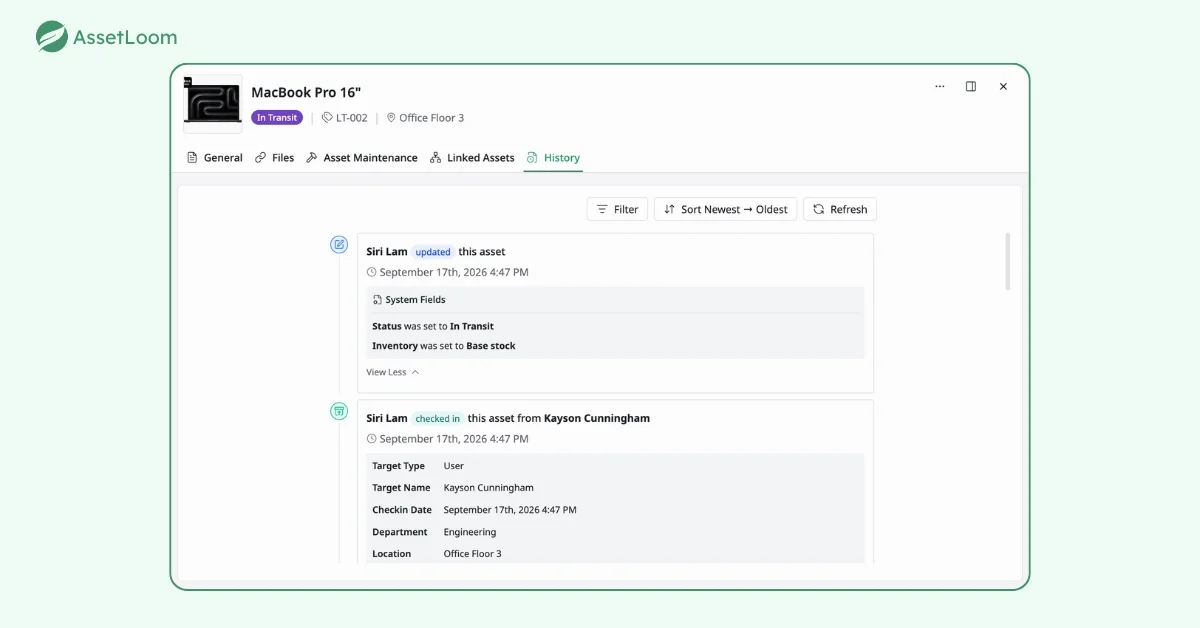
AssetLoom helps track:
- Check-in and check-out history
- Assignment changes
- Location changes
- Maintenance activities
- Asset status updates
- Depreciation information
This gives teams a complete picture of each asset from purchase to retirement.
To Sum Up
IT asset naming conventions provide a simple foundation for better inventory management. They help teams identify assets faster, reduce confusion, and maintain consistency across growing environments. However, naming conventions alone are not enough. Modern IT teams need structured asset information, standardized reference data, and lifecycle tracking to maintain accurate inventory. By combining naming standards with an IT asset management platform like AssetLoom, organizations can create a reliable source of truth for their technology environment.
Ready to improve your IT inventory management? AssetLoom helps IT teams organize assets, maintain accurate records, and gain better visibility throughout the entire asset lifecycle. Start managing your IT assets with AssetLoom today.