IT Asset Lifecycle Management Policy Template That Works
Download a free IT asset lifecycle management policy template, plus sample clauses and simple checks that show whether your team follows each rule.
An IT asset lifecycle management policy template gives you a ready-made structure for how IT assets are requested, bought, assigned, maintained, and retired. You fill in your company’s roles, rules, and approval steps. You end up with a policy your team can follow and an auditor can check.
That second part is where most policies fail. Writing the document is easy. The hard part is getting people to follow it on a busy Tuesday, when a new hire starts in an hour and the only spare laptop is “probably in the cabinet.”
So this guide does two things. It walks through each section your policy needs, with sample clauses you can copy. It also shows how to write each rule so you can actually verify it. Our free template is available to download further down.
What Is an IT Asset Lifecycle Management Policy Template?
An IT asset lifecycle management policy template is a formalized document that outlines the processes and procedures for managing IT assets throughout their lifecycle. This includes hardware (e.g., computers, servers, and networking equipment), software (e.g., applications and licenses), and other technology-related resources. The policy governs each stage of an asset’s lifecycle, from procurement to disposal, ensuring compliance, cost efficiency, and security.
The lifecycle typically includes the following stages:
- Planning: Identifying the need for an IT asset based on organizational goals.
- Acquisition: Purchasing or leasing assets, including vendor selection and contract negotiation.
- Deployment: Installing and configuring assets for use within the organization.
- Maintenance: Regular updates, repairs, and monitoring to ensure optimal performance.
- Decommissioning: Retiring or disposing of assets securely when they are no longer needed.
Related article: What Is IT Asset Lifecycle Management?
More specifically, this policy serves as a roadmap for IT teams, finance departments, and other stakeholders to align asset management with business objectives. By implementing a clear policy, organizations can avoid mismanagement, reduce downtime, and ensure compliance with regulations like GDPR, HIPAA, or ISO 27001.
Why You Need a Lifecycle Management Policy
An IT asset lifecycle management policy focuses on managing those assets over time to keep things organized, secure, and cost-effective. It makes sure everyone is on the same page. For what it’s worth, putting one in place can:
- Save Money: You can avoid unnecessary purchases and make the most of what you already have.
- Stay Compliant: A policy helps you meet legal, regulatory, and audit requirements.
- See Everything Clearly: Know exactly what assets you have, where they are, and who’s using them.
- Boost Security: Reduce risks by setting clear steps for secure disposal and data wiping.
- Work More Efficiently: Streamline processes like assigning devices or scheduling maintenance.
A good policy also promotes better coordination across departments, helping everyone work more effectively.
Key Components of a Good IT Asset Lifecycle Management Policy Template
Your IT asset management policy template should clearly outline asset classification, ownership, lifecycle management, and protection responsibilities. Based on ISO 27001-aligned best practices, a well-rounded IT asset lifecycle management policy template should include the following sections:
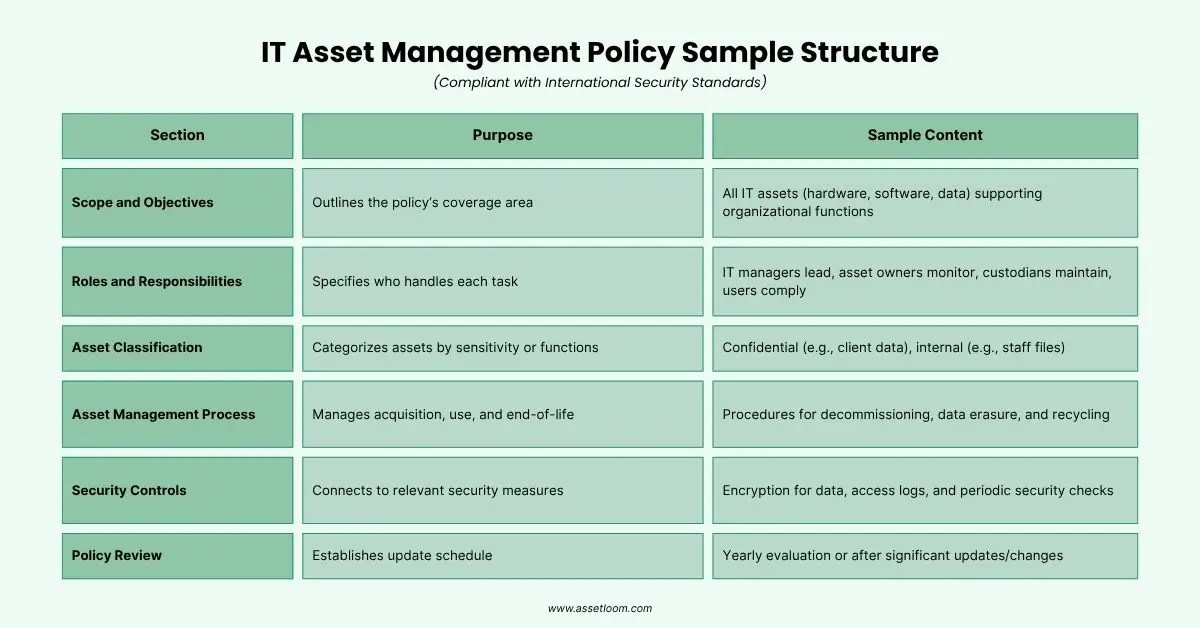
1. Objectives and Scope
Define why the policy exists and what it covers. Be specific about asset types (laptops, mobile devices, servers, peripherals, software licenses, cloud subscriptions) and who it applies to, including contractors.
Sample clause. “This policy applies to all IT assets purchased, leased, or provided by [Company], and to all employees and contractors who use them.”
How to check it. Pick five random assets from different categories. If anyone argues about whether the policy covers them, your scope needs work.
2. Roles and Responsibilities
List who owns each part of the lifecycle. This is the section that decides whether the rest of the policy works.
Sample clause. “The IT Asset Manager maintains the asset inventory. Department heads approve hardware requests for their teams. HR notifies IT of every employee departure at least 3 business days before the last working day.”
How to check it. For every rule in the policy, you should be able to name one role that owns it. “Everyone” is not a role.
3. Asset Classification
Group assets into categories and define how each is tagged, tracked, and audited. A laptop and a box of toner shouldn’t follow the same rules.
Sample clause. “All hardware assets valued above [$X] receive an asset tag before deployment. Accessories such as docks and monitors are tracked by assigned user. Consumables are tracked by quantity.”
How to check it. Walk the office and pick up ten tagged items. Each tag should match a record with the right category and owner.
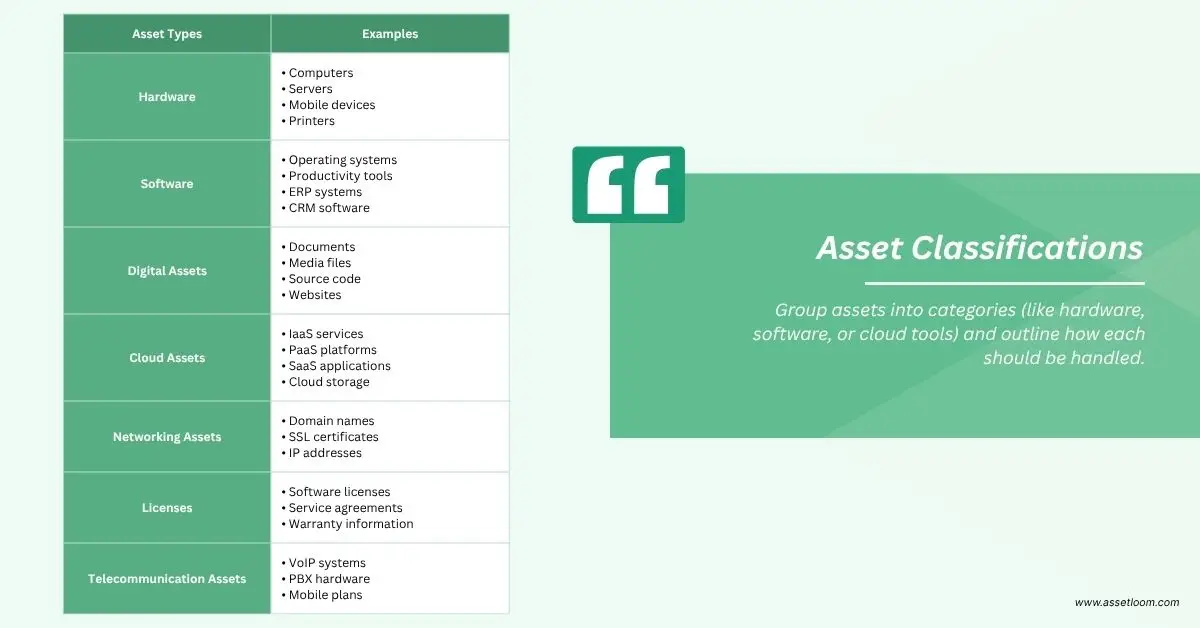
4. Asset Management Process
Group assets into categories and define how each is tagged, tracked, and audited. A laptop and a box of toner shouldn’t follow the same rules.
Sample clause. “All hardware assets valued above [$X] receive an asset tag before deployment. Accessories such as docks and monitors are tracked by assigned user. Consumables are tracked by quantity.”
How to check it. Walk the office and pick up ten tagged items. Each tag should match a record with the right category and owner.
5. Security Controls
Connect asset management to your security requirements, including encryption, access, and data removal before reuse or disposal.
Sample clause. “All storage media are sanitized before reuse or disposal using a method consistent with NIST SP 800-88 Rev. 2. The sanitization method, date, and responsible person are recorded on the asset record.”
How to check it. Pull the last five retired assets. Each should show a sanitization record, not just a “retired” label.
6. Policy Review
Set how often the policy is reviewed and what triggers an early update.
Sample clause. “The IT Asset Manager reviews this policy annually, and after any audit finding, security incident, or major change in tools or headcount.”
How to check it. Look at the document’s revision history. If the last review date is older than your newest laptop, it’s overdue.
Download Your Free IT Asset Lifecycle Management Policy Template (PDF)
To help you get started, we’ve created a free IT Asset Lifecycle Management Policy Template that includes all the sections mentioned above. It’s easy to edit and can be adapted to fit your organization, no matter the size.
Download Free Template HereThe template includes:
- Ready-to-use policy sections
- Editable fields for your company name, departments, and key roles
- Helpful notes to guide your customization
Whether you’re building a policy from scratch or improving an existing one, this template offers a solid starting point.
How to Customize the Template for Your Business
Every organization is different, so it’s important to tailor the template to fit your specific needs. Here are some tips:
- Connect to Business Goals: Make sure the policy supports your overall goals, like saving money or improving compliance.
- Get Input from Teams: Work with IT, finance, HR, and legal to make sure the policy reflects everyone’s needs.
- Keep It Simple: Use clear, straightforward language so everyone can understand and follow the policy.
- Use ITAM Tools: Platforms like AssetLoom can help automate asset tracking and make sure your policy is followed.
- Train Your Team: Offer training so everyone knows their role in managing IT assets.
- Review Regularly: Set a schedule to review and update the policy as your business and technology needs change.
By customizing the policy, you make it a useful tool that supports your operations, not just a document to file away.
How AssetLoom Supports Your IT Asset Lifecycle Management Policy
A policy tells people what to do. AssetLoom gives you the records that show they did it. Here is how it connects to the sections of your IT asset lifecycle management policy template.
One inventory for every asset class
AssetLoom tracks IT assets, accessories, software licenses, components, and consumables in one place. That lines up directly with your Asset Classification section. Laptops get individual records, docks and monitors get assigned to users, and toner gets tracked by quantity, all in the same system.
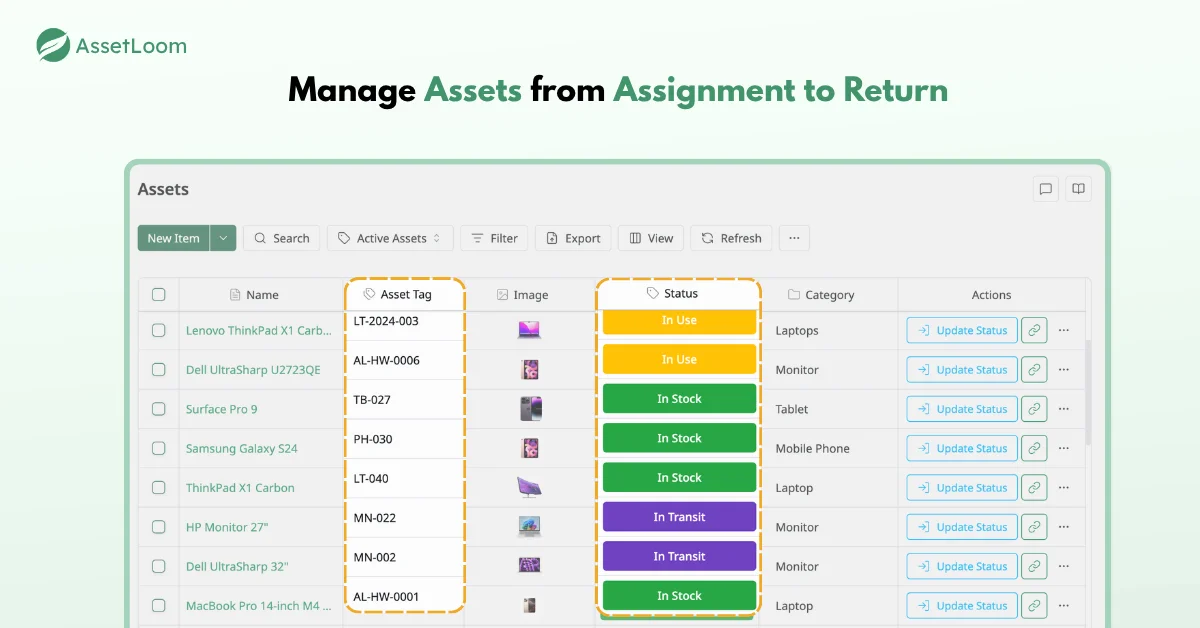
Tagging that matches your labeling rule
If your policy says every asset gets a tag before deployment, AssetLoom lets you generate QR codes or barcodes in CODE128, CODE39, or EAN13 format and print them as asset labels. The tag on the device and the entry in your inventory stay matched, so audits stop depending on someone reading serial numbers with a flashlight.
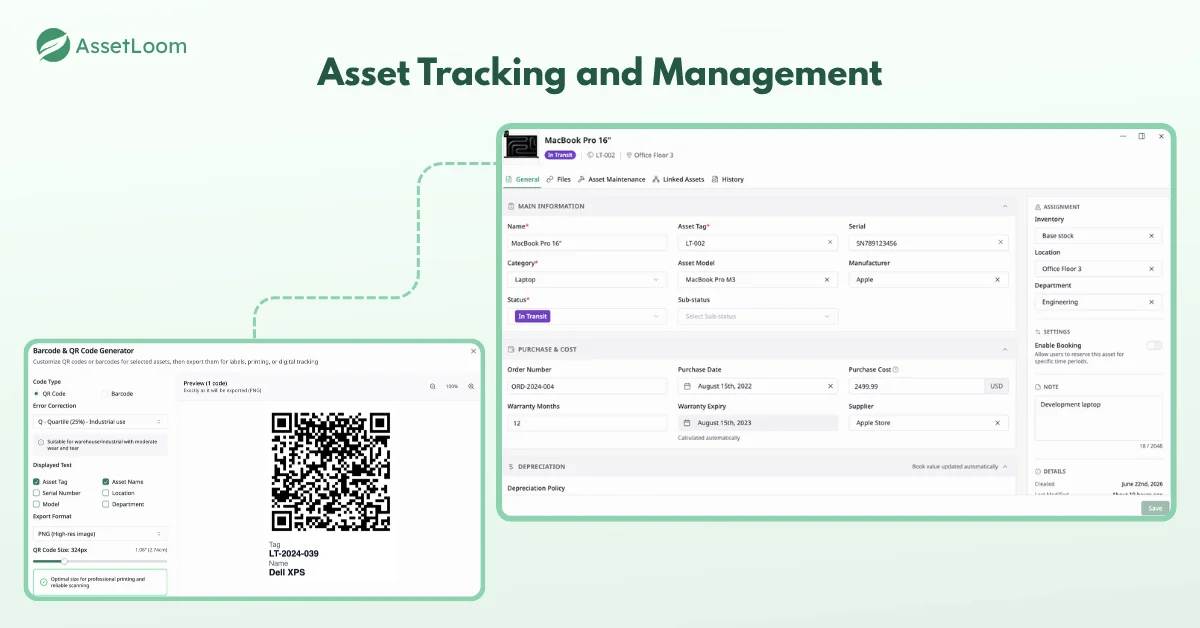
Check-in and check-out records for assignment and returns
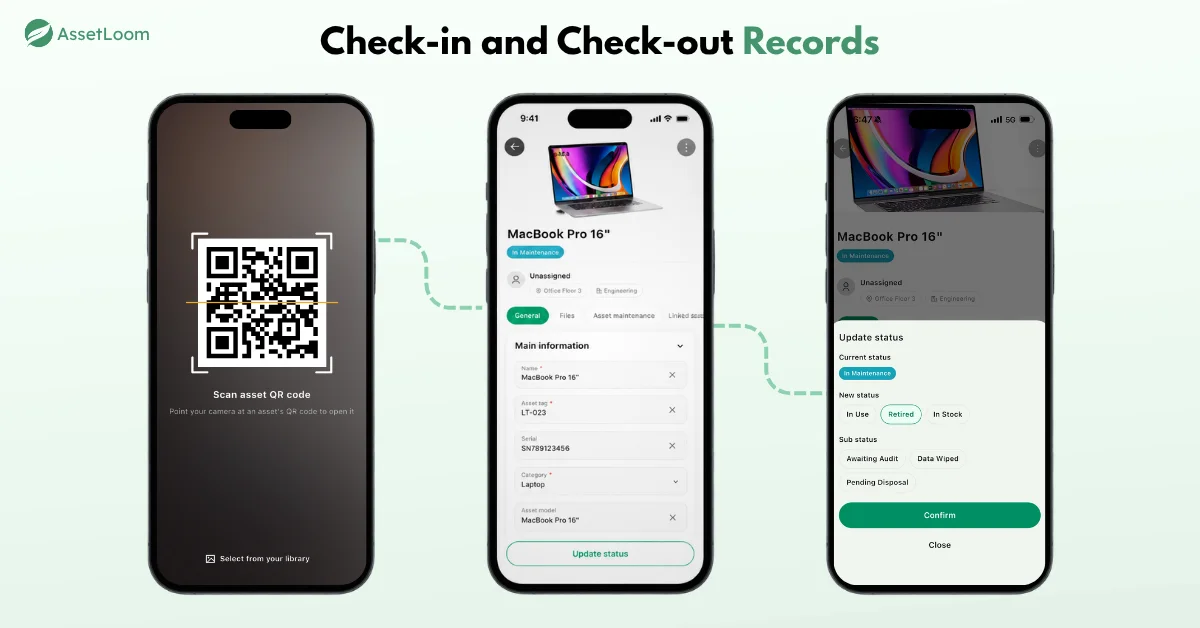
Scan an asset’s label with your phone to check it out to a named user. Scan it again to check it in when it comes back. That’s the evidence your Asset Management Process section needs. When an auditor asks whether departing employees returned their equipment, you compare departures against check-in records instead of asking around.
An inventory that stays current with Intune and Jamf Pro
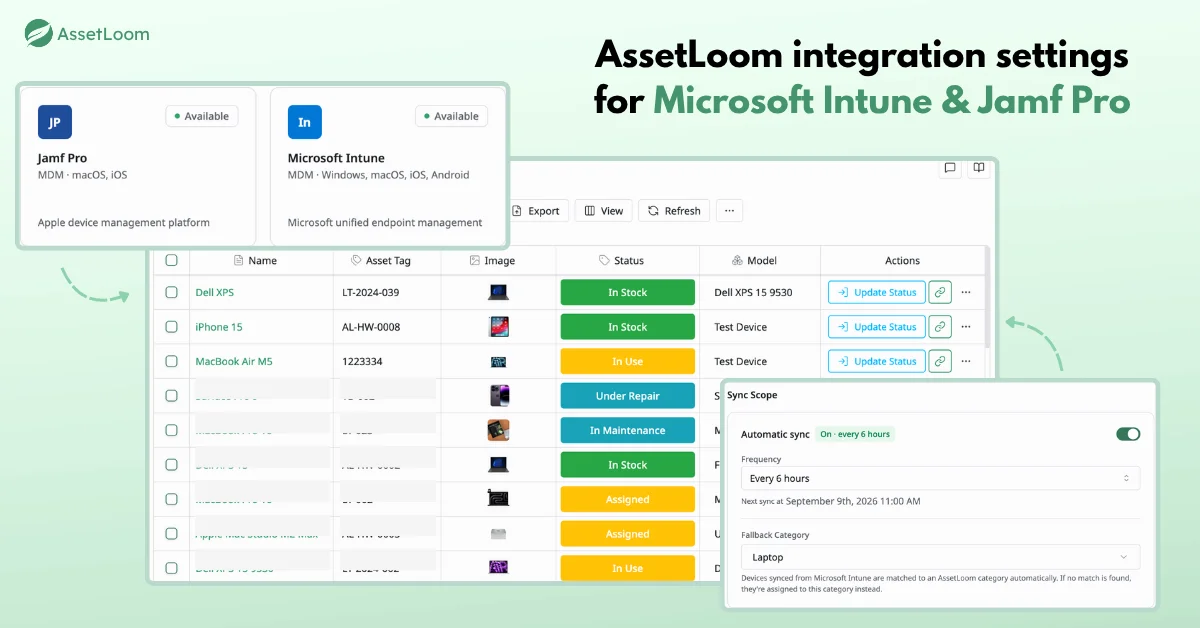
AssetLoom integrates with Microsoft Intune and Jamf Pro, so devices you already manage there can feed into your asset records. Fewer manual updates mean fewer gaps between what your policy requires and what your inventory shows.
Conclusion
Writing an asset policy is the easy part. Making it stick depends on two things. Every rule needs a clear owner, and following it should leave a record you can point to. Get those right and your policy stops being a document you dust off before audits. It starts shaping how your team actually handles devices.
Download the free template to set your rules, then use AssetLoom to track every asset, label it, and log each check-out and return in one place. Start with the free tier and see how your policy holds up with real data behind it.
FAQs
1. What should an IT asset lifecycle management policy template include?
It should include objectives and scope, roles and responsibilities, asset classification, the asset management process for each lifecycle stage, security controls, and a policy review schedule. Strong templates also add sample clauses and space for your own approval thresholds, owners, and timelines.
2. Who should own the IT asset lifecycle management policy?
Usually the IT Asset Manager or IT operations lead owns the document and the inventory. Ownership of individual steps is shared. Finance approves purchases, HR triggers offboarding, and department heads approve requests. The policy should name each role clearly so no step depends on “someone.”
3. How often should you update your IT asset lifecycle management policy template?
Review it at least once a year. Also review it after an audit finding, a security incident, a major tooling change, or a big shift in headcount or remote work. A policy that describes last year’s process creates audit findings on its own.
4. Can a small business use an IT asset lifecycle management policy template?
Yes. Small teams benefit because one person often handles everything, and a written policy keeps knowledge from living in one head. Keep it short, cut approval steps you don’t need, and focus on the essentials such as tagging, assignment, returns, and secure disposal.
5. What’s the difference between an IT asset policy and an IT asset procedure?
A policy states the rules and who is responsible, such as “all assets are returned on the last working day.” A procedure explains the steps, such as how IT collects, inspects, and checks in a device. Many teams keep the policy short and link to separate procedures.