The 5 Stages of the Hardware Asset Management Lifecycle You Need to Know
Learn the 5 stages of the hardware asset management lifecycle, where each one breaks in real IT teams, and how to keep every device record accurate.
Hardware Asset Management (HAM) tracks and manages IT hardware like laptops, servers, and networking gear. The hardware asset management lifecycle makes this easier by breaking it into five clear stages: Planning, Procurement, Deployment, Maintenance, and Retirement. It’s a smart way to keep costs down, stay within rules, and run an efficient IT setup. Knowing these steps helps you avoid wasting money and keeps your hardware working for you.
This guide explains each stage so you can improve how your business handles IT assets. Whether you’re dealing with lost equipment or rising expenses, the right approach makes a difference. Master these steps, and you’ll turn a confusing mess of hardware into a smooth, cost-saving system. Let’s get started with what this lifecycle really means.
What is the Hardware Asset Management Lifecycle?
The hardware asset management lifecycle is the process of tracking physical IT assets, such as laptops, servers, monitors, and network devices, from the moment you plan a purchase until the device is disposed of. The goal is simple. Every device should have an accurate record at every stage, including cost, owner, location, and condition.
It’s one part of the broader practice of hardware asset management, which also covers policies, audits, and reporting. The lifecycle is the timeline. HAM is everything you build around it.
Why should you care? Hardware is expensive, it walks away easily, and it stores data. A lost monitor is a budget problem. A lost laptop with an unencrypted drive is a security incident with a very uncomfortable email attached.
5 Stages of the Hardware Asset Management Lifecycle
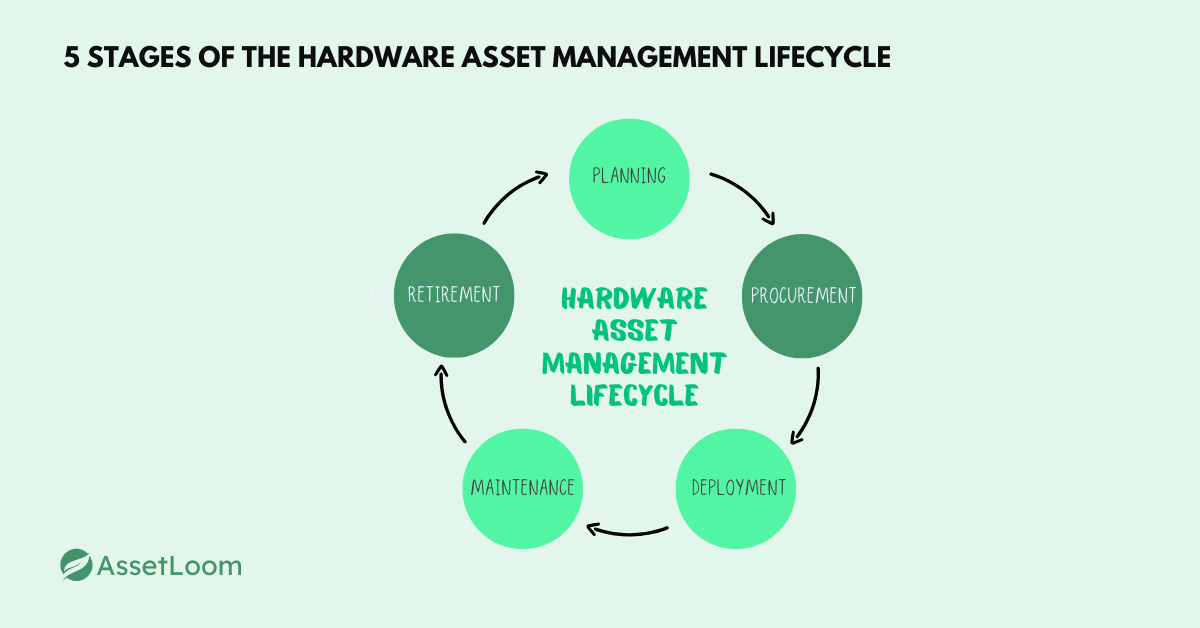
Stage 1: Planning
Planning launches the hardware asset management lifecycle, and it’s where you get ahead of the game. So, what’s it all about? It’s your chance to map out what hardware your business actually needs, no guesswork allowed. Here’s what you do:
- Identify hardware needs based on your goals.
- Set a budget that keeps spending in check.
- Make rules for tracking every piece of gear.
For example, you pick equipment that fits today and scales tomorrow. This stage is your blueprint for success.
Now, let’s talk about why planning is a big deal. First, it saves you money by stopping overbuying. Next, it cuts waste by ensuring hardware matches your systems. Basically, without this step, you’re risking chaos and extra costs down the road.
However, people mess this up sometimes. One mistake is skipping lifecycle planning, which leads to overspending fast. Another is ignoring compatibility, leaving you with gear that doesn’t work together. Avoid these, and you’re on the right track.
Stage 2: Procurement
Procurement is the next stop in the hardware asset management lifecycle, where plans turn into action. So, what’s the deal here? It’s all about getting the hardware you need without breaking the bank. Here’s how it works:
- Pick vendors and negotiate smart deals.
- Buy or lease gear like servers, laptops, or networking tools.
- Record details think serial numbers and warranties for tracking. For instance, you’re locking in equipment that fits your budget and goals. This stage is where the rubber meets the road.
Now, why should you care? First, good procurement keeps costs low by avoiding bad buys. Next, it sets up success by ensuring gear matches your needs. Basically, this step keeps the lifecycle smooth and saves you from headaches later.
But watch out, mistakes happen. One slip is not recording assets, so you lose track of them fast. Another is skipping maintenance plans, leaving you unprepared for upkeep. Dodge these, and you’re golden.
Stage 3: Deployment
Deployment is the third step in the hardware asset management lifecycle, where your gear finally gets to work. So, what’s happening here? It’s about putting hardware into action across your business. Here’s what you do:
- Install and set up equipment like computers or servers.
- Assign gear to teams or people who need it.
- Connect it to your IT network for smooth use.
For example, you’re getting laptops to employees or servers online fast. This stage brings your plans to life.
Now, why is deployment a big deal? First, it cuts downtime so work keeps moving. Next, it boosts efficiency by getting gear where it’s needed. In short, a solid rollout keeps the lifecycle humming and your team productive.
However, things can go wrong. One error is not monitoring gear, which leads to glitches. Another is losing track of who has what, causing waste. Skip these pitfalls, and you’re set.
Stage 4: Maintenance
Maintenance is the fourth step in the hardware asset management lifecycle, keeping your gear in top shape. So, what’s this all about? It’s making sure your hardware stays reliable over time. Here’s what’s involved:
- Update and fix equipment as needed.
- Manage warranties or service deals.
- Track use to see how it’s holding up.
For instance, you’re keeping laptops running smoothly or servers humming along. This stage is all about longevity.
Now, why does maintenance count? First, it prevents breakdowns that stop work cold. Next, it extends gear life, saving you replacement costs. Simply put, this step keeps the lifecycle strong and your budget happy. But slip-ups happen. One is skipping regular checks, leading to sudden failures. Another is not tracking use, so you miss gear sitting idle. Avoid these, and your hardware stays solid.
Stage 5: Retirement
Retirement wraps up the hardware asset management lifecycle, closing the loop on old gear. So, what’s the scoop? It’s about safely removing hardware that’s done its job. Here’s what you do:
- Wipe data to keep it secure.
- Recycle or resell equipment if possible.
- Update records to show it’s gone. For example, you’re clearing out old laptops without leaving risks behind. This stage ends things right.
Now, why does retirement matter? First, it protects against leaks by securing data. Next, it keeps you legal by meeting rules like privacy laws. In short, this step ensures the lifecycle finishes strong and safe. However, watch out for slip-ups. One is sloppy disposal, risking data breaches or fines. Another is not updating records, messing up audits. Skip these errors, and you’re good to go.
Best Practices for Managing the Hardware Asset Lifecycle
Want to make the hardware asset management lifecycle work perfectly for your business? Here’s how to do it with clear, simple steps that save time and money. Start by using one system, like HAM software, to keep an eye on all your gear (laptops, servers, printers, anything with a plug), so you always know where it is. Next, automate tasks like software updates or maintenance alerts to cut down on manual work and catch problems before they grow. For example, imagine spotting a failing server early instead of dealing with a crash later. These best practices make the difference, so check them out:
- Track everything in one place: Use a single tool to list all assets, making it easy to see what you have.
- Automate where you can: Set up tools to handle updates and send reminders, keeping things smooth.
- Check assets often: Run regular audits to make sure your records match reality and stay within the law.
- Train your team: Train staff on the rules so everyone knows how to handle gear properly.
- Plan for scalability: Build a system that grows as your company adds more tech or people.
- Prioritize security: Protect data with strict rules, especially when old gear gets retired.
- Measure performance: Look at how gear is used to cut waste and plan better buys.
By following these tips, you’ll keep your hardware management simple, safe, and smart every step of the way.
How AssetLoom Supports the Hardware Asset Management Lifecycle
We built AssetLoom for IT teams that have outgrown spreadsheet IT but don’t want a six-month implementation project. Here is how it fits into each stage of the hardware asset management lifecycle.
One record per device from day one
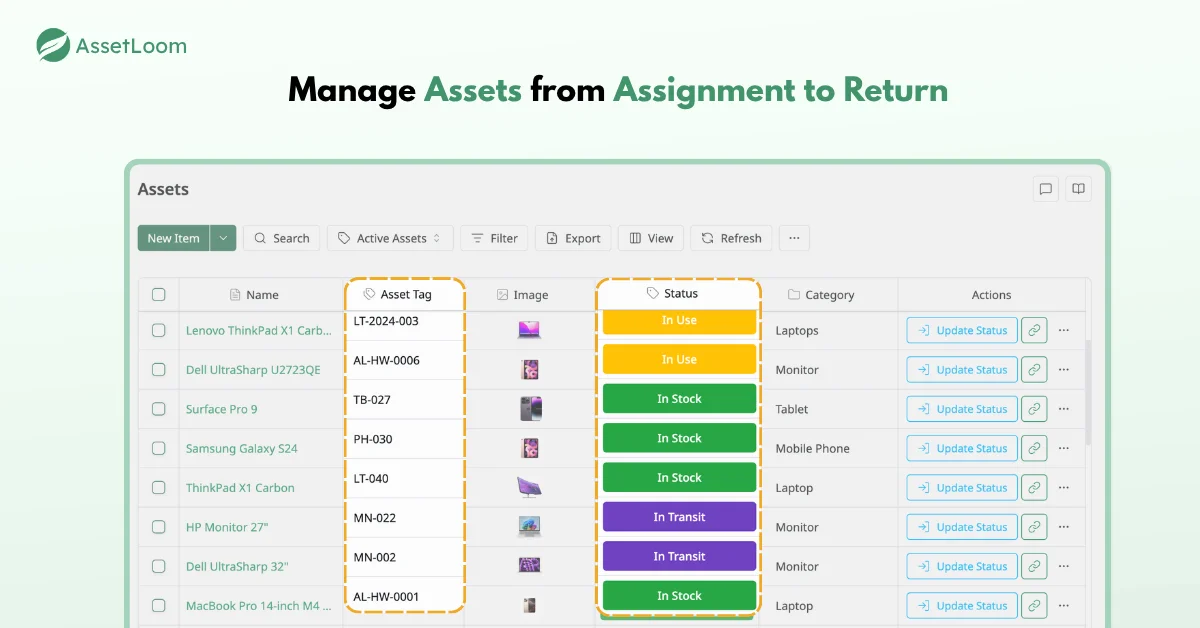
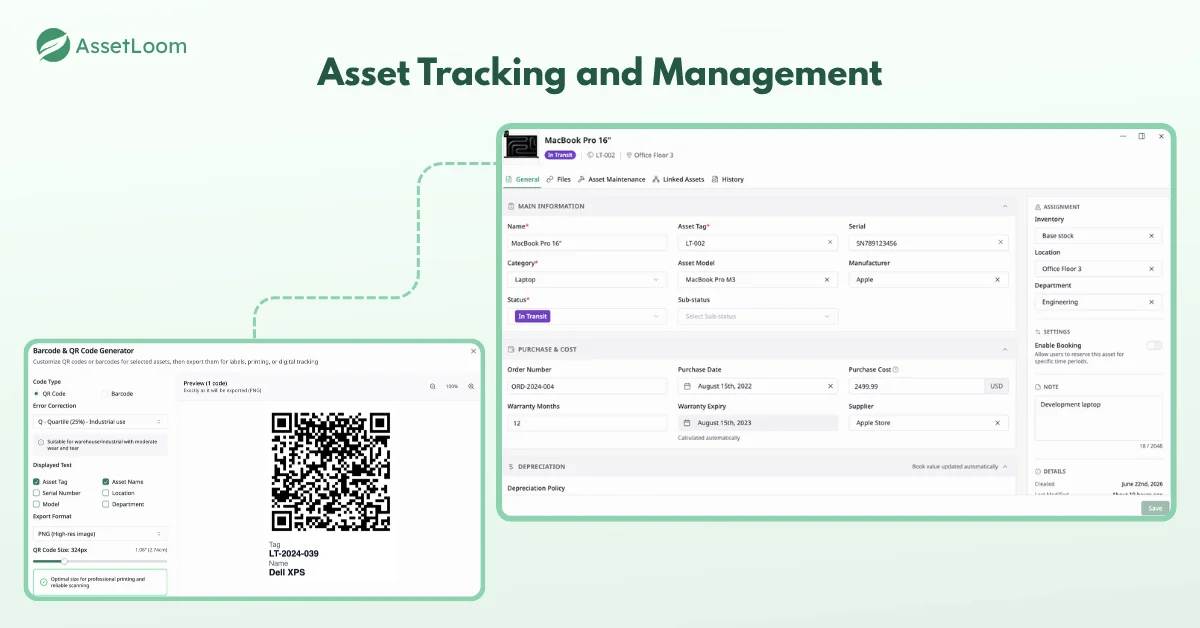
AssetLoom tracks hardware assets alongside the things that usually fall through the cracks, including accessories, components, consumables, and software licenses. The laptop, its dock, the replacement SSD, and the toner for the office printer can all live in one system instead of four tabs of the same spreadsheet.
Labels and mobile scanning for deployment
You can generate QR codes or barcodes in CODE128, CODE39, or EAN13 format for your asset tags, print them, and stick them on before a device leaves IT. At handover, scan the label with your phone to check the device out to a person. When it comes back, scan it again to check it in. It’s the fastest way we know to make a hallway handover leave a trail.
Keep records current with Microsoft Intune and Jamf Pro
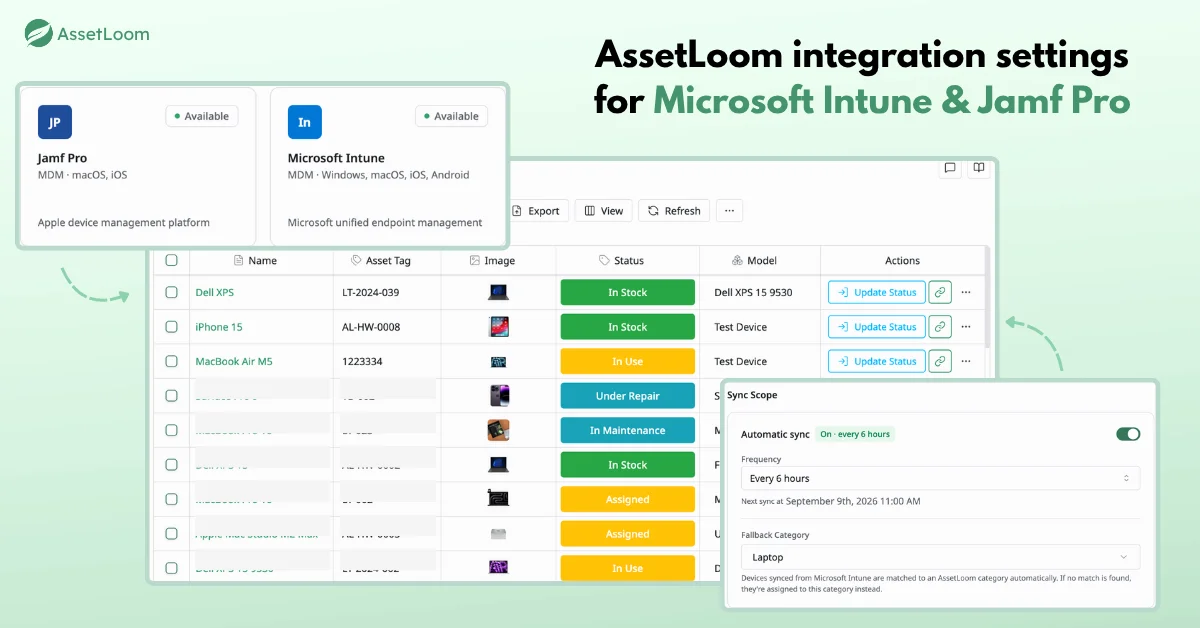
If you already manage devices in Microsoft Intune or Jamf Pro, AssetLoom integrates with both. Devices you manage there can feed into your asset records instead of being retyped by hand. That includes remote laptops that rarely visit the office, which are exactly the ones spreadsheets lose first.
A clean trail at retirement
AssetLoom doesn’t wipe devices. Use your approved sanitization tools for that. What AssetLoom does is keep the asset record and its check-in and check-out activity. That lets you show where a device went and who had it before it was retired.
Conclusion
Every IT team already runs the hardware asset management lifecycle, whether they call it that or not. Devices get planned, bought, handed out, fixed, and eventually retired. The difference between a calm audit and a panicked one is whether the record is kept up.
So don’t just learn the stages. Watch the handoffs between them, because that’s where devices disappear. Create records early, label what leaves IT, update the record when anything changes, and document retirement with proof. Start with one record per device and let it follow that device through every stage of the hardware asset management lifecycle.
FAQs
1. How is the hardware asset management lifecycle different from IT asset management?
The hardware asset management lifecycle focuses on physical devices such as laptops, servers, monitors, and network equipment. IT asset management is broader. It also covers software licenses, subscriptions, and cloud resources. Most teams run the hardware lifecycle as one part of a wider ITAM program, often in the same tool.
2. How long does a laptop stay in the hardware asset management lifecycle?
It depends on the device, workload, and budget. Many organizations plan laptop refreshes every three to five years, and they often keep servers and network gear longer. Condition and cost are better signals than age. When repairs, downtime, or security limits outweigh a device’s value, it’s time to plan retirement.
3. Can I manage the hardware asset management lifecycle in a spreadsheet?
You can, for a while. A spreadsheet works for a handful of devices and one person who keeps it updated. It breaks down when several teams edit it, devices change hands often, or an audit asks for history. That’s usually the point where a dedicated asset management tool pays for itself.
4. What should happen to asset records after a device is retired?
Keep them. Mark the asset as retired and store the sanitization method, date, responsible person, and any disposal or recycling certificate. Auditors, security teams, and insurers may ask what happened to a device years after it left your building, and a deleted record can’t answer that question.
5. Does AssetLoom wipe data from retired devices?
No. AssetLoom doesn’t perform data sanitization. Use approved wiping or destruction methods that match your data sensitivity and policies. AssetLoom helps by keeping the asset record and its check-in and check-out activity, so your retirement process leaves a clear trail.