7 Best Equipment Scheduling Software Tools for 2026
Compare 7 equipment scheduling software tools for 2026. See pricing, features, and reviews to find the right equipment management software for your team.
Comparing equipment scheduling software takes time, so we tested seven tools for reservations, tracking, and maintenance to help IT and operations teams pick the right one, save budget, and stop double-booking gear.
Equipment scheduling software shows what is free, what is booked, and when it will be available next. Not every tool solves the same problem: some focus on reservations, others on maintenance. We built this comparison to make that difference clear, including where our own product, AssetLoom, fits and where it does not.
Top 7 Equipment Scheduling Software at a Glance
This table lists seven equipment scheduling software options by use case, features, price, and rating. Use it to shortlist tools before you read the full reviews below.
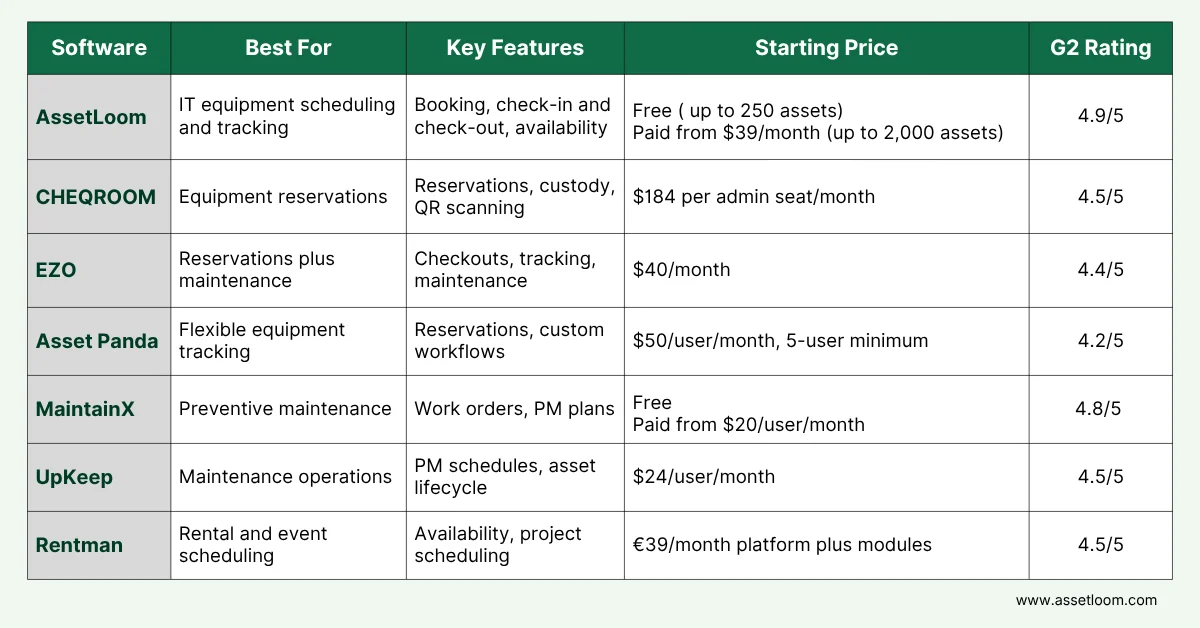
Starting prices can be misleading. Some tools charge a flat fee, while others charge per user, require a minimum number of seats, or limit how many assets you can track. Asset Panda starts at $50 per user but requires five users, so the minimum is $250/month. CHEQROOM charges only for admin seats, while EZO’s entry price covers a limited number of assets. Compare the real cost based on your team size and asset count, not just the starting price.
The 7 Best Equipment Scheduling Software Compared
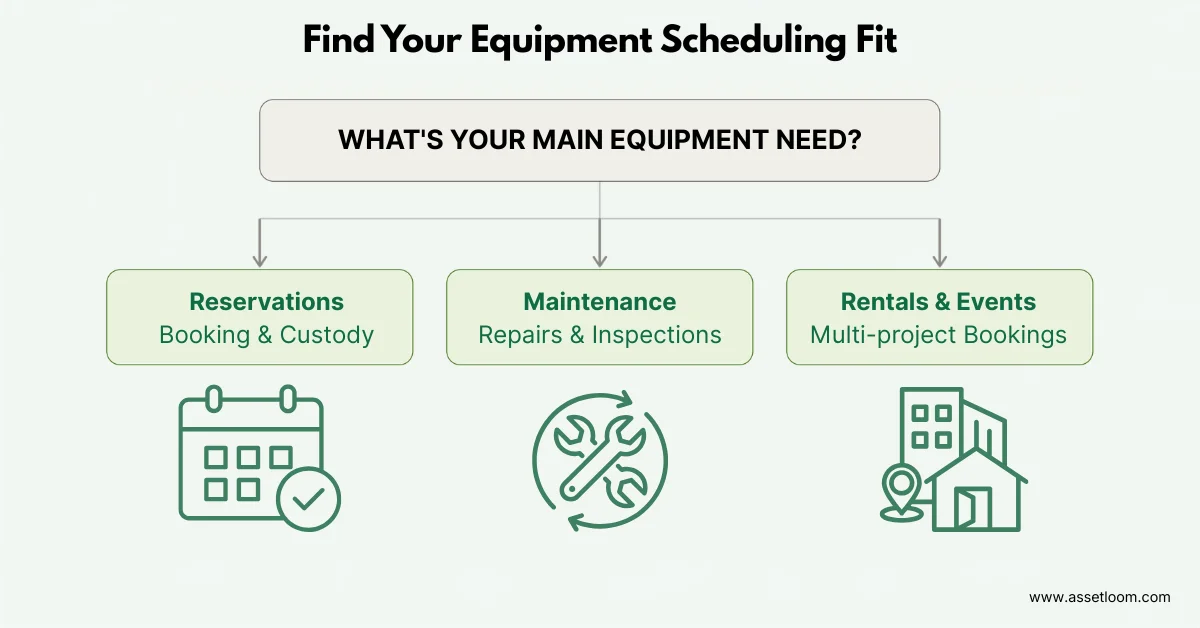
The right equipment scheduling software depends on what you need to manage. Some tools are built for reservations and check-outs, while others focus more on maintenance, asset tracking, or rental operations.
Note: Free plans, limits, and pricing policies may change over time. Check each provider’s official website or contact the vendor for the latest information.
1. AssetLoom
AssetLoom is an IT AssetOps platform that gives your team total control over hardware, software, contracts, and workflows. Scheduling lives on the same asset record as ownership and history, so a booking is never disconnected from who owns the device or what state it is in.
Key features:
- Equipment booking and reservations
- Check-in and check-out
- Asset status and custody tracking
- QR and barcode workflows
- Reporting and dashboards
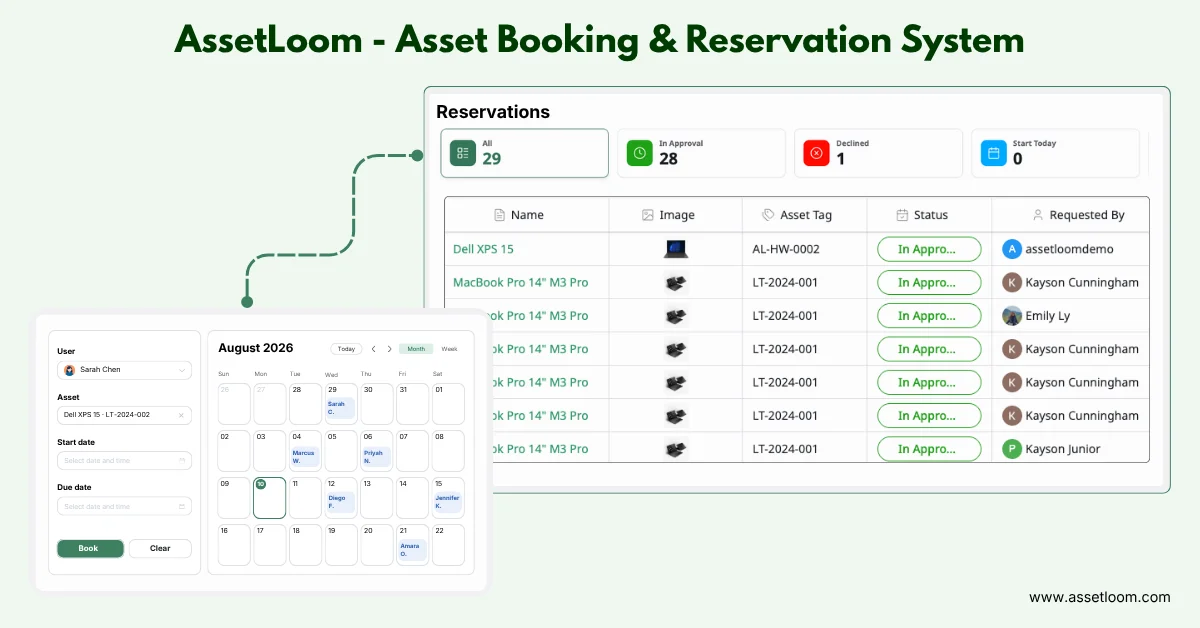
Pricing: Free plan covers up to 250 assets, including booking and check-in and check-out. Paid plans start at $39/month (up to 2,000 assets), $119/month ( up to 10,000 assets), and $279/month (up to 30,000 assets), all billed annually.
Pros:
- Booking and asset lifecycle tracking live in one system
- Free plan includes booking and check-in/check-out, not just basic tracking
- Priced by asset count, not per user, which suits teams with more devices than admins
Cons: Not built for industrial maintenance or rental businesses that need quoting and invoicing
Best for: IT teams that want scheduling and asset control in one place, without per-user pricing.
2. CHEQROOM
CHEQROOM is built around reservations, check-outs, and custody. Universities, studios, and AV teams use it to track high-value gear that needs a clear chain of custody.
Key features:
- Reservations and calendar-based booking
- Check-in and check-out with custody tracking
- QR code scanning
- Long-term loan management
Pricing: No free plan, 7-day trial. Starts at $184/month per admin seat, billed annually, with unlimited regular users and items on every plan. Business runs $275, and Enterprise runs $367 per admin seat.
Pros:
- Purpose-built reservation workflow rather than a general asset tool retrofitted for scheduling
- Unlimited regular users and items, so cost does not grow with headcount
Cons: No free plan. Entry price is high for very small teams or tight budgets
Best for: Teams that need a dedicated reservation and custody system and can absorb the per-seat cost.
3. EZO
EZO overlaps closely with AssetLoom. It combines asset tracking, reservations, and checkouts, and adds maintenance features on higher tiers.
Key features:
- Asset tracking across locations
- Reservations and checkouts
- QR and barcode support
- Utilization reporting
- Maintenance features on higher tiers
Pricing: $40/month (Essential), $55/month (Advanced), $65/month (Premium). These starting prices cover roughly 100–250 tracked items with unlimited users; cost rises as tracked-item volume grows, so compare at your actual asset count rather than the headline price.
Pros:
- Broadest feature set: tracking, reservations, and maintenance in one system
- Tiered pricing lets teams add maintenance only when needed
- Unlimited users on every tier
Cons:
- Maintenance capability is not included at the entry tier
- Pricing scales with tracked-item count, so the real cost at higher asset volumes can end up above the entry-tier headline price
Best for: Teams that want reservations and tracking now, with room to add maintenance later.
4. Asset Panda
Asset Panda stands out for custom fields and workflows, plus a reservation module with double-booking prevention. It suits teams with unusual equipment that does not fit a standard template.
Key features:
- Reservation management with double-booking prevention
- Highly customizable fields and workflows
- Barcode tracking
- Role-based access across multiple branches
Pricing: Starter is $50/user/month, billed annually, with a 5-user minimum, so the real floor is $250/month for up to 1,000 assets. Business+ is $60/user/month with a 10-user minimum, or $600/month, for up to 5,000 assets. Collaborator (view-only) seats cost $10 each.
Pros:
- Deep customization for unusual equipment types
- Centralized visibility across multiple branches
- Strong reputation for ease of use and mobile barcode scanning
Cons:
- Seat minimums mean the real starting cost is well above the $50 headline price
- Annual billing only, no month-to-month option
- Reviewers note old reservations pile up and must be deleted one by one
Best for: Teams with non-standard equipment that need heavy customization and can commit to annual billing
5. MaintainX
MaintainX treats equipment scheduling as a maintenance question. It focuses on when equipment needs service, not who has it right now.
Key features:
- Recurring and repeating work orders
- Preventive maintenance plans
- Procedures and checklists with signature capture
- Maintenance analytics and reporting
Pricing: Basic is free, with unlimited work orders but a cap on repeating work orders and one month of advanced analytics. Essential is $20/user/month billed annually and removes the repeating-work-order cap. Premium is $65/user/month billed annually.
Pros:
- Genuinely free tier, not a time-limited trial
- Strong mobile experience for technicians in the field
Cons:
- Reservation-style booking is not the focus
- Parts and inventory management, purchase orders, and API access require Premium
Best for: Maintenance teams whose scheduling problem is really about service timing, not reservations.
6. UpKeep
UpKeep is a maintenance management system aimed at maintenance and reliability teams rather than office equipment.
Key features:
- Preventive maintenance scheduling (Premium and up)
- Work order management
- Asset lifecycle tracking on higher tiers
- Offline mobile mode
Pricing: Essential is $24/user/month, Premium is $55/user/month. Professional and Enterprise need a custom quote.
Pros:
- Strong mobile app, often cited as a differentiator
- Unlimited work orders and locations even on the entry tier
Cons:
- Advanced reporting and custom fields are gated to higher tiers
- Per-user pricing adds up as the team grows
Best for: Mobile-first maintenance teams ready to budget for Premium to get preventive scheduling.
7. Rentman
Rentman covers a different job: scheduling equipment across rental jobs and events, with quoting built in.
Key features:
- Equipment availability and shortage tracking across projects
- Project-based scheduling
- QR and barcode check-in/check-out
- Multi-warehouse support
Pricing: platform base fee is €39/month flat. Inventory and crew modules start from €14/power user/month each, so total cost depends on how many modules and seats you need.
Pros:
- Only tool on this list built specifically for rental and event workflows
- Modular pricing lets you pay only for the modules you use
Cons:
- EUR-native, modular pricing is harder to estimate up front than a flat number
- Not a fit for teams that mainly need office or IT equipment booking
Best for: AV, event, and rental production companies scheduling equipment across projects.
Which Equipment Scheduling Software Fits Your Workflow?
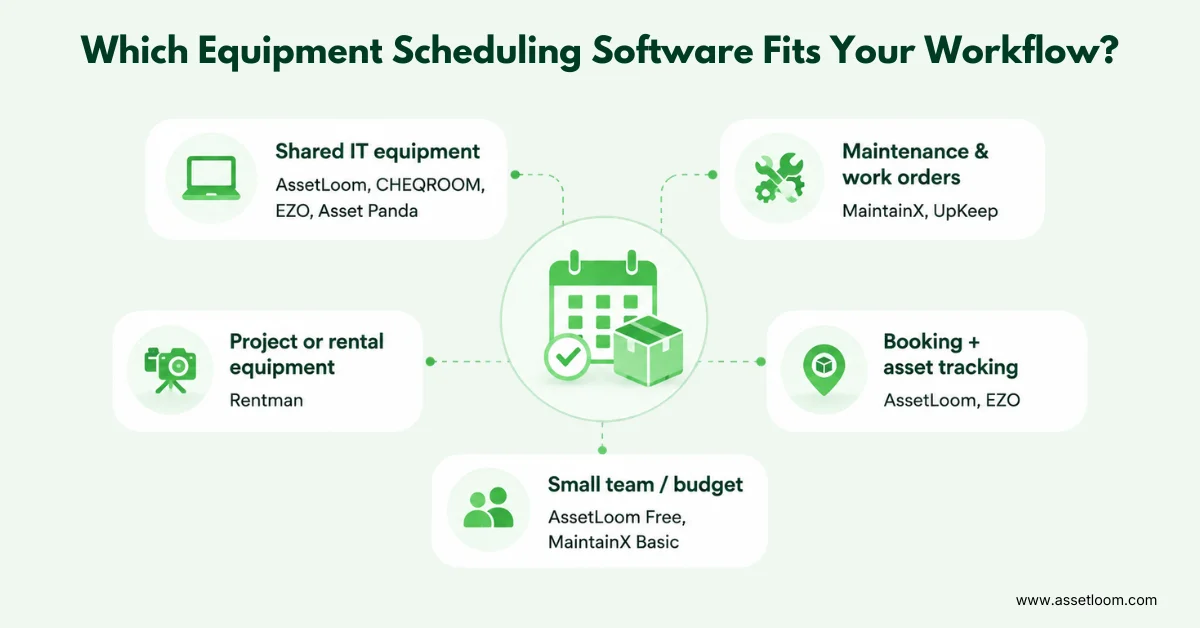
The best equipment scheduling software should match how your team actually manages equipment, not just offer the longest feature list. Use your main workflow to narrow down the options:
- For shared IT equipment: Choose AssetLoom, CHEQROOM, EZO, or Asset Panda if your main needs are booking equipment, checking availability, assigning items to employees, and tracking returns.
- For preventive maintenance and work orders: MaintainX or UpKeep are better fits when equipment availability depends on inspections, repairs, service schedules, and technician work.
- For project-based or rental equipment: Rentman is a stronger choice when equipment needs to be scheduled across client projects, events, warehouses, or rental jobs.
- For booking plus full asset tracking: AssetLoom or EZO work well if you want reservations connected to ownership, location, custody, asset history, and the wider equipment lifecycle.
- For small teams on a budget: AssetLoom Free or MaintainX Basic are practical starting points if you want to test an equipment scheduling software workflow without committing to a large paid plan upfront.
Final Thoughts
The right equipment scheduling software depends on how your team uses equipment. For booking and custody, prioritize reservations, check-in/check-out, and asset tracking. For maintenance-heavy workflows, focus on preventive maintenance and work orders.
Compare your shortlist against your budget, team size, and daily workflow before you commit. If you manage shared IT equipment, AssetLoom combines booking, custody, and asset tracking in one platform, with a free plan to get started.
FAQs
1. Do I need equipment scheduling software or equipment management software?
Choose scheduling software if your main problem is knowing when equipment is available and who can use it. Choose equipment management software if you also need to track ownership, location, custody, maintenance, and the full asset lifecycle. Platforms such as AssetLoom and EZO combine both areas.
2. What happens when two people need the same equipment?
Tools like AssetLoom, CHEQROOM, Asset Panda, EZO, and Rentman focus on reservations and can help prevent double bookings. MaintainX and UpKeep focus more on maintenance schedules and work orders than employee equipment booking.
3. Can I see who has a piece of equipment right now?
Yes, if the software supports check-in/check-out or custody tracking. This is a core workflow in AssetLoom, CHEQROOM, EZO, Asset Panda, and Rentman, while it plays a smaller role in maintenance-focused tools.
4. What does equipment scheduling software actually manage?
It helps teams see when equipment is available, reserved, checked out, or unavailable, so they can plan shared resources without relying on spreadsheets, emails, or group chats.
Need broader IT asset management beyond booking and scheduling? Read our comparison of the best IT asset management software.
5. Which option makes sense if I want to start for free?
AssetLoom’s Free plan supports up to 250 assets with booking and check-in/check-out included. MaintainX also has a free Basic plan, but it is better suited to maintenance-focused teams.