Top Tools for Managing Contract Expiration Reminders in 2026
Discover the top 5 tools for managing contract expiration reminders in 2026. Learn about their features and which is best for your business.
A missed contract renewal can quickly turn into unexpected costs, service disruptions, or compliance risks. The challenge is that many teams still track contract dates manually across spreadsheets, emails, and different systems, making it easy for important deadlines to slip through the cracks.
Contract expiration reminder tools help businesses stay ahead by automating notifications, centralizing contract information, and making renewal management more organized. After reviewing several options, here are the five best tools that we highly recommend for your teams.
1. AssetLoom
AssetLoom is an IT asset management platform that helps organizations track hardware, software licenses, and IT resources throughout their lifecycle. It provides centralized license visibility, automated renewal reminders, and flexible access control to help IT teams stay organized and avoid unexpected license issues.
Best For: Organizations and teams that need a centralized way to manage software licenses, track renewals, and maintain visibility across their technology assets.
Related article: The Importance of Software License Management for Businesses
Key Features:
- Custom License Renewal Reminders: AssetLoom helps teams stay ahead of license expiration dates with configurable reminders. IT teams can set notifications based on their renewal process, such as 90, 60, or 30 days before expiration, giving them enough time to review usage, negotiate renewals, or make changes.
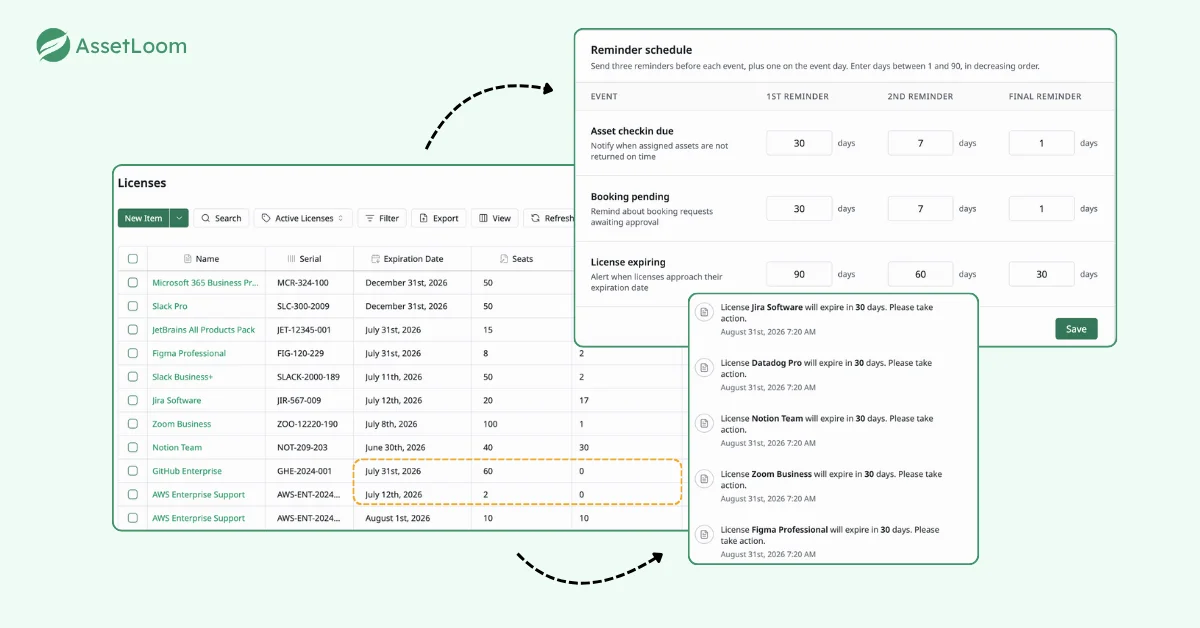
- Centralized License Management: Manage all software licenses in one organized view. Teams can quickly check license details, including vendors, expiration dates, assigned users, and license status, instead of tracking information across multiple spreadsheets or systems.
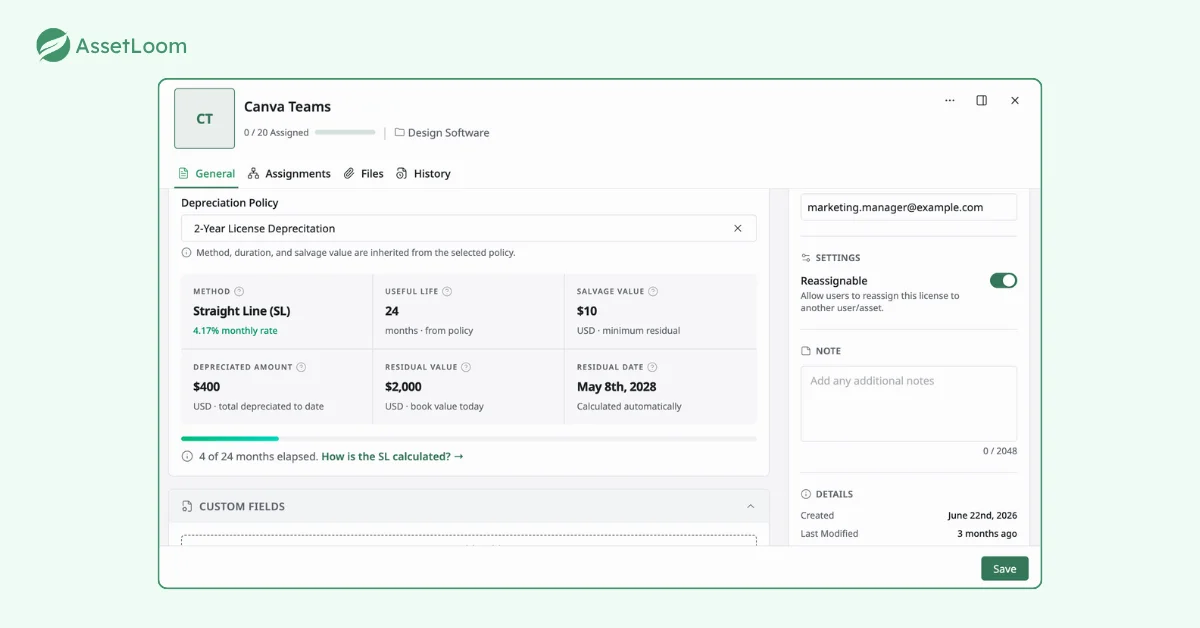
- License Depreciation Tracking: Track the decreasing value of software licenses over time with built-in depreciation calculations. AssetLoom helps teams understand the remaining financial value of their licenses, monitor asset costs throughout their lifecycle, and make better decisions about renewals, upgrades, or replacements.
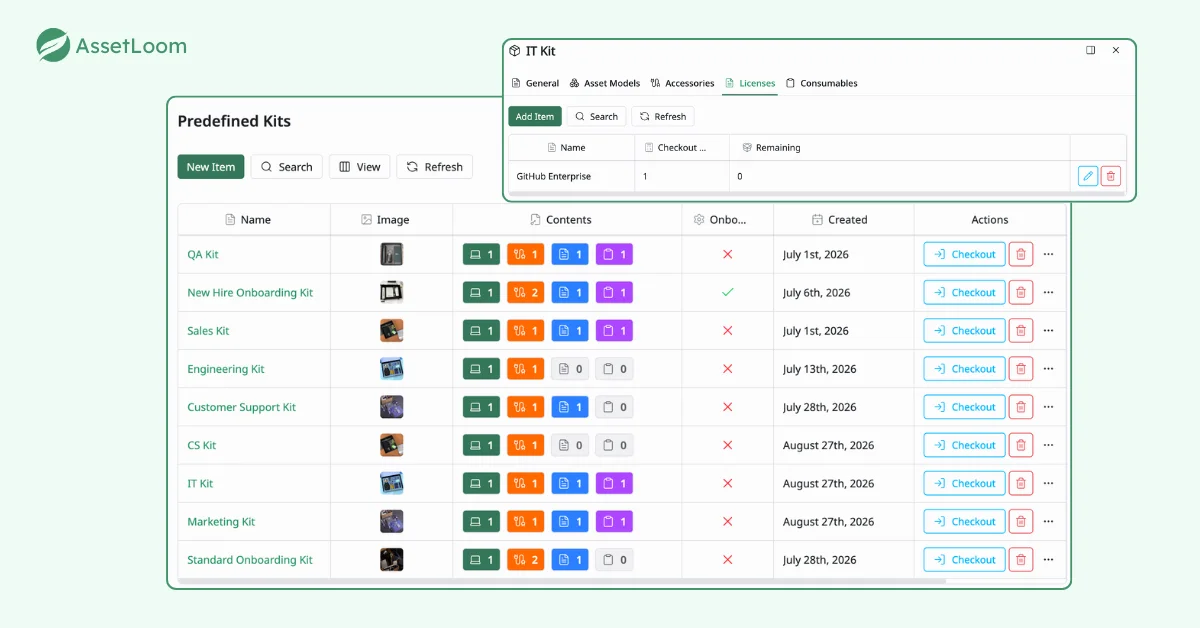
- Predefined License Kits: Simplify license assignment by creating predefined kits that bundle commonly used software licenses together. This makes onboarding employees or assigning standard software packages faster and more consistent.
- Access Control and Permissions: Control who can view, edit, or manage license information. This helps protect sensitive software agreements while ensuring the right teams have access to the data they need.
Advantages:
- Provides a centralized view of software licenses, making it easier to monitor ownership, usage, and renewal timelines.
- Custom reminders help reduce the risk of missed renewals and unexpected service interruptions.
- Predefined license kits simplify repetitive assignment processes, especially for teams managing many employees or devices.
Read more: SaaS License Management Software: The Key to Efficient Software Management
Disadvantages:
- Businesses with only a few contracts might find AssetLoom’s features more than they need, as it’s designed for more complex setups.
- Advanced automation rules might not be available at the moment
2. Juro
Juro is a platform that uses AI to manage the entire contract process, designed for legal and business teams. It tracks expiration dates and supports contract creation and teamwork.
Best For: Legal teams or growing businesses that need a full contract management system with reliable reminders and teamwork features.
Key Features:
- Expiration Notifications: Juro sends email alerts for contracts nearing expiration, with options to set when you want to be notified (e.g., 30 or 60 days before). A dashboard shows all contract statuses—active, pending, or expiring—with filters to sort them.
- AI Data Extraction: Juro’s AI pulls out key contract details, like expiration dates, parties, or clauses, so you don’t have to enter them manually. This makes contracts easier to search and manage.
- Team Editing: A browser-based editor lets multiple team members work on contracts at the same time, with version tracking to see changes and comments.
- Integrations: Juro connects with Slack, Microsoft Teams, Salesforce, and other CRMs, so you can get notifications or update contracts within tools you already use.
- Contract Analytics: The platform provides reports on contract details, like how often contracts are renewed or how long negotiations take, to help with planning.
- eSignature Support: Juro includes built-in eSignature tools, making it easier to sign renewals or new contracts.
- Custom Workflows: You can set up rules to automate tasks like sending reminders or routing contracts for approval.
Advantages:
- The AI features save time by automatically pulling out important contract information.
- The team editing tools make it easier for groups to work on contracts together.
- Connections with other tools make it flexible for different business setups.
Disadvantages:
- Some users mention that email notifications can sometimes be delayed, so you might need to check manually.
- More advanced features, like detailed reports, may only be available in higher-priced plans.
3. Contract Hound
Contract Hound is a simple tool made for small businesses and non-profits. It focuses on basic features to track contract expirations without complicated setups.
Best For: Small businesses or non-profits that need a simple, low-cost way to track contract expirations.
Key Features:
- Email Notifications: Sends automatic email alerts 30 days before a contract expires, with options to send to multiple team members. The platform is working on adding SMS notifications for more flexibility.
- Easy Contract Uploads: You can upload contracts using a drag-and-drop interface, supporting common file types like PDF or Word, which makes setup quick.
- Approval Processes: Allows you to set up simple approval steps for contract renewals or changes, with notifications sent to the right people when action is needed.
- Centralized Storage: Contracts are stored in a secure, cloud-based system with basic search options based on contract name, date, or vendor.
- User Permissions: You can control who sees or edits contracts by setting access levels for team members.
- Basic Reports: Creates simple reports on contract statuses and upcoming expirations, useful for small-scale tracking.
Advantages:
- The platform is easy to use and set up, even for people with little technical experience.
- Its low cost makes it affordable for small businesses and non-profits.
- Users often rate it highly for being simple and straightforward.
Disadvantages:
- It doesn’t have the advanced automation or connections to other tools that AssetLoom or Juro offer.
- Businesses with complex contract needs might find it too basic.
4. Expiration Reminder
Expiration Reminder is a tool focused on tracking expirations for contracts, licenses, and certifications. It’s popular in industries like healthcare and education, where meeting regulatory standards is important.
Best For: Businesses in regulated industries, like healthcare or education, that need reliable expiration tracking and compliance support.
Key Features:
- Custom Notifications: Sends email alerts for expirations, with options to set when you want to be notified (e.g., 15, 30, or 60 days). The dashboard shows current, expiring, and expired items, with color-coded markers for quick review.
- Compliance Reports: Creates detailed reports for audits, meeting standards like HIPAA or GDPR, with options to export in PDF or CSV formats.
- Data Import: Allows you to upload contract data from Excel or CSV files, making it easier to manage large numbers of contracts.
- Integrations: Works with ERP, CRM, and financial systems like QuickBooks or SAP, so expiration tracking fits into your broader business processes.
- Mobile Access: Includes a mobile app for iOS and Android, letting you check contract statuses and receive notifications on the go.
- Multi-Document Tracking: Manages not just contracts but also certifications, licenses, and other time-sensitive documents in one place.
Advantages:
- Strong compliance features make it a good fit for industries with strict regulations.
- The dashboard gives a clear view of expirations for the year ahead.
- A 14-day free trial is available without needing payment details.
Disadvantages:
- Its automation features aren’t as advanced as AssetLoom’s, so some manual setup may be needed.
- It doesn’t offer much for contract negotiation or teamwork compared to full contract management platforms.
5. ContractWorks
ContractWorks is a cost-effective contract management tool that offers a balance of usability and features, including expiration reminders and contract collaboration, suitable for businesses of different sizes.
Best For: Businesses looking for an affordable, easy-to-use contract management system with reliable reminders and teamwork features.
Key Features:
- Renewal Notifications: Sends customizable email alerts for contract renewals and important dates, with options to adjust when and to whom notifications are sent.
- AI Contract Analysis: Uses GPT-3 to simplify complex contract language, highlight key terms like expiration dates, and suggest clauses for new contracts.
- Team Editing: Offers a browser-based editor for real-time contract changes, compatible with Microsoft Word, with version control to track edits.
- Secure Storage: Provides SOC 2-compliant storage with full-text search, metadata tagging, and audit trails for compliance and accountability.
- Custom Dashboards: Lets you create personalized views of contract data, such as upcoming expirations or contracts by vendor, for better organization.
- Reporting Tools: Generates detailed reports on contract statuses, renewal trends, and compliance metrics, which can be exported for reviews.
Advantages:
- Easy to set up and use, with quick contract approval processes.
- More affordable than many other large-scale contract management tools.
- Works well for both small and larger businesses.
Disadvantages:
- Advanced reporting and analytics may require more expensive plans.
- Doesn’t include built-in eSignature tools, so you’ll need to use a separate service like DocuSign.
Choosing the Right Tool
Choosing a contract expiration reminder tool is not only about finding a system that sends notifications before deadlines. The better question is whether the tool helps your team build a reliable process for managing contracts, licenses, and renewals over time.
Business Size and Needs
Start by looking at what you actually need to manage. A company with only a handful of contracts may only need a simple reminder system. However, organizations managing hundreds of software licenses, vendors, and IT assets usually need more than expiration alerts. They need visibility into ownership, usage, costs, and renewal history to make better decisions.
Connections to Other Tools
The next consideration is how the tool fits into your existing workflow. Renewal management often involves multiple teams, including IT, procurement, finance, and business owners. A solution that connects with your current tools can reduce manual follow-ups and make it easier to turn upcoming renewals into actionable tasks.
Automation Abilities
Automation is another important factor. The value of these tools is not just reminding people about deadlines, but reducing the chance of human error. Features such as custom reminder schedules, automated workflows, and status tracking help teams stay proactive instead of reacting when a contract is about to expire.
Access Control
As your organization grows, access control and reporting become increasingly important. Different teams may need different levels of access, while managers may need reports to understand software spending, renewal trends, and future costs.
Ultimately, the right tool depends on whether you need a simple expiration tracker or a broader platform that supports the entire lifecycle of your contracts and software assets. Choosing a solution that matches your current needs while supporting future growth can help prevent missed renewals, reduce unnecessary costs, and improve operational visibility.
FAQs
1. What should businesses look for in a software license management tool?
A good software license management tool should provide visibility into license ownership, usage, costs, and renewal timelines. Key capabilities include centralized license tracking, automated reminders, reporting, access controls, and integration with existing IT workflows. The right tool helps teams reduce manual tracking, maintain compliance, and make better decisions about software investments.
2. How can companies avoid paying for unused software licenses?
Companies can reduce unnecessary license costs by regularly reviewing license assignments, monitoring usage, and removing licenses from inactive users or outdated systems. A centralized license management system helps teams identify unused or underused licenses before renewal periods.
3. Who should manage software license renewals in an organization?
Software license renewals are usually a shared responsibility between IT teams, procurement, and finance. IT teams review technical needs and usage, procurement handles vendor discussions, and finance evaluates costs and budget impact.
4. What information should businesses track for each software license?
A complete software license record should include vendor details, license type, purchase date, renewal date, cost, assigned users or devices, contract information, and usage details. Keeping this information updated helps teams maintain compliance and make better renewal decisions.
5. How early should businesses prepare for software license renewals?
Many organizations begin reviewing important software licenses 60–90 days before expiration. This gives teams enough time to evaluate usage, review alternatives, negotiate with vendors, and avoid unexpected service interruptions.
Conclusion
Contract expiration reminders are essential to avoid disruptions and meet compliance requirements. AssetLoom is the top choice because it combines reliable reminders with automatic task creation in Jira, and its features work for organizations of all sizes, from small startups to large enterprises.
Juro and ContractWorks offer full contract management systems for teams needing collaboration, while Contract Hound and Expiration Reminder are better for smaller businesses or those with compliance needs. By choosing the right tool, you can stay on top of deadlines, reduce risks, and keep contracts organized in 2025.
Explore AssetLoom License Management and simplify your software license operations.