Top Cloud Asset Management Software for Modern Businesses (2026 Updated)
Compare the top cloud asset management tools in 2026, including pricing, key features, and which type of team each one fits best.
Cloud asset management empowers organizations to maintain comprehensive visibility and control over their diverse asset portfolios. In the modern business environment, assets are increasingly distributed, encompassing both physical hardware and virtual cloud resources. Therefore, choosing the best-fit cloud asset management software is paramount.
Cloud asset management software has emerged as a critical tool for organizations seeking to streamline operations, reduce costs, and enhance security. This article will help you explore the top 10 CAM solutions, comparing their pricing, features, and suitability for various business needs.
Criteria for comparison:
- Pricing: Cost-effectiveness, free tiers, and trial availability.
- Features: Asset tracking, QR/barcode support, booking/allocation, automation, and integrations.
- Best Fit: Ideal user demographics and industry applications.
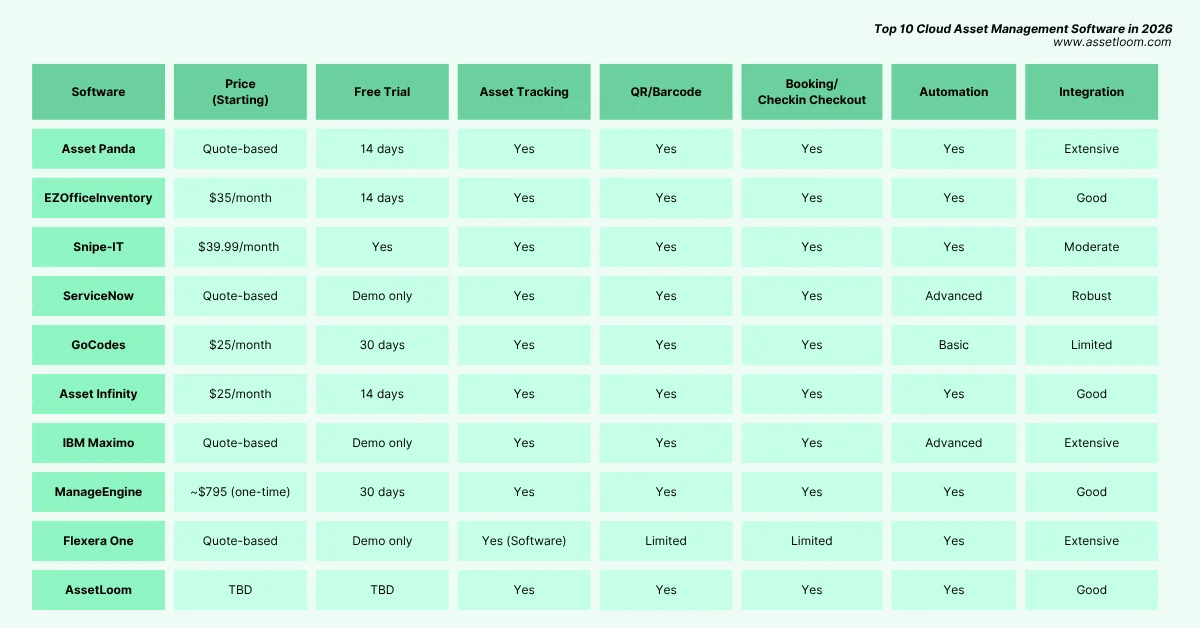
1. Asset Panda
Asset Panda is one of the most popular Cloud asset management software in the market. The flexibility and mobile app support make Asset Panda a practical choice for teams needing simple Cloud asset tracking.
- Pricing:
- Quote-based pricing (customized per organization); contact sales for details.
- Discounts are available for multi-year contracts, educational, and non-profit organizations.
- Free trial: 14-day free trial available.
- Features:
- Asset Tracking: Robust tracking for physical and digital assets across multiple locations using a centralized cloud platform. Tracks asset lifecycle from procurement to disposal.
- QR/Barcode: Supports QR code and barcode scanning via mobile apps (iOS/Android) for real-time updates.
- Asset Booking/Allocations/Check-in Check-out: Includes check-in/check-out features and asset reservation capabilities, with an availability calendar.
- Automation Workflow: Offers automated workflows for maintenance schedules, alerts, and inventory re-ordering based on stock levels.
- Integration: Integrates with Zendesk, Jira, Google Suite, OneDrive, Okta, and more for seamless workflow management.
- Best Fit For: Small to medium-sized businesses (SMBs) needing a flexible, user-friendly solution with mobile accessibility. Ideal for industries like education, construction, and IT with diverse asset types.
2. EZOfficeInventory
EZOfficeInventory is a dynamic cloud-based solution designed to streamline asset and inventory management. Its accessibility and robust tracking capabilities make it a go-to for organizations seeking efficiency across locations.
- Pricing:
- Starts at $35/month for up to 250 assets. Additional pricing tiers available based on asset volume.
- Free trial: 14-day free trial offered.
- Features:
- Asset Tracking: Tracks equipment, tools, and inventory with real-time updates across web and mobile platforms.
- QR/Barcode: Supports QR, barcode, and RFID scanning via mobile apps for efficient asset management.
- Asset Booking/Allocations/Check-in Check-out: Features check-in/check-out, asset grouping, and reservations for streamlined allocation.
- Automation Workflow: Customizable alerts and notifications for asset availability, maintenance, and returns.
- Integration: Integrates with Jira Service Desk, Zendesk, Google Suite, Dropbox, and many others, enhancing operational connectivity.
- Best Fit For: Enterprises and SMBs that need detailed inventory and equipment management, especially in manufacturing, education, and healthcare.
3. Snipe-IT
Snipe-IT is an open-source cloud asset management software that simplifies IT asset tracking for budget-conscious teams. Its clean interface and flexible hosting options make it a standout for organizations seeking cost-effective control over assets and licenses.
- Pricing:
- Free for the self-hosted version (requires setup on your own server). Cloud-hosted plans start at $39.99/month (Basic Hosting), with Small Business Hosting at $99.99/month and Dedicated Hosting at $249.99/month (billed monthly).
- Free trial: No official trial for hosted plans, but the self-hosted version is free to test indefinitely.
- Features:
- Asset Tracking: Tracks hardware, software licenses, accessories, and consumables across their lifecycle with a centralized dashboard.
- QR/Barcode: Built-in QR code generator and support for barcode scanning via mobile devices for check-in/check-out.
- Asset Booking/Allocations/Check-in Check-out: Enables asset assignments, check-in/check-out, and marking assets as requestable for user reservations.
- Automation Workflow: Offers email alerts for license expirations and basic automation for asset status updates (e.g., pending, ready to deploy).
- Integration: Supports Active Directory, Google Chat, Datastudio, and a JSON REST API for custom integrations.
- Best Fit For: Small to medium-sized businesses, particularly IT departments, needing an affordable, customizable solution for up to 5,000–10,000 assets.
4. ServiceNow IT Asset Management
IT Asset Management by ServiceNow is a powerhouse in enterprise-grade cloud asset management solutions for asset oversight. Its scalability and advanced automation make it a top choice for complex IT environments.
- Pricing:
- Custom pricing based on organizational needs (quote-based). No public pricing available; contact sales.
- Free trial: No official free trial, but demos can be scheduled.
- Features:
- Asset Tracking: Tracks hardware, software, and virtual assets across their lifecycle with detailed inventory views.
- QR/Barcode: Supports barcode and QR scanning for physical asset identification.
- Asset Booking/Allocations/Check-in Check-out: Offers procurement automation and allocation workflows.
- Automation Workflow: Extensive automation for compliance, license management, and lifecycle processes.
- Integration: Integrates with HR systems, IT tools, and third-party apps via a robust API ecosystem.
- Best Fit For: Large enterprises needing a scalable, customizable IT asset management solution integrated with broader IT operations.
5. GoCodes
GoCodes is a straightforward cloud asset management software focused on physical asset tracking. Its use of tamper-proof QR codes and GPS makes it ideal for teams needing simple, reliable solutions.
- Pricing:
- Starts at $25/month for up to 200 assets (billed annually). Higher tiers available for more assets.
- Free trial: 30-day free trial offered.
- Features:
- Asset Tracking: Tracks physical assets with GPS, providing real-time location data via cloud software.
- QR/Barcode: Uses patented, tamper-proof QR code labels for quick scanning and registration.
- Asset Booking/Allocations/Check-in Check-out: Supports check-in/check-out and maintenance tracking.
- Automation Workflow: Basic automation for maintenance alerts and reporting.
- Integration: Limited native integrations but offers API access for custom connections.
- Best Fit For: Small to medium businesses in industries like construction, education, and healthcare needing affordable, straightforward asset tracking
Modern asset tracking platforms help teams maintain visibility into their physical assets, from location tracking and identification to assignment and lifecycle management.
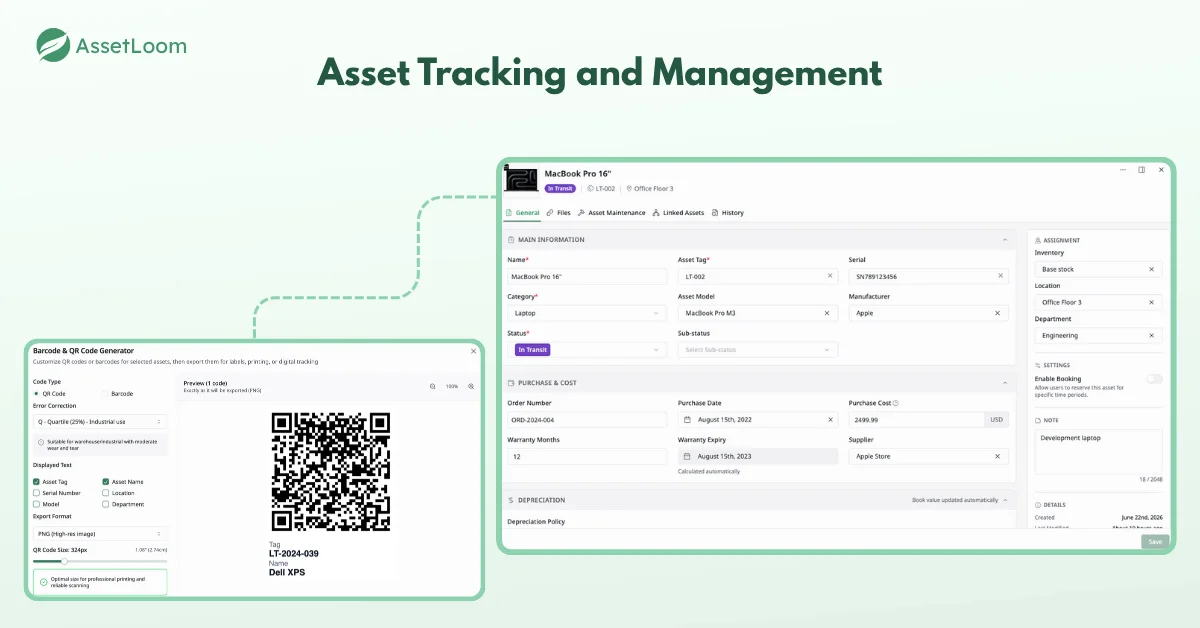
Example of asset tracking capabilities with AssetLoom, including asset details, status, assignments, and lifecycle information.
6. Asset Infinity
Asset Infinity is a versatile cloud-based platform designed to manage assets and inventory holistically. Its comprehensive tracking and modular approach appeal to organizations seeking tailored solutions.
- Pricing:
- Starts at $25/month for basic plans (pricing varies by features and asset volume).
- Free trial: 14-day free trial available.
- Features:
- Asset Tracking: Tracks assets across locations and departments with full lifecycle visibility.
- QR/Barcode: Supports QR, barcode, RFID, and NFC for precise tracking.
- Asset Booking/Allocations/Check-in Check-out: Includes check-in/check-out and transfer functionalities.
- Automation Workflow: Automates inventory re-orders, maintenance schedules, and alerts.
- Integration: Integrates with ERP systems and offers modules for purchases and helpdesk support.
- Best Fit For: Businesses of all sizes needing customizable asset and inventory management, particularly in logistics and manufacturing.
7. IBM Maximo
IBM Maximo is a leading cloud-based enterprise asset management solution powered by AI and analytics. Its advanced capabilities make it a premium choice for asset-intensive industries.
- Pricing:
- Quote-based pricing tailored to enterprise needs. No public pricing.
- Free trial: No free trial, but demos are available.
- Features:
- Asset Tracking: Enterprise-grade tracking for physical and IT assets with AI/ML insights.
- QR/Barcode: Supports QR and barcode scanning for asset identification.
- Asset Booking/Allocations/Check-in Check-out: Manages allocations and maintenance schedules.
- Automation Workflow: Advanced automation for predictive maintenance and workflow optimization.
- Integration: Connects with ERP, IoT devices, and other IBM solutions.
- Best Fit For: Large organizations in industries like manufacturing, utilities, and transportation needing scalable, high-end asset management.
8. ManageEngine AssetExplorer
ManageEngine AssetExplorer is a cloud asset management software with a focus on network discovery. Its affordability and configurability make it accessible for IT-centric teams.
- Pricing:
- Quote-based pricing, starting around $795 for perpetual licenses (one-time fee).
- Free trial: 30-day free trial available.
- Features:
- Asset Tracking: Tracks hardware and software assets with network discovery.
- QR/Barcode: Supports barcode scanning for physical asset management.
- Asset Booking/Allocations/Check-in Check-out: Tracks ownership and allocations within IT environments.
- Automation Workflow: Automates license compliance and asset discovery processes.
- Integration: Integrates with ManageEngine’s ITSM suite and third-party tools like Intune.
- Best Fit For: IT departments in medium to large businesses needing detailed software and hardware tracking.
9. Flexera One
Flexera One is a cloud asset management software specializing in software and SaaS optimization. Its strength in license management makes it a standout for hybrid IT environments.
- Pricing:
- Custom quote-based pricing.
- Free trial: No free trial, but demos are available.
- Features:
- Asset Tracking: Tracks cloud, on-premises, and SaaS assets with detailed visibility.
- QR/Barcode: Limited focus on physical asset QR/barcode; more software-centric.
- Asset Booking/Allocations/Check-in Check-out: Focuses on license allocation rather than physical booking.
- Automation Workflow: Automates license optimization and compliance checks.
- Integration: Integrates with AWS, Azure, Google Cloud, and other enterprise tools.
- Best Fit For: Enterprises focused on software asset management (SAM) and cloud optimization across hybrid environments.
10. AssetLoom
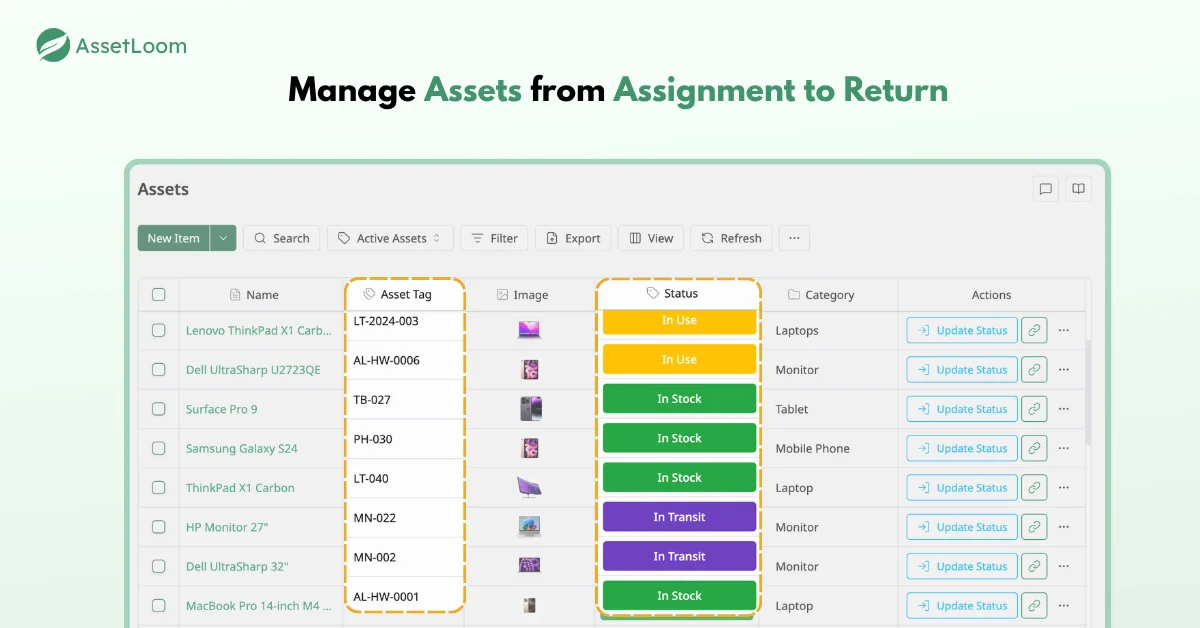
AssetLoom is a cloud-based IT asset operations platform built to give IT teams one place to manage hardware, accessories, software licenses, components, and consumables, without needing a dedicated ITAM specialist to run it. The focus is on practical, day-to-day visibility: knowing what you have, where it is, who’s using it, and when something needs attention, rather than a sprawling feature list that’s mostly unused.
Pricing: AssetLoom offers a free tier to get started, with additional paid plans available as needs grow. Check the current pricing page for exact tier details, since this is an area that’s actively evolving.
Features:
- Asset Tracking: Manages the full range of IT asset types (hardware, accessories, software licenses, components, and consumables) with lifecycle status, inventory stock levels, and expiration or renewal tracking in one dashboard.
- QR/Barcode: Auto-generated QR codes for each asset, so field teams can scan instead of manually searching a spreadsheet.
- Booking/Allocations/Check-in-Check-out: Built-in asset reservations, booking, and loan tracking, useful for shared equipment pools like laptops, AV gear, or field devices.
- Automation Workflow: Automated maintenance alerts, inventory updates, and task assignments so renewals and upkeep don’t rely on someone remembering to check a spreadsheet.
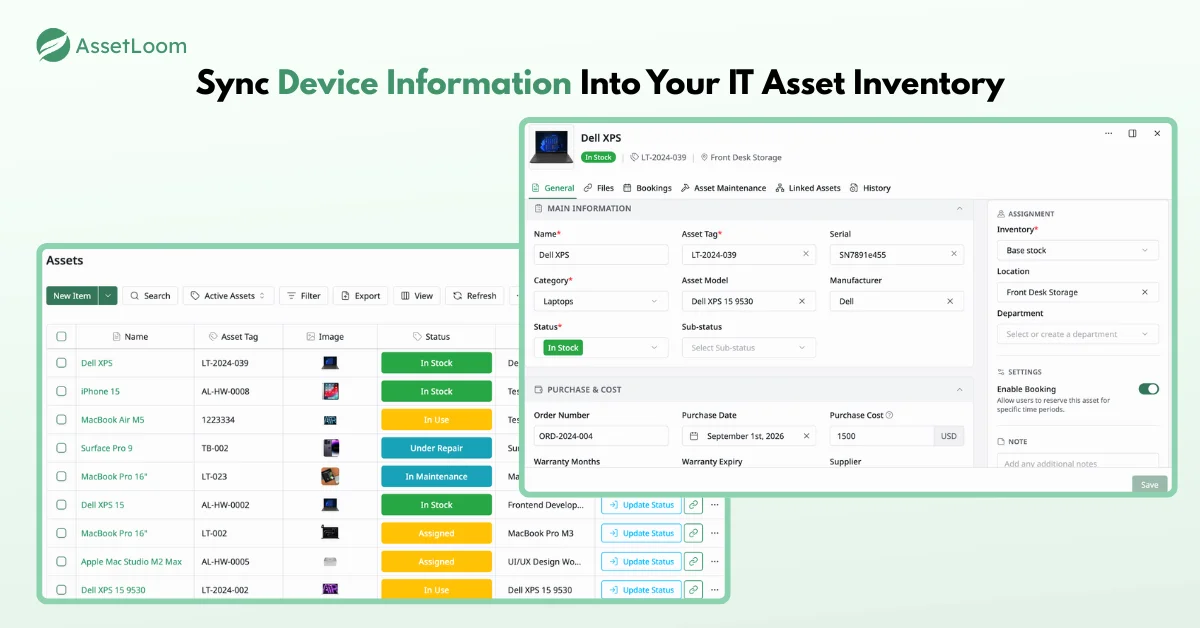
- Integrations: Native integration with Microsoft Intune and Jamf Pro, so device data you already manage through MDM doesn’t have to be re-entered or reconciled by hand.
Best fit: Teams that manage a mix of hardware, licenses, and consumables and want a straightforward platform that’s easy to roll out, particularly if you’re already standardized on Intune or Jamf for device management and want asset data to sit alongside it rather than in a separate silo.
Our Perspective
The best pick is not the tool with the most features. It is the tool that fits how your team actually works.
If you want simple, easy tracking without a complicated setup, AssetLoom is a good option to check out. This is especially true if you already use Intune or Jamf Pro and want your asset data linked to that, instead of sitting in a separate spreadsheet.
Choose based on what your team actually needs: simplicity, automation, or IT-specific discovery. Don’t choose based on which vendor has the biggest marketing page.