How to Calculate Equipment ROI Using Your Own Asset Data
Learn how to calculate equipment ROI using your own asset data, from repair tickets to idle devices, with IT examples that finance will actually trust.
If you need to calculate equipment ROI for laptops, servers, or other IT hardware, the formula takes about a minute. The proof takes much longer.
Most IT teams can tell you what they paid for their hardware. Ask how much of it is actually in use, and the room gets quiet. Some laptops sit in a drawer for months. Some spares exist only in a spreadsheet. Some get bought twice because the first ones were “somewhere.” Each one quietly lowers your return, and none of them show up on the purchase order.
Here’s the part most ROI guides skip. IT hardware doesn’t earn revenue, so its return comes from costs avoided and work hours protected. Most of that return is won or lost after purchase, at boring moments like a repair ticket, an offboarding, or a surprise audit. This guide walks through each of those moments, the math behind them, and the asset records that make your numbers hard to argue with.
The Equipment ROI Formula Only Works If You Record This First
Equipment ROI compares what a device gives back with what it costs. For IT hardware, “gives back” means avoided repair costs, prevented downtime, and work hours your people get back. Payback tells you how many months it takes to earn the money back. To calculate equipment ROI, you only need two formulas.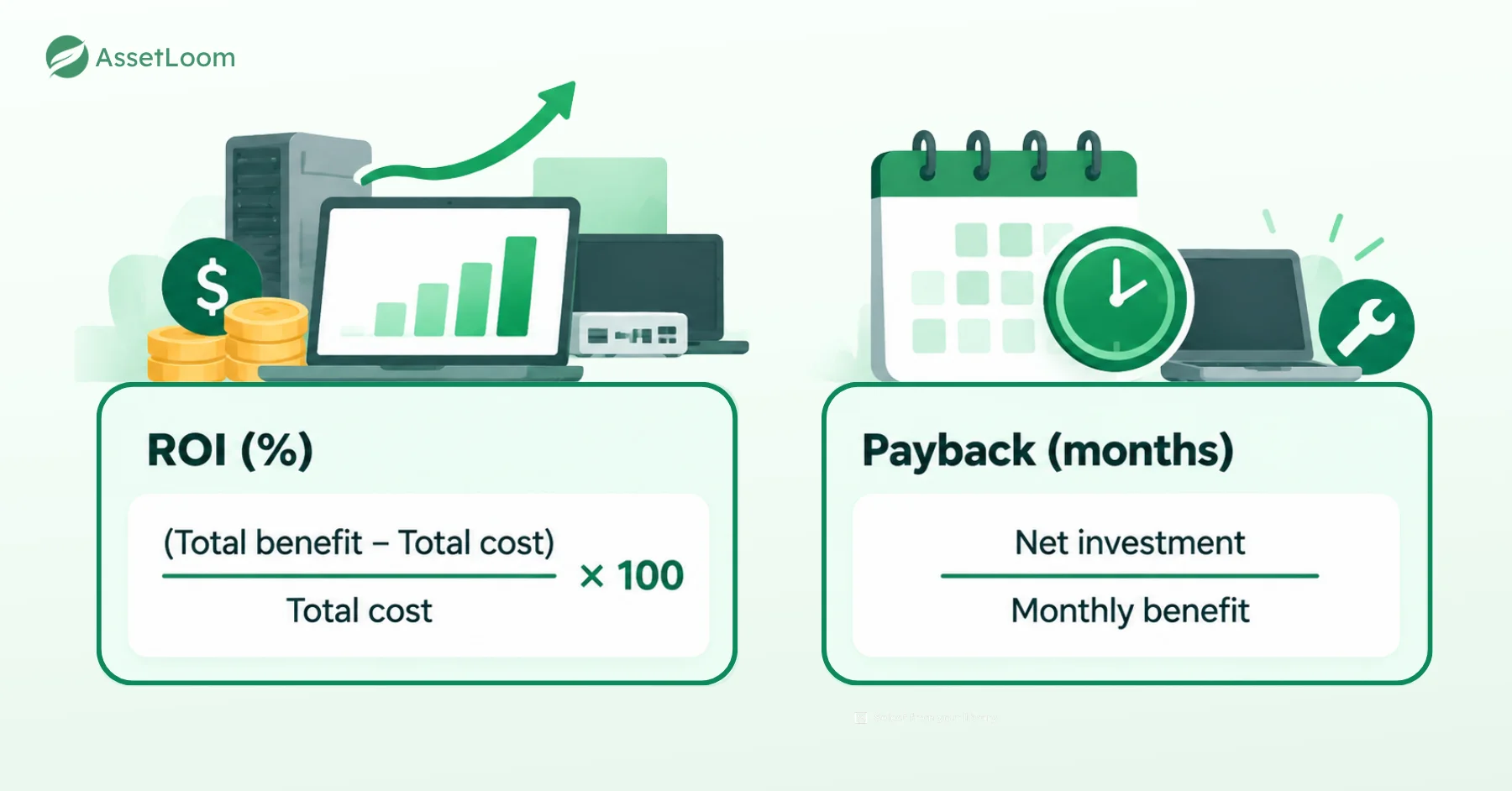
Here’s the part most guides skip. A benefit only exists compared with what happens if you don’t buy. If you replace a laptop and never recorded how often the old one broke, you can’t prove the new one saved anything. Even when it did.
Before any purchase, you need a baseline for the devices you plan to replace. Three numbers are enough. Tickets per device, repair spend, and downtime hours. If your helpdesk already logs tickets by asset tag, pull the last 12 months, and you’re done. If it doesn’t, collect 60 to 90 days first. It feels like homework. It’s also the difference between “trust me” and “here’s the record.”
When You Need Budget for New Laptops
You need 50 new laptops. Last year you asked with “people will be more productive,” and finance said no.
Finance isn’t against you. They just can’t approve a feeling. When you calculate equipment ROI for a refresh, lead with hard savings from your baseline, like repair spend and replacement parts. Put productivity hours second, and show a range from conservative to expected. A case that still works in the conservative column is a case finance can sign.
Then check something most ROI guides never mention. ROI depends on the role, not just the device. A $2,200 laptop pays off for a developer who compiles code all day. For someone at the front desk who lives in a browser, it’s $1,400 of power they’ll never use.
Here’s the same 50-person team, bought two different ways.
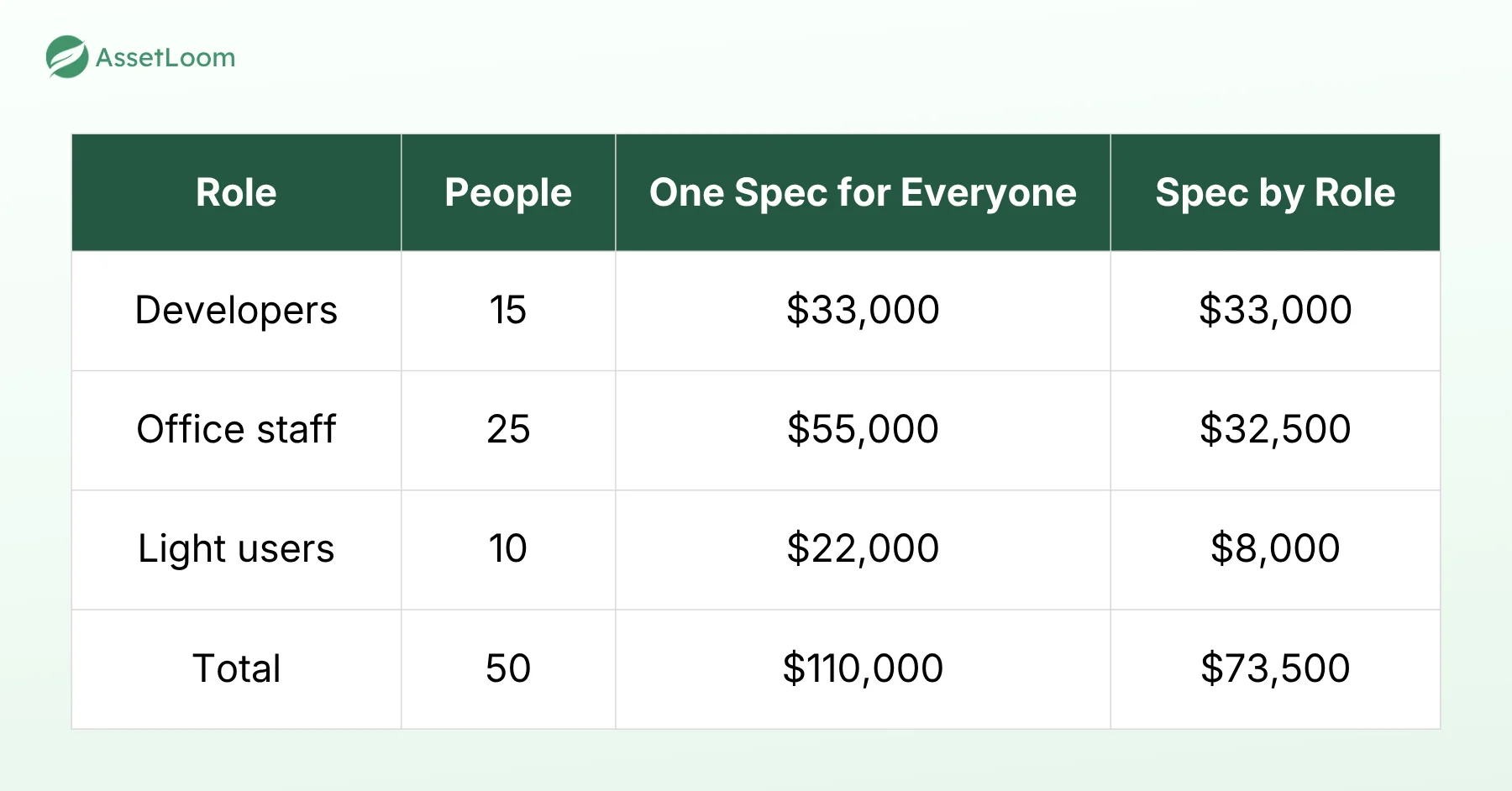
The benefit barely changes, because light users gain nothing from extra power. But the cost drops by $36,500, and that pushes ROI up without a single new assumption. Your assignment records already tell you who does what.
If you lease instead of buying, the same logic works. Swap the purchase price for total lease payments over the term.
When a Laptop Needs Another Repair
This is the ROI question IT answers every week, usually standing next to a broken laptop.
Say a 4-year-old developer laptop needs a $350 repair, and the developer says they lose about an hour a week to slow builds.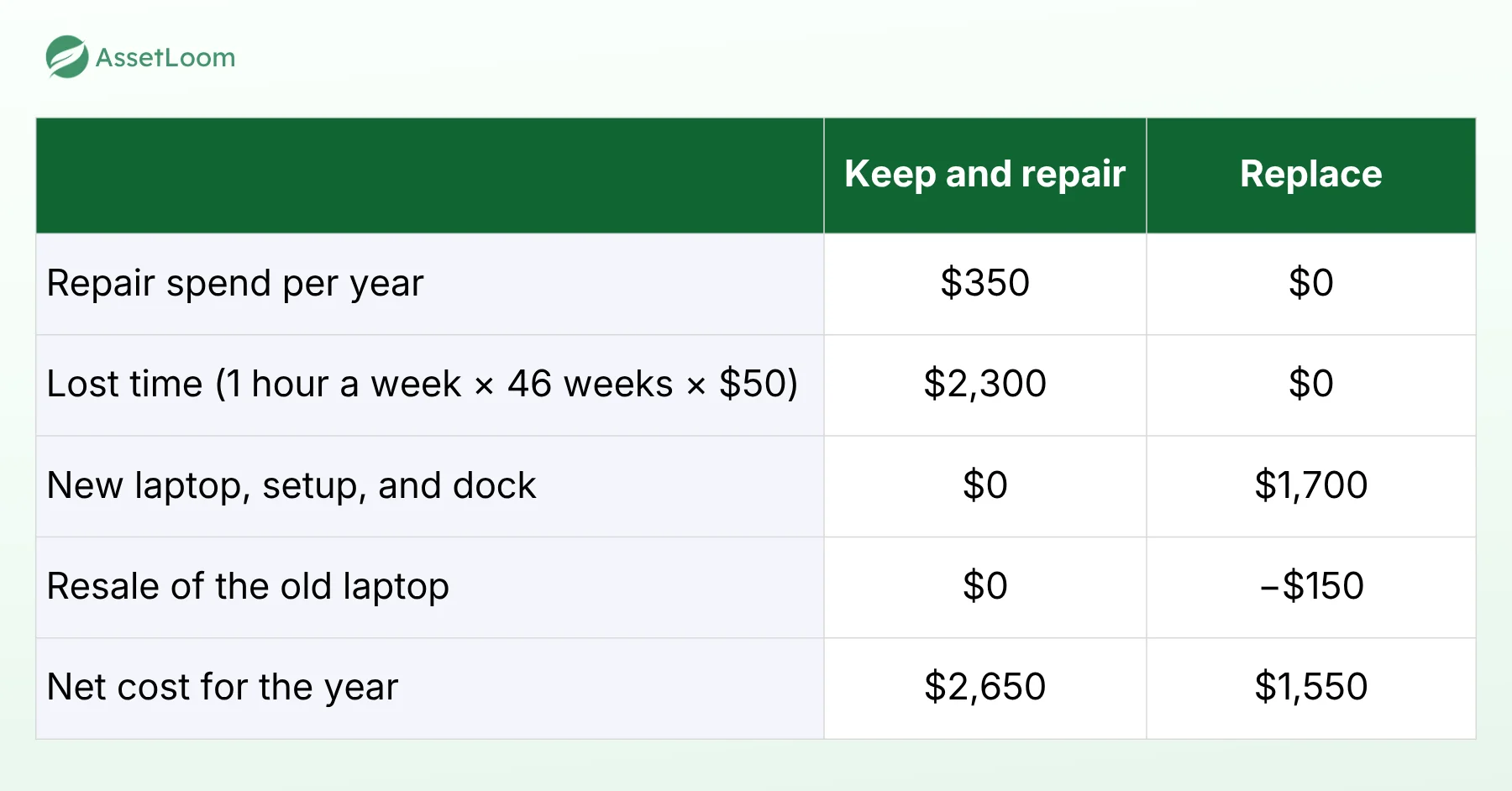
Replacing returns $2,650 a year on a $1,550 investment. That’s about 71% ROI in year one and payback in about 7 months. But if finance counts only the repair savings, payback stretches to about 53 months, longer than the laptop will live. The same replacement gets rejected.
So the decision rests on whether the lost hours are on record. A ticket note or a timed build test is evidence. A hallway complaint is not.
Our rule of thumb is to start the replacement conversation when yearly repair plus downtime reaches about half the replacement cost. Check warranty first, though. A covered repair changes the whole table.
When Devices Sit Unassigned
Every ROI projection quietly assumes each device is used 100% of the time, for its whole life. Real fleets never get close. That gap has a price, and there’s a simple way to see it.
We call it Cost per Active Month.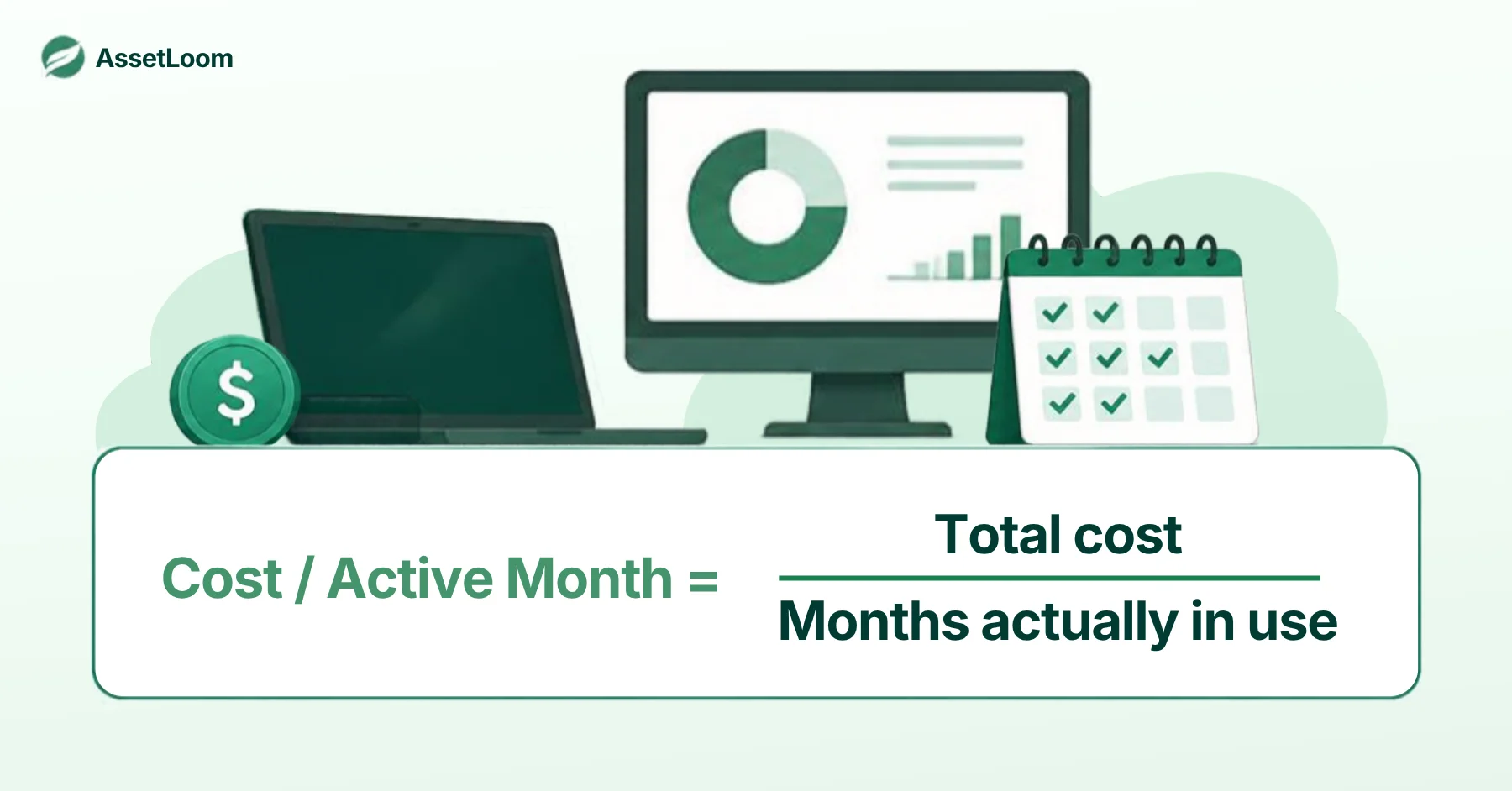
A $1,600 laptop used for 36 months costs about $44 a month. If it sits idle for 9 of those months, it really costs about $59 per active month. That’s a 33% cost increase, and no invoice will ever show it.
Offboarded Laptops That Sit Idle for Weeks
Someone leaves on Friday. Their laptop comes back three weeks later and gets reimaged two weeks after that. Meanwhile, a new hire’s laptop gets ordered because “we don’t have any spares.” We do. They’re in a drawer.
Now multiply. With 30 leavers a year and about 5 weeks idle each, that’s roughly 35 idle months, or about $1,500 in lost value. Add 4 laptops bought early while the spares waited, and another $6,400 left the budget months before it had to. How fast you redeploy can move ROI as much as the discount you fought for at purchase.
The fix is a simple rule. Flag any device that stays unassigned for more than 30 days, and treat it as an available spare the moment it’s reimaged.
For the full process, see our guide to the Laptop Handover and Recovery Process
The Audit Count Doesn’t Match the Spreadsheet
The spreadsheet says 212 laptops. The physical count finds 197. Nobody remembers the other 15, and the spreadsheet was last edited by someone who left in March.
Each missing laptop is a write-off of its remaining book value, plus any warranty or support fees you’re still paying for a device nobody can find. At an average book value of $700, that’s $10,500 gone before anyone asks what data was on them.
Instead of one big annual count, run rolling spot checks by scanning asset labels for a few teams or shelves at a time. Small gaps get caught in weeks, not at year-end.
When a Device Reaches End of Life
Leaks drain value in the middle of a device’s life. The last year is your chance to win some of it back. Moving a developer laptop to a lighter role for one more year drops its cost per active month from about $44 to about $33, for almost no extra spend. Resale works the other way. The longer you wait, the less it’s worth.
Use purchase date, condition, and current assignment to choose the right move. If your ITAM process already tracks all three, the call takes minutes.
- If the device is healthy and someone in a lighter role needs one, redeploy it.
- If it’s aging but still has meaningful resale value, sell it now before that value drops further.
- If it keeps coming back for repairs and would fetch little on resale, retire it and wipe it.
Whichever move you choose, record it. A redeployed laptop with no updated assignment is just the next drawer laptop.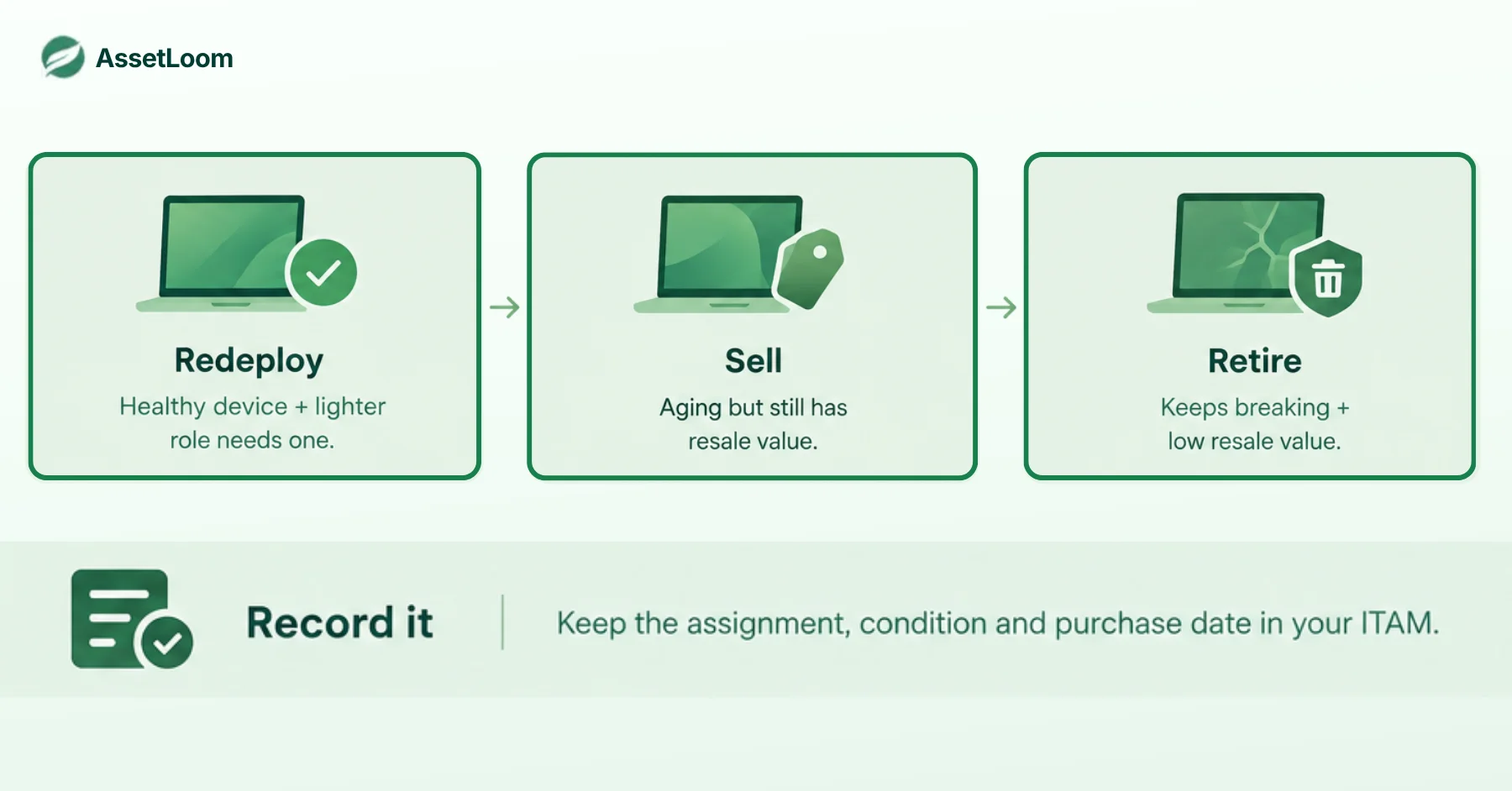
The CFO Question: “What Did We Get for That?”
Back to the budget meeting from the start. This time, you bring one page built from every moment above.
- Projected vs actual ROI for the purchase
- Cost per active month across the fleet
- Total idle days
- Devices lost or unaccounted for
- Average days to redeploy a returned device
This page works because every number comes from your own records, not vendor estimates. Show hard savings first and treat productivity gains as upside. And avoid the three mistakes that kill trust fastest, which are counting only the invoice price, counting the same benefit twice, and assuming full benefit from day one.
The first time you present this, some numbers will look bad. That’s fine. A bad number you can explain beats a good number you can’t prove. Clean records start with solid IT inventory management.
How AssetLoom Supports Equipment ROI Tracking
Every calculation in this guide depends on records you can trust. That’s where AssetLoom helps.
- Track assets, accessories, licenses, components, and consumables in one place, so your baseline starts from a real inventory.
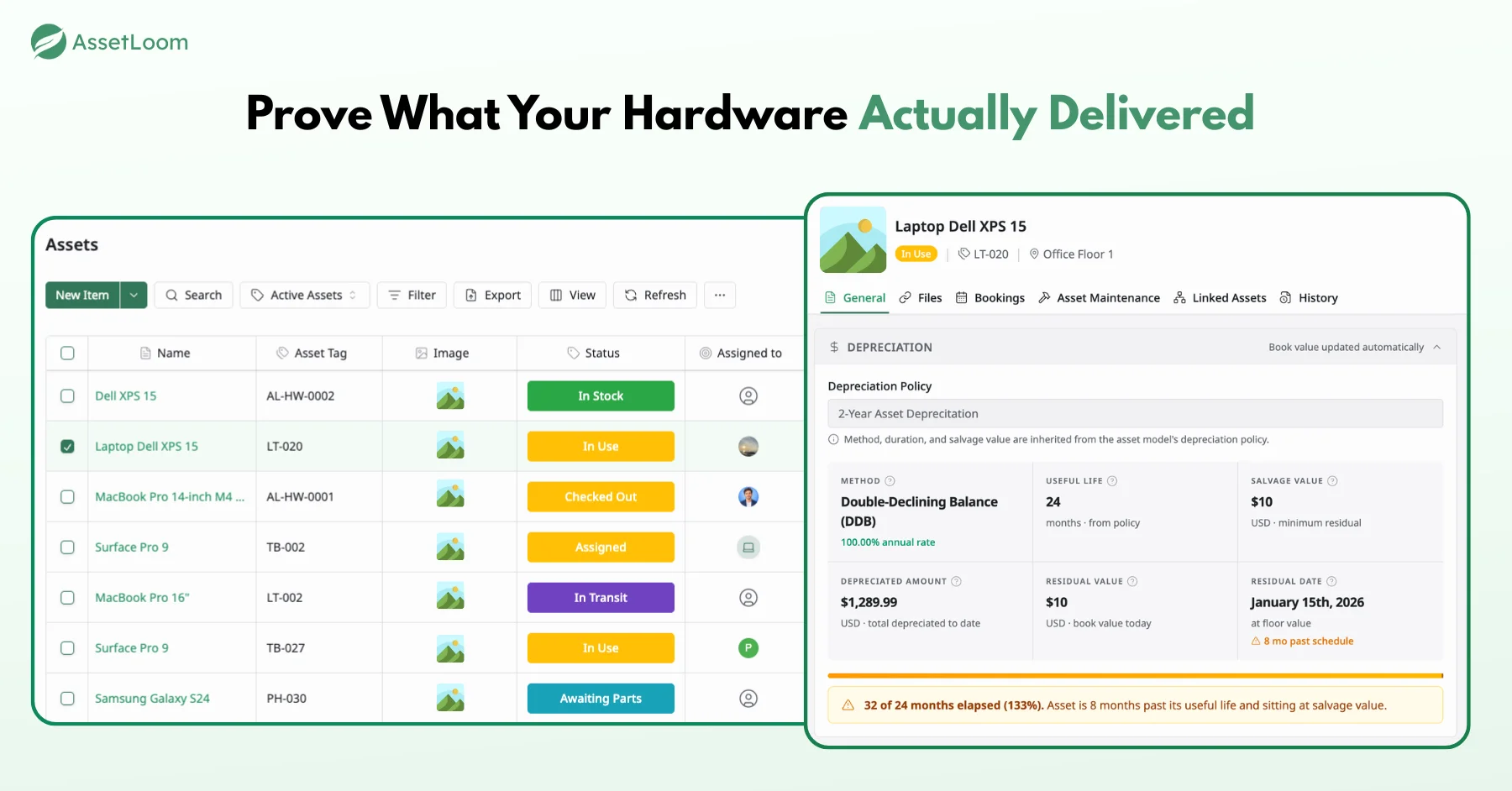
- Assign a depreciation policy to each asset model, and AssetLoom calculates every device’s residual value from its purchase cost and date, ready for resale and write-off decisions.
- Generate QR and barcode labels (CODE128, CODE39, EAN13) as PNG, SVG, or PDF, so every device matches its record.
- Check devices in and out with a QR scan in AssetLoom Mobile on Android, not a spreadsheet edit.
- Connect Microsoft Intune or Jamf Pro to pull managed device data into your records.
You can start on AssetLoom’s free plan and work out your ROI from your own data before you commit any budget.
Final Thought: The Formula Is the Easy Part
The formula takes a minute. The return is earned at every repair ticket, offboarding, and audit, and it’s proven with records, not estimates. Start with a baseline, watch cost per active month, and redeploy fast.
Next budget review, you don’t want to walk in with “trust me.” AssetLoom gives you one place to track devices, labels, and check-ins, so your records are ready when the CFO asks. That’s how you calculate equipment ROI that finance actually believes.
FAQs
1. What is a good ROI for IT equipment?
Industry benchmarks rarely fit hardware that earns no revenue. For IT, a practical test is whether payback lands well inside your refresh cycle. If a 3-year laptop pays back in 12 months, you’re in good shape.
2. What is the difference between equipment ROI and TCO?
TCO is the full cost of owning a device, from purchase to disposal. ROI compares that cost with what the device gives back. You need an honest TCO first to get an honest ROI.
3. Should I include depreciation or tax savings in equipment ROI?
Calculate them separately from operational ROI. Depreciation and tax rules vary by country and company, so confirm the method with your finance team before you present.
4. Is refurbished IT equipment a better ROI than new?
Often for light roles, as long as the warranty and expected life cover your plan. For power users, repeated downtime can wipe out the savings quickly.
5. How often should I recalculate equipment ROI?
Once a year, and after big changes like a reorg, a hiring wave, or a major refresh. Comparing projected and actual ROI after 12 months is the most useful check you can run.