Best IT Asset Management Tools for SMBs: Affordable and Scalable Solutions
Best it asset management tools should leverage free trials (e.g., AssetLoom,...) to ensure the tool fits their growth plans and IT needs.
Small and medium-sized businesses (SMBs) often need IT asset management tools that are both cost-effective and capable of growing with their operations. These tools help track hardware and software assets, manage licenses, and ensure compliance, all while fitting within tight budgets. Below, we outline the best options based on affordability and scalability, tailored for SMBs.
Read also: What is an IT Asset Management Tool and Why Do You Need One?
Recommended Tools
Here are the top ITAM tools for SMBs, including AssetLoom, selected for their cost-effectiveness and ability to scale:
- AssetLoom: A modern cloud-based IT asset management platform that helps organizations track assets, hardware, software licenses, accessories, and consumables throughout the asset lifecycle. It includes QR/barcode tracking, asset operations, reporting, CSV import, and integrations with Microsoft Intune and Jamf Pro.
- ManageEngine AssetExplorer: Cloud-hosted, starts at $955/year for 250 nodes, ideal for comprehensive asset tracking.
- Lansweeper: Pay-per-asset pricing at $1/asset/year, highly scalable for mixed IT environments.
- Snipe-IT (Cloud Hosted): Starts at $39.99/month, excellent for hardware-focused SMBs.
- Atera: Starts at $99/month, an all-in-one platform for growing SMBs.
- Freshservice: Varies in pricing, strong for compliance-focused SMBs with ITSM needs.
For very budget-conscious SMBs, free tools like GLPI or Spiceworks Inventory are viable, though they may require more technical setup.
Why These Tools?
AssetLoom stands out for its modern approach to IT asset management, combining lifecycle tracking, automation, and integrations that help organizations reduce manual inventory work. With support for IT assets, software licenses, accessories, components, and consumables, teams can manage assets from procurement through retirement in one platform. Its Microsoft Intune and Jamf Pro integrations help keep device information synchronized, while QR/barcode scanning simplifies physical asset verification.
Established tools like ManageEngine and Lansweeper offer robust features for both hardware and software, while Snipe-IT is a budget-friendly, hardware-focused option. Atera and Freshservice provide integrated IT management for SMBs needing more than just it asset tracking. Free trials, such as those offered by AssetLoom and ManageEngine, allow SMBs to test suitability before committing.
Detailed Tool Evaluations
Notes:
- AssetLoom: A cloud-based ITAM solution launched in 2026, offering real-time tracking and automation. Pricing details are anticipated to be affordable, with a free trial available.
- ManageEngine AssetExplorer: Provides both cloud and on-premises deployment options, with a free edition for up to 25 nodes. The paid version starts at $795 for a one-time license.
- Lansweeper: Offers a free plan supporting up to 100 assets, with paid plans starting at $1 per asset per year. It supports both cloud and on-premises deployments.
- Snipe-IT: An open-source ITAM tool with a free self-hosted version. The cloud-hosted version starts at $39.99 per month.
- Atera: A cloud-based platform offering a 30-day free trial. Paid plans start at $99 per month per technician.
- Freshservice: A cloud-based IT service management tool with a 14-day free trial. Paid plans start at $29 per month per agent.
- GLPI: A fully free and open-source ITAM solution, with both on-premises and cloud deployment options. Paid support services are available.
- Spiceworks Inventory: A free, ad-supported cloud-based ITAM tool suitable for small businesses.
This table provides a clear overview to help SMBs select an ITAM tool that aligns with their deployment preferences, budget, and feature requirements.
Detailed Insights by Tool
1. AssetLoom
Overview: AssetLoom is an emerging cloud-based IT asset management solution designed to manage a growing technology environment. It helps teams track different IT resources while maintaining visibility across the complete asset lifecycle.
Key Features:
- Complete Asset Lifecycle Management: Track assets from purchase and assignment to maintenance, depreciation, and retirement.
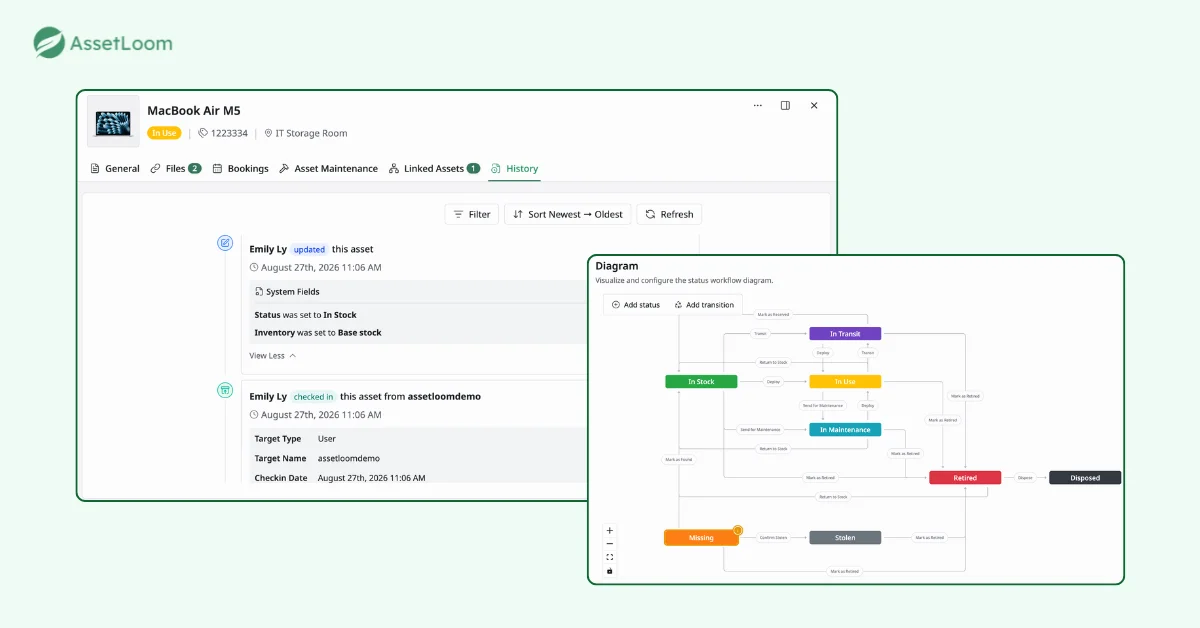
- Asset Operations: Manage assignments, bookings, maintenance activities, and custody history from one platform.
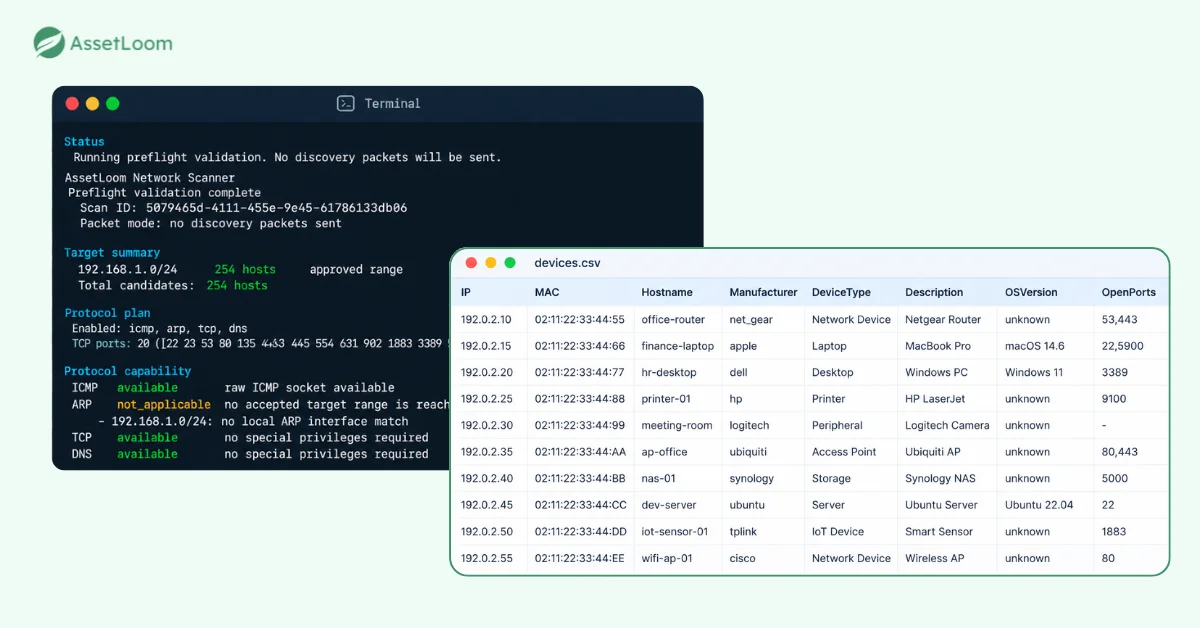
- Asset Discovery: Use AssetLoom Network Scanner to discover connected devices through agentless discovery, reducing manual data entry. Discovered information can be exported as CSV and imported into AssetLoom.
- QR & Barcode Tracking: Generate and scan QR/barcodes to simplify asset verification, check-in/check-out, and audits.
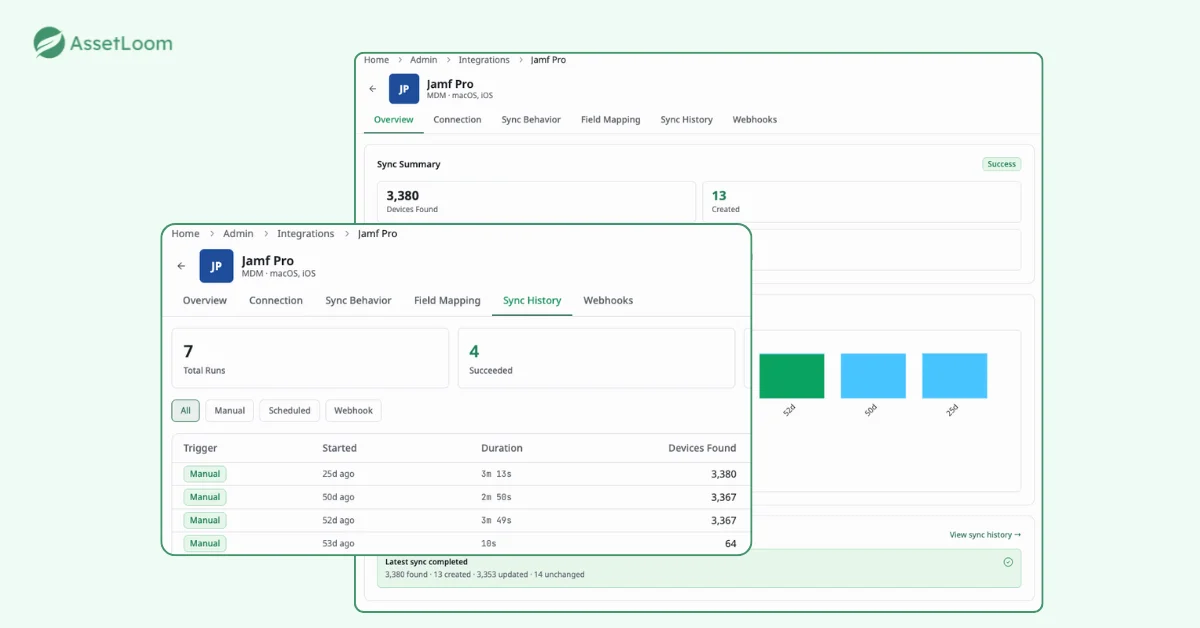
- Device Management Integrations: Connect with Microsoft Intune and Jamf Pro to synchronize device information and keep inventory records accurate.
- Reporting & Dashboards: Gain visibility into asset status, inventory levels, lifecycle information, and operational activities.
- Why It’s Great For You: AssetLoom is designed for organizations that want more than basic asset tracking but do not need the complexity of enterprise ITAM platforms. Its combination of automation, integrations, and lifecycle management helps SMBs reduce manual work, improve inventory accuracy, and make better decisions about their technology investments.
2. ManageEngine AssetExplorer
Overview: ManageEngine AssetExplorer is a comprehensive IT asset management solution that combines hardware, software, and license management. It supports both cloud and on-premises deployment, making it flexible for businesses with varying needs.
Key Features:
- Asset Tracking: Track both hardware and software assets throughout their lifecycle with robust reporting.
- License Management: Stay compliant with automatic license tracking and alerts for renewal or expiration.
- Network Discovery: Automatically scans and detects network-connected devices, ensuring you don’t miss an asset.
- Incident Management: Built-in IT service management (ITSM) features help manage service requests and incidents related to assets.
Why It’s Great for SMBs: AssetExplorer is ideal for businesses looking for an all-in-one asset management solution with ITSM capabilities. Its strong reporting features and compliance management make it particularly beneficial for SMBs in regulated industries. The flexible deployment options (cloud and on-premises) provide adaptability to different business environments.
3. Lansweeper
Overview: Lansweeper(NLP) is a versatile and highly scalable asset management tool that offers pay-per-asset pricing. It’s designed to cater to businesses that need both IT asset discovery and management, as well as the flexibility to scale as the business grows.
Key Features:
- Comprehensive Asset Discovery: Automatically detects and classifies network assets, including devices, software, and services.
- Cloud and On-Premise Deployment: Lansweeper can be deployed either in the cloud or on-premises, providing greater flexibility.
- Customizable Reporting: Offers extensive reporting options to track and analyze asset data.
- Integration with ITSM Tools: Integrates with popular IT service management tools to provide a seamless workflow.
Why It’s Great for SMBs: Lansweeper’s pricing model makes it highly adaptable for SMBs of various sizes. The flexibility to scale and add more assets as needed makes it a great choice for growing companies. With both cloud and on-premises deployment options, it accommodates different infrastructure preferences.
4. Snipe-IT (Cloud Hosted)
Overview: Snipe-IT is an open-source IT asset management tool that is particularly effective for tracking hardware assets. It can be hosted on the cloud or on-premises, and its affordability makes it an excellent choice for SMBs that want to manage their assets with minimal cost.
Key Features:
- Asset Tracking: Ideal for managing physical assets like computers, phones, and other hardware.
- License Management: Tracks software licenses and helps maintain compliance.
- Audit & Reporting: Customizable reports for asset audits and compliance checks.
- User Interface: Simple and intuitive, making it easy for non-technical users to adopt.
Why It’s Great for SMBs: Snipe-IT is a budget-friendly, open-source solution that’s perfect for businesses focused on managing physical assets. Its low cost, combined with ease of use, makes it a great choice for SMBs with limited budgets or those just starting with asset management.
5. Atera
Overview: Atera is a comprehensive IT management platform that combines asset management with remote monitoring and management (RMM). It is particularly suited for SMBs looking for an all-in-one solution to manage their IT assets alongside proactive system monitoring.
Key Features:
- Remote Monitoring: Offers real-time monitoring of asset health, ensuring that systems are running smoothly.
- Ticketing System: Helps SMBs manage IT issues and support requests related to assets.
- Automation: Includes automation tools to handle routine tasks like maintenance and updates.
- Reporting and Analytics: Provides actionable insights into asset usage and system performance.
Why It’s Great for SMBs: Atera’s ability to combine asset management with remote monitoring and IT service management tools makes it an excellent all-in-one solution. For SMBs that need proactive monitoring of their IT environment alongside asset management, Atera is a robust option.
6. Freshservice
Overview: Freshservice is a cloud-based IT service management (ITSM) platform that includes IT asset management as one of its key features. It is ideal for SMBs that need to integrate asset management with other ITSM processes such as incident and change management.
Key Features:
- Asset Lifecycle Management: Tracks assets throughout their lifecycle—from procurement to disposal.
- Incident & Problem Management: Helps resolve IT issues tied to assets using an integrated ticketing system.
- Compliance & Reporting: Includes tools to generate compliance reports and track asset status.
- Customizable Dashboards: Provides customizable views of asset data for various teams and stakeholders.
Why It’s Great for SMBs: Freshservice is an excellent choice for SMBs that require more than just asset management. Its strong ITSM features, combined with its ability to manage IT assets, make it a comprehensive solution for businesses that need a holistic approach to IT operations.
7. GLPI
Overview: GLPI (Gestionnaire Libre de Parc Informatique) is an open-source IT asset management tool that is free to use. It offers extensive asset management and ITSM features, making it suitable for SMBs that are tech-savvy and looking for a customizable, no-cost solution.
Key Features:
- Inventory Management: Tracks both hardware and software assets, with detailed records.
- Ticketing System: Includes a built-in ITSM module for managing support requests and incidents.
- Customizable Dashboards: Customizable reports and dashboards to monitor assets and incidents.
- Free and Open-Source: Free to use, with options for paid support services.
Why It’s Great for SMBs: GLPI is a powerful open-source solution for SMBs that need a no-cost, customizable IT asset management system. While it may require more setup and technical expertise, it provides a wealth of features at zero cost, making it an ideal solution for budget-conscious SMBs.
8. Spiceworks Inventory
Overview: Spiceworks Inventory is a free, ad-supported IT asset management tool that helps SMBs track their hardware and software assets. It’s easy to deploy and offers a simple solution for smaller businesses.
Key Features:
- Automatic Asset Discovery: Automatically detects and inventories hardware assets on your network.
- Software Tracking: Tracks installed software to help ensure compliance and licensing.
- Reporting: Provides basic reporting for asset audits and inventory management.
- Free Forever: Completely free with ad support.
Why It’s Great for SMBs: Spiceworks Inventory is an excellent choice for SMBs that need a simple, free solution for managing their assets. It offers easy deployment and basic functionality without any upfront costs, though it does come with ads.
FAQs
1. What problems can IT asset management tools help solve?
IT asset management tools help organizations address common operational issues such as unknown devices, inaccurate inventory records, missed renewals, unclear asset ownership, and inefficient hardware replacement planning.
By keeping asset information organized and accessible, teams can spend less time searching for information and more time managing their IT environment effectively.
2. How do ITAM tools support employee onboarding and offboarding?
ITAM tools can help streamline the process of assigning equipment to new employees and recovering assets when employees leave.
Teams can maintain records of assigned devices, track asset handovers, confirm returned equipment, and update asset status after each transition. This helps reduce lost equipment and improves accountability.
3. Can ITAM tools help with software license compliance?
Yes. ITAM tools can help organizations maintain records of software ownership, license quantities, renewal dates, and assignments.
This visibility helps teams monitor license usage, prepare for audits, avoid unexpected renewals, and make better decisions about software investments.
4. How do ITAM tools help during IT audits?
ITAM tools provide a structured record of assets, including their location, ownership, status, and lifecycle history. During audits, teams can quickly verify whether inventory records match the actual environment.
Features such as barcode scanning, asset history, and reporting can make the audit process faster and more reliable.
5. What is the difference between ITAM and inventory management?
Inventory management mainly focuses on knowing what items exist and where they are located. IT asset management covers a broader lifecycle, including purchasing, assignment, maintenance, financial tracking, compliance, and retirement.
For IT teams, ITAM provides a more complete view of how technology resources are used and managed over time.
Conclusion
Choosing the right IT asset management tool is not only about finding the most feature-rich platform. For SMBs, the right solution should help reduce manual work, improve inventory accuracy, and provide better visibility as the business grows.
Whether you are moving away from spreadsheets, improving asset tracking processes, or managing a growing number of devices and licenses, an ITAM platform can help your team stay organized and make better decisions.
Ready to take control of your IT assets? Explore AssetLoom and simplify your asset tracking process with a modern IT asset management platform.