Best Inventory Management Software Key Features and Top Tools Compared
Compare the best inventory management software for 2026, the features that matter most, and how AssetLoom fits in if IT assets are part of your stock.
Inventory management software helps businesses track, organize, and manage their inventory more efficiently. Instead of relying on spreadsheets or manual processes, modern solutions provide real-time visibility, automation, and reporting to help teams make better decisions.
With many inventory management tools available today, choosing the right solution requires looking beyond basic stock tracking. The best software combines accurate inventory data, automation, integrations, and flexible workflows to support different business needs.
In this article, we’ll explore the key features to look for in inventory management software and compare some of the best solutions available in 2026.
Why Inventory Management Software Is Important
Good inventory management helps businesses maintain the right stock levels, avoid delays, and reduce unnecessary costs. However, manual methods like spreadsheets often lead to inaccurate data, stock shortages, or over-ordering.
Inventory management software solves these challenges by automating tracking and providing real-time visibility. With accurate data, teams can make better decisions, reduce errors, and respond faster to changing demands.
Understanding the IT asset inventory management key features of these tools helps companies choose software that fits their workflows and supports long-term growth.
Related article: What is Inventory Management? Definition, Scopes, Methods
Key Features to Look for in Inventory Management Software
Not every tool needs every feature on this list. But the further down a tool falls short, the more manual workarounds your team ends up building, and workarounds are exactly what you’re trying to get away from.
| Feature | Why It Matters |
|---|---|
| Real-time inventory tracking | Keeps stock levels updated instantly to prevent shortages and inaccurate inventory data. |
| Multi-channel integration | Syncs inventory across platforms like Shopify, Amazon, and eBay to keep data consistent. |
| Order management | Manages orders, invoices, shipments, and bulk processing in one place. |
| Warehouse management | Tracks inventory by location, manages transfers, and supports barcode scanning. |
| Reporting and analytics | Provides insights into stock levels, trends, and inventory performance. |
| Automated reordering | Creates purchase orders automatically when stock reaches reorder points. |
| Barcode scanning and mobile access | Helps teams quickly update inventory and perform stock checks anywhere. |
| Demand forecasting | Uses historical data to predict future inventory needs and improve planning. |
| Scalability and customization | Adapts to growing teams, locations, and unique business workflows. |
| User-friendly interface | Makes inventory tasks easier with simple navigation and clear dashboards. |
These features represent the core capabilities to look for when comparing inventory management software. However, the right choice depends on your workflow, business size, and the type of inventory you manage.
For organizations managing IT equipment and digital assets, features like lifecycle tracking, asset history, QR codes, and integrations can be especially important for maintaining visibility and control.
Related article: QR, Barcode, or RFID: What’s the Best Fix for IT Inventory Tracking?
7 Best Inventory Management Software Options in 2026
Different businesses have different inventory management needs. Some companies focus on product stock, while others need better visibility into equipment, ownership, and asset lifecycle. Below are some of the leading inventory management solutions to consider based on different use cases.
1. AssetLoom
Best for: IT asset inventory management
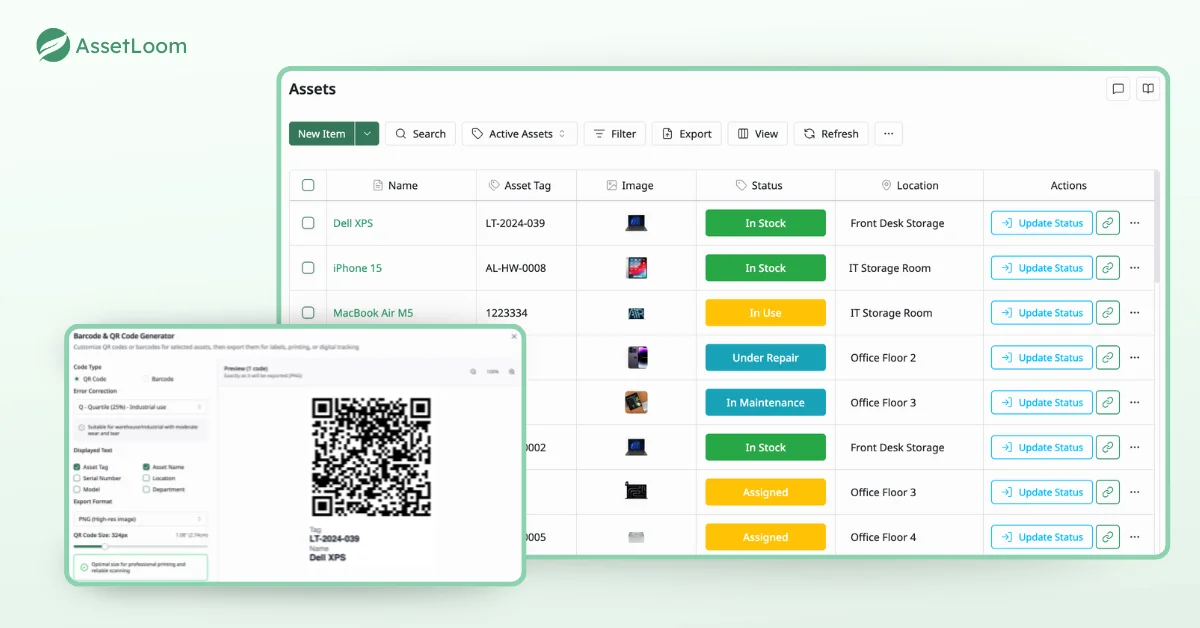
AssetLoom is an IT Asset Operations Platform designed to help organizations manage devices, software licenses, ownership information, and asset lifecycle processes in one centralized platform.
Instead of tracking IT assets across spreadsheets or disconnected tools, teams can maintain accurate inventory records and understand where assets are located, who is using them, and what stage they are in.
Key features:
- Centralized IT asset inventory
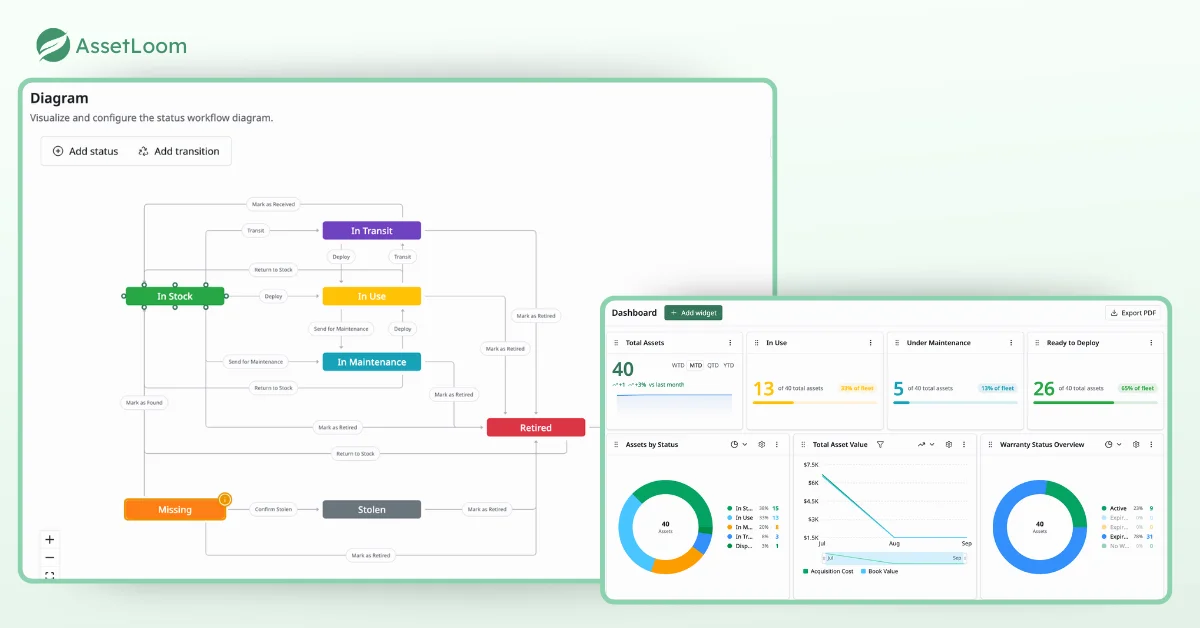
- Asset lifecycle management
- QR code and barcode tracking
- Check-in and check-out management
- Software license tracking
- Custom fields and configurations
- Reports and dashboards
- Microsoft Intune and Jamf Pro integrations
Pricing: Free plan available. Paid plans scale with asset count and add-ons like integrations and custom workflows.
Worth knowing: AssetLoom is built specifically for IT and digital assets rather than general retail inventory, so it won’t cover things like POS integrations or multi-channel selling. If your inventory is products for sale rather than equipment and licenses, one of the other tools below will fit better.
Manage your IT assets with confidence. Try AssetLoom for free and bring your hardware, software, and ownership data together in one place.
2. Asset Panda
Best for: Enterprise asset management
Asset Panda helps organizations track physical assets, manage workflows, and customize asset management processes.
Key features:
- Custom workflows
- Mobile asset tracking
- Asset history
- Reporting tools
Pricing: No free plan. Pricing is based on asset count and user seats, with published rates generally starting in the $29 to $50 per month range and custom quotes for larger deployments.
Worth knowing: Reviewers frequently mention that costs climb quickly as asset counts and user seats grow, and initial setup can take longer than lighter-weight tools.
3. Snipe-IT
Best for: Open-source IT asset tracking
Snipe-IT is a popular open-source solution for organizations looking for a flexible way to manage hardware assets and software licenses.
Key features:
- Asset check-in/check-out
- License management
- User assignment
- Reporting
Pricing: Free to self-host with unlimited assets and users. Managed hosting plans start at around $40 per month if you’d rather not run the server yourself.
Worth knowing: The free tier means you’re responsible for your own server, backups, and security patching, and software license management is more basic than tools built specifically for IT asset lifecycle tracking.
4. Zoho Inventory
Best for: Small business inventory management
Zoho Inventory helps businesses manage products, orders, warehouses, and sales channels.
Key features:
- Order management
- Warehouse tracking
- Shipping integration
- Inventory reports
Pricing: Free plan available for very small order volumes. Paid plans start at around $29 per month and scale up based on order volume, users, and warehouses.
Worth knowing: The free plan caps out fast (around 50 orders per month, 1 user), so growing teams typically need to upgrade sooner than they expect.
5. Sortly
Best for: Simple inventory tracking
Sortly focuses on making inventory tracking easier for small teams through visual inventory management and barcode scanning.
Key features:
- Barcode scanning
- Mobile inventory management
- Custom fields
- Inventory alerts
Pricing: Free plan available for basic use. Paid plans start at around $49 per month for teams that need more items, users, or reporting.
Worth knowing: Useful features like QR code and barcode label printing are gated behind paid tiers, and the free plan’s item limit is low enough that most business users outgrow it quickly.
Custom fields and inventory alerts aren’t unique to Sortly; most tools on this list offer some version of them. Here’s what that looks like in AssetLoom, for reference.
6. Cin7
Best for: Complex warehousing and manufacturing
Cin7 is built for businesses with more complex warehousing and manufacturing needs, offering deeper order and production management than basic inventory tools.
Key features:
- Warehouse and multi-location management
- Manufacturing and production tracking
- Multi-channel order management
- Reporting and analytics
Pricing: No free plan. Published plans start at around $349 per month, with higher tiers and a custom-priced enterprise option for larger operations.
Worth knowing: Entry pricing is already high compared to most tools on this list, and it jumps sharply again if you need manufacturing or advanced warehouse features.
7. NetSuite Inventory Management
Best for: Businesses that want inventory tied to a full ERP
NetSuite Inventory Management is part of a full ERP suite, which makes sense for businesses that want inventory tightly connected to finance and operations rather than run as a standalone tool.
Key features:
- Real-time inventory visibility across locations
- Built-in financial and operations integration
- Demand planning
- Multi-currency and multi-subsidiary support
Pricing: No published pricing. NetSuite is quote-based, priced around a base platform fee plus per-user and per-module costs, and typically requires a sales conversation to scope.
Worth knowing: Implementation costs and timelines can be substantial, often tens of thousands of dollars, so this is a much bigger commitment than a standalone inventory tool and usually only makes sense if you also need the ERP functionality.
How to Choose the Right Software for Your Team
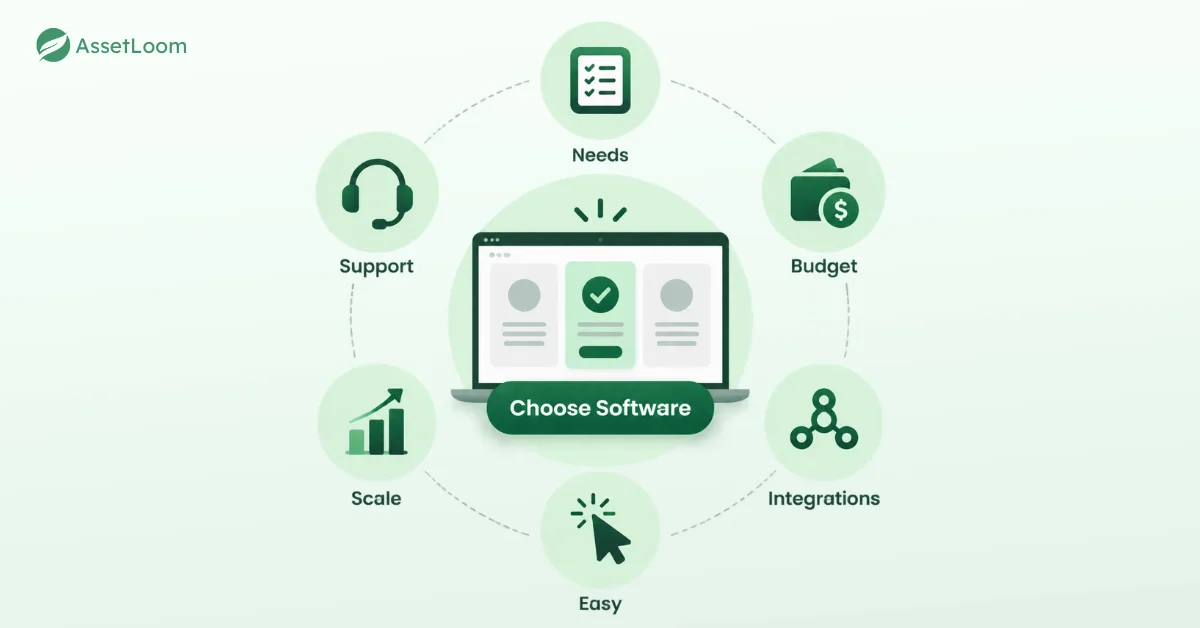
The right inventory management software depends on your business needs, workflow, and future growth plans. Before choosing a solution, consider these key factors:
- Identify your business requirements. Focus on the features your team actually needs, such as multi-channel integration, warehouse management, or real-time tracking.
- Set your budget. Choose software that provides the right value for your business size instead of simply selecting the lowest-cost option.
- Check integration capabilities. Make sure the software works smoothly with your existing tools, including e-commerce platforms, accounting systems, ERP, and POS software.
- Test ease of use. Try a free trial or demo to see how easily your team can complete daily tasks and adopt the system.
- Consider scalability. Look for software that can support more users, locations, and inventory volume as your business grows.
- Review support options. Reliable customer support and helpful resources can help your team resolve issues faster when needed.
2026 Trends Worth Watching
A few shifts are shaping how inventory software is built and used this year:
- Cloud-first is now the default, not a differentiator. Anywhere access and automatic updates are table stakes.
- AI-assisted forecasting is showing up in more platforms, moving demand planning from an educated guess to something genuinely data-driven.
- Mobile-first workflows are standard, not an add-on. Teams expect to manage inventory from a phone as easily as a desktop.
- Sustainability tracking is gaining traction, with more systems adding features for waste reduction and excess-inventory reporting.
Related Article: 3 Key Challenges in IT Asset Inventory Management
Conclusion: Manage Your Inventory With Greater Visibility
Choosing the right inventory management software depends on your business needs. Whether you manage products, equipment, or IT assets, the right platform should help your team maintain accurate records and make better decisions.
For organizations managing IT devices and digital assets, AssetLoom provides a simple and cost-effective way to track assets, manage ownership, and monitor lifecycle changes.
Start managing your IT assets today with AssetLoom and get better visibility across your entire inventory.