Basic Network Discovery: ICMP, ARP, and TCP Methods Explained
Learn how ICMP, ARP, and TCP network discovery methods find active devices, improve scan coverage, and support more accurate IT asset records.
IT teams cannot manage devices they cannot see. New equipment, changing IP addresses, and unknown connections can quickly make asset records outdated.
Network discovery methods help identify which devices are active across a network. This article will cover Level 1 of network discovery, focusing on how ICMP, ARP, and TCP detect devices, when each method works best, and why using them together can improve scan coverage.
1. What Is Network Discovery?
Network discovery is the process of identifying devices that are connected to or reachable through a network. It helps IT teams understand what is currently active across a defined IP (Internet Protocol) address range, including laptops, servers, and other network-connected equipment.
Depending on the method used and the device configuration, the scan may collect details such as:
- IP address
- MAC (Media Access Control) address
- Hostname
- Device manufacturer
- Responsive network services
- Current reachability status
Some scanning tools may also gather additional information, but network discovery does not automatically provide a complete asset record. Unlike IT asset discovery, which reveals device usage data and its lifecycle stage, a network scan may simply confirm that a laptop is connected. However, it may not show who uses it, when it was purchased, or its current lifecycle stage.
Read more: Understanding Network Discovery Scan: Top Features to Look For
For this series, we group network discovery into three practical levels. Each level builds on the previous one by collecting more information about the devices found:
- Level 1: Basic Network Discovery: ICMP, ARP, TCP probes, DNS lookups, OUI (Organizationally Unique Identifier) lookups, and basic device classification.
- Level 2: Advanced Network Discovery: SNMP v1/v2c, WMI, mDNS, and more detailed device classification.
- Level 3: Deep Network Discovery: SSH, SNMPv3, WinRM, software inventory, service and operating-system detection, and detailed device profiling.
Level 1 mainly uses unauthenticated network responses and publicly available identifiers. Levels 2 and 3 introduce management interfaces and authenticated access, allowing the scanner to collect more detailed and reliable device information.
2. Basic Methods For Network Discovery
The three most basic network discovery methods in Level 1 are ICMP, ARP, and TCP discovery. Each one checks for devices differently and is better suited to certain network conditions.
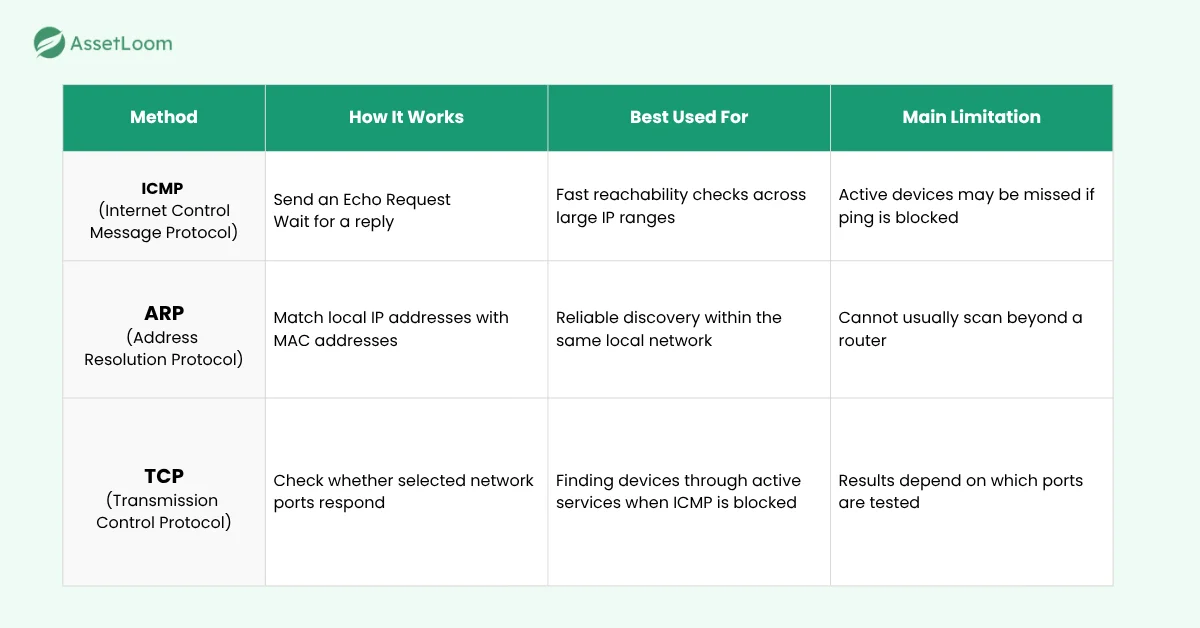
ICMP Discovery: Checking Whether a Device Responds
ICMP stands for Internet Control Message Protocol. It is commonly used by network tools to send status and error messages between devices.
The best-known example is the ping command. When an IT team pings an IP address, the scanner sends a small ICMP message asking whether a device is available at that address. If the device replies, the scanner can confirm that it is currently reachable.
How ICMP Discovery Works
The scanner sends an ICMP Echo Request to each IP address within the selected range. A device that accepts the request may return an ICMP Echo Reply.
When a reply is received, the scanner records the IP address as active. It may also measure how long the response took, which can provide a basic indication of network delay.
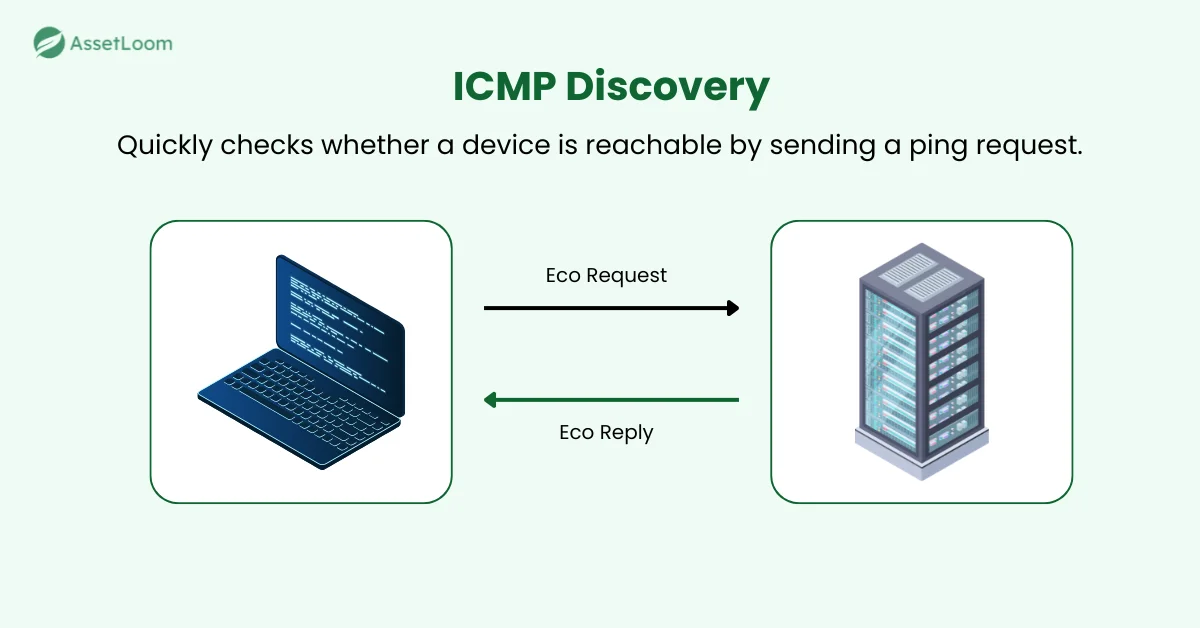
The process is quite lightweight, so ICMP is often used as the first step in a larger discovery scan. It allows the scanner to check many addresses quickly before using more detailed methods.
What ICMP Discovery Can Reveal
ICMP discovery mainly answers one question: Can a device be reached at this IP address?
A successful response may provide:
- The active IP address
- The time taken for the device to respond
- Whether the device is reachable from the scanner
- A rough indication of how many network hops away the device is, based on the reply’s TTL value.
However, ICMP usually provides limited information about the device itself. A reply may confirm something is connected, but it may not reveal the device name, operating system, or assigned user.
Learn more: How Does an IP Address Scanner Work
When ICMP Discovery Works Best
One of the main advantages of ICMP is speed. A scanner can send requests across a large IP range without creating a full connection to every device. It is also simple to understand and widely supported. This makes it useful when ping traffic is allowed, and the goal is to identify potentially active devices quickly.
On the other hand, it is less reliable when firewalls or device settings block ICMP responses. Many organizations block or limit ICMP traffic as part of their security settings. Individual devices may also be configured to ignore ping requests.
ARP Discovery: Finding Devices on the Local Network
ARP stands for Address Resolution Protocol. It is used to connect an IP address with the MAC address of a device on the same local network.
When a scanner uses ARP discovery, it asks which device is using a specific IP address. If a device is present, it responds with its MAC address. This helps the scanner confirm that the device is active on the local network.
How ARP Discovery Works
The scanner sends an ARP request to each IP address within the selected local network range. The request asks which device is using that address.
A device that owns the IP address responds with its MAC address. The scanner then records the IP and MAC address as a matched pair.
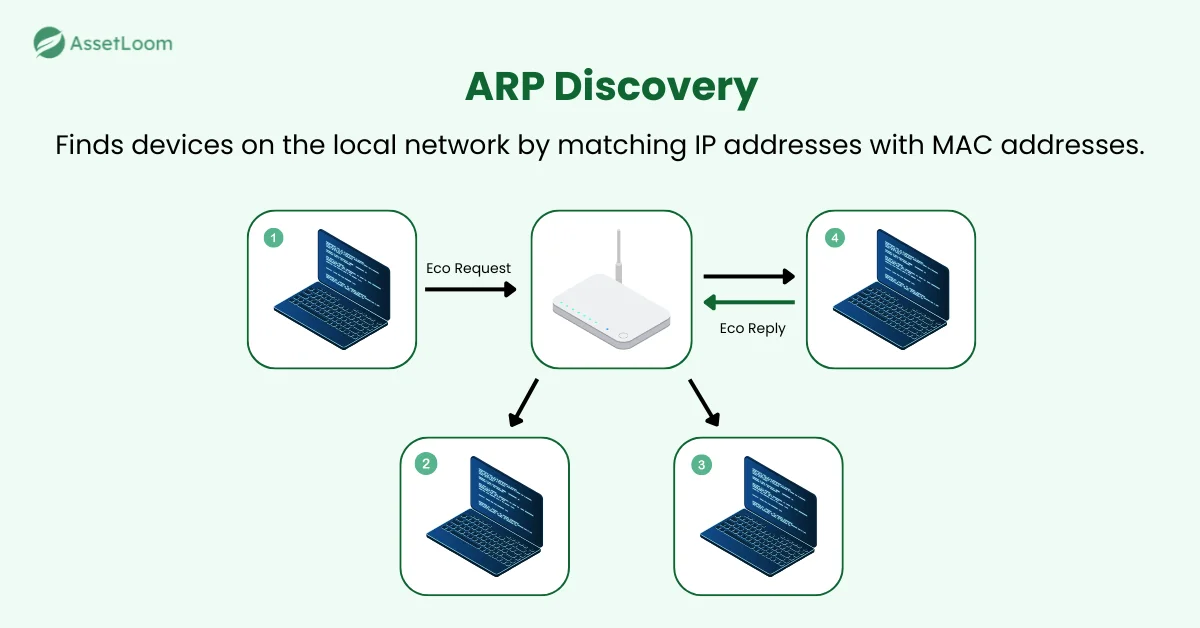
Because ARP works directly within the local network, it can often find devices that do not respond to ICMP requests. A device may ignore a ping but still need to answer ARP requests so it can communicate with other devices nearby.
What ARP Discovery Can Reveal
ARP discovery mainly helps answer two questions: Is a device using this local IP address, and what is its MAC address?
A successful response may provide:
- The active IP address
- The device’s MAC address
- Whether the device is present on the local network
The MAC address can help IT teams distinguish between devices, especially when IP addresses change. However, ARP usually does not reveal the exact device model, operating system, assigned user, or business purpose.
Many modern laptops and phones use private or randomized MAC addresses on Wi-Fi. These addresses may change between networks or over time, and their prefixes may not identify the device manufacturer. Even with a fixed address, the vendor may refer to the network card, docking station, or virtual platform rather than the device itself.
IT teams should therefore combine the MAC address with other details, such as the hostname, IP address, device history, and data from management tools, before matching it with an asset record.
When ARP Discovery Works Best
ARP is highly useful for discovering devices within the same local network. It is often more reliable than ICMP because devices usually need to respond to ARP to communicate with nearby systems. ARP operates below the IP layer, so host firewall rules that block ping don’t apply to it. A device that refuses to answer ARP can’t use IPv4 on that network at all.
However, ARP normally cannot discover devices located beyond a router. It is limited to the local broadcast domain (VLAN) where the scanner is running. Companies with several offices or subnets may need a scanner or discovery point in each part of the network.
TCP Discovery: Testing Whether a Network Service Responds
TCP stands for Transmission Control Protocol. It is used by many common network services, including websites, remote access tools, file sharing systems, and email servers.
TCP discovery checks whether a device responds when the scanner attempts to communicate through a selected network port. A response can confirm that the device is active, even when it does not answer ICMP requests.
How TCP Discovery Works
The scanner sends a connection request to one or more TCP ports on each IP address within the selected range.
For example, it may check:
- Port 22 for SSH
- Port 80 for HTTP
- Port 443 for HTTPS
- Port 445 for SBM (Windows file sharing)
- Port 3389 for Remote Desktop
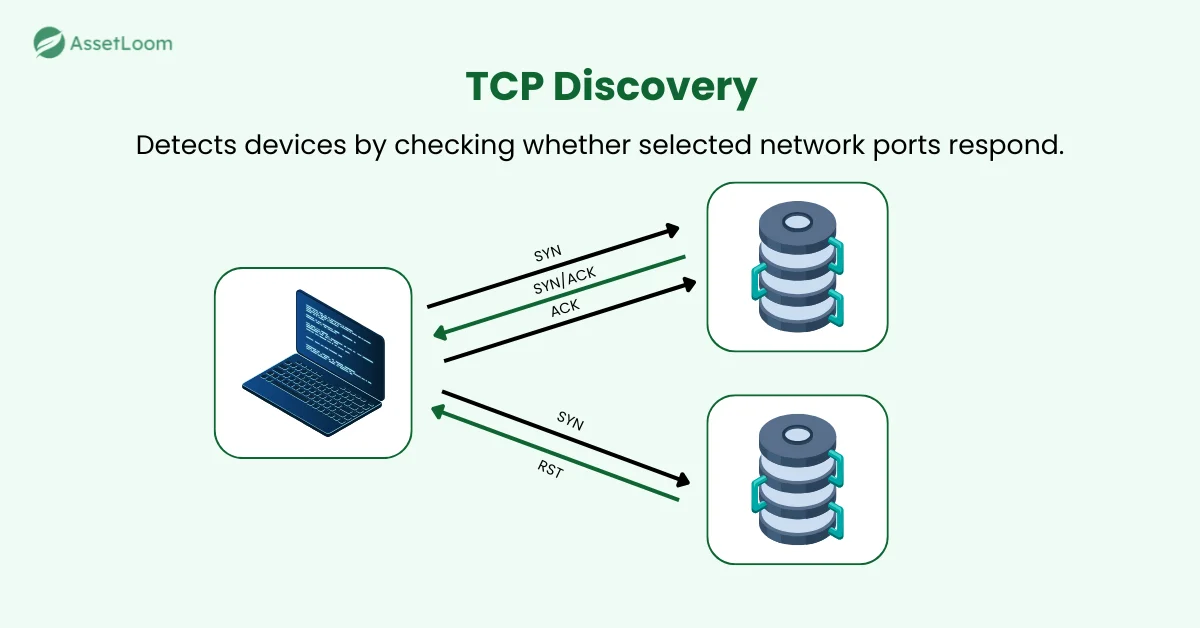
If the device accepts or rejects the connection request, the scanner can usually confirm that something is active at that IP address. Even a closed-port response may show that the device is online.
When the scanner receives no response, the result is less certain. The device may be offline, the port may be blocked, or a firewall may be filtering the request.
What TCP Discovery Can Reveal
TCP discovery mainly answers this question: Does a device respond through one of the selected network ports?
A successful response may provide:
- The active IP address
- Which TCP ports respond
- Whether certain network services may be available
- Basic clues about the device’s purpose
For example, a response on a port may suggest that the device is running a secure web service. A response on another port may indicate that Remote Desktop is available.
However, a responsive port does not always confirm the exact device type or software in use. Further checks may be needed to identify the device and match it with an asset record.
When TCP Discovery Works Best
TCP discovery works well when ICMP is blocked or when the scanner needs to check for specific services. Unlike ARP, it can also reach devices across routers, provided that network and firewall rules allow the connection requests.
Its effectiveness depends heavily on which ports are selected. A device may be active but remain undetected if none of the tested ports are open or responsive.
Checking many ports can also make the scan slower and may trigger security monitoring tools. For this reason, IT teams usually choose a small set of relevant ports based on the types of devices and services they expect to find.
3. Best Practices For Effective Network Discovery
Understanding each method is important, but reliable discovery also depends on how scans are planned and repeated. The following practices can help IT teams reduce missed devices and interpret their results more accurately.
Use Multiple Discovery Methods
No single discovery method can find every device in every network environment. ICMP may be fast, but some devices block ping requests. ARP can find devices that ignore ICMP, but it is generally limited to the local network. TCP can discover devices through responsive services, but its results depend on which ports are tested.
Using these methods together helps reduce blind spots. For example, a printer on the local network may block ping but still respond to ARP. A remote server cannot be found through ARP, but it may respond through TCP port 443.
Schedule Scans Regularly
A one-time scan only shows what was reachable at that particular moment. Devices may be disconnected, asleep, working remotely, or temporarily unavailable during the scan.
Regular scans provide a more complete view over time. A laptop that is missed during one scan may appear during the next. A newly installed printer or server can also be identified sooner instead of remaining unnoticed for months.
The right frequency depends on how often the network changes. The most important point is consistency. A repeated schedule makes it easier to identify changes instead of starting from the beginning each time.
Keep Historical Records To Identify Changes
Current scan results show what is visible now, while historical results show how the network has changed. By comparing scans over time, IT teams can identify devices that:
- Have recently joined the network
- No longer appear in scan results
- Frequently move between IP addresses
- Only appear at certain times
- Have changed their device name or network details
A device that disappears from one scan may simply be offline. If it remains missing for several weeks, the team may need to check whether it has been returned, retired, replaced, or moved to another network.
Avoid Treating “No Response” as “No Device”
A common mistake is assuming that a silent IP address means no device is present. In practice, no response can mean any of the following: the device is offline, ICMP is blocked at the firewall, or the device is simply asleep.
A team may run one scan and mark an unresponsive address as “unused.” Later, another discovery method may reveal an unknown device using that address. A single non-response should trigger a follow-up check with a different method, not a conclusion.
The reverse can also happen. A response may come from a router or gateway rather than the target device itself. For example, a router may return an ICMP error, while proxy ARP may answer on behalf of another address.
Treat each result as a clue. Confirm uncertain addresses with another discovery method before marking them as active or unused.
Check out AssetLoom’s free network scanner here!
FAQs
1. Which Method Should an IT Team Try First?
For a broad range of network addresses, ICMP is usually a practical starting point. It is fast, lightweight, and can quickly show which devices respond to basic reachability checks.
For devices on the same local network, ARP may be the better first choice. It can often find devices that ignore ping requests and also returns their MAC addresses.
2. When Should You Move From ICMP to TCP?
TCP discovery is useful when an IP address does not respond to ICMP but may still be active.
The scanner can check a small set of relevant ports, such as 22, 80, 443, 445, or 3389. A response can confirm that the device is online, even when ping is blocked.
TCP should therefore be treated as a follow-up method rather than proof that a silent address is unused.
3. Can Network Discovery Find Devices Using IPv6?
Yes, but IPv6 discovery works differently from IPv4. IPv6 does not use ARP. Instead, it uses Neighbor Discovery Protocol, or NDP, to find nearby devices and their network addresses.
Because IPv6 has an extremely large address space, scanning every possible address is not practical. On a local network, a scanner may send a request to the IPv6 all-nodes address, ff02::1, and check which devices reply. It can also review the neighbor cache to find devices that have recently communicated on the network.
ICMPv6 is more important to IPv6 than ICMP is to IPv4 because IPv6 depends on it for basic network communication. However, devices may still ignore ordinary ping requests, so one method may not find every device.
TCP discovery can also work with IPv6, but the scanner usually needs a list of known or previously discovered addresses rather than scanning the entire IPv6 range.
4. Can Network Discovery Find Devices Outside the Office?
A scanner can only find devices it can reach through the network. Laptops used at home may not appear unless they are connected through a company VPN or another managed network connection.
Remote devices are often tracked through endpoint management platforms, device agents, or integrations with services such as Microsoft Intune or Jamf. These sources can complement local network scans.
5. What Should IT Teams Do With an Unknown Device?
An unknown device should be reviewed before it is added to the asset inventory or removed from the network.
The IT team can check its IP address, MAC address, hostname, manufacturer, location, and recent activity. They may also contact the relevant department or network owner to confirm who uses it and why it is connected.
If the device cannot be identified or approved, the case should be passed to the security team for further investigation.
Final Thoughts
ICMP, ARP, and TCP each discover devices in different ways. ICMP provides fast reachability checks, ARP works well on local networks, and TCP identifies devices through responsive services.
Using multiple methods, running scans regularly, and comparing the results with asset records can give IT teams a clearer view of the devices they manage.
Stay tuned for the next articles, where we’ll explore Level 2: Advanced Network Discovery and Level 3: Deep Network Discovery.