AssetLoom Mobile Is Live on Android: Manage Assets Anywhere
AssetLoom Mobile is now live on Android, with iOS coming soon. Scan QR codes, track assets, and manage maintenance from anywhere your team works.
We just shipped something we’ve wanted to build since day one: AssetLoom, now in your pocket.
This September, we launched the first release of the AssetLoom mobile app, available now on Android through Google Play. The iOS version is on its way, and we’ll share an update the moment it lands on the App Store. It brings real-time notifications, asset details, QR-based check-in and check-out, and maintenance history to wherever your IT team actually works, which is rarely sitting at a desk in front of the web app. If you have ever had to walk back to your laptop just to check who a device is assigned to, this release is for you.
What’s New in the AssetLoom Mobile App?
Think about how a typical asset issue actually plays out. A notification comes in first, then you get pulled into it, and the next few minutes usually go into hunting for context before you can even start fixing the problem. This release is built around that exact sequence, so each step hands you what you need for the next one.
Everything you see on mobile stays in sync with the web app, so whatever your team updates from a desk shows up on your phone right away, and vice versa. That’s what makes the rest of this workflow actually reliable.
Here is what that looks like with AssetLoom Mobile.
1. Notifications and Updates
Get notified about asset changes and maintenance updates as they happen, so your team can react in real time instead of finding out three days later during a routine check. This is the piece we think gets underrated. Most asset problems don’t announce themselves; they just sit quietly until someone stumbles onto them during an audit. A notification the moment something changes is what turns “we’ll catch it eventually” into “we caught it today.”
2. Mobile Asset Dashboard
You get a quick overview of your assets without opening the web app: key stats, recent activity, and anything that needs attention. In our experience, this kind of at-a-glance view matters most exactly when you don’t have time to dig through a full dashboard, like when you’re already standing in front of a device someone flagged as broken.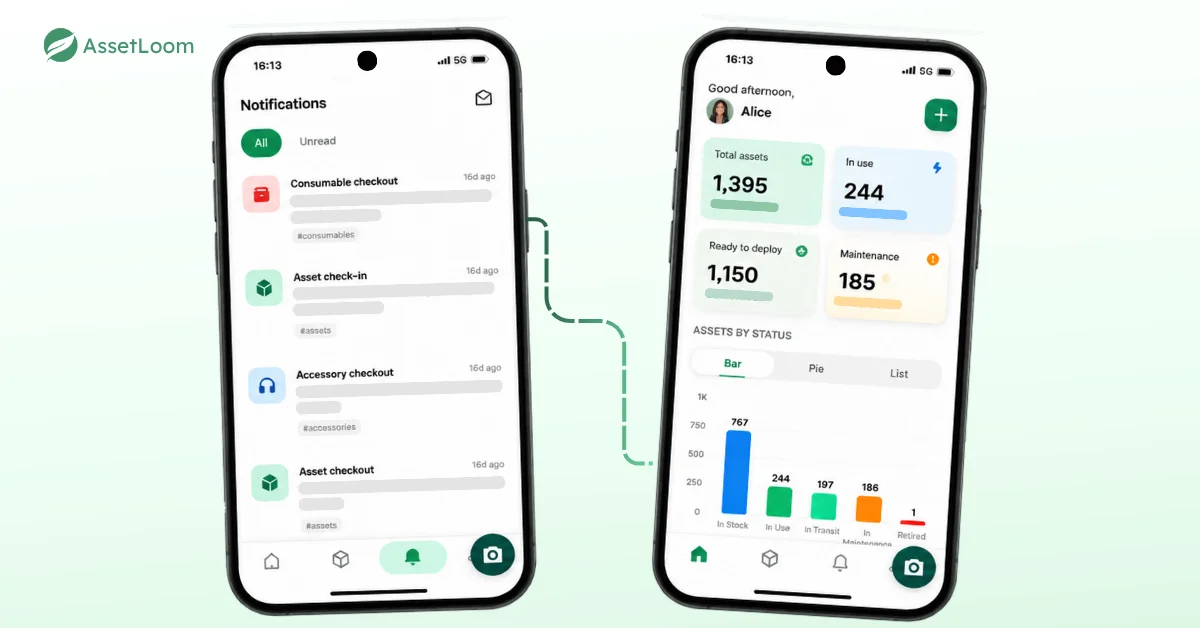
Monitor asset changes, key insights and important updates in real time.
3. QR Code Scanning
Point your camera at an asset’s QR code, and the app pulls up its record instantly. From there, you can update its status to check it in or check it out, so handoffs and returns happen right on the spot instead of waiting until someone gets back to a desk.
No more scrolling through a spreadsheet or typing in asset tags by hand. This is the feature we think will get used the most, especially during physical audits or when processing a batch of returned equipment.
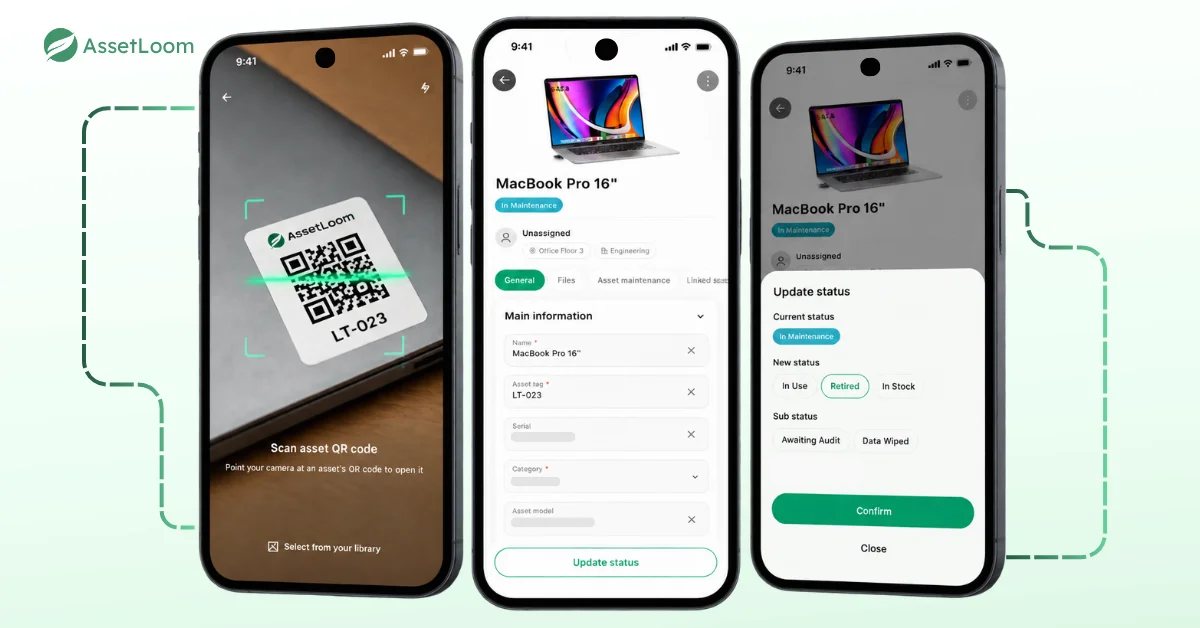
Find asset information and update status instantly.
4. Asset Tracking and Management
Pull up assigned assets, review key details, and check asset history right from your phone. If someone stops you in the hallway asking, “Wait, is this laptop still under warranty?” you can actually answer on the spot instead of saying, “Let me check and get back to you.”
5. Asset Maintenance Tracking
Review ongoing and completed maintenance activity straight from the app. If a device has been sent out for repair, you can check its status without pinging whoever manages that record.
We have seen this become a small but real drag on teams: maintenance updates end up scattered across a shared inbox or a ticketing tool nobody checks daily, and by the time someone asks about a repair, no one has a quick answer. Having that history right on the asset itself means the answer is one tap away instead of a chase.
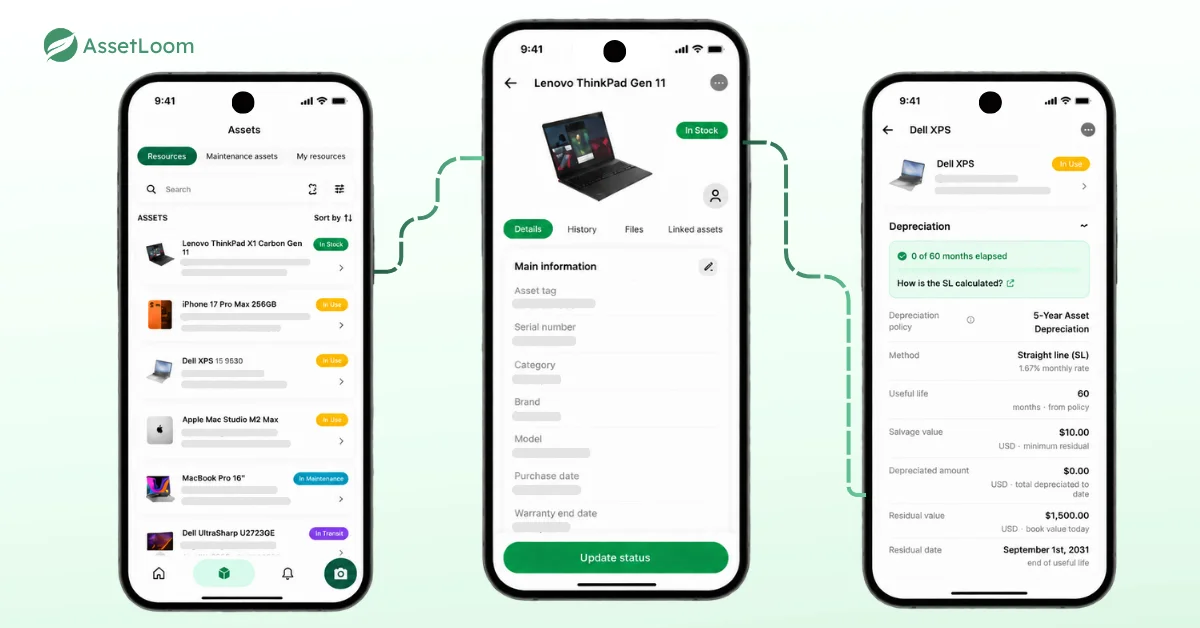
Track ownership, details and lifecycle information from your phone.
Ready to try it? Download AssetLoom Mobile from Google Play now. The iOS version is coming soon, so stay tuned.
If you’re new to AssetLoom, start your free trial and see how it works for your team from day one.
Where Mobile Access Makes a Difference
If you have managed IT assets across more than one location, you already know the real problem is rarely a lack of data. It’s that the data sits somewhere you can’t reach the moment you actually need it.
Where this release actually helps:
- A technician updates a device on-site, then has to remember every detail hours later back at a desk, and something almost always gets missed or entered wrong
- Someone runs a physical asset check by typing serial numbers into a search bar one by one, instead of just scanning the item in front of them
- A device goes out for repair, and its status lives in someone’s inbox or a separate ticket instead of somewhere the whole team can see
- An asset changes hands or condition, and nobody notices until the next scheduled check because no one happened to be looking at the dashboard
These situations are not unusual. They are the everyday challenges of managing physical assets across different locations. That is why asset management should not be limited to a desk. Teams need access to accurate asset information wherever the work happens.
Getting Started with AssetLoom Mobile
Download the app from the Google Play Store, log in with your existing AssetLoom account, and you’re ready to go. From there:
- Turn on notifications so you’re not the last to know about a change
- Check the dashboard for a quick read on asset status and recent activity
- Scan any asset’s QR code the moment you’re on-site to pull up its full record
- Review assigned assets and asset history right from your phone
- Review maintenance history for anything currently being repaired
What’s Coming Next for Mobile
First on that list is the iOS version, which our team is working on right now. If your team runs on iPhones, we’ll let you know as soon as it’s ready to download. We built AssetLoom Mobile the same way we built the core platform: start with the workflows IT teams rely on most, ship it, then improve based on real feedback instead of guessing what might be useful.
If there’s a mobile capability you wish existed, we want to hear about it. Your feedback shaped the first version of AssetLoom, and it’s exactly what will shape where mobile goes next. Ready to see it for yourself? Explore AssetLoom and start managing your IT assets from wherever your team works.