Free Asset Management Template Excel to Organize Your IT Inventory
Download free asset management template Excel files to easily track and organize IT assets, software, hardware, and subscriptions.
If you’re spending too much time trying to keep track of laptops, monitors, software licenses, or who has what device, you’re not alone. Managing IT assets can quickly become messy, especially if everything is scattered across different spreadsheets or not documented at all.
The good news is you don’t need complex tools to get organized. A simple Excel template can help you start managing assets in a more structured way. In this post, you’ll find a set of free, easy-to-use templates that cover different types of asset tracking—from hardware and software to licenses and fixed assets.
If you’re looking for a broader guide on setting up a full system, check out our IT asset management tool. Otherwise, scroll down and grab the templates that match what you need.
IT Asset Management Template (Excel)
IT asset management is all about knowing what devices your organization owns, where they are, and who’s using them. If that information lives in scattered documents or emails, it’s easy to lose track of things. That’s where this Excel template comes in.
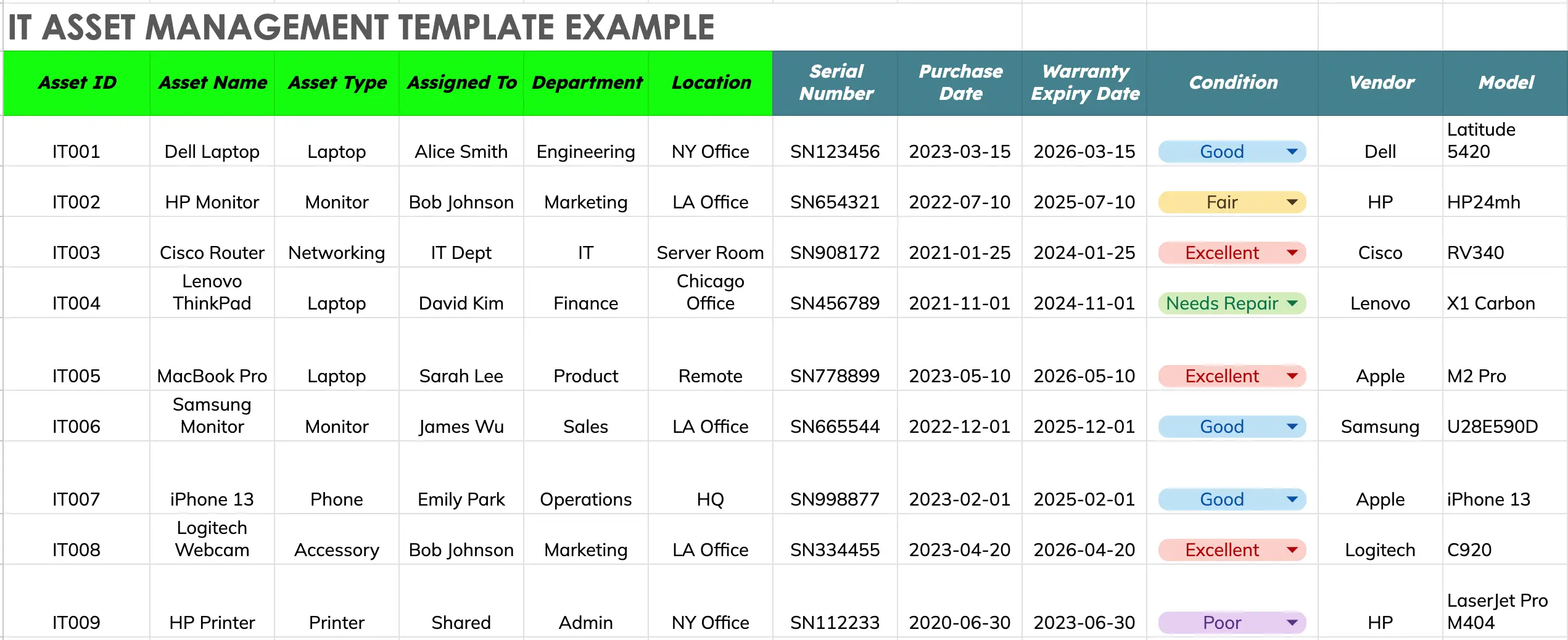
This template helps you organize your IT inventory in one simple sheet. You can track details like asset type, serial number, purchase date, warranty status, assigned user, and current location. It works for everything from laptops and monitors to phones, routers, and printers.
Having this information in one place makes it easier to avoid duplicate purchases, identify outdated hardware, and plan for replacements. You’ll also save time when responding to audits or support requests because the data is already laid out clearly.
📥 Download IT Asset Management Template Google Sheets
Software Asset Management Template
The Software Asset Management sheet helps you track all the software and digital tools your organization is paying for. This includes everything from productivity apps and design tools to subscriptions for communication platforms and enterprise systems.
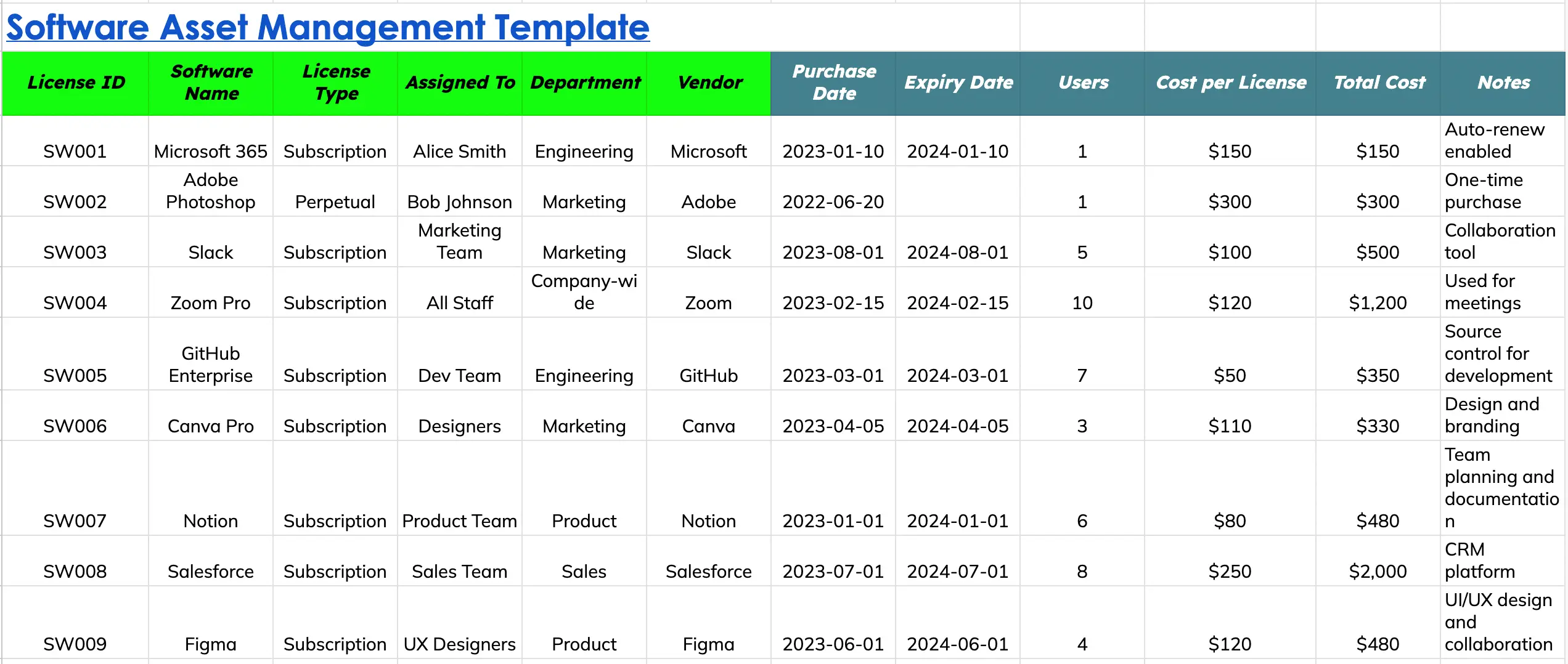
It’s easy to lose track of licenses, especially when different teams are using different tools, and renewals happen automatically. This template helps you stay organized by showing what software is in use, how many licenses are assigned, when they expire, and how much you’re spending.
You can list each software license by name, type (subscription or one-time), the team or person it’s assigned to, the number of users, and the cost per license. It also includes fields for vendor names, purchase and renewal dates, and notes for anything that needs special attention, like auto-renewal settings or shared team access.
📥 Download Software Asset Management Template Google Sheets
Fixed Asset Management Template
The Fixed Asset Management sheet is designed to help you track long-term physical assets owned by your organization—things like office furniture, equipment, company vehicles, and infrastructure. These are assets that don’t move often, have a high value, and are used over several years.
This template lets you monitor key information such as purchase dates, locations, conditions, and the expected useful life of each asset. It also includes depreciation details so you can calculate how much value an asset has lost over time, which is useful for accounting and financial reporting.
Each row represents a fixed asset with important details like category, current value, depreciation method, and notes for tracking inspections, maintenance, or replacements.
📥 Download Fixed Asset Management Template Google Sheets
License & Subscription Tracking Template
The License & Subscription Tracking sheet is useful for managing recurring services your organization pays for. These can include cloud software (like Google Workspace or Salesforce), professional tools (like Adobe or Figma), and other digital subscriptions such as website hosting, email platforms, or domain renewals.
Without a tracking system, it’s easy to miss renewals, overpay for unused licenses, or lose track of who is using what. This template helps you stay in control by showing what subscriptions are active, when they expire, how much they cost, and who is responsible for them.
The sheet includes fields for the license or subscription name, vendor, start and end dates, assigned department or owner, cost, renewal settings, and usage notes. You can also use it to track whether auto-renew is enabled, so you’re not caught off guard by surprise charges.
📥 Download License & Subscription Tracking Template Google Sheets
Hardware Inventory Template
The Hardware Inventory Template helps you keep a detailed record of all IT-related hardware in your organization—everything from laptops and desktops to printers, docking stations, and peripherals. It’s especially useful for IT teams that issue and manage physical devices across departments or locations.
This sheet focuses on item-level tracking. You can record technical details, assign assets to individuals or teams, and monitor usage, availability, and condition. Unlike the broader IT Asset Management template, this sheet is more focused on managing high-volume hardware inventories where multiple units of the same item type are issued or stored.
You can track information such as item category, manufacturer, model, serial number, asset tag, purchase info, and current status. It’s also helpful for logging maintenance needs or planning replacements.
📥 Download Hardware Inventory Template Google Sheets
Asset Checkout Template
The Asset Checkout Template helps you track items that are temporarily issued to employees, contractors, or teams—such as laptops, projectors, cameras, or tools. This is especially useful in environments where equipment is frequently borrowed, moved between departments, or shared among staff.
Without a checkout system, it’s easy to lose track of who has what, when it’s due back, or whether the item is in good condition. This template gives you a clear view of all borrowed items, helping you hold users accountable and manage returns efficiently.
The sheet includes key fields like asset ID, item name, who it was checked out to, checkout and due dates, return status, and condition upon return. It also includes space for notes in case of damage or delays.
📥 Download Asset Checkout Template Google Sheets
Asset Depreciation Tracking Template
The Asset Depreciation Tracking Template is designed to help you monitor how the value of your physical assets decreases over time. This is especially important for accounting, tax reporting, and budgeting. Assets like laptops, furniture, equipment, and vehicles lose value each year, and tracking that depreciation helps you understand their current worth and plan for replacements.
This sheet includes fields for the original purchase cost, purchase date, useful life (in years), depreciation method, and the asset’s current value based on time passed. It uses simple formulas, typically straight-line depreciation, which spreads the cost of the asset evenly over its useful life.
You can also include extra details like serial numbers, assigned department, and condition to keep everything in one place.
📥 Download Asset Depreciation Tracking Template Google Sheets
Summary Table (Optional Visual Aid)
Summary Table: Asset Management Templates at a Glance
| Template Name | Purpose | Example Assets Tracked | Best For |
|---|---|---|---|
| IT Asset Management Template | Track detailed information about IT hardware | Laptops, monitors, phones, routers | IT teams, office managers |
| Software Asset Management Template | Manage software licenses, users, and renewal dates | Microsoft 365, Adobe, Slack, Zoom | License admins, finance, IT |
| Fixed Asset Management Template | Track long-term physical assets and their depreciation | Furniture, projectors, vehicles, servers | Accounting, operations, finance teams |
| License & Subscription Template | Monitor recurring digital service subscriptions | Google Workspace, domains, cloud tools | Admin, IT, operations |
| Hardware Inventory Template | Log inventory-level hardware and peripheral details | Mice, monitors, docking stations, accessories | IT storerooms, asset dispatch |
| Asset Checkout Template | Record temporary asset loans to staff or teams | Laptops, projectors, cameras, tablets | Offices, field teams, shared devices |
| Asset Depreciation Template | Calculate current value of assets using depreciation logic | Desks, printers, company cars, AC units | Finance, auditors, controllers |
Managing your organization’s assets doesn’t have to be complicated. With the right templates in place, you can stay organized, reduce waste, and make better decisions about budgeting, replacements, and renewals. Whether you’re tracking IT hardware, software licenses, fixed equipment, or subscriptions, having everything in one place gives you clarity and control.
From Multiple Asset Templates to One Connected Asset System
Templates are useful when you need a quick way to organize asset information. However, as your inventory grows, many teams end up with multiple spreadsheets:
One sheet for laptops and hardware
- Another for software licenses
- Another for warranties and renewals
- Another for asset assignments and returns
The challenge is no longer storing information. It is connecting the information together.
AssetLoom helps teams bring asset data into one centralized platform while reducing the manual effort required to maintain accurate records.
Build Your Inventory Faster with Asset Discovery
Instead of creating every device record manually, AssetLoom Network Scanner helps identify devices connected to your environment and collect important asset information automatically.
Using agentless discovery, teams can scan their network without installing agents on individual devices. This helps uncover devices that may not already exist in your inventory records.
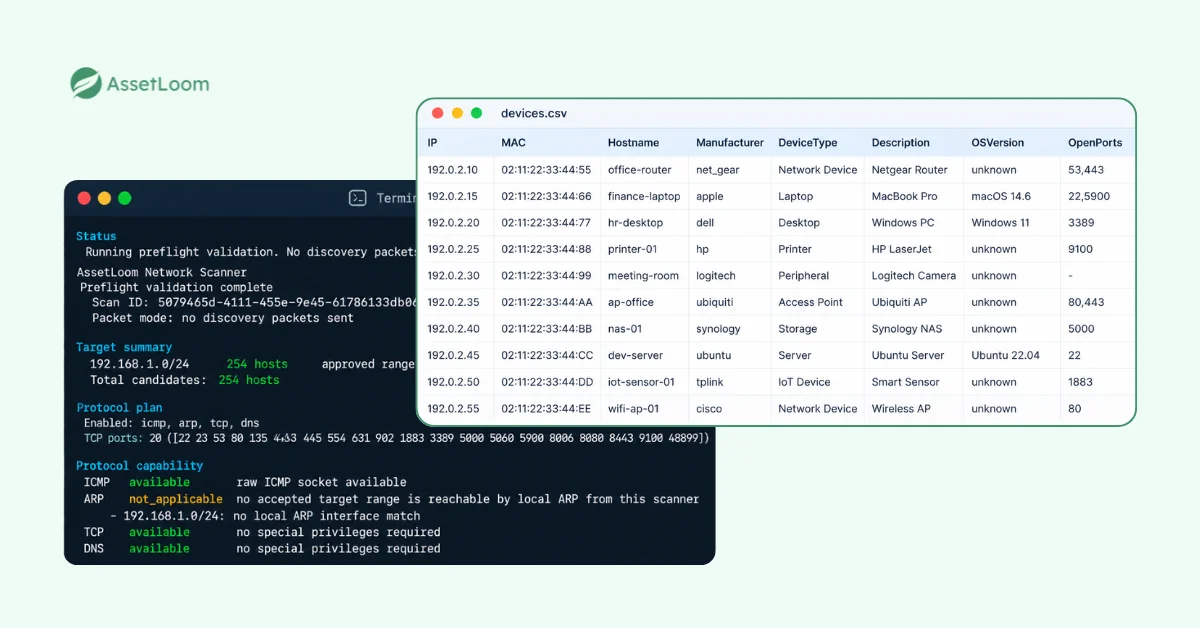
After discovery, teams can export the collected information as a CSV file and import it directly into AssetLoom, turning discovered devices into manageable asset records.
Connect Assets With the Information That Matters
Once assets are in AssetLoom, teams can connect inventory details with operational information that spreadsheets often separate.
Manage:
- Hardware, accessories, components, and consumables
- Software licenses and subscriptions
- Asset owners and locations
- Warranty and maintenance information
- Depreciation and lifecycle status
- Asset history and activity records
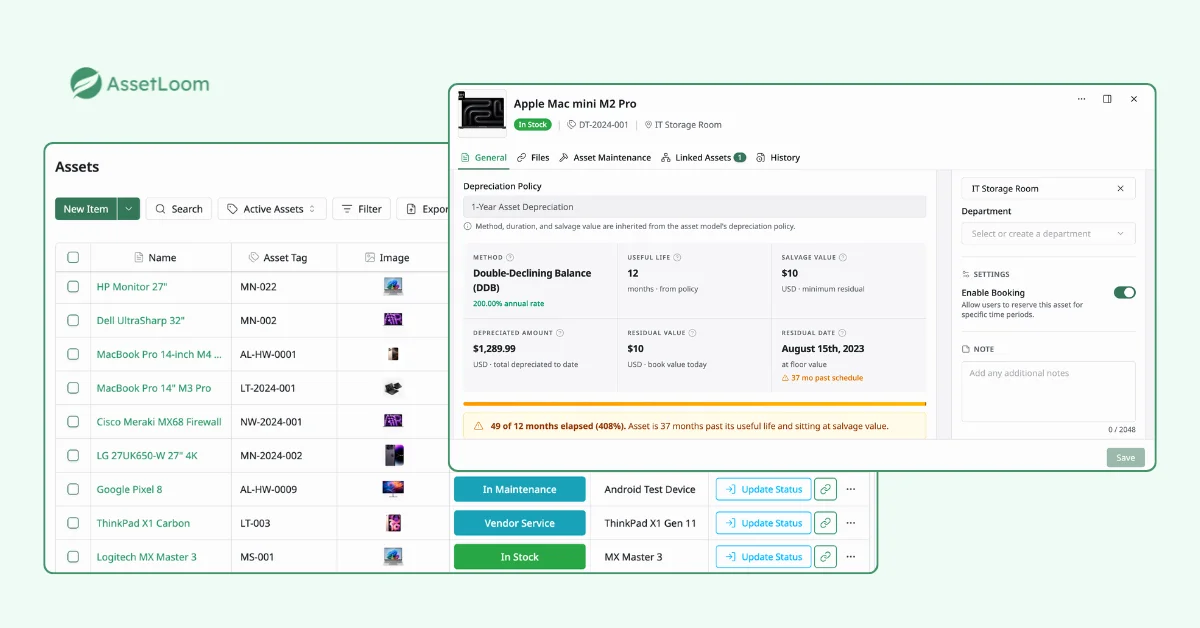
This gives IT teams a clearer view of the entire asset lifecycle, from the moment a device enters the organization until it is replaced or retired.
Instead of maintaining separate templates and manually updating each file, teams can manage their assets from one connected platform.
FAQs
1. Can asset management templates be customized for different departments?
Yes. Asset management templates can be adapted based on how different teams manage their resources. IT teams may focus on device details, serial numbers, and assigned users, while finance teams may need purchase costs, depreciation, and financial records.
Customizing templates helps each department track the information most relevant to their workflows.
2. How do companies keep asset information consistent across multiple spreadsheets?
Companies can improve consistency by using standardized fields, naming conventions, asset IDs, and shared templates across teams. However, managing multiple spreadsheets can become challenging when different files contain overlapping or outdated information.
Centralized asset management platforms can help connect information from different asset categories into one system.
3. What is the difference between asset tracking and asset management?
Asset tracking focuses on knowing where assets are, who has them, and their current status. Asset management covers a broader process, including purchasing, assignment, maintenance, depreciation, compliance, and retirement.
Tracking is one part of managing the complete asset lifecycle.
4. How can companies prepare asset data before moving to asset management software?
Before migration, teams should clean up existing records by removing duplicates, standardizing asset names, confirming ownership information, and organizing important details such as purchase dates and warranty information.
A structured template can help create a cleaner starting point before importing data into an asset management platform.
5. When should a company use an asset management platform instead of spreadsheets?
Spreadsheets are useful for getting started, especially when managing a smaller number of assets. However, organizations may need dedicated asset management software when they have multiple asset types, frequent updates, multiple locations, or difficulty keeping records accurate.
A dedicated platform helps automate updates, connect asset information, and provide better visibility across the entire asset lifecycle.
Final Thoughts
Asset management templates are a practical starting point for organizing your company’s resources. Whether you are tracking IT hardware, software licenses, subscriptions, fixed assets, or equipment checkouts, a structured template helps you create better visibility and keep important information in one place.
Download the free Asset Management Templates to get started, then move beyond manual tracking with the free AssetLoom Network Scanner and AssetLoom for complete IT asset lifecycle management.