Asset Management IT Open Source: 5 Best Tools for 2026
Asset management IT open source tools cut license costs, but someone still has to run them. Compare 5 tools for 2026 and see when self-hosting pays off.
Asset management IT open source tools promise zero license fees and full control of your data. For many teams, that promise is real. But the software is free, and running it is not. Someone has to patch it, back it up, and remember how it works when the auditor shows up.
The short answer? Asset management IT open source fits teams with at least two people who can maintain a server. If you can’t name them, a free hosted tool usually costs less. Below, we compare the five best options for 2026 and help you decide.
What Is Asset Management IT Open Source?
Asset management IT open source means using software with public source code to track your IT assets. That covers laptops, servers, monitors, peripherals, and software licenses. You download it, run it on your own server, and change the code if you need to.
With asset management IT open source software, the license matters more than most people think. Copyleft licenses like GPL and AGPL ask you to share your code changes in some situations. Apache 2.0 has fewer conditions. For most internal IT teams this rarely causes problems, but your legal team may still want to check.
One more thing. “Free” and “open source” are not the same. Spiceworks and AssetTiger cost nothing to start, but their code is closed. Spiceworks also retired its desktop app in 2021 and now runs as a cloud service. We left both out of this list for that reason.
The Real Cost of Open Source ITAM: The Two-Owner Rule
Asset management IT open source removes the license fee. It does not remove the work. We call that work the maintainer tax, and it shows up every month.
Here is the recurring work a self-hosted ITAM tool needs.
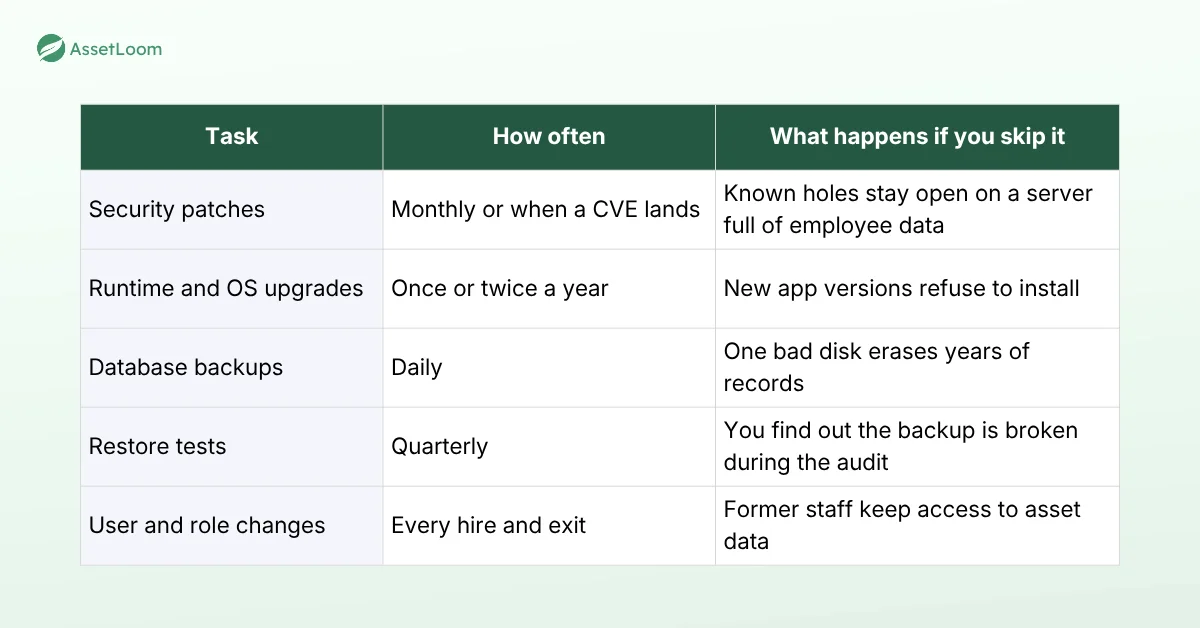
None of these tasks is hard alone. Together, they need an owner and a backup person.
Updates also grow over time. Snipe-IT v8.6.3 requires PHP 8.2 or newer, so an old server turns “just update it” into a weekend project.
We hear this story a lot. The sysadmin who set up the tool leaves. Nobody else knows the login, and the backups were never tested. Then an audit hits, the upgrade fails, and the team rebuilds the laptop list from old invoices. Welcome back to Spreadsheet IT.
That is why we use the Two-Owner Rule. Before you pick any asset management IT open source tool, name two people who can patch, back up, and restore it. Only one name? That’s a single point of failure with a login page. Zero names? Choose a hosted tool.
Top 5 Asset Management IT Open Source Tools for 2026
Now that you’re sold on the idea of open source IT asset management, let’s explore the top 5 tools dominating the market in 2025. These solutions stand out for their features, ease of use, and active communities, based on recent reviews and industry insights.
1. Snipe-IT
Snipe-IT is the asset management IT open source tool most IT teams try first, and for good reason. It tracks hardware, software licenses, accessories, consumables, and components. Check-in and check-out take a few clicks, and it prints QR code and barcode labels. It is built on Laravel (PHP) and licensed under AGPL-3.0.
Best for small and mid-sized IT teams that mainly need to know who has which device.
What we like is the clean interface, the REST API, and LDAP and SCIM support for user sync. Grokability, the company behind it, also sells managed hosting if you want the software without the server.
Watch out for upgrade planning. Version 8.6.3, released in June 2026, is largely a security release and requires PHP 8.2 or newer. Plan your server updates before you plan your app updates. If you want a side-by-side view, read our AssetLoom vs Snipe-IT comparison.
2. GLPI
GLPI combines IT asset management with an ITIL-style service desk. It covers hardware, software licenses, contracts, budgets, a CMDB, and ticketing in one place. It is written in PHP and licensed under the GPL.
Best for IT support teams that want assets and tickets in the same system.
What we like is the breadth. GLPI 11 reached a stable release on October 1, 2025, and the team still maintains the 10.x branch. A large plugin ecosystem fills most gaps, and you can define custom asset types.
Watch out for complexity. GLPI does a lot, and the setup shows it. Reviewers also note that license management is mostly manual upkeep. Budget real time for configuration and training.
3. OCS Inventory NG
OCS Inventory NG has focused on automated inventory since 2001. Agents on each computer report hardware and software details to a central server. IP discovery and SNMP scans cover printers, routers, and devices that can’t run an agent. It can also push software packages to machines.
Best for teams that need accurate, automatic data about what is installed on every machine.
What we like is that it removes manual data entry for computers. Many teams pair it with GLPI, where OCS collects the data and GLPI manages ownership, contracts, and tickets.
Watch out for scope. OCS is an inventory and deployment tool, not a full lifecycle system. You still need something else for check-outs, custody, and retirement. Rolling out agents across a mixed fleet also takes planning.
4. Shelf.nu
Shelf.nu is a newer open source platform for tracking physical equipment. It focuses on QR asset tags, custody tracking, bookings, and audits. You scan a tag with any phone to view, check out, or report an asset. The full application is licensed under AGPL-3.0.
Best for teams that lend out shared gear, such as loaner laptops, cameras, or lab equipment.
What we like is the booking workflow and the phone-first scanning. There is also a hosted version if you want to test it before you self-host.
Watch out for fit. Shelf.nu is designed for equipment of all kinds, not only IT, so confirm it covers software license tracking before you commit. Self-hosted setups are also built around Supabase, which shapes your infrastructure choices.
5. Ralph
Ralph, created by Allegro, is an asset management, DCIM, and CMDB system for data centers and back office hardware. It tracks purchases, lifecycles, and costs, and it is licensed under Apache 2.0.
Best for infrastructure teams managing racks, servers, and data center assets.
What we like is the data center depth, which most general ITAM tools lack.
Watch out for support. Since February 2025, Allegro publishes Ralph under a sources-only model, without guarantees, and it does not promise responses to issues or pull requests. Commercial support is available through a third party. Only choose Ralph if your team can fix problems on its own.
Should You Choose Asset Management IT Open Source?
It depends less on features and more on your team. Use this checklist. Open source is a strong fit when:
- At least two people can run Linux, a database, and a web server
- You need custom fields, workflows, or integrations that hosted tools don’t offer
- Your policy requires data to stay on your own servers
- You are comfortable with community forums instead of a support contract
Think twice when:
- One person would own the server alone
- You need guaranteed support or an SLA
- Your team already struggles to keep up with patching
- Leadership expects the tool to be “free” with no time cost
If most of your answers land in the second list, asset management IT open source will likely cost you more in maintenance hours than it saves in licenses.
When a Hosted Tool Makes More Sense: How AssetLoom Fits
We build AssetLoom, so read this section with that in mind. AssetLoom is not open source. It is a hosted ITAM platform for teams that want clear asset visibility without running a server.
The free plan is free forever for up to 250 assets, with no credit card. It includes asset tracking, CSV import, check-in and check-out, booking and reservations, warranty tracking, a basic dashboard, and the mobile app. AssetLoom also generates QR code and barcode labels, so you can tag devices on day one.
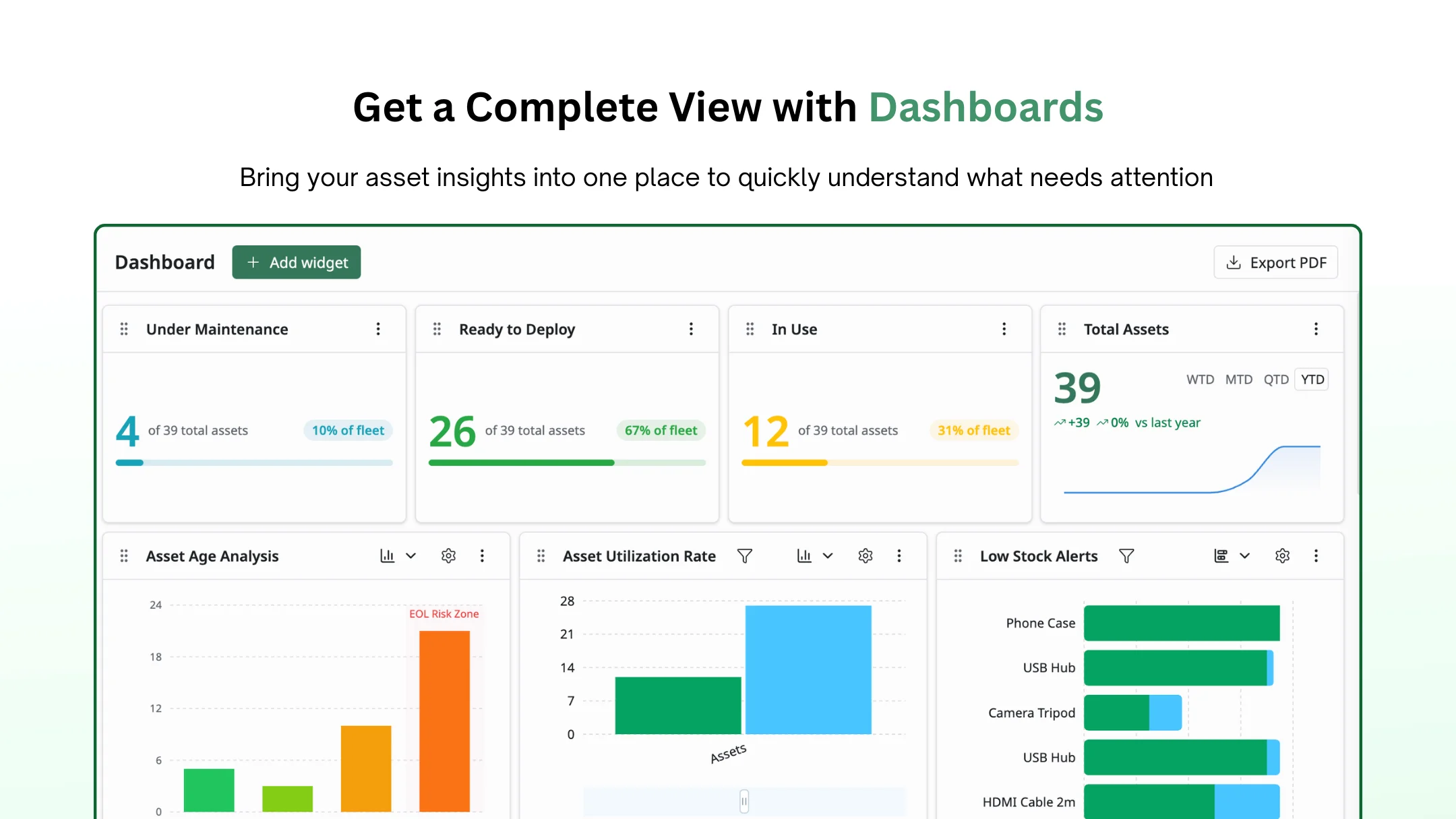
AssetLoom asset management dashboard showing total assets, warranty alerts, and check-ins
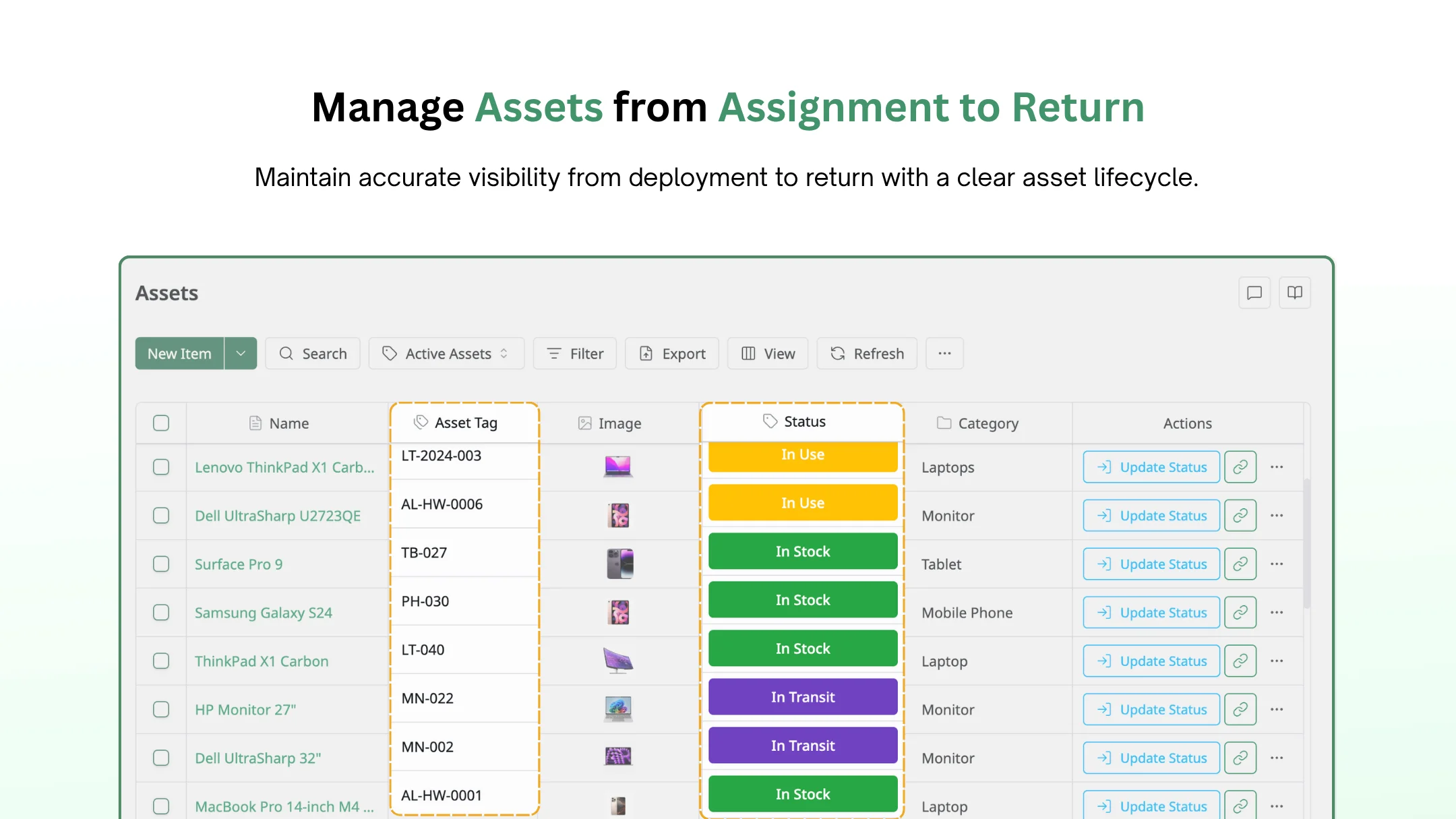
AssetLoom hardware asset record with owner, location, and lifecycle details
Paid plans add more as you grow.
- Starter adds custom fields and asset depreciation.
- Pro adds MDM sync with Microsoft Intune and Jamf Pro, plus Slack and Microsoft Teams integration.
- Enterprise offers private cloud or on-premises deployment for teams with strict data rules.
The trade-off is simple. You give up access to the source code. In return, nobody on your team has to patch the server, test the backups, or explain to finance why the audit report is late. If you’re still comparing no-cost options, our guide to free IT asset management software goes deeper.
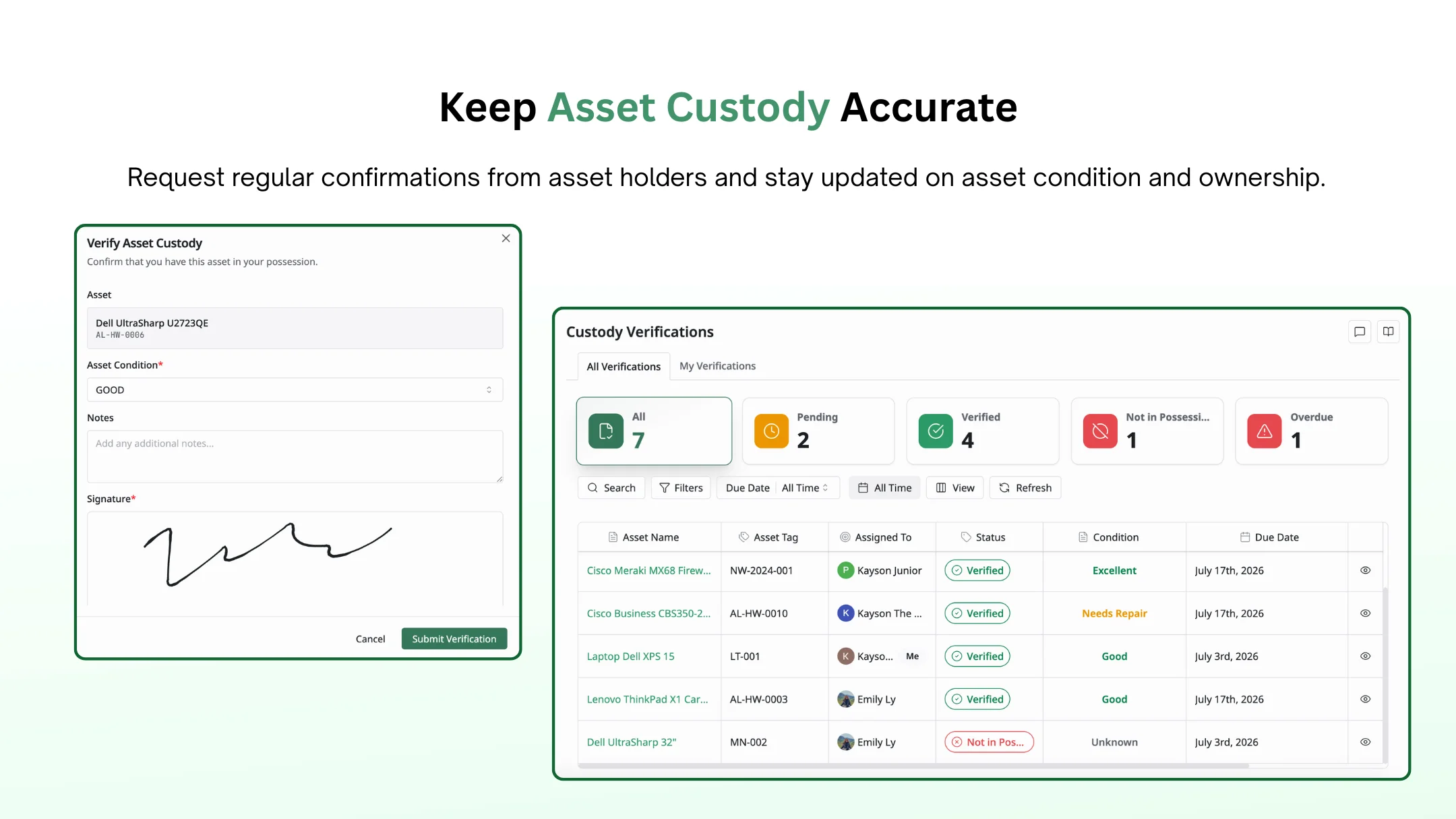
AssetLoom compared with Snipe-IT, showing check-outs and total asset value
FAQs About Asset Management IT Open Source
1. Is open source IT asset management software really free?
The license is free. Running it is not. You pay with server costs, staff time for patches and upgrades, and the risk of downtime when the one person who knows the system is away. Count those costs before you compare it with a paid or hosted tool.
2. What is the best open source IT asset management tool?
For most IT teams, Snipe-IT is the easiest asset management IT open source tool to start with. Choose GLPI if you also need a service desk, OCS Inventory NG for automatic inventory, Shelf.nu for shared equipment bookings, and Ralph for data center assets.
3. Is open source ITAM secure?
Asset management IT open source can be very secure, because anyone can review the code and projects publish security fixes openly. The risk usually comes from the installation, not the code. An unpatched server is the real weak point, so security depends on how fast your team applies updates.
4. Can open source ITAM tools discover devices automatically?
Some can. OCS Inventory NG uses agents, IP discovery, and SNMP scans to find devices. GLPI offers its own agent for inventory. Snipe-IT focuses on tracking and usually relies on imports, the API, or integrations for new device data.
5. Can I switch from an open source tool to a hosted one later?
Yes. Most open source ITAM tools can export records to CSV, and most hosted tools, including AssetLoom, can import CSV files. Clean up duplicates and old records before you move, so you don’t carry the mess into the new system.
Final Thoughts
Open source ITAM tools give you control and zero license fees. But every tool on this list still needs a clear owner. Apply the Two-Owner Rule before you install anything. If two people can run it, go for it. If not, a free hosted plan is the safer choice. Your team’s capacity, not the price tag, is the real test for asset management IT open source.