Free Asset Inventory Template Excel Download
Download a free Excel asset inventory template to simplify tracking hardware, software, and office equipment. Perfect for small teams and IT admins.
Assets disappear. Licenses expire. No one knows who took the second monitor.
Sound familiar?
You don’t need fancy software to fix it—just one solid spreadsheet that’s built to keep your assets in check.
This free Excel template is clean, smart, and ready to use. It’s not just a tracker. It’s your first step toward asset sanity.
Let’s take a look inside.
What Is an Asset Inventory—and Why It Actually Matters
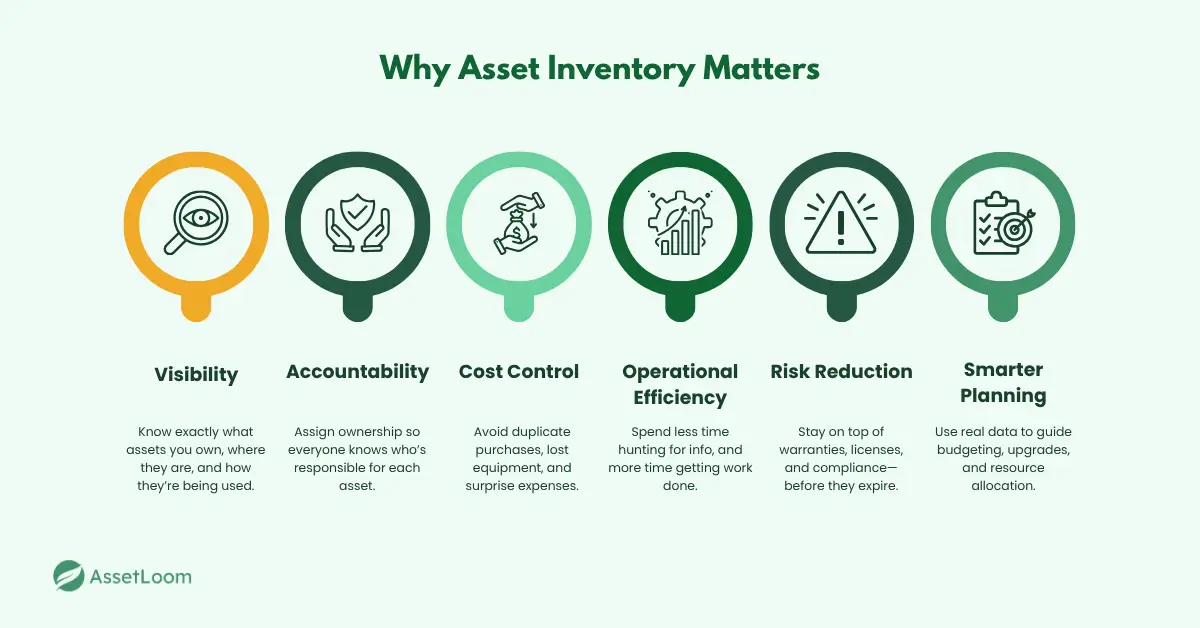
An asset inventory isn’t just a list of equipment—it’s the backbone of how your business keeps track of everything it owns. From laptops, monitors, and phones to software licenses, network devices, and even office furniture, it captures all the important details in one place.
A good asset inventory shows you:
- What assets you have: So you’re not buying duplicates or missing critical gear.
- Where they are: Whether on-site, remote, or in storage, knowing the location saves time and confusion.
- Who’s responsible: Assigning ownership helps with accountability and support.
- When maintenance or warranties expire, staying ahead avoids costly downtime or surprises.
Managing an asset inventory may seem simple, but challenges in IT asset inventory management—such as outdated records, scattered data, and unclear ownership, make it more complex than it appears.
Why is this so important? Without an accurate inventory:
- Assets can go missing or get misused
- You risk compliance and audit failures
- Renewals and upgrades get overlooked, leading to wasted money
- Teams spend hours hunting down information instead of focusing on their work
In short, a clear, up-to-date asset inventory reduces risks, saves money, and keeps your business running smoothly. And while some companies invest in expensive tools, it all starts with one smart, well-designed spreadsheet.
Common Challenges Teams Face with Asset Inventory
If you’ve ever tried to keep track of company equipment, you know it sounds simple—until it isn’t. Asset inventory can get messy fast, even with a team that’s doing their best. Here are some of the most common issues that come up, and why they matter more than you might think.
1. Things Don’t Get Updated
This is probably the most common problem: the inventory starts out strong, but over time, it slips. A laptop gets handed off to someone new and no one logs it. An old printer is thrown out, but still shows up as “active.” Before you know it, your spreadsheet is out of sync with reality—and it becomes harder and harder to trust what’s in there.
2. The Info Lives in Too Many Places
One person has a spreadsheet, someone else keeps notes in an email, and another team is tracking things in their own system. Sound familiar? When asset data is scattered, no one has the full picture. That leads to duplicate purchases, missing records, and a whole lot of wasted time just trying to answer basic questions like: “Where is that monitor?” or “Did we already buy that software?”
3. No One Really Owns It
Assets fall through the cracks when no one is responsible for keeping tabs on them. Maybe it was assigned to someone who left, or it just never had a clear owner to begin with. Without accountability, updates get missed and gear goes untracked. It’s not about blaming people—it’s about setting up a process that makes ownership part of the system.
4. It’s All Manual—and That Slows Everyone Down
Typing everything into a spreadsheet by hand might work for a while, but it doesn’t scale. People get busy, entries are skipped, or numbers are typed wrong. And even when it’s done well, it’s slow. Over time, those little delays and errors add up, and you’re left with a file that nobody really wants to rely on.
5. Renewals and Warranties Slip Through the Cracks
Most teams don’t have a great system for tracking software licenses or warranty expirations—and it shows. One day, something breaks or a subscription lapses, and suddenly you’re dealing with unexpected downtime or surprise costs. It’s not that people don’t care—it’s that there’s no easy way to stay on top of it all.
6. Remote Work Makes It Even Harder
When everyone worked in the same office, it was easier to keep track of where things were. Now? Equipment is spread across homes, coworking spaces, and storage closets. Without a centralized view, it’s tough to know what’s out there, let alone who has it or whether it’s being used.
So What’s the Cost?
A little disorganization might not seem like a big deal at first—but over time, it adds up. Teams end up spending hours looking for answers. Equipment goes missing. Budgets get wasted. And when audits or compliance reviews come around, you’re left scrambling. It’s frustrating, stressful, and totally avoidable.
A Simple Way to Get Back on Track
The good news? You don’t need expensive software to fix this. A clean, easy-to-use Excel template can go a long way. It gives you one place to keep everything organized—what you have, where it is, who’s using it, and when it needs attention. It’s not about being perfect—it’s about having a system that works.
What’s Inside This Asset Inventory Template
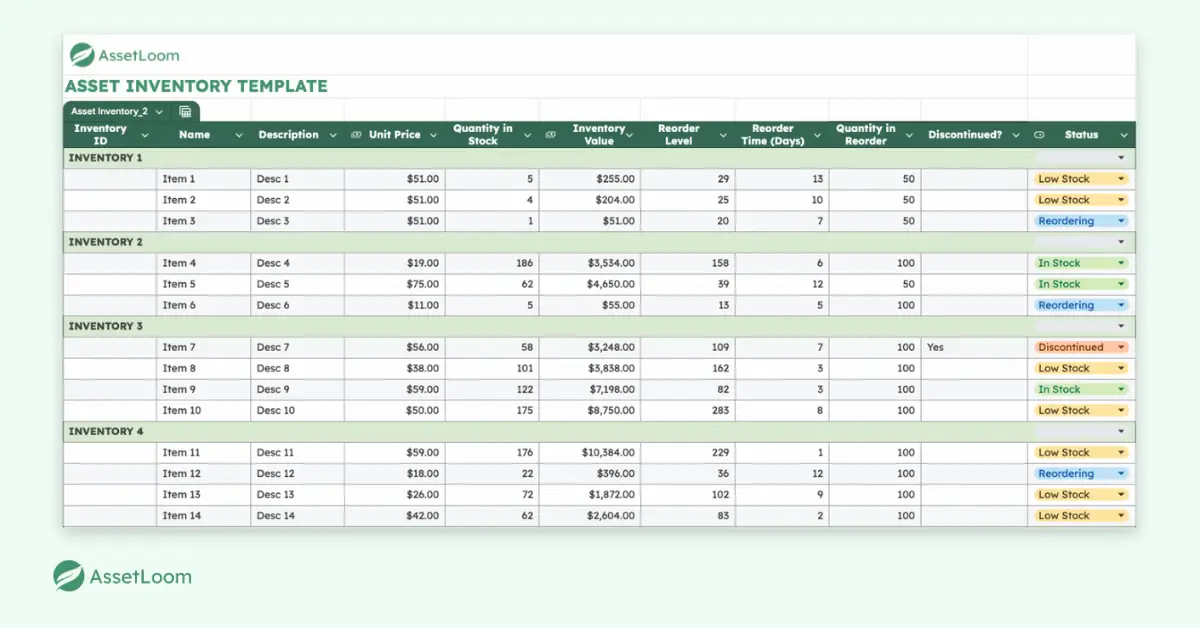
This template isn’t just a blank table—it’s built with real asset tracking in mind, so you’re not starting from scratch.
Here’s what you’ll find inside:
- Inventory ID & Name: Unique identifiers for each item, making them easy to search and reference.
- Description: A brief summary to distinguish items, especially helpful for similar products.
- Unit Price: The cost per item, used to calculate total inventory value.
- Quantity in Stock: This shows how many units are currently available.
- Inventory Value: Automatically calculated as Unit Price × Quantity in Stock for real-time valuation.
- Reorder Level: The minimum stock threshold that triggers a reorder.
- Reorder Time (Days): Average time needed to restock the item—helps avoid supply gaps.
- Quantity in Reorder: Number of units to reorder once the level is triggered.
- Discontinued?: Marks items that are no longer active or in circulation.
- Status: Auto-filled field showing current state—In Stock, Low Stock, Reordering, or Discontinued—based on live inventory data.
The layout is clean, the fields are clear, and dropdowns help keep everything consistent. Whether you’re tracking five assets or five hundred, this template gives you structure that scales.
Download the Free Asset Inventory Template
Ready to get organized? You can download the template below and start tracking your assets immediately—no signups, no fluff, just a clean, practical file that works.
It comes pre-filled with example entries to guide you, plus dropdown menus that make updates quick and consistent. You can easily edit, expand, or customize it to suit your team’s needs.
Download the Asset Inventory TemplateWhether you’re building your first inventory or cleaning up a messy one, this template gives you the foundation to do it right.
When an Asset Inventory Template Is No Longer Enough
An asset inventory template gives you a structured way to record what you own. But the biggest challenge is not creating the list — it’s keeping that list accurate as your environment changes.
New laptops are deployed. Devices move between employees. Old equipment stays in storage. Without a way to automatically collect and update information, even the best spreadsheet can become outdated.
AssetLoom helps teams move from manually maintained inventory lists to a continuously updated asset management process.
Automatically Find Devices Across Your Network
Instead of relying only on manual updates, AssetLoom Network Scanner helps IT teams identify connected devices and collect key information about their environment.
Using agentless discovery, teams can scan their network without installing agents on individual devices. This makes it easier to uncover devices that may not already exist in your inventory records.
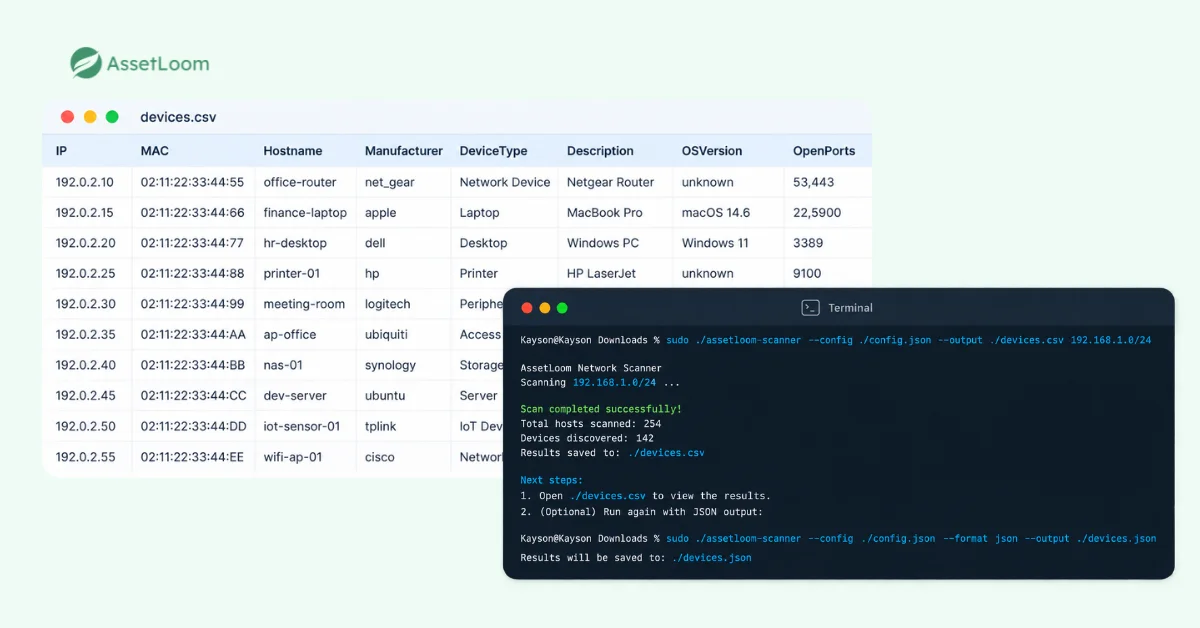
This helps answer questions that spreadsheets often cannot:
- Are there devices connected to our network that we don’t know about?
- Does our inventory match our actual environment?
- Which devices need to be added or reviewed?
Read more: Safe Network Scanning Practices: Top 5 Tips For Your First Network Scan
Turn Discovered Data Into a Complete Asset Record
After scanning, teams can export discovered device information as a CSV file and import it directly into AssetLoom. Instead of manually creating hundreds of asset entries, teams can quickly build a more complete inventory baseline.
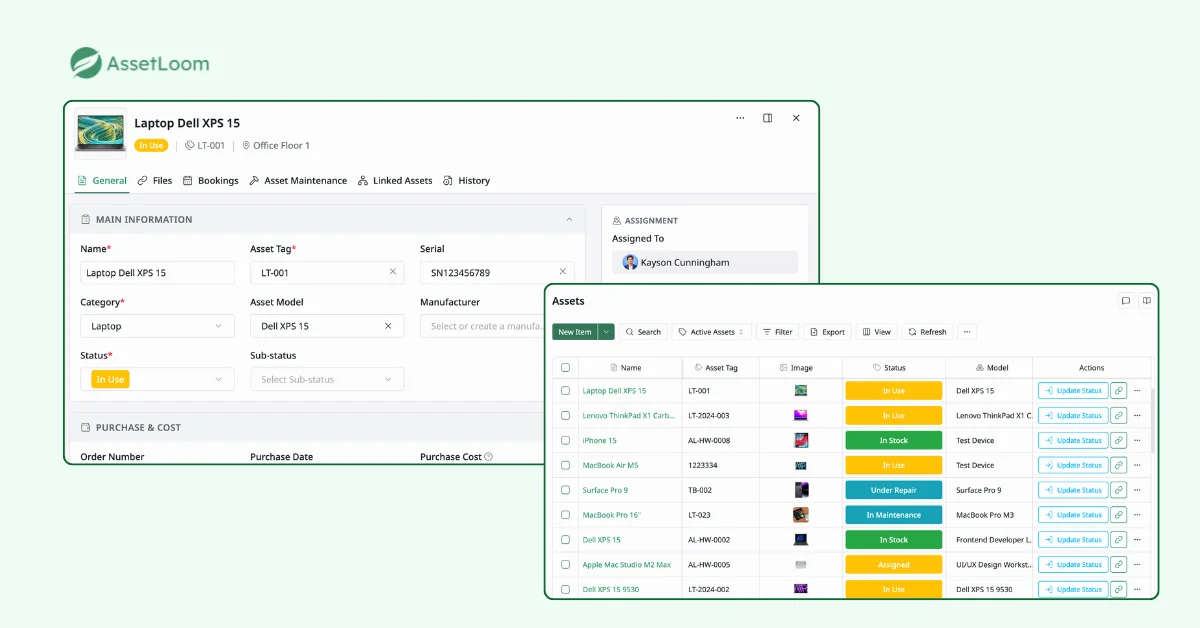
Once imported, AssetLoom allows teams to enrich asset records with operational details such as:
- Assigned users and locations
- Purchase and warranty information
- Maintenance history
- Depreciation details
- Current asset status
This creates a single source of truth for IT assets, helping teams spend less time maintaining spreadsheets and more time managing their technology environment.
FAQs
1. What is the difference between an asset inventory and an asset register?
An asset inventory is a complete record of the resources a company owns or manages, including information such as asset type, location, ownership, and status. An asset register is often a more formal record used to track financial and lifecycle details, such as purchase cost, depreciation, and retirement information.
Both help organizations maintain visibility into their assets and make better decisions about usage, replacement, and budgeting.
2. How often should an asset inventory be updated?
The frequency depends on how often assets change within your organization. Businesses with frequent equipment purchases, employee changes, or device movement may need continuous updates, while smaller teams may review their inventory monthly or quarterly.
Regular updates help ensure that asset records match the actual environment and prevent missing or outdated information.
3. Can an asset inventory template track software licenses?
Yes. An asset inventory template can include software license information such as license name, number of seats, renewal dates, assigned users, and expiration dates.
However, as the number of licenses grows, dedicated software asset management tools can help automate tracking, reduce missed renewals, and provide better visibility into software usage.
4. How can companies verify that their asset inventory is accurate?
Companies can improve inventory accuracy by regularly comparing records with physical assets, assigning ownership clearly, standardizing asset information, and performing periodic audits.
For larger environments, automated discovery tools can help identify connected devices and highlight differences between recorded assets and actual devices.
5. When should a company move from an Excel asset inventory template to asset management software?
Excel works well for getting started, especially for smaller inventories. However, organizations may need dedicated asset management software when they have multiple locations, frequent asset changes, more users updating records, or difficulty keeping inventory information accurate.
A dedicated platform helps automate data collection, centralize asset information, and provide better visibility across the asset lifecycle.
Start Simple, Stay in Control
You don’t need complex systems to get your asset inventory under control. You just need a tool that’s clear, consistent, and built for real work.
It’s simple, yes. But the impact? Huge. Better visibility. Fewer surprises. Smarter decisions.
Download the free Asset Inventory Template to get started, then move beyond manual tracking with the free AssetLoom Network Scanner and AssetLoom for complete IT asset lifecycle management.