Simplify Asset Audit Sign-Offs And Cut Missing-Device Follow-Ups
Learn how to run an asset audit sign-off, confirm who holds each device, track responses, and resolve missing or outdated records from one place
Asset Audit Sign-Off should confirm that every company asset is still with the right person. Yet for many teams, it becomes a time-consuming process of checking spreadsheets, tracing ownership, sending reminders, and resolving outdated records.
This article explains why asset audits become difficult and how AssetLoom helps you verify custody, track responses, and manage exceptions from one place.
1. When The Asset List No Longer Matches Reality
It’s time for the company’s annual asset audit.
The IT team opens its asset register and sees hundreds of laptops, phones, and accessories assigned across different departments. According to the records, every item has an owner, but the team knows the information may no longer reflect reality.
Some employees have changed departments. Others are working remotely or have left the company. A few devices were replaced, shared with colleagues, or returned without the records being updated.
To verify everything, IT sends spreadsheets and emails to employees asking them to confirm the equipment they currently have.
Responses arrive in different formats. Some employees confirm immediately, some report incorrect assignments, and many do not respond at all. Department leads are asked to follow up, while IT manually compares every response against the asset register.
What should have been a routine audit becomes weeks of reminders, spreadsheets, and uncertainty.
2. What Is An Asset Audit Sign-off, Actually?
An asset audit sign-off in ITAM is a formal process where employees confirm that the assets recorded under their name are still in their possession.
Rather than relying only on the asset register, IT asks each asset holder to verify the information directly. Employees can confirm the asset, report its current condition, or flag it as returned, transferred, missing, or incorrectly assigned.
Unlike a basic inventory count, the sign-off creates a traceable record of who verified each asset and when. This gives IT stronger evidence that asset records reflect what is actually happening across the organization.
Learn how to conduct a successful IT asset audit
3. Why Annual Asset Audits Still Become A Burden?
Flexera’s 2026 survey found that audit response and audit-related allocation each consumed 22% of ITAM teams’ time. What led to this issue?
Asset information changes throughout the year. Employees join, leave, move departments, work from new locations, or receive replacement equipment. Even when the asset register was accurate when an item was assigned, it may become outdated over time.
By the time the next annual audit begins, IT may need to investigate months of outdated information at once.
From the employee’s side, the request often arrives as one more email in a full inbox. This is often vague about which laptop, what ‘confirm’ even means, and easy to defer. By the time IT follows up a second or third time, nobody remembers whether they replied at all.
4. How AssetLoom Can Help With Your Asset Audit Process
The issue is not the audit itself. It’s the lack of a structured verification process, one that lets IT focus only on the exceptions instead of re-checking every record.
AssetLoom brings your asset records, custody assignments, and verification responses into one connected workflow. Here is how each step supports a smoother audit process:
Step 1: Start With A Reliable Asset List
Your audit begins with one centralized record of the assets owned by your organization. You can import all existing asset records into the platform via CSV files instead of rebuilding your asset list from scratch. This is especially useful when your team manages a large number of assets in spreadsheets.
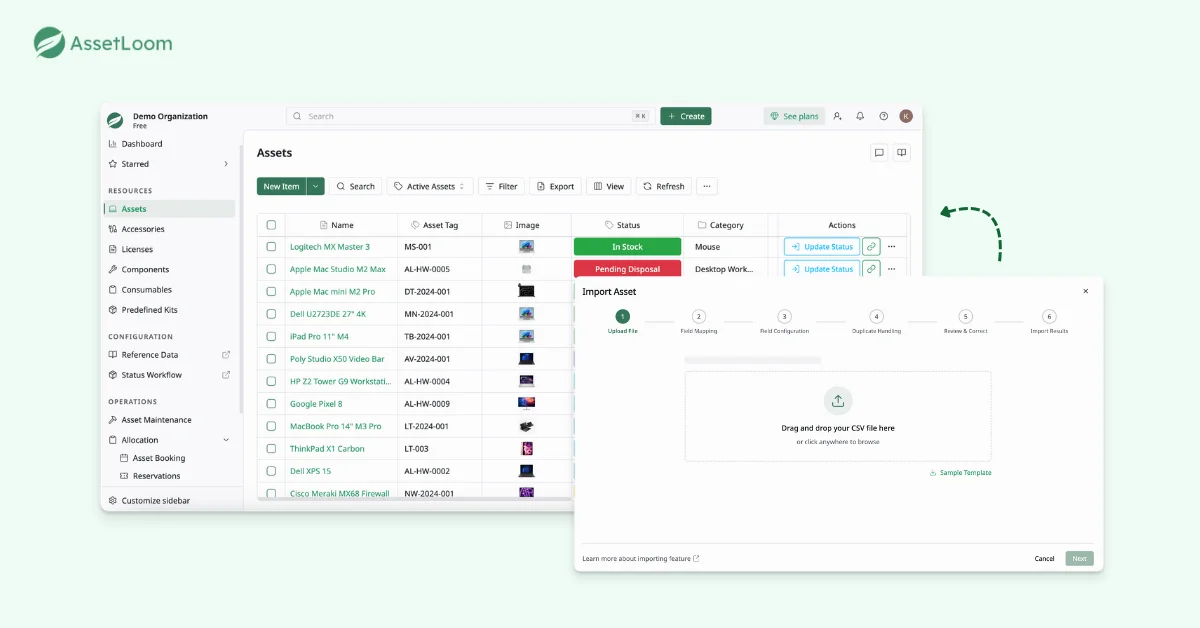
Once everything is in one place, your team can review it before the audit begins: identifying missing assignees, outdated statuses, duplicate entries, and incomplete details.
Step 2: Check Out Assets To The Right Users
An audit cannot confirm asset possession unless every item is linked to a responsible user. You can check out assets to employees while recording their status, checkout date, and expected return date.
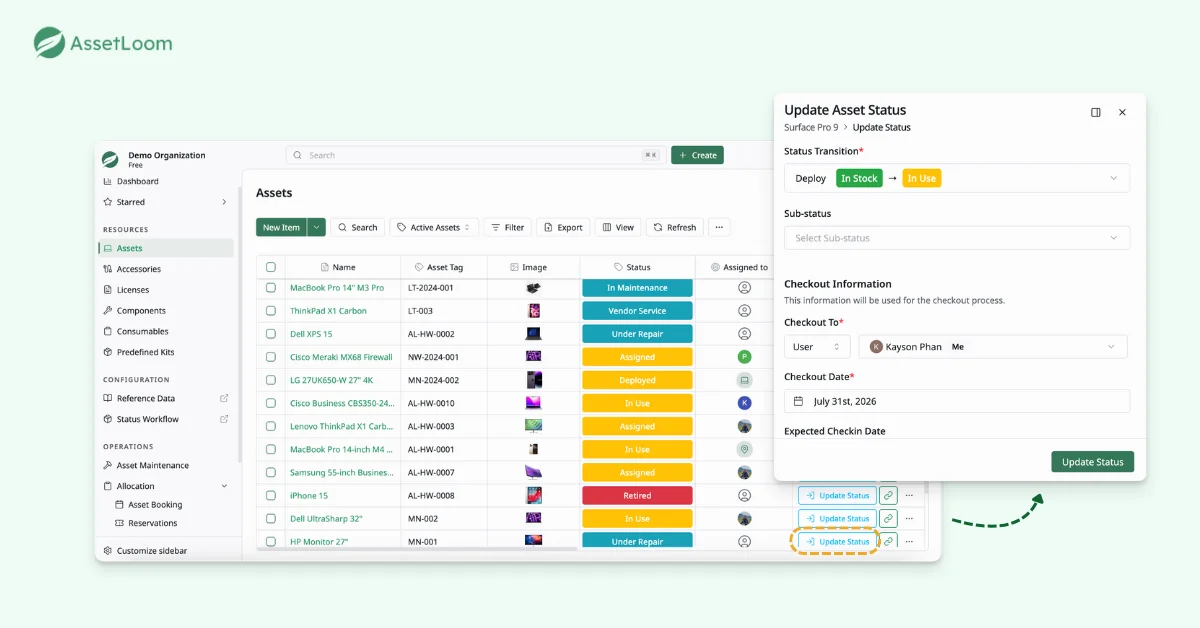
This creates a clear chain of custody for each device. When verification begins, employees receive an accurate list of the assets assigned to them. Your team can avoid sending requests to the wrong people and quickly identify assets with missing or outdated ownership records.
Step 3: Send Verification Requests
When it is time to conduct the audit, you can create custody verification requests directly. Each request is sent to the current asset holder and can include a due date and any instructions they need.
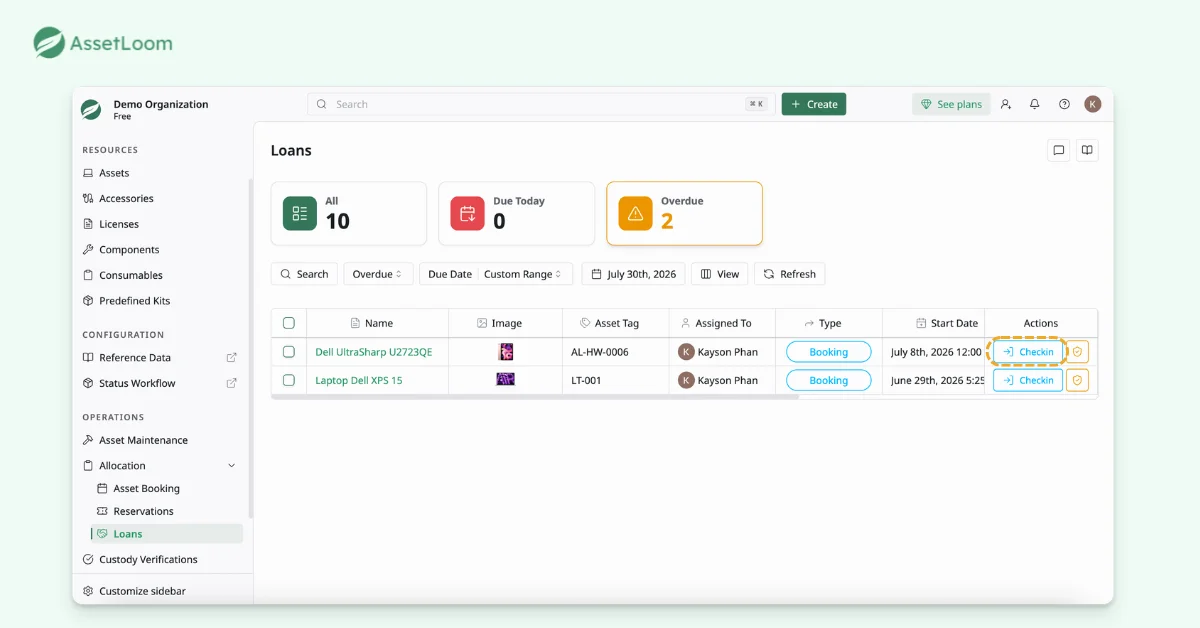
This process is not limited to permanently assigned assets. You can also verify commonly shared equipment, including items managed through booking systems.
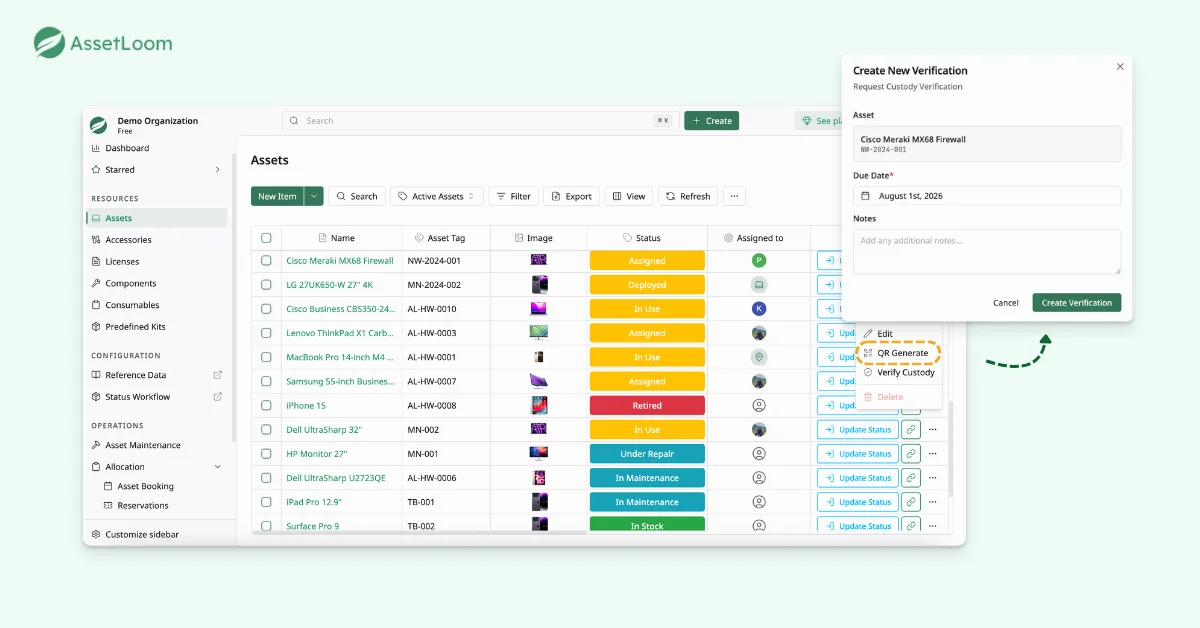
Instead of checking who has each asset, sending individual emails, and manually collecting confirmations, you can launch the entire verification process in just a few minutes. Employees receive the right request immediately, while your team can track every response from one place.
Learn more: Verifying IT Asset Custody: What Every Business Needs to Know
Step 4: Tracking Custody Responses
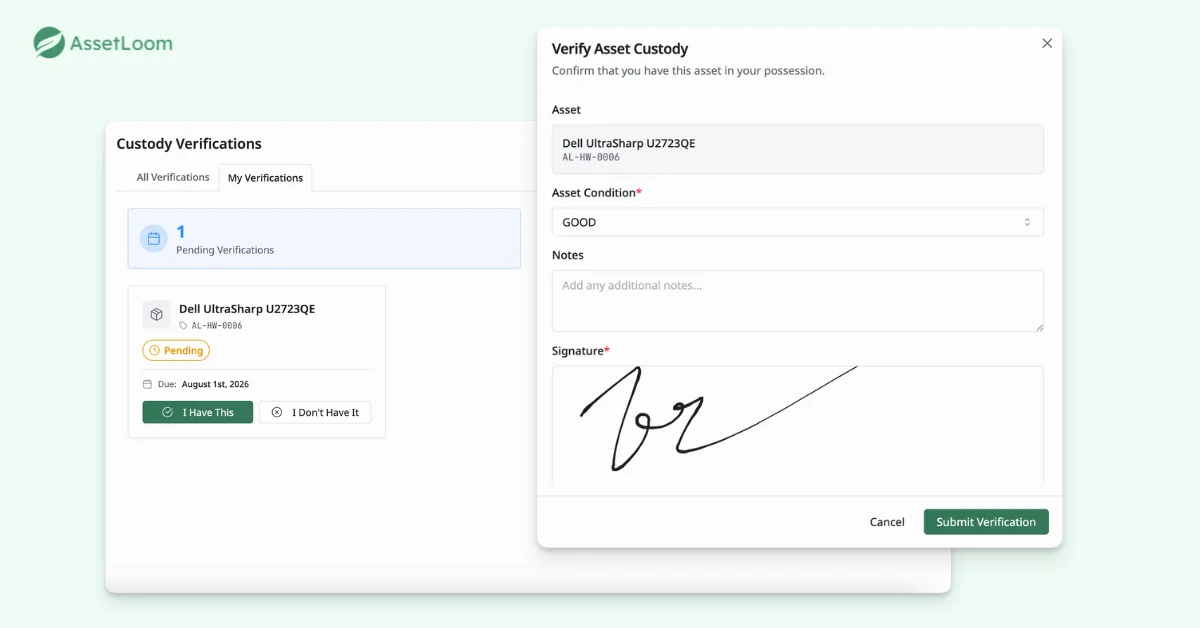
After receiving verification requests, employees can confirm whether they still have the asset. They can also record its condition, add notes, and provide a signature as proof of verification.
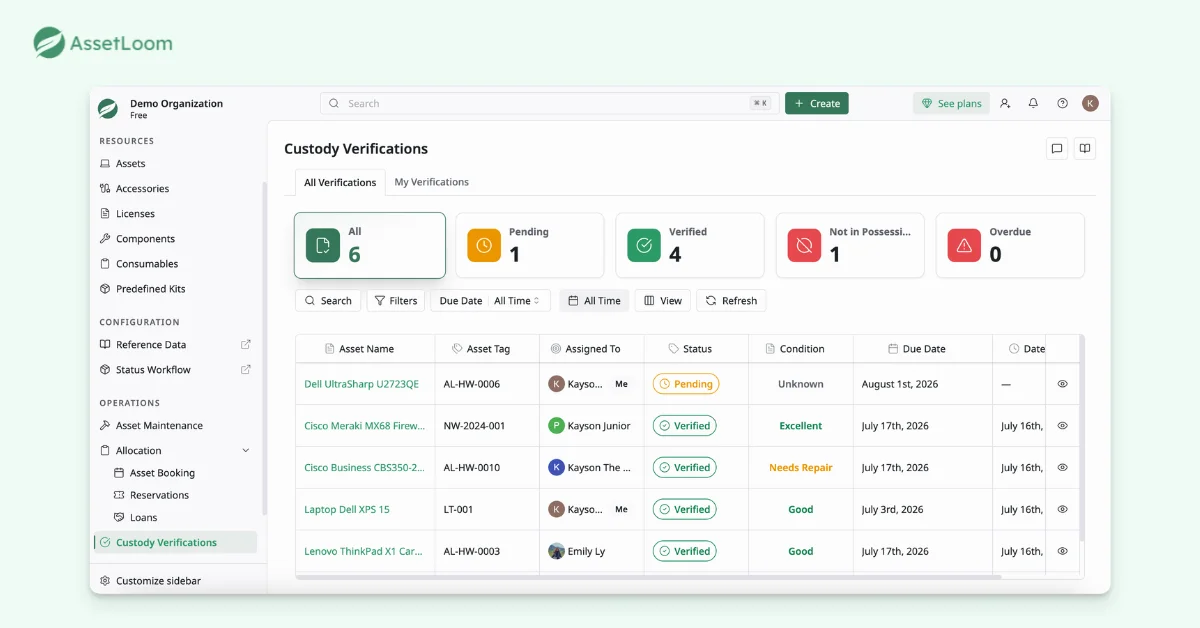
When an employee no longer has the item, they can report it directly instead of confirming incorrect information. Your team can then review the exception and investigate whether the asset was returned, transferred, or misplaced.
All custody responses land on a single screen: pending, completed, overdue, or flagged as not in possession. From there, your team can follow up on exceptions, resolve outstanding records, and keep a full audit trail for reference.
FAQs
1. How often should an organization run an asset audit sign-off?
The right frequency depends on how quickly assets move within the organization. Many companies run a full audit annually, while teams with frequent employee changes, shared equipment, or remote workers may benefit from quarterly or department-level checks.
2. Should every company asset be included in the same audit?
Not necessarily. You can prioritize high-value, portable, or sensitive assets such as laptops, phones, tablets, and networking equipment. Lower-risk items can be reviewed separately or included in a broader annual inventory check.
3. Who should review disputed or unconfirmed asset records?
IT usually manages the overall audit, but department leads can help resolve records within their teams. Finance, security, or compliance teams may also need to review high-value assets, missing devices, or unresolved exceptions.
4. How should remote employees verify company equipment?
Remote employees can confirm their assigned assets digitally and provide additional details when required. Depending on company policy, this may include a written note, the asset’s current condition, a photo, or a signed acknowledgment.
5. What should happen after an employee reports that they no longer have an asset?
The record should be investigated before it is updated. Your team may need to confirm whether the asset was returned, transferred, replaced, lost, or incorrectly assigned. Once the situation is verified, the asset status and custody history should be updated accordingly.
Final Thoughts
An asset audit should help your team improve record accuracy, not create another layer of administrative work. With a structured process, employees can confirm the assets in possession, while IT gains a clear view of responses.
AssetLoom brings asset records, custody assignments, verification requests, and responses into one platform. Your team can complete audits with greater clarity, maintain a traceable history, and keep asset information aligned with what is actually happening across the organization.
If your team is heading into another audit season with spreadsheets and reminder emails, AssetLoom is free to try through the end of the year!