AI Asset Inventory: Building Visibility for the New Era of AI Adoption
As AI adoption grows across every department, traditional IT inventories are falling behind. See why AI asset inventory is becoming the visibility layer modern IT teams need.
AI is no longer something companies test in a small pilot project. It is already part of everyday work: AI assistants drafting content, AI features embedded inside SaaS tools employees already use, applications wired directly into AI APIs.
Because of that, the challenge for IT teams is no longer adoption. It is visibility: what AI assets exist, who uses them, what data they can reach, and who is responsible for each one. Most organizations cannot answer that with confidence, and that gap is exactly what AI asset inventory is built to close.
Where AI Adoption Actually Enters an Organization
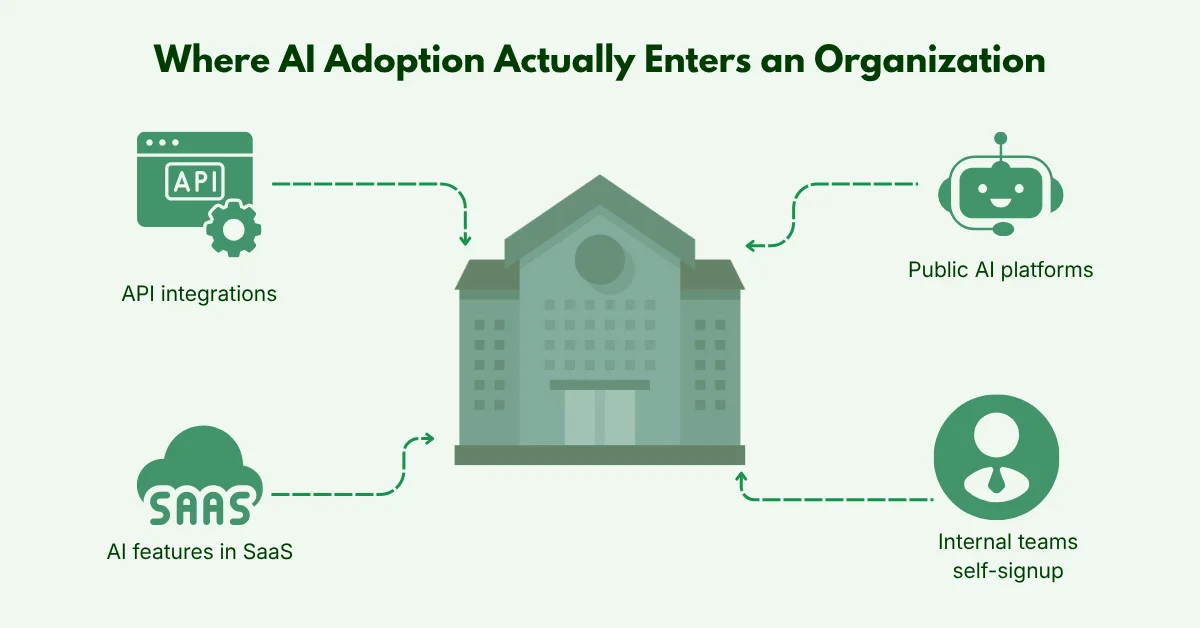
Traditional software adoption follows a few predictable paths: a request goes to IT, someone approves it, and procurement issues a license. However, AI adoption does not always follow this process. It can enter through several channels:
- Employees subscribe to tools on their own.
- AI features are added to SaaS applications already approved for other reasons.
- Teams start using public AI platforms without a formal request.
- Developers build API integrations for needs.
- Internal teams create AI projects outside standard procurement.
Because these channels sit outside the usual approval process, IT can usually list only the applications it formally approved. But it may not know which teams use AI, which vendors process company data, or who is responsible for each one.
How This Plays Out in Practice
A marketing employee signs up for a $29-a-month AI writing tool on a personal card. No request is filed, so IT never reviews it. Three months later, four more people on the team are using it, and it has quietly become part of how the team works.
Nothing about this was reckless; the tool solved a real problem, and paying for it was easy. But no one has reviewed what data it can access, no one owns the subscription, and if the original employee leaves, access does not get revoked because no record shows it was ever granted. This is the ordinary, unremarkable way Shadow AI accumulates.
Why Traditional IT Controls Miss This
Traditional ITAM follows a predictable path: request, approval, purchase, deployment, and retirement. AI often bypasses this process. Employees can subscribe to tools themselves, SaaS platforms can add AI features without a new review, and teams can build AI integrations outside procurement. Meanwhile, models, APIs, datasets, and agents have no natural place in inventories built for traditional IT assets.
To find applications operating outside these traditional controls, organizations can use the Shadow IT Scanner to discover cloud applications being accessed across their network.
The Risks That Build Up Without Visibility
Unmanaged AI adoption rarely fails all at once. It accumulates as small, ordinary problems until they become expensive or hard to unwind.
Data Exposure
Employees may submit sensitive information into an AI tool without knowing where it is processed or how long it is retained. Security teams cannot evaluate a risk they do not know exists.
Compliance Pressure
As AI-specific regulation increases, organizations are asked directly what AI systems are in use, who is responsible for them, and what data they can access. An inventory with gaps cannot answer that with confidence.
Operational Drag and AI Sprawl
Departments buy overlapping tools that solve the same problem, subscriptions renew automatically because no owner ever gets a notice, and access stays active after someone leaves because no record shows it existed.
Vendor Concentration Risk
As adoption spreads, so does the number of unreviewed AI vendors with access to company data. Each one carries its own security posture, subprocessors, and data-handling terms, none of which get evaluated if the tool itself was never logged in the first place.
Each risk compounds the others: a tool nobody can see never gets reviewed for compliance, and a tool that was never reviewed is more likely to be handling data in ways no one anticipated.
Visibility Has to Come Before Governance
Most AI governance starts with a simple question: What AI tools are employees allowed to use? But before answering that, organizations need to know what AI tools are already being used.
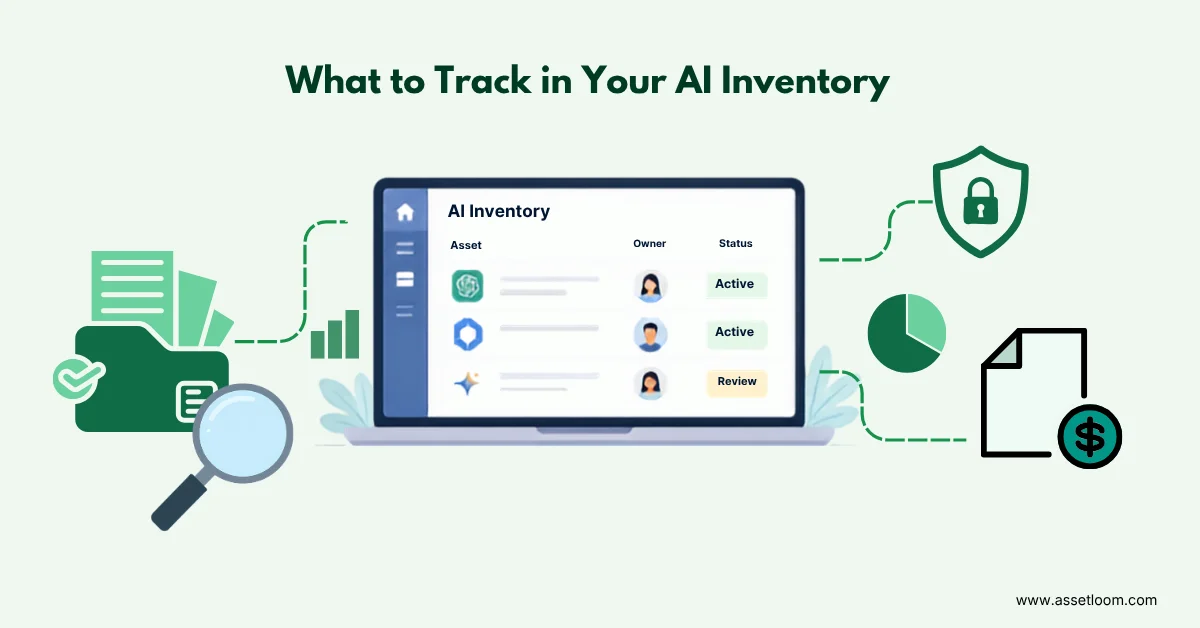
A policy can only cover the tools the organization knows about. Any AI tool outside that view may continue to be used without review or control. To build a clear view of AI usage, organizations need to know:
- AI Assets: What AI tools and resources are being used?
- Ownership: Who is responsible for each AI asset?
- Usage: Which teams or employees use them?
- Data Access: What data can these AI tools access?
- Cost: How much are AI subscriptions and services costing?
- Lifecycle: Should each asset be renewed, reviewed, or retired?
Without this visibility, organizations can only manage the AI they know about. AI tools outside their view can continue to operate without proper oversight.
What Is an AI Asset Inventory?
An AI asset inventory is the practice of identifying, recording, and managing every AI-related resource an organization uses, extending traditional IT inventory with the context AI specifically requires.
What Types of AI Assets to Track
AI assets can take many forms across your technology environment, so organizations need to track more than just standalone AI applications.
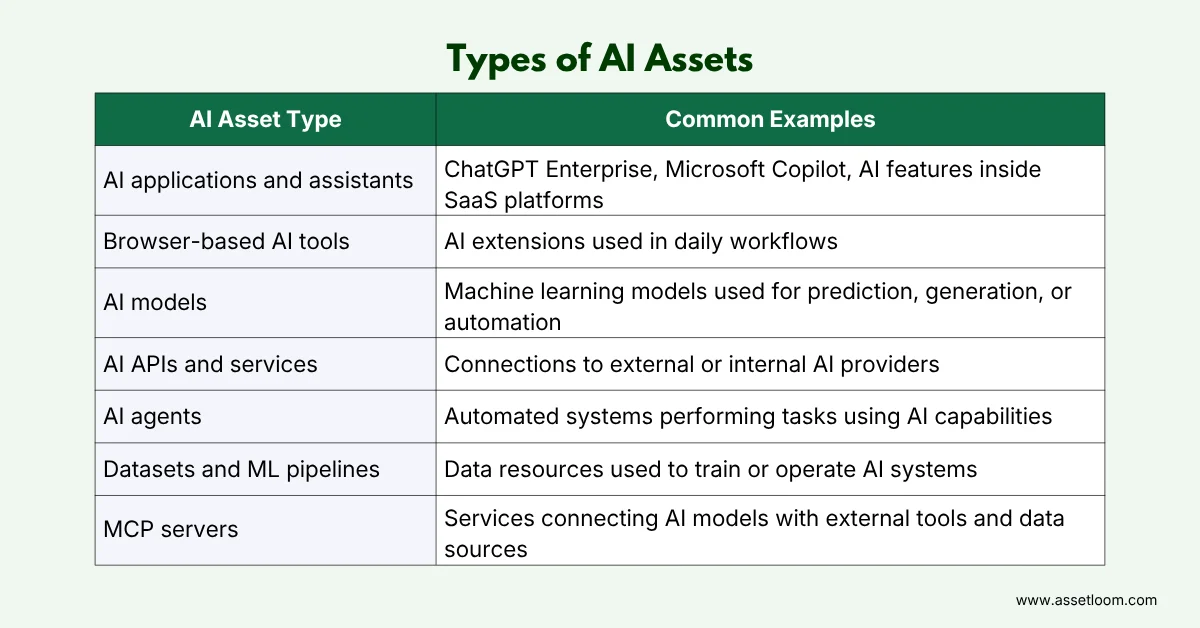
Most organizations only track the tools employees interact with directly, since those are easiest to spot. The technical layer underneath is harder to see but affects cost, security, and operational decisions just as much, so a complete inventory has to cover both.
It Is Not the Same as a SaaS Inventory
A SaaS inventory and an AI inventory overlap, but they are not the same record. A SaaS inventory typically tracks applications, users, costs, and renewal dates. Once an application has AI built into it, that record needs more: what AI capability it provides, which model it relies on, what data it can access, and how it is classified for risk.
Knowing that a SaaS application exists is different from knowing what its AI features can see and do. That distinction is where AI asset inventory starts to earn its place alongside, not instead of, your existing ITAM processes.
How to Start Building One
Most teams build this step by step rather than trying to do everything at once:
- Check every source that may show AI usage, such as IT and SaaS records, procurement data, employee requests, and manager reports. No single source gives you the full picture.
- Classify what you find by type, department, and purpose. An unfamiliar $29 charge could turn out to be the AI tool mentioned in the example above.
- Assign an owner to each asset, not just a department. Someone needs to be responsible for managing and reviewing each AI asset.
- Include each asset in your normal IT asset lifecycle process, from approval and active use to renewal and retirement. This keeps AI tools within your regular review process.
- Review the inventory regularly. AI tools change faster than most software. Features are added, ownership changes, and subscriptions that made sense six months ago may no longer be used.
Conclusion: Managing AI Starts With Knowing What Exists
The question is no longer whether an organization should use AI. It already has, often across several departments, without a single formal request being filed.
The real work is maintaining visibility as adoption keeps expanding, so ownership, cost, and data access can be actively managed instead of assumed. An AI asset inventory turns that visibility into something usable: a record of who owns each asset, why it exists, what it costs, and when it should be reviewed.
Frequently Asked Questions
1. Is an AI Asset Inventory the Same as SAM or SaaS Management?
Not quite. SAM and SaaS management track applications, licenses, users, and costs in general. An AI asset inventory goes deeper; it also tracks what a tool can do, what data it touches, and how risky that access is.
2. Why Is Shadow AI a Concern?
Shadow AI is AI usage adopted outside formal IT processes, typically with no assigned owner, security review, or cost tracking. The risk is not that employees found a useful tool; it’s that no one is accountable for how it’s used.
3. How Often Should an AI Asset Inventory Be Updated?
Whenever a meaningful change happens, a new service is adopted, ownership changes, or an asset is retired. Companies adopting AI quickly need more frequent reviews. Read more on IT asset lifecycle management.
4. How Do Companies Discover AI Assets?
By combining SaaS records, procurement data, employee reports, endpoint data, cloud platforms, and code repositories. No single source reveals everything, so using several together surfaces both user-facing tools and the technical layer behind them.
5. Who Should Own the AI Asset Inventory?
There is no single model that fits every organization. IT or ITAM teams often maintain it, while security, procurement, legal, and compliance contribute information relevant to their own responsibilities. What matters is that someone is clearly responsible for it.