Affordable Asset Management Tools That Actually Work
Affordable asset management tools streamline IT asset tracking for small and large teams. Save money, stay audit-ready, and simplify your workflow without breaking the bank.
An affordable asset management tool saves you from the headache of tracking IT assets with messy spreadsheets or scribbled notes. IT Asset Management (ITAM) keeps tabs on laptops, software licenses, and servers to cut costs and dodge audit stress. You don’t need a big budget to get it right. Budget friendly tools like AssetTiger, Spiceworks, BlueTally, Snipe-IT, and Budibase pack powerful features without the high cost. This blog highlights top affordable asset management tools that work for small startups and big companies alike, making asset tracking simple and pain free. Nobody wants a tool that’s harder to use than a 90s pager. Our picks are easy, effective, and kind to your wallet.
Let’s dive into how these tools can fix your IT mess and keep your team happy.
Why ITAM Matters for Your Team
IT Asset Management (ITAM) means tracking every piece of hardware (like laptops and servers) and software (like licenses for Adobe or Microsoft) to save money, reduce risks, and plan better. Without ITAM, you’re stuck with a messy inventory, which can lead to costly mistakes.
For example, a small marketing firm found they were paying for 50 unused software licenses, costing them thousands yearly. That’s money better spent on new gear or coffee for the team! ITAM spots these gaps, helping you cut unnecessary costs and optimize your budget.
ITAM also keeps you ready for audits. Compliance checks can be stressful if you don’t know what assets you have or where they are. A good ITAM system ensures you’re prepared, avoiding fines or last minute scrambles. Plus, it helps you plan for upgrades or replacements by showing what’s outdated or overused. The best news? You don’t need a huge budget to get started. Some Affordable asset management tools offer powerful features like inventory tracking, license management, and reports without draining your wallet. If your asset list feels like a tangled knot, ITAM untangles it. It brings order, saves cash, and lets your IT team focus on bigger wins, not chasing down missing laptops or expired licenses.
Related article: It Asset Management Tool
Are Affordable Tools Too Good to Be True?
Wondering if an affordable asset management tool can really get the job done? The idea that low cost or free tools are low quality is a myth. Tools like Snipe-IT and BlueTally offer powerful features that match expensive software, no tech degree required. They handle asset tracking, license management, and reporting with ease, helping IT teams stay organized without spending a fortune.
For example, a small retail chain with 10 stores used BlueTally’s free plan to track 250 laptops and software licenses. They cut audit preparation time by 30% and saved $5,000 annually by spotting unused licenses. That’s real impact without a big price tag. Modern affordable asset management tools use open source or freemium models to deliver reliable performance for businesses of all sizes. You don’t need to break the bank to manage assets well. These tools prove that budget friendly options are smart, not cheap. Pick one, and your IT team can work efficiently while keeping your budget happy.
Top Affordable Asset Management Tools for 2025
Finding an affordable asset management tool that delivers real value can feel like searching for a diamond in a pile of rocks. These tools help small startups and larger businesses alike manage assets, cut costs, and stay ready for audits without breaking the bank. Each one offers unique strengths, from free plans to customizable options, so you can find the perfect fit for your team. No more wrestling with spreadsheets or paying for features you don’t need. Let’s dive into these affordable asset management tools that work hard, keep your budget happy, and make your IT team’s life easier. Try their free trials or demos to see which one clicks for you.
1. AssetLoom
AssetLoom is a modern cloud-based IT asset management (ITAM) platform designed to help businesses manage their technology environment from discovery to retirement. It provides a centralized system to track hardware, software licenses, accessories, components, and consumables while reducing manual inventory work.
Unlike basic asset tracking tools, AssetLoom combines inventory management with asset operations, helping IT teams manage ownership, availability, maintenance, and lifecycle activities in one place.
Key Features:
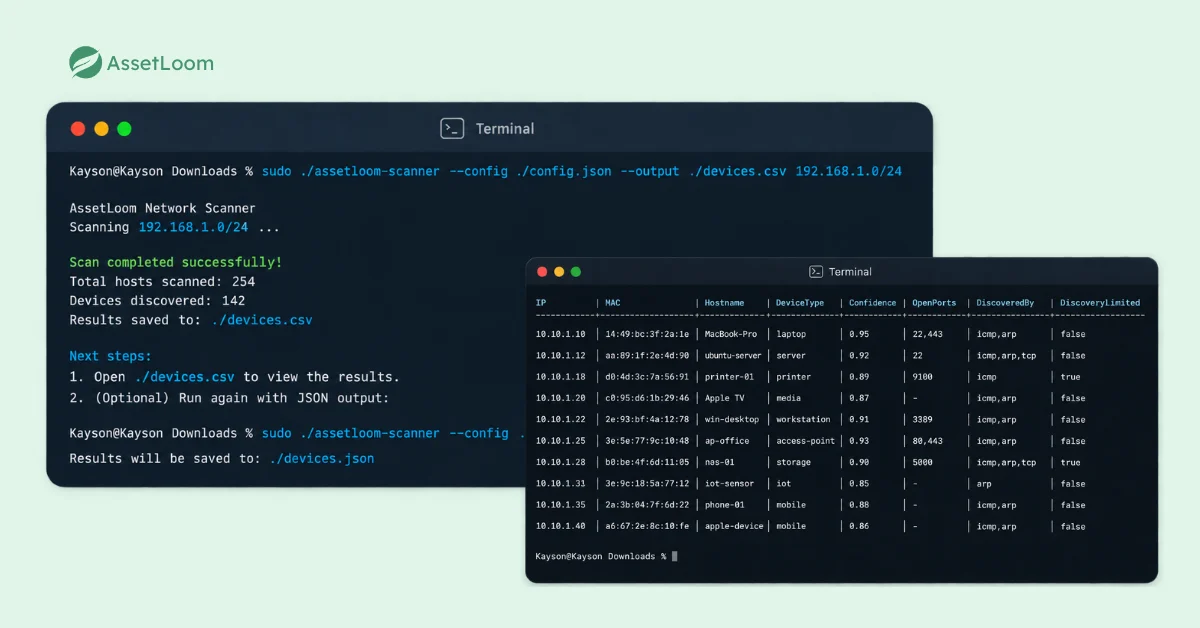
- Agentless Asset Discovery: AssetLoom Network Scanner helps teams discover connected devices without installing agents on individual machines. Discovered device information can be exported as CSV files and imported into AssetLoom to quickly build or update inventory records.
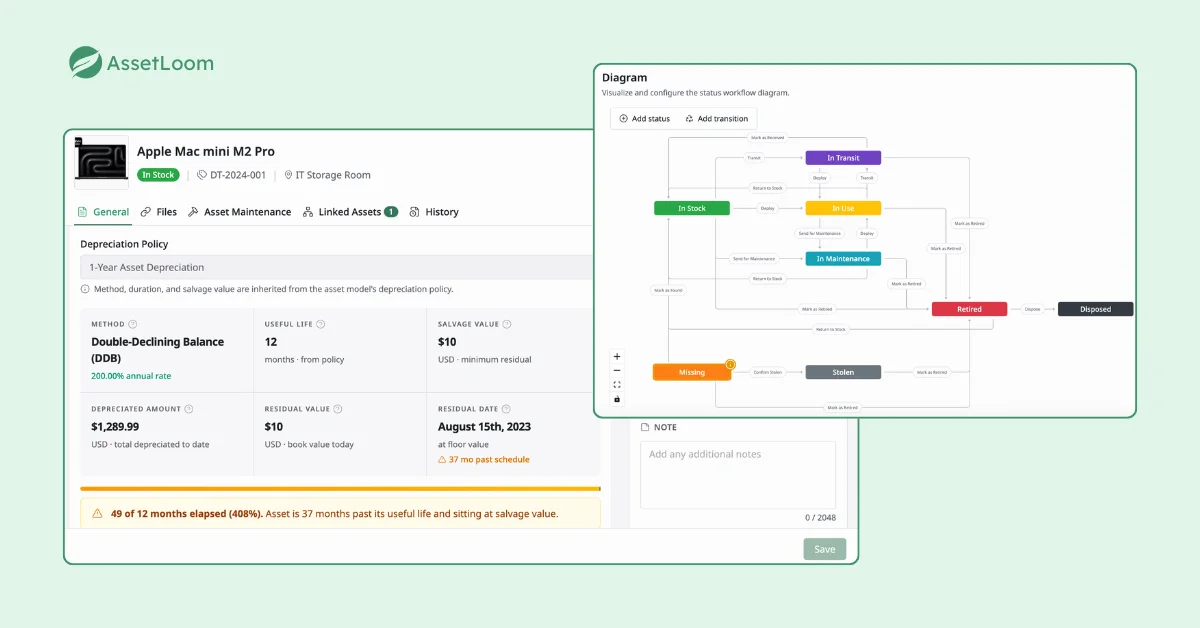
- Complete Asset Lifecycle Management: Track assets from procurement and assignment to maintenance, depreciation, and retirement.
- Software License Management: Track software licenses, ownership, renewal information, and lifecycle status alongside other IT assets.
- QR & Barcode Tracking: Generate and scan QR/barcodes to simplify asset verification, check-in/check-out processes, and audits.
- Device Management Integrations: Connect with Microsoft Intune and Jamf Pro to synchronize device information and maintain more accurate inventory records.
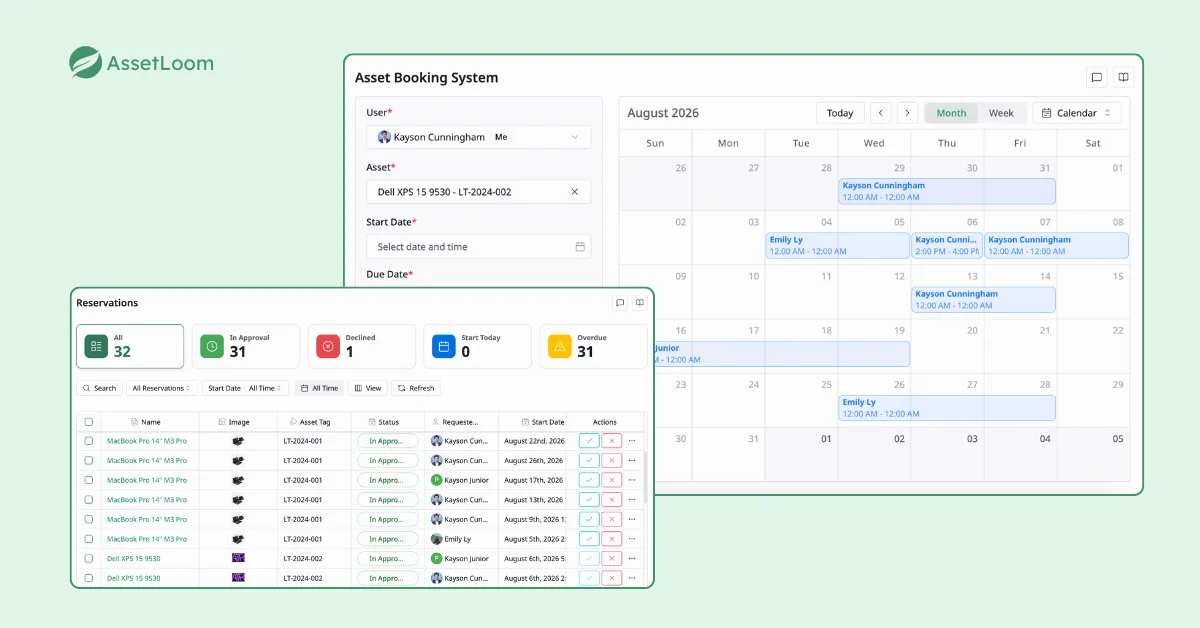
- Asset Operations: Manage bookings, maintenance activities, custody history, and asset availability for better day-to-day operations.
- Dashboards and Reports: Gain visibility into inventory status, asset distribution, lifecycle trends, and operational activities.
Pricing: AssetLoom offers a free plan for organizations getting started with IT asset management, with paid options available for teams that need additional capacity and capabilities.
Best For: Organizations that are looking for an affordable ITAM solution that combines asset discovery, lifecycle management, and daily IT operations without enterprise-level complexity.
2. AssetTiger
AssetTiger is a cloud based affordable asset management tool designed for small teams who want a simple, no-hassle way to track assets. Its generous free plan supports up to 250 assets, making it ideal for startups or small offices managing IT equipment like laptops and monitors or even non-IT items like furniture. The mobile app lets you update assets on the go, and its straightforward design means you’re up and running fast. AssetTiger focuses on ease of use, helping you avoid the chaos of manual tracking without a big price tag.
Key Features:
- Barcode scanning for quick asset check-ins and updates.
- Cloud-based inventory accessible to unlimited users.
- Maintenance alerts to schedule repairs or replacements.
- Basic reporting for audits and budget planning.
Pricing: Free for up to 250 assets; paid plans start at $120/year for more assets and features.
Things to consider: Limited integrations with other IT tools; free plan lacks advanced reporting like custom analytics.
Best For: Small businesses or teams managing mixed assets (IT and non-IT) on a tight budget.
3. Spiceworks IT Asset Management
Spiceworks offers a free, ad-supported tool that’s a go-to for small IT teams needing a quick way to track assets. It’s lightweight, easy to set up, and backed by a vibrant community of IT pros who share tips and fixes. Spiceworks scans your network to find devices automatically, saving you from manual data entry. It’s perfect for teams who want a free asset management tool without complex setup. While ads can pop up, the trade-off is a solid tool at zero cost.
Key Features:
- Automatic network scanning to find devices like PCs and servers.
- Software license tracking with alerts for renewals or overuse.
- Basic inventory reports for quick asset overviews.
- Community forums for troubleshooting and advice.
Pricing: Free (ad-supported); premium plans start at $99/year for ad-free and extra features.
Things to consider: Ads can be annoying; limited features for large or complex IT environments.
Best For: Small teams or startups needing a simple, no-cost tool for basic asset tracking.
4. BlueTally
BlueTally is a modern, cloud-based affordable asset management tool built for simplicity and team collaboration. Its free plan is packed with features, making it a top choice for IT teams who want a clean interface and easy setup. BlueTally lets you customize how you track assets, and its integrations with tools like Slack make it a team favorite. It’s designed to keep everyone on the same page, whether you’re managing 50 or 500 assets.
Key Features:
- Custom fields to track assets your way (e.g., serial numbers, locations).
- User-friendly dashboard for quick asset insights.
- Integrations with Slack, Microsoft 365, and other platforms.
- Audit logs to track changes and ensure compliance.
Pricing: Free for basic features; paid plans start at $10/month per user for advanced features.
Things to consider: Paid plans can get pricey for larger teams; free plan limits advanced integrations.
Best For: Small to mid-sized teams needing a modern, collaborative tool on a budget.
5. Snipe-IT
Snipe-IT is an open-source tool loved by IT pros for its flexibility and low cost. You can host it yourself for free, making it a great pick for tech-savvy teams, or opt for affordable cloud hosting. Snipe-IT handles everything from hardware tracking to license compliance, with features like QR code scanning to speed things up. Its active community keeps it updated and reliable.
Key Features:
- Barcode and QR code scanning for fast asset updates.
- License management with detailed compliance reports.
- REST API for building custom integrations.
- User permissions to control access and edits.
Pricing: Free (self-hosted); hosted plans start at $39.99/month for 500 assets.
Things to consider: Self hosting requires technical skills; community support can be hit or miss.
Best For: Tech savvy teams or mid sized firms needing a low cost asset management tool with flexibility.
6. Budibase
Budibase is an open-source platform with a customizable IT asset management template, perfect for teams who want a tailored solution without high costs. It lets you build a tracking system that fits your exact needs, from dashboards to data fields. While it requires some setup effort, it’s a powerful option for IT teams with coding skills. Budibase supports both IT and non-IT assets, making it versatile for mixed inventories.
Key Features:
- Custom dashboards for tracking hardware and software.
- Supports integrations with databases and third-party apps.
- Flexible data fields for unique asset types.
- Open-source community for updates and support.
Pricing: Free (self-hosted); cloud plans start at $8/month per user.
Things to consider: Setup requires technical know how; not ideal for non-technical users.
Best For: IT teams with coding skills wanting a flexible, low-cost tool.
These affordable asset management tools prove you can manage assets like a pro without spending a fortune. From AssetTiger’s free plan for small teams to Budibase’s custom dashboards for tech wizards, there’s a tool for every need. Test them out with free trials or demos to find the one that fits your workflow. Your assets will stay organized, your budget will stay happy, and your IT team won’t need to pull their hair out.
How to Choose the Right Tool for Your Needs
Picking the right affordable asset management tool doesn’t have to feel like solving a puzzle with missing pieces.
Start by looking at your team size. Small startups with 20 devices need simple tools like AssetTiger or BlueTally, while bigger companies with thousands of assets might lean toward Snipe-IT or Budibase for their flexibility.
Next, think about what you’re tracking: just hardware like laptops and servers, or software licenses too? Make sure the tool handles both if you need it. Check if it connects with your existing software, like Slack for BlueTally or databases for Budibase. Usability is key, so test free trials to avoid tools that feel clunkier than an old keyboard.
For example, BlueTally’s clean dashboard makes tracking a breeze, while Spiceworks is great for quick setups. Don’t just grab the first tool you see. Try demos to find one that fits your workflow. An affordable asset management tool like these can save your budget and your sanity, so test before you commit.
FAQs
1. Can affordable asset management tools support growing businesses?
Yes. Many affordable asset management tools are designed to help organizations start with basic tracking and expand as their needs grow.
As businesses add more devices, users, and locations, they can look for tools that support features such as automation, integrations, reporting, and more advanced lifecycle management.
2. How do companies migrate from spreadsheets to an asset management tool?
The migration process usually starts by cleaning existing spreadsheet data, removing outdated records, and standardizing important fields such as asset names, categories, owners, and locations.
Many asset management tools support CSV import, making it easier to transfer existing inventory data and build a more structured asset management process.
3. What types of assets can be managed with an asset management tool?
Asset management tools can typically handle a wide range of resources, including laptops, desktops, servers, mobile devices, software licenses, accessories, and other company equipment.
Organizations can choose tools based on the asset types they need to track and whether they require additional capabilities such as maintenance, reservations, or lifecycle management.
4. How can asset management tools help reduce manual work?
Asset management tools reduce manual effort by automating repetitive tasks such as inventory updates, asset assignments, reminders, and reporting.
Some platforms also provide discovery capabilities that help identify devices automatically, reducing the need for teams to manually enter every asset record.
5. What should businesses consider before replacing their current asset tracking process?
Before switching tools, businesses should evaluate their current challenges, such as inaccurate inventory data, limited visibility, manual updates, or difficulty managing asset changes.
It is also important to consider future needs, including integrations, automation, reporting requirements, and how the tool will support asset management as the organization grows.
Conclusion
Managing IT assets doesn’t have to be complicated or expensive. The right asset management tool can help your team move away from spreadsheets, reduce manual work, and maintain better visibility into your technology environment.
Whether you are managing a small inventory today or preparing for future growth, choosing a tool that supports your needs, from asset tracking and software management to automation and reporting, can make a significant difference.
Ready to simplify your IT asset management process? Explore AssetLoom and manage your hardware, software licenses, and asset operations in one centralized platform.