Top 10 IT Inventory Management Software for Your Business
Explore the top 10 IT inventory management software solutions to efficiently track and manage your IT assets. Find the best tool for your business needs!
Managing IT inventory is an important part of running a business. It helps keep track of things like laptops, servers, and software licenses so everything stays organized, compliant, and cost-effective.
IT-specific tools are built for managing hardware, software, and other digital resources used in your business. In this blog, we’ll share the Top 10 IT Inventory Management Software to help you save time, reduce costs, and stay in control of your IT resources.
Top 10 IT Inventory Management software at a glance
1. AssetLoom - Best IT Asset Operations Software
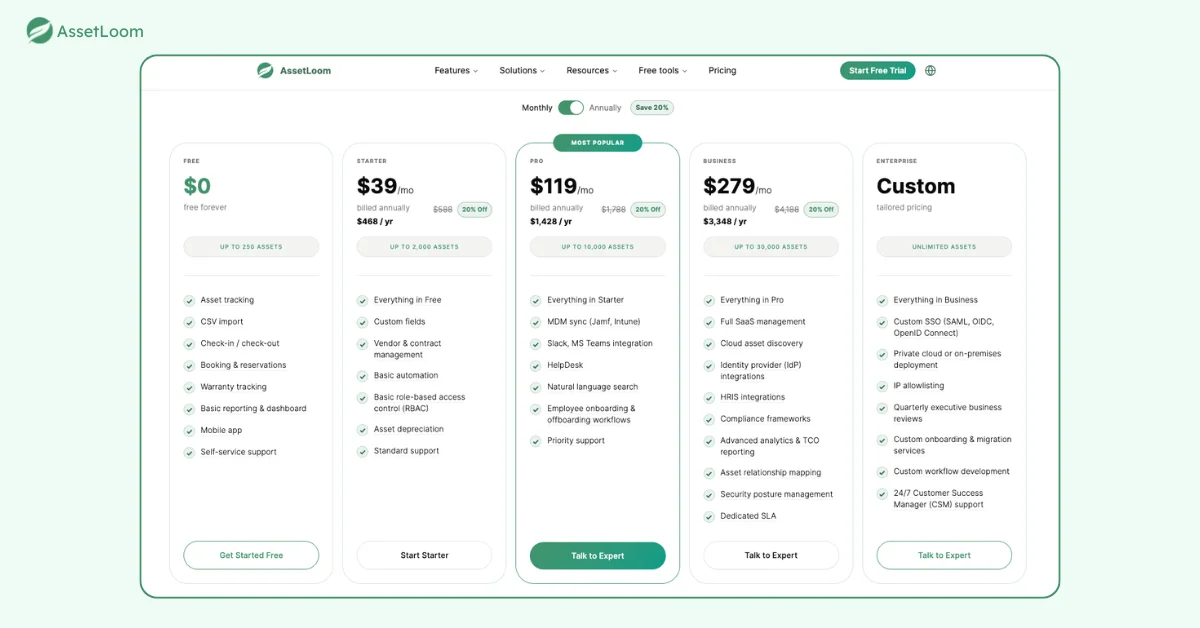
- Free forever plan available for teams managing up to 250 assets. No credit card required. Starter from $39/year, Pro from $119/year · Business from $279/year. Custom Enterprise plans available.
- G2 Rating: 4.9/5
Best For:
- Businesses of any size that want an all-in-one platform for hardware, software licenses, and IT components without enterprise-level complexity or cost.
- IT teams, procurement, facilities, and operations teams that need one shared source of truth for every asset.
IT Inventory Management Features
- Centralized Asset Inventory: Import data from spreadsheets, legacy tools, or other systems to build a reliable, single-source inventory in minutes, covering hardware, software licenses, contracts, and consumables.
- Agentless Network Discovery: Scans and imports every device across your infrastructure with zero endpoint footprint, so there’s nothing to install and no performance drag on managed systems.
- Full Asset Lifecycle Tracking: Follows every asset from acquisition through deployment, maintenance, and disposal, with automated depreciation schedules so nothing falls through the cracks.
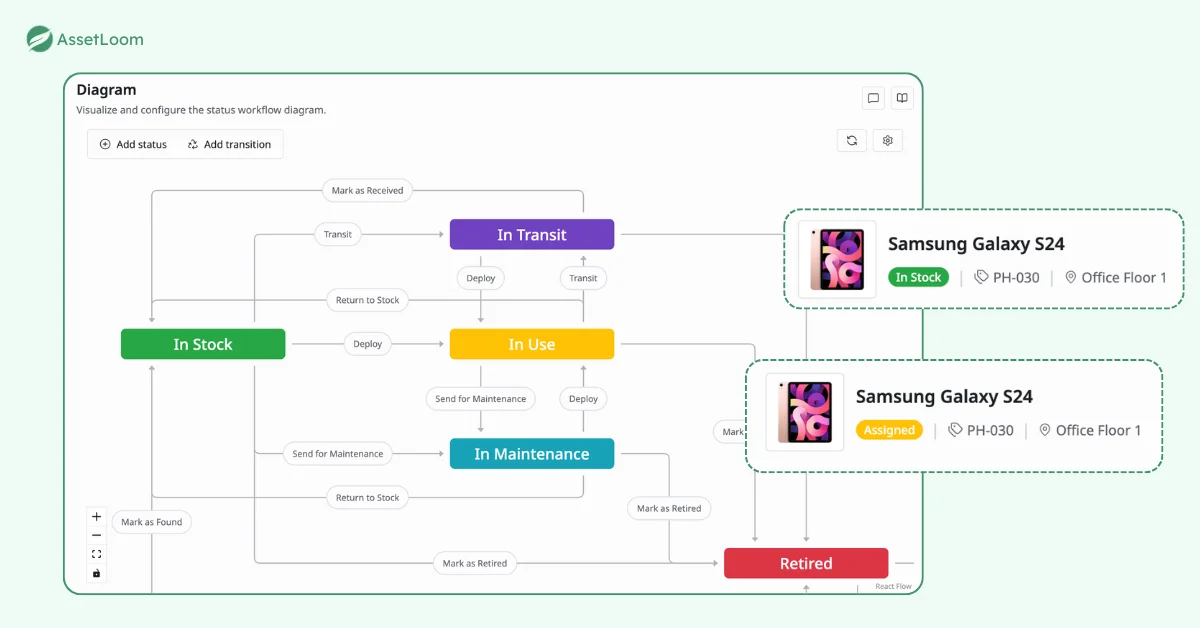
- Real-Time Inventory Dashboards: Live stock levels with automated threshold alerts, so you catch shortages and license gaps before they become incidents.
- Booking & Smart Assignment: Assign or reserve assets with built-in conflict detection, and let employees self-serve through integrated approval workflows.
- No-Code Workflow Automation: Cut repetitive tasks like onboarding new hardware or triggering decommission reviews by up to 80%, with policy enforcement running silently in the background.
- Software License & Contract Management: Track license keys, renewal dates, and vendor contracts in one place to stay audit-ready and compliant.
- Native Integrations: directly sync device data from Jamf, Intune, also integrates with collaboration tools like Microsoft Teams, Slack, plus an API-first design for custom connectors.
Pros of AssetLoom
- Free forever plan with no credit card required, plus transparent, affordable paid tiers as you scale.
- Agentless discovery means faster setup with no endpoint software to deploy or maintain.
- No-code automation meaningfully cuts manual IT admin work.
- Broad native integrations with the tools IT teams already use (Jira, Okta, AWS, Azure, Slack, and more).
- Security and compliance (RBAC, audit logs) built in from day one.
- Highest-rated option on this list at 4.9/5 on G2.
Cons of AssetLoom
As a newer entrant, it has a smaller install base than legacy enterprise platforms.
AssetLoom IT Asset Inventory Software Pricing
AssetLoom offers a genuine free-forever plan for up to 250 assets. Paid plans start at $39/year (Starter, up to 2,000 assets), $119/year (Pro, up to 10,000 assets), and $279/year (Business, up to 30,000 assets), with custom Enterprise pricing for larger organizations.
👉 Start your free AssetLoom trial, no credit card required.
2. Asset Panda
- Free demo available
- Pricing upon request
- G2 Rating: 3.9/5
Best For:
- Businesses that need a mobile-friendly and customizable IT inventory solution.
- Teams looking for streamlined tracking of hardware, software, and maintenance schedules.
IT Inventory Management Features
- Mobile Asset Tracking Leverage a mobile app for real-time updates, barcode scanning, and easy access to asset details from anywhere.
- Customizable Workflows Configure workflows to fit specific business needs, such as check-in/check-out processes or maintenance tracking.
- Maintenance Management Schedule and track maintenance tasks to extend asset lifespan and prevent downtime.
- Cloud-Based Platform Access data anytime, anywhere with a secure, cloud-based system.
- Reporting and Analytics Generate detailed reports on asset performance, usage, and costs to support informed decision-making.
Pros of Asset Panda
- User-friendly mobile app for asset management on the go.
- Customizable workflows to fit unique business processes.
- Robust reporting and analytics for better insights.
- Cloud-based platform for real-time data access.
- Maintenance tracking to extend asset lifespan.
Cons of Asset Panda
- Initial pricing may be higher for small businesses.
- Customization features might require time to set up.
- Some users may face a learning curve with advanced functionalities.
Pricing
Asset Panda’s pricing is based on the number of assets you want to track. They offer annual plans tailored to your specific needs.
3. Spiceworks Inventory
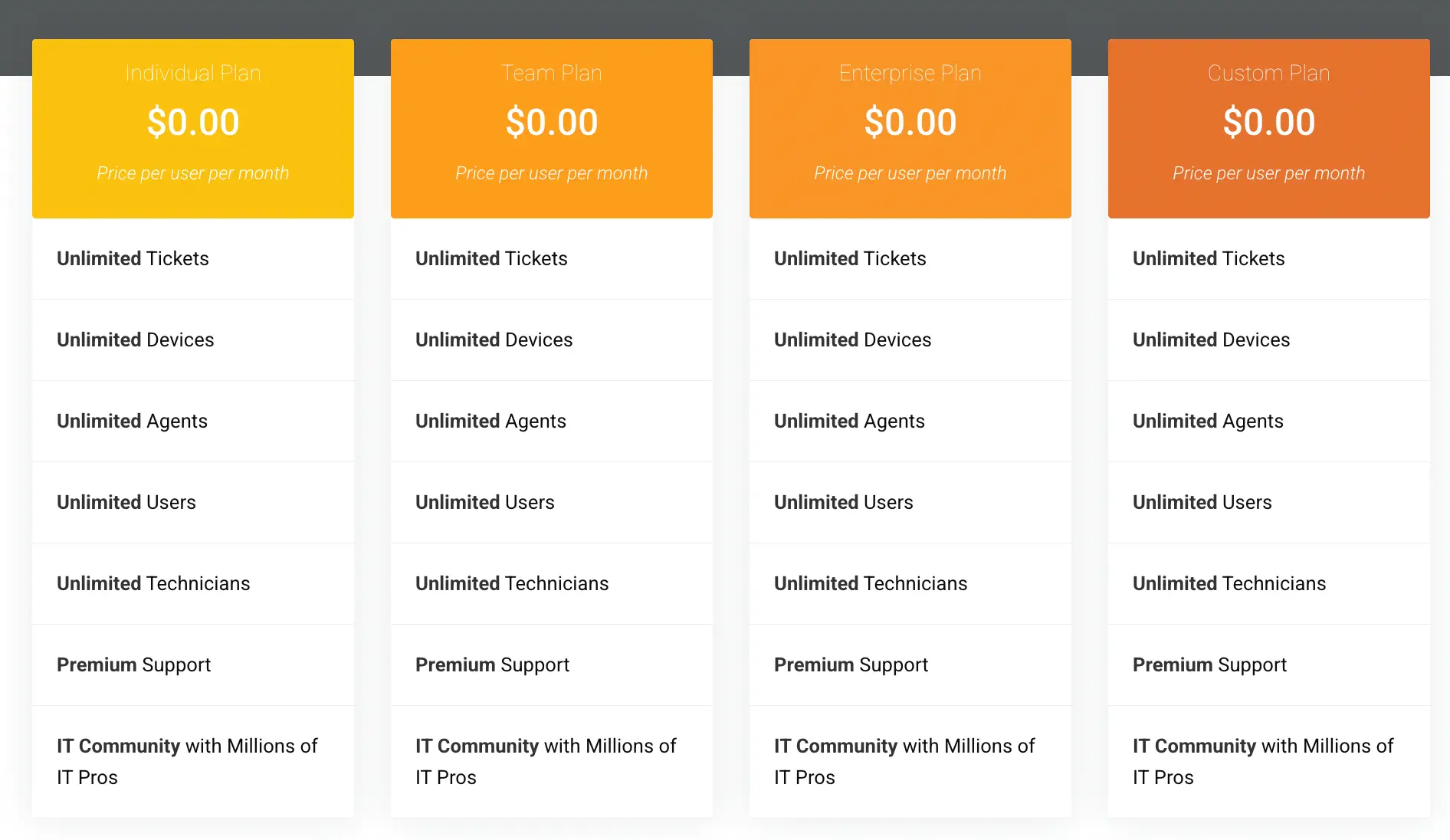
Free to Use G2 Rating: 4.0/5 Pricing: Free IT inventory management tool.
Best For:
- Small businesses looking for a cost-effective IT inventory solution.
- Teams that need a simple, no-cost tool for basic asset tracking and management.
IT Inventory Management Features
- Network Discovery Automatically detects and tracks devices across your network, keeping your inventory up to date.
- Software Inventory Tracking Monitors installed software, ensuring compliance and identifying unused applications.
- Hardware Asset Management Tracks hardware like laptops, desktops, servers, and printers with detailed asset information.
- Integration with Spiceworks Tools Seamlessly works with other Spiceworks solutions, such as help desk software, for streamlined IT operations.
- Custom Alerts Set alerts for critical events like expiring warranties or software license renewals to stay proactive.
Pros of Spiceworks Inventory
- Completely free to use, making it ideal for small businesses.
- Simple setup with automated network discovery.
- Tracks both hardware and software assets effectively.
- Integrates with other Spiceworks tools for IT management.
- Provides basic reporting for asset insights.
Cons of Spiceworks Inventory
- Limited advanced features compared to paid solutions.
- May not scale well for larger businesses.
- Requires consistent internet connectivity for some features.
- Basic interface might lack customization options.
Pricing
Free IT inventory management software with no subscription fees.
4. Snipe-IT
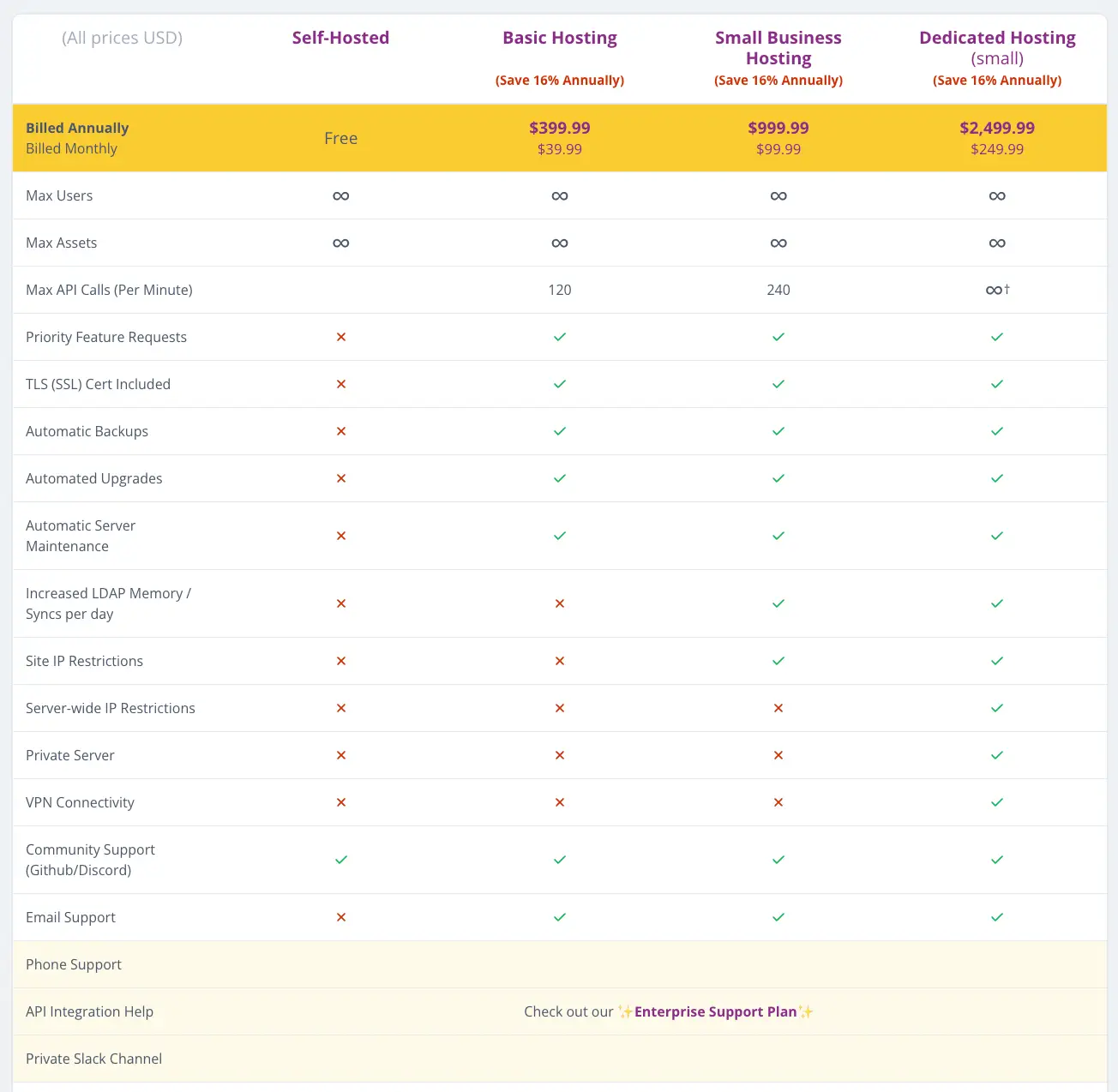
G2 Rating: 4.6/5 Pricing: Free for self-hosting; cloud-hosted plans start at $39.99/month.
Best For:
- Organizations looking for a cost-effective, customizable, and open-source IT inventory solution.
- Teams with technical expertise to self-host or those needing affordable cloud hosting.
IT Inventory Management Features
- Check-In/Check-Out Tracking Tracks the assignment and return of assets, ensuring accountability and proper resource allocation.
- Custom Fields Allows users to add custom fields to tailor asset management to specific business needs.
- Asset Tagging Generates unique asset tags with barcodes for easy tracking and identification.
- User and Role Management Offers granular control over user access with customizable roles and permissions.
- Maintenance and Warranty Tracking Keeps records of warranties and maintenance schedules to prevent downtime.
- Multilingual Support Available in multiple languages, making it accessible for global teams.
Pros of Snipe-IT
- Free and open-source with a budget-friendly cloud-hosted option.
- Highly customizable to fit specific needs.
- Robust check-in/check-out tracking for shared assets.
- Easy barcode generation for asset tagging.
- Multilingual support for global use.
Cons of Snipe-IT
- Self-hosting requires technical expertise and server maintenance.
- Limited advanced features compared to premium tools.
- Cloud-hosted plans may lack certain enterprise-level functionalities.
- Customization setup can be time-consuming.
Pricing
Free: Self-hosted with open-source access.
Cloud Hosting: Starts at $39.99/month for up to 100 assets. Larger plans available.
5. Lansweeper
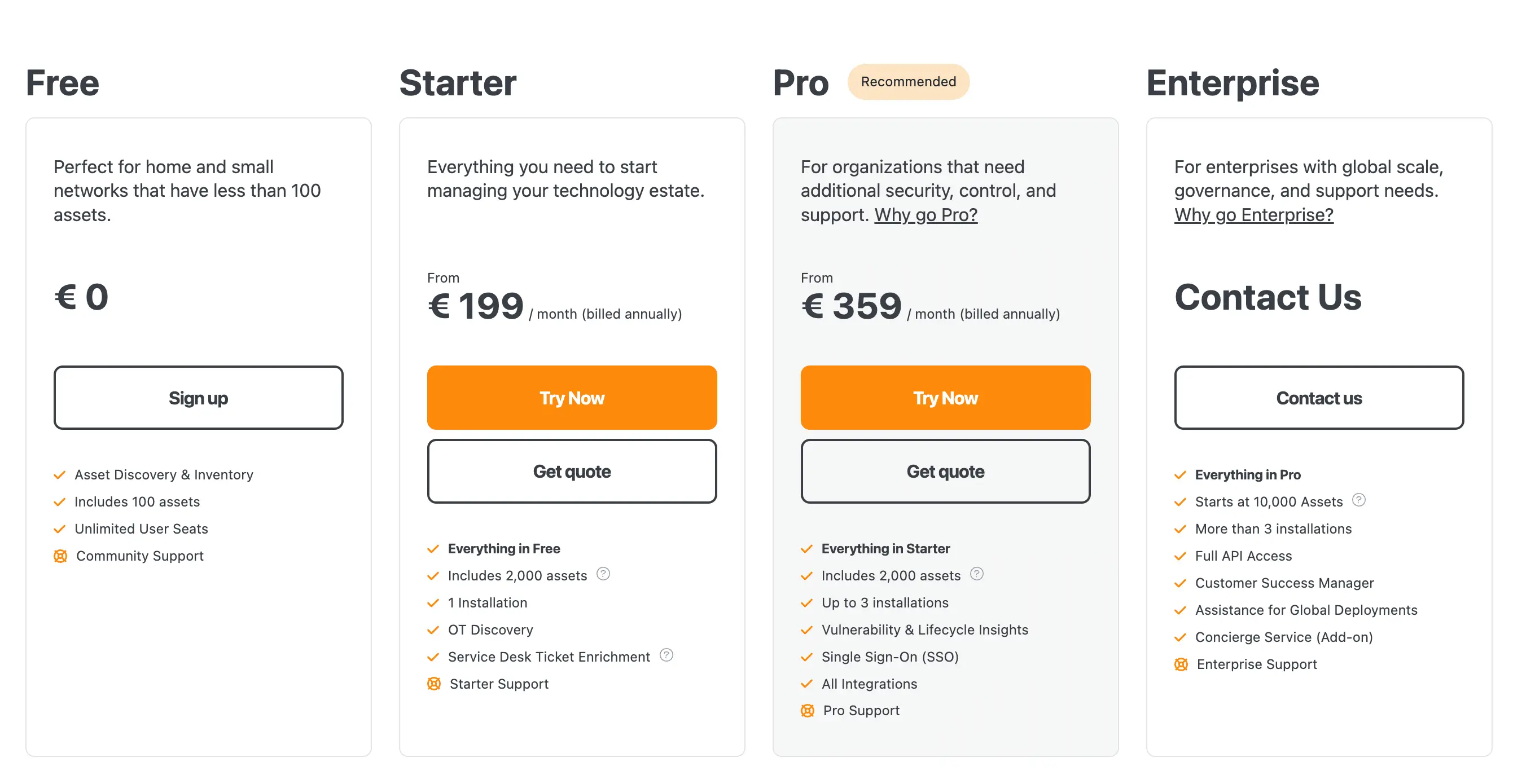
Free Trial Available G2 Rating: 4.4/5 Pricing: Starts free for up to 100 assets.
Best For:
- Businesses with complex IT infrastructures needing automated network and asset discovery.
- IT teams seeking detailed insights into hardware, software, and network devices.
IT Inventory Management Features
- Automated Asset Discovery Scans and identifies all IT assets across the network, including hardware, software, and virtual machines.
- Software License Management Tracks installed software and ensures compliance with vendor agreements.
- Network Mapping Automatically maps devices and connections in your network for improved visibility.
- Custom Reporting Generates detailed reports on asset usage, performance, and compliance metrics.
- Integration Capabilities Connects with ITSM, CMDB, and other tools for unified IT management workflows.
Pros of Lansweeper
- Comprehensive network and asset discovery.
- Detailed reporting for performance and compliance insights.
- Scalable for businesses with large or complex IT environments.
- Integration-friendly for seamless IT workflows.
- Provides real-time updates for asset monitoring.
Cons of Lansweeper
- Pricing can be high for smaller businesses.
- Initial setup may require technical expertise.
- User interface may feel complex for beginners.
- Advanced features may require customization efforts.
Pricing
Pricing scales based on the number of assets managed.
6. Atera
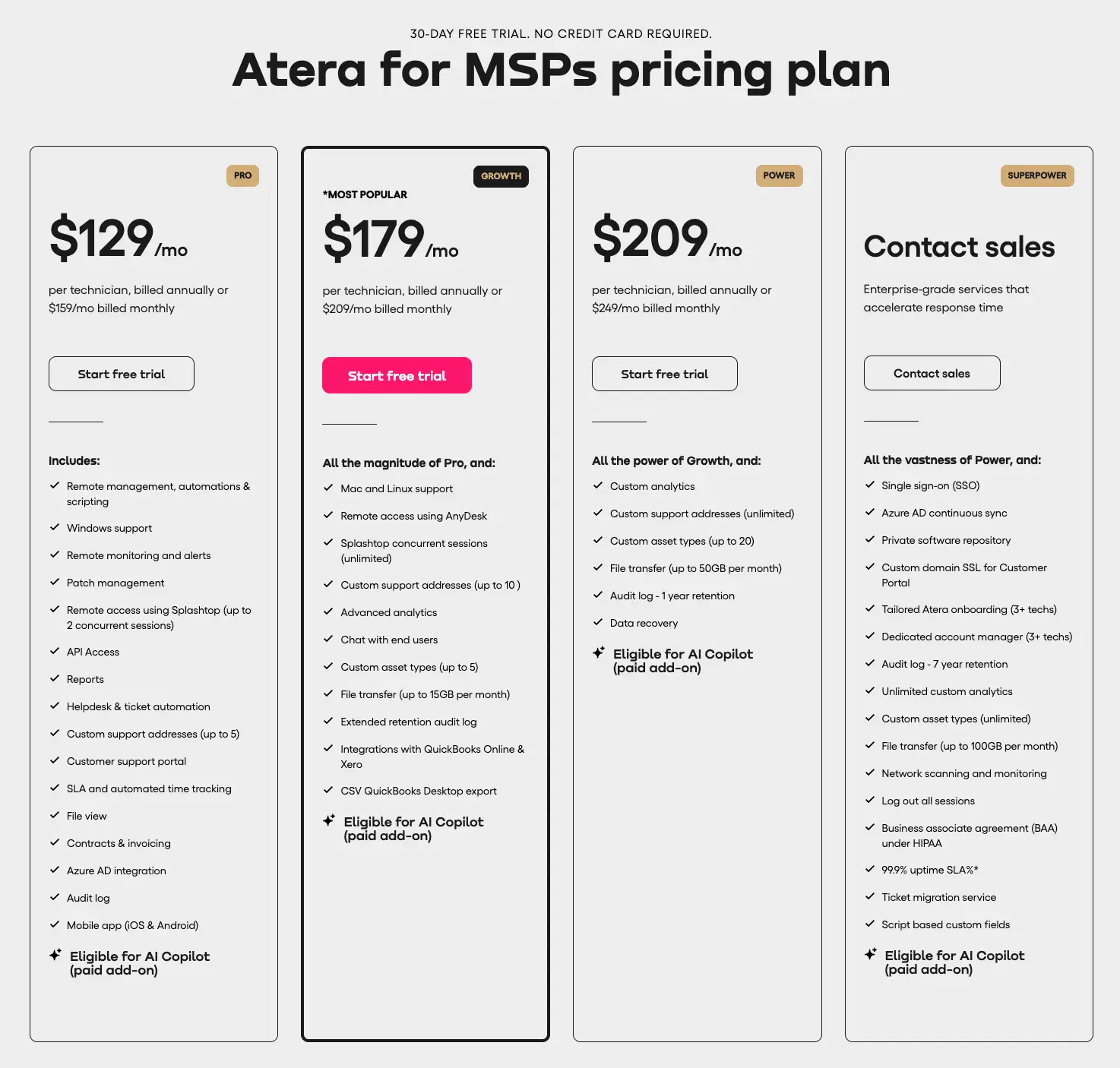
30 Days Free Trial Available G2 Rating: 4.6/5 Pricing: Starts at $129/month
Best For:
- Managed Service Providers (MSPs) and IT teams managing multiple clients or endpoints.
- Businesses needing an all-in-one solution for IT inventory and remote monitoring.
IT Inventory Management Features
- Remote Monitoring and Management (RMM) Provides real-time monitoring of devices, software, and networks from a centralized dashboard.
- Automated Asset Discovery Automatically identifies and tracks IT assets, including hardware and installed software.
- Patch Management Automates the process of updating software and firmware, ensuring devices stay secure and compliant.
- Ticketing System Integration Links asset data to help desk tickets for streamlined troubleshooting and support.
- Custom Reporting Generates detailed reports on asset health, usage, and performance, helping IT teams make data-driven decisions.
Pros of Atera
- All-in-one platform combining inventory management, RMM, and ticketing.
- Scalable pricing model for unlimited devices.
- Real-time monitoring ensures proactive asset management.
- Automates tasks like patch management to save time.
- Cloud-based platform accessible from anywhere.
Cons of Atera
- Higher monthly costs compared to single-purpose tools.
- Advanced features may require a learning curve for beginners.
- Primarily designed for MSPs, which might not suit all business models.
- Limited offline capabilities.
Pricing
7. Deel IT
Free Trial Available G2 Rating: 4.8/5 Pricing: Custom pricing based on organization size and needs. Starts at $99/month
Best For:
- Global teams and businesses managing remote or distributed workforces.
- Organizations seeking a tool for IT asset management combined with global payroll and compliance.
IT Inventory Management Features
- Global Asset Tracking Tracks IT assets across multiple locations, ensuring visibility and control for distributed teams worldwide.
- Automated Asset Assignment Automatically assigns IT resources (e.g., laptops, software) to remote employees, streamlining onboarding processes.
- Compliance and Security Ensures IT assets comply with global data protection regulations, providing secure management across different countries.
- Inventory Reporting Provides detailed insights into asset usage, health, and lifecycle, helping businesses optimize their IT infrastructure.
- Integration with HR and Payroll Syncs IT asset management with employee records, simplifying the management of devices for remote or international teams.
Pros of Deel IT
- Ideal for managing IT assets in global, remote teams.
- Streamlined onboarding and asset assignment for distributed workforces.
- Ensures compliance with international data protection standards.
- Integrates with payroll and HR systems for better employee asset management.
- Offers clear, actionable inventory reports for optimizing resources.
Cons of Deel IT
- Custom pricing may be a barrier for small businesses.
- Primarily designed for remote teams, which might not suit all organizations.
- Integration may require some setup time and expertise.
- Limited to global teams, not necessarily ideal for local-only businesses.
8. SysAid
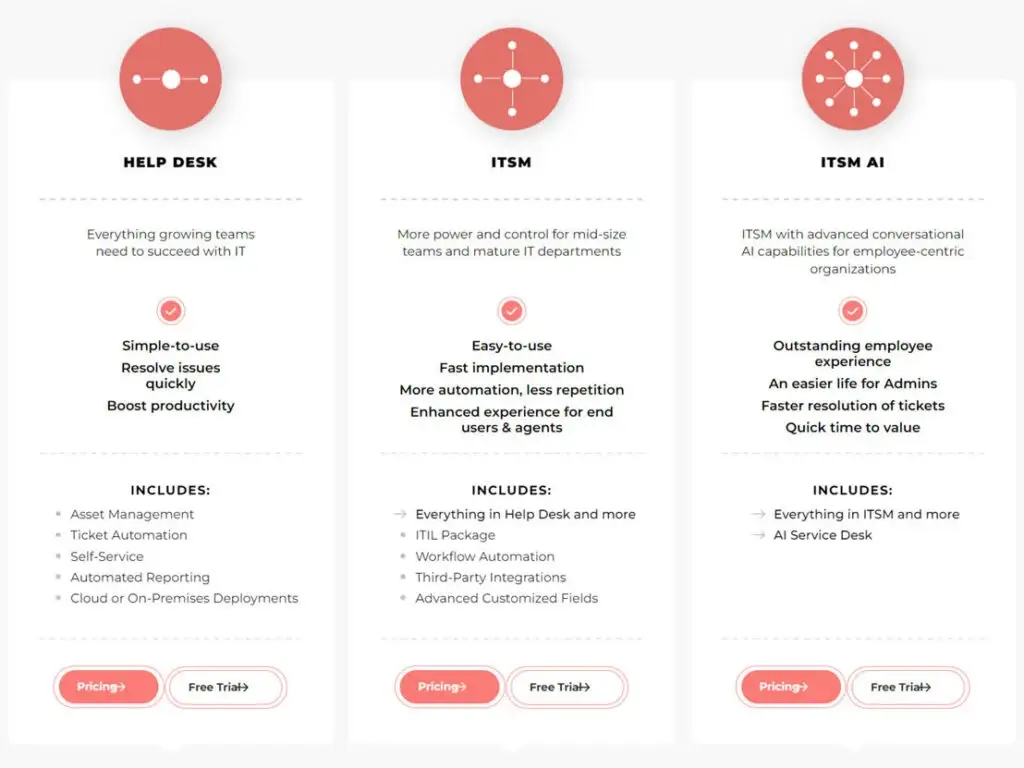
Free Trial Available G2 Rating: 4.5/5 Pricing: Starts at $108/user/month
Best For:
- IT teams looking for a combined IT asset management and IT service management (ITSM) solution.
- Medium to large organizations with complex IT infrastructures needing efficient asset tracking and service desk integration.
IT Inventory Management Features
- Integrated ITSM and ITAM Combines asset management with IT service management (ticketing, incident tracking), providing a unified solution for managing both assets and support.
- Automated Asset Discovery Automatically discovers devices, software, and network resources, ensuring your inventory is always up to date.
- Asset Lifecycle Management Tracks assets from procurement to retirement, managing every phase of their lifecycle to maximize value and avoid unnecessary costs.
- Software License Management Ensures software compliance by tracking licenses, renewals, and usage to avoid legal or financial risks.
- Customizable Dashboards and Reporting Provides real-time reporting and customizable dashboards to monitor asset usage, performance, and compliance.
Pros of SysAid
- Combines IT asset management and service management in one platform.
- Automated asset discovery reduces manual work and keeps your inventory accurate.
- Comprehensive reporting and customizable dashboards for better asset visibility.
- Strong focus on software license compliance and audit readiness.
- Scalable for businesses with complex IT infrastructures.
Cons of SysAid
- Higher cost for small businesses, especially for advanced features.
- Requires some technical knowledge for setup and customization.
- May have more features than needed for smaller, simpler IT environments.
Pricing
Starts at $108/user/month, with pricing scaling up based on features and number of users.
9. ServiceNow
Free Trial Available G2 Rating: 4.4/5 Pricing: Custom pricing based on business size and needs.
Best For:
- Large enterprises or businesses with complex IT asset management and service management needs.
- Organizations looking for an integrated IT service management (ITSM) and IT asset management (ITAM) solution.
IT Inventory Management Features
- Integrated ITSM and ITAM Combines service management and asset management into one platform, streamlining both operations and support processes.
- Automated Asset Discovery Automatically detects and tracks all devices, software, and network resources across your enterprise.
- Lifecycle Management Manages the full lifecycle of assets from acquisition to retirement, ensuring timely upgrades, replacements, and disposal.
- Software License Management Tracks and optimizes software usage to ensure compliance and prevent over-licensing or under-licensing.
- Customizable Dashboards and Reporting Provides advanced reporting capabilities and customizable dashboards for real-time monitoring of asset performance and usage.
- Advanced Security and Compliance Features Ensures compliance with regulations and integrates security features to protect asset data.
Pros of ServiceNow
- Comprehensive solution that combines ITSM and ITAM in a single platform.
- Automates asset discovery and lifecycle management to reduce manual work.
- Powerful reporting and analytics for data-driven decision-making.
- Scalable and ideal for large enterprises with complex IT infrastructure.
- Strong security and compliance features, ensuring data protection.
Cons of ServiceNow
- High cost, especially for small to mid-sized businesses.
- Requires technical expertise to set up and configure.
- May have more features than necessary for smaller organizations.
- Pricing can be complex and customized based on needs.
Pricing
Custom pricing based on the size of your organization and the features required. ServiceNow is typically more suited for larger enterprises with complex needs.
ServiceNow has four main editions: Express, Standard, Enterprise, and Premier. The Express edition is the most basic and is designed for small businesses with up to 500 employees. Pricing for this edition starts at $10 per user per month.
The Premier edition is ServiceNow’s most comprehensive offering and includes all of the features of the other editions, plus exclusive benefits such as 24/7 support and a dedicated account manager. Pricing for this edition starts at $100 per user per month.
10. NetSuite
Free Trial Available G2 Rating: 4.0/5 Pricing: Custom pricing based on business size and needs.
Best For:
- Large businesses or enterprises looking for a comprehensive cloud-based ERP system with robust IT asset management capabilities.
- Companies needing seamless integration between IT asset management and financial management.
IT Inventory Management Features
- Comprehensive Asset Management Offers a complete view of IT assets, including hardware, software, and cloud resources, with full lifecycle management from procurement to disposal.
- Real-Time Asset Tracking Provides real-time visibility into asset status, usage, and location, allowing businesses to optimize their IT resources.
- Software License Management Tracks software licenses, ensuring compliance with licensing agreements and preventing over-licensing.
- Integration with Financial Management Seamlessly integrates with NetSuite’s financial management tools, ensuring that asset-related costs are accurately tracked and reported.
- Customizable Dashboards and Reporting Offers advanced reporting capabilities, allowing businesses to create customized dashboards and reports for asset performance and utilization.
- Scalability NetSuite is designed to scale with growing businesses, making it ideal for organizations that anticipate expansion or need a solution that can handle increasing asset management demands.
Pros of NetSuite
- Comprehensive, all-in-one solution combining IT asset management with ERP and financial tools.
- Real-time asset tracking and lifecycle management for full visibility.
- Advanced reporting and customizable dashboards for insightful decision-making.
- Seamless integration with other business functions such as finance, procurement, and sales.
- Scalable for growing businesses and complex IT environments.
Cons of NetSuite
- High cost, making it better suited for large enterprises rather than small businesses.
- Complex setup and implementation, often requiring technical expertise.
- Custom pricing may be a barrier for smaller companies with limited budgets.
- Features may be overwhelming for businesses with simpler asset management needs.
Pricing
Custom pricing based on the number of users and the features required. NetSuite is typically better suited for large enterprises or companies with complex asset management needs.
Main Features of a Good IT Inventory Management Software
IT estates in 2026 are more fragmented than ever: hybrid on-prem and cloud, remote endpoints, and a growing layer of unmanaged SaaS subscriptions that IT never provisioned. That’s shifted what “good” ITAM software actually needs to cover. Below are the features that consistently separate a genuinely useful platform from a glorified spreadsheet, grouped by how buyers evaluate them.
Discovery and Visibility
- Automated, Agentless Discovery: Continuously identifies and catalogs hardware, software, and network devices without requiring you to install and maintain endpoint agents. Broader discovery, across on-prem, cloud, and remote devices, means fewer blind spots and less manual data entry.
- SaaS and Shadow IT Visibility: With software spend increasingly going through SaaS subscriptions bought outside IT’s purview, the ability to surface unsanctioned apps and unused seats has moved from “nice to have” to a core requirement, not just an add-on.
- Centralized Inventory Management: Combines hardware, software, contracts, and cloud resources into a single repository. This gives IT a real-time, single source of truth instead of scattered spreadsheets and tribal knowledge.
Lifecycle and License Governance
- Asset Lifecycle Management: Tracks each asset from procurement through deployment, maintenance, and retirement, with automated depreciation schedules so replacements and write-offs don’t get missed.
- Software License Management: Monitors license usage against vendor agreements to prevent both over-licensing (wasted spend) and under-licensing (audit risk), and flags renewals before they lapse.
- Check-In/Check-Out and Booking: Tracks who has which asset and for how long, which matters most for shared equipment, loaner devices, and hybrid or hot-desk environments.
Operations and Integration
- Integration with MDM, ITSM, or HRIS: Connects with service desks, identity providers, MDM/endpoint tools, and accounting systems so asset data feeds directly into existing workflows instead of living in a silo.
- Automation and Policy Enforcement: No-code workflows that handle routine tasks, like onboarding a new laptop or triggering a decommission review, cut down on manual admin work and enforce consistent policy without extra headcount.
- Automated Notifications: Alerts for license renewals, warranty expirations, or overdue returns so issues get caught before they become compliance gaps or unplanned costs.
Reporting and Cost Governance
Reporting and Analytics: Turns raw asset data into dashboards on usage, cost, and utilization, helping teams spot underused hardware, redundant subscriptions, and hidden cost drivers.
Deployment Flexibility: Cloud, on-premises, or hybrid deployment options let organizations balance scalability against control and data residency requirements.
Additional Considerations
- Price: Choose software that fits your budget while meeting your needs.
- Ease of Use: A user-friendly interface is essential.
- Scalability: Ensure the software can handle your organization’s growth, including more assets, users, and locations without sacrificing performance.
- Security Features: Protect sensitive IT asset data with robust security measures, such as role-based access, encryption, and compliance with industry standards.
- Customizability: Look for tools that allow you to tailor workflows, reports, and dashboards to fit your unique business processes and goals.
- Customer Support and Training: Reliable support and training options ensure your team can quickly resolve issues and maximize the software’s potential
In conclusion, choosing the right IT inventory management software is essential for optimizing your IT resources, improving efficiency, and ensuring compliance. Whether you’re a small business or a large enterprise, the options listed here offer a variety of features to meet your needs and budget